Consulting Firm Terms of Service Scannable Dashboard Website Template
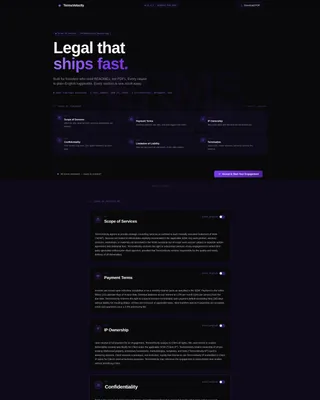
Velocity is a modular card grid landing page built for consulting firms that move at startup speed. It presents a full terms-of-service page as a scannable product dashboard, complete with a clickable table of contents, plain-English clause toggles, and a floating accept button that activates only after the visitor has read every section.
by Rocket studio
Quick summary
Velocity turns a consulting firm's terms-of-service page into a readable, navigable experience. Each clause lives in its own modular card. A clickable header grid lets visitors jump to any section instantly. A plain-English toggle rewrites legal language into startup vernacular. The result is a legal document that respects the reader's time and earns their trust before asking for a signature.
Who this template is for
This template is built for fast-moving consulting firms that work with early-stage and scaling technology companies. It is especially useful when the audience reads documentation the way engineers read code rather than the way lawyers read briefs.
- Series A founders who need to review and accept service terms quickly between sprints
- Operations leads at scaling startups who want clear, jargon-free agreements before signing
- Fractional executives and independent consultants who need a professional terms page that does not slow down a deal
What problem this template solves
Standard terms-of-service pages are dense, unformatted, and easy to skip. Clients either ignore them or forward them to legal, which delays the engagement. This template removes that friction.
- Walls of legal text buried in a single scrollable document kill momentum before a project starts
- No navigation means clients cannot find the specific clause they care about without reading everything
- Generic formatting signals that the firm treats compliance as an afterthought rather than a professional commitment
What you get with this template
You get a fully structured, single-page terms-of-service landing page built as a modular card grid. Every section is self-contained, visually distinct, and logically sequenced to build contractual clarity from scope to exit.
- An interactive header card grid that acts as a clickable table of contents with smooth-scroll navigation
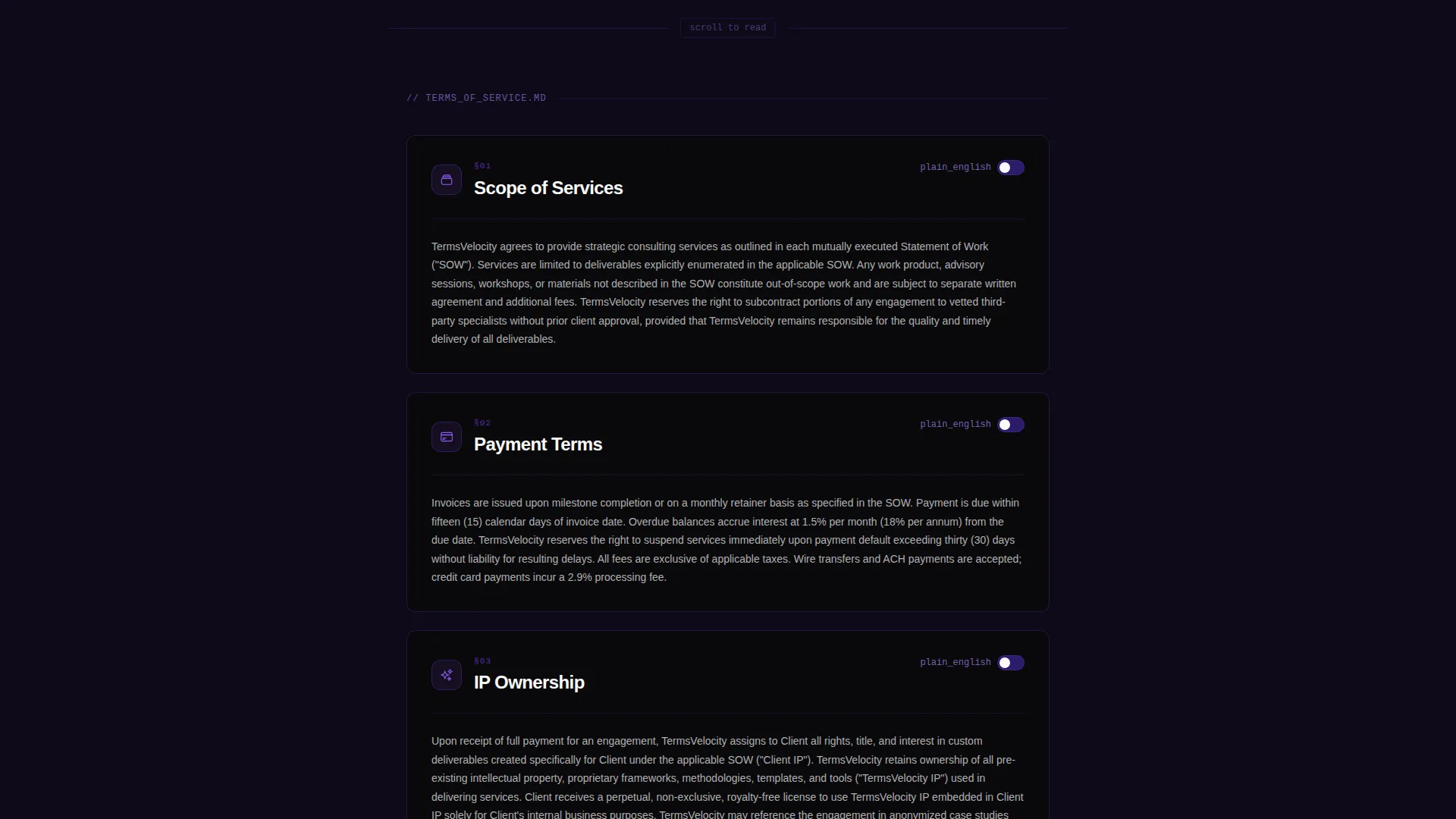
- Six core terms sections presented as individual cards, each with a plain-English toggle and escalating visual weight
- A floating accept button that activates only after the visitor scrolls past the final section, plus a header-level PDF download option
Feature list
This template is purpose-built around the consulting firm terms-of-service use case. Every component serves a specific function in making legal language readable and actionable.
Interactive Card Table of Contents
The header opens with a modular card grid showing all six terms sections at a glance. Each card displays a section icon, a one-line plain-English summary, and an animated arrow. Clicking any card smooth-scrolls the viewport directly to that section.
Plain-English Clause Toggle
Every terms card includes a toggle that switches the displayed text between formal legal language and startup-friendly plain English. This gives clients full transparency while keeping the document legally precise underneath.
Escalating Visual Card Weight
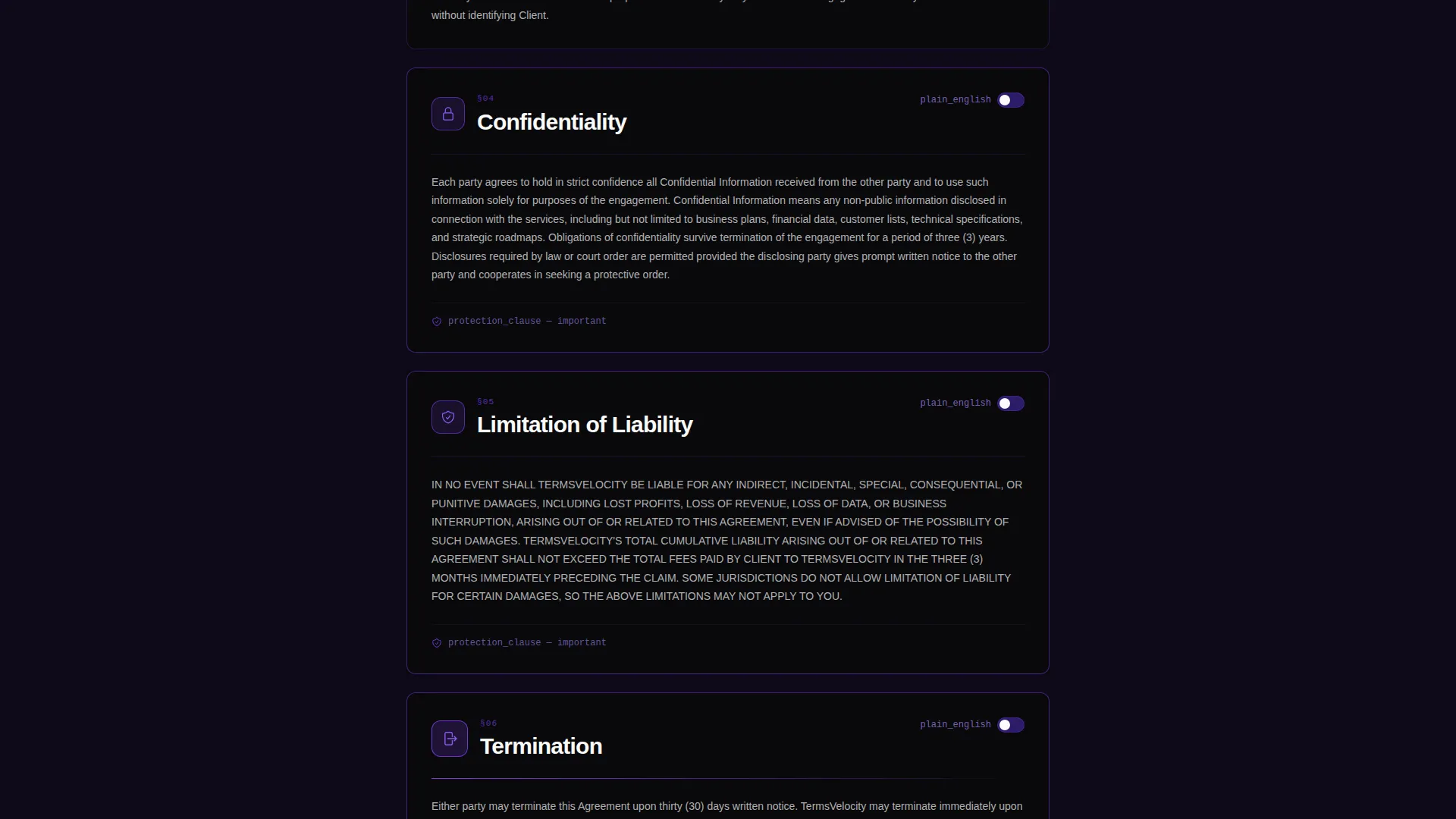
Cards increase in visual prominence as the stakes of the clause rise. Termination and limitation-of-liability cards carry heavier violet borders and bolder typography, signaling their importance without requiring the reader to already know which clauses matter most.
Scroll-Activated Accept Button
A primary call-to-action button labeled "Accept and Start Your Engagement" is pinned to a floating bottom bar. It activates only after the visitor has scrolled past the final terms section, confirming full exposure to every clause before acceptance.
PDF Download Path
A secondary "Download as PDF" link sits in the header for legal teams or clients who prefer a printable version of the terms. It provides a parallel path without disrupting the primary on-page reading experience.
Alternating Section Backgrounds
Section backgrounds alternate between absolute void black and a deep ultraviolet wash. This creates a natural reading rhythm and visually separates each clause without requiring dividers or extra spacing.
Page sections overview
| Section | Purpose |
|---|---|
| Header Card Grid | Clickable table of contents for instant section navigation |
| Scope of Services | Defines the consulting work covered under the agreement |
| Payment Terms | Outlines fees, schedules, and billing conditions |
| IP Ownership | Clarifies intellectual property rights for all deliverables |
| Confidentiality | Sets expectations for handling sensitive information |
| Limitation of Liability | Caps firm exposure and defines risk boundaries |
| Termination Conditions | Explains how either party can exit the engagement |
Design & branding system
The visual identity follows a Startup Velocity theme built on a Void and Violet color system. The palette reads like a dark-mode code editor at midnight, precise, purposeful, and immediately distinctive.
- Core colors are absolute void black (#09090B), deep ultraviolet (#2D1B69), electric violet (#7C3AED), and phosphor white (#FAFAFA) for text and card surfaces
- Cards sit on the void black background with thin one-pixel violet borders that brighten on hover, giving each card a subtle interactive pulse
- Section backgrounds alternate between pure void and a barely-there ultraviolet wash (#0F0A1A) to create visual rhythm without breaking the dark-mode aesthetic
Mobile & speed optimization
The modular card grid layout is naturally suited to smaller screens because each card is self-contained and stacks cleanly. The page does not depend on wide viewports to remain readable or navigable.
- Card grid columns reflow to a single column on mobile, keeping every section fully accessible without horizontal scrolling
- The floating accept button and header PDF link remain reachable at all viewport sizes so neither conversion path is lost on smaller devices
- Smooth-scroll navigation from the header cards works on touch devices, preserving the product-dashboard feel across all screen types
How this template helps you convert
This template treats the accept action as something the visitor earns by finishing the page, not a gate they must pass to start reading. That shift in framing changes how clients experience the entire document.
- The interactive card table of contents reduces drop-off by letting visitors jump directly to the clause they care about, keeping them engaged instead of bounced
- The plain-English toggle builds genuine trust by showing that the firm has nothing to hide, making clients more likely to accept terms without requesting a separate legal review
- The scroll-activated accept button turns completion into a natural next step rather than an interruption, so the click feels earned and deliberate on both sides
Other information about this template
This template fits into a broader consulting firm website template system. It is designed to work as a standalone terms-of-service landing page or as a linked page within a larger site.
- The template style is Card Grid (Modular), which means sections can be reordered or expanded without breaking the overall layout
- The creative direction follows an Industry Report approach, where each section escalates in weight and stakes the way a well-structured pitch deck builds its narrative
- The header concept is an Interactive Preview, making the table of contents functional rather than decorative
- The click-through landing-page direction means every design decision points toward a single primary action: accepting the terms and starting the engagement
- This template is categorized under Technology and is specifically designed for the consulting firm terms-of-service page niche within consulting firm website templates

Theme
Startup Velocity
Creative direction
Industry Report
Color system
Void & Violet
Style
Card Grid (Modular)
Direction
Click-Through
Page Sections
Interactive Card Table of Contents
Plain-english Clause Toggle
Escalating Visual Card Weight
Scroll-activated Accept Button
Header PDF Download Option
Alternating Background Sections
Related questions
Can I edit the legal text inside each card?
Does the plain-English toggle require any coding to set up?
Can I add or remove terms sections from the card grid?
Is this template suitable for consulting firms outside the technology sector?
What happens to the floating accept button on mobile devices?



