Church Vertical SaaS Booking Website Template
Vestry is a bento grid landing page template built for church booking systems. It presents a glassmorphic dashboard interface with color-coded calendar views, interactive bento tiles, and a lead generation flow built around a three-field demo request form. Church administrators, facilities managers, and senior pastors can immediately see how their own scheduling chaos gets resolved.
by Rocket studio
Quick summary
Vestry is a single-page bento grid template designed for a church facility booking system. It combines a full-width dashboard screenshot header with interactive bento tiles, a glassmorphic visual system, and a focused lead generation form. The layout speaks directly to church administrators who need conflict-free room scheduling across every ministry.
Who this template is for
This template is built for organizations that sell or promote a church scheduling and booking platform. It speaks the language of the people who actually manage church facilities day to day.
- Church administrators managing overlapping ministry bookings across the week
- Facilities managers handling room requests from regular congregants and external groups such as wedding parties
- Senior pastors and ministry leaders who need clear, conflict-free visibility into every space
What problem this template solves
Double-booked rooms and missed confirmation emails are a real source of frustration inside busy churches. This template gives a booking platform a landing page that demonstrates its solution before the visitor ever signs up.
- It removes the confusion of juggling multiple ministries competing for the same rooms on the same days
- It shows how automated confirmations and conflict resolution work, using real room names and real time slots that church staff instantly recognize
- It replaces passive feature lists with interactive demos that let visitors experience scheduling before they commit
What you get with this template
The template delivers a complete single-page layout purpose-built for a church room booking product. Every section earns attention through interaction rather than description.
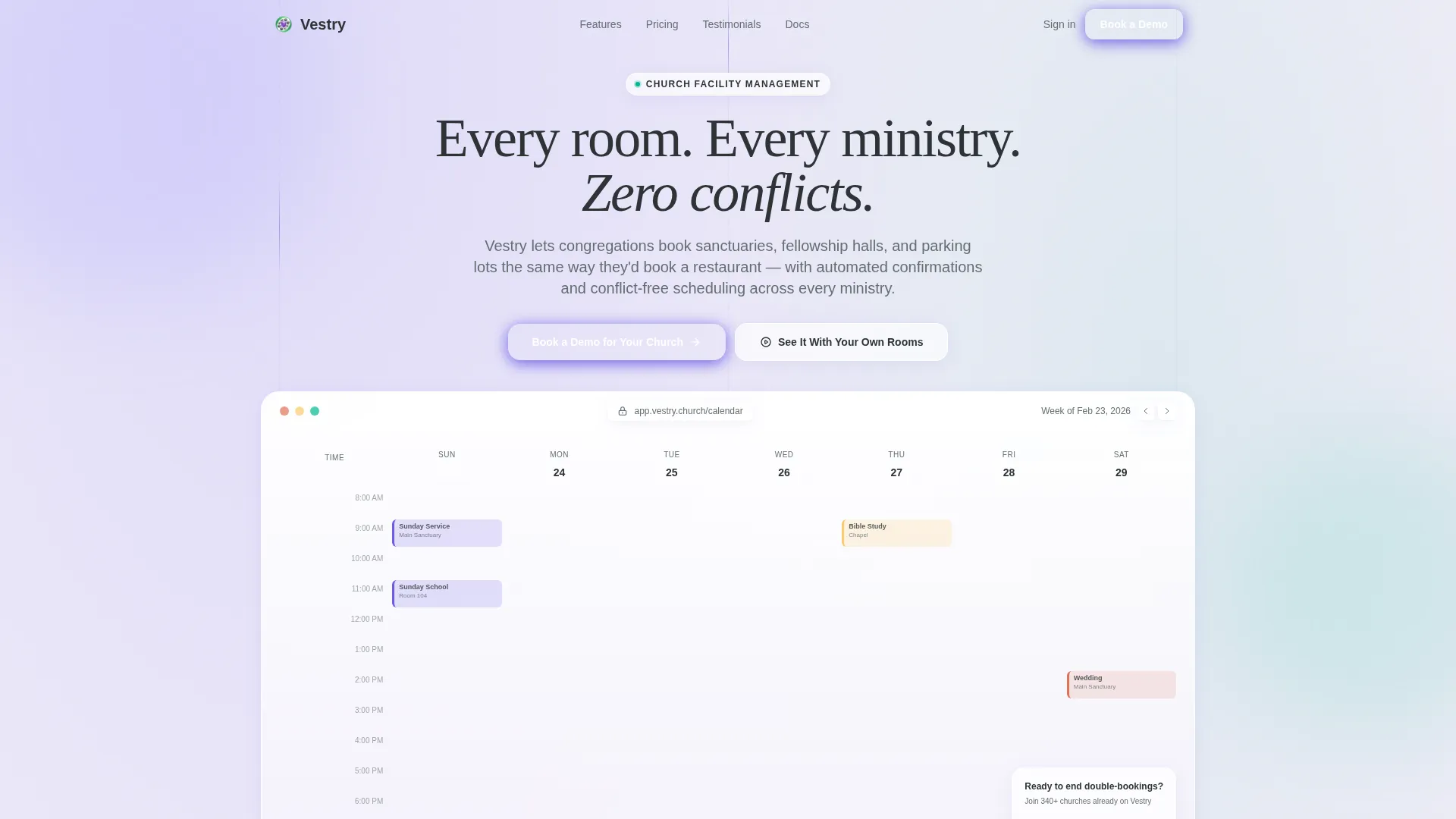
- A full-width header featuring a pixel-perfect dashboard screenshot with a live week view and a glassmorphic "Book a Demo for Your Church" call-to-action button
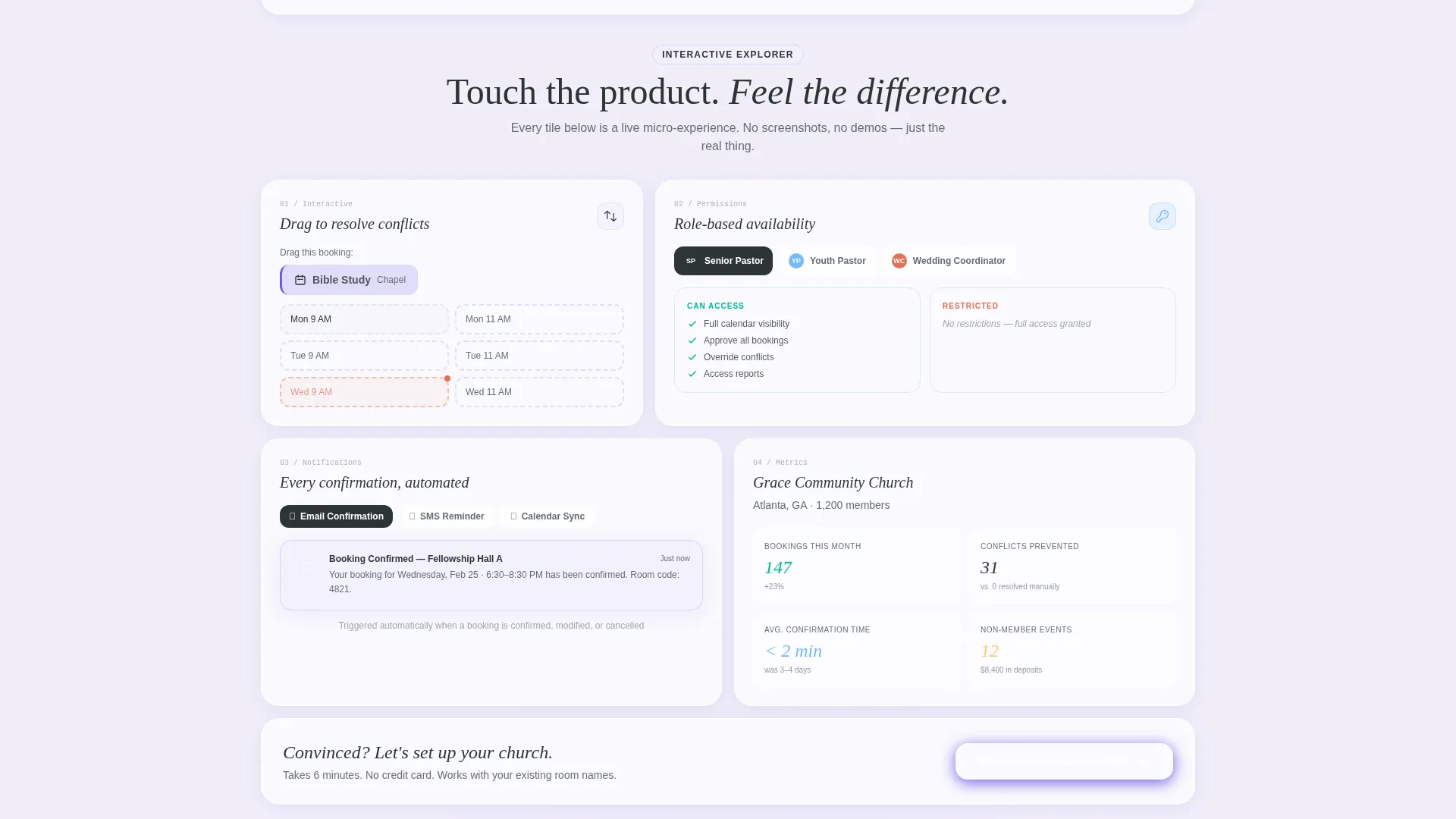
- A bento grid of interactive tiles covering drag-and-drop booking, a role-based permissions panel, and notification preview cycles
- A three-field lead generation form collecting church name, weekly average attendance, and work email, plus a self-guided sandbox path for visitors who want to explore first
Feature list
This section covers the core capabilities delivered inside the Vestry template layout.
Full-Width Dashboard Header
The header renders a pixel-perfect week view of the booking dashboard in active use. Color-coded blocks show Sunday services in violet, a Saturday wedding in rose, and a Tuesday grief support group in soft teal. A glassmorphic popover hovers over an open Thursday slot, offering a "Reserve This Room" prompt with a dropdown pre-set to Fellowship Hall A.
Interactive Bento Grid Tiles
Each tile below the header is a clickable micro-experience. One tile lets visitors drag a booking across time slots and watch conflicts resolve in real time. Another expands into a permissions panel showing how different roles such as a youth pastor and a wedding coordinator see different availability.
Notification Preview Cycle Tile
A dedicated bento tile cycles through the three core confirmation touchpoints. Visitors see an email confirmation, an SMS reminder, and a calendar sync notification in sequence. This answers the "will people actually know they're confirmed?" objection without a single line of explanatory copy.
Role-Based Permissions Panel
The permissions tile shows how access levels control what each staff member sees. A youth pastor view differs from a wedding coordinator view. This makes the concept of multi-user scheduling instantly legible to administrators who manage several ministry teams.
Lead Generation Form with Dual Paths
The primary path is a three-field form requesting church name, weekly average attendance selected from a dropdown, and work email. The secondary path offers a self-guided sandbox labeled "See It With Your Own Rooms," which captures the visitor's email on entry and lets them explore before committing.
Anchored Repeat Call-to-Action
The primary call-to-action button reappears anchored at the bottom of every second bento row. This keeps the conversion prompt visible throughout the scroll without interrupting the interactive exploration of the product.
Page sections overview
| Section | Purpose |
|---|---|
| Full-Width Header | Show dashboard in use with primary call-to-action |
| Drag-and-Drop Tile | Let visitors experience conflict-free booking live |
| Permissions Panel Tile | Demonstrate role-based availability views |
| Notification Preview Tile | Cycle through confirmation, reminder, and sync |
| Anchored call to action Row | Repeat demo request prompt between bento rows |
| Lead Generation Form | Capture church name, attendance size, and email |
| Sandbox Entry Path | Offer self-guided exploration behind email capture |
Design & branding system
The visual identity follows a glassmorphic style that feels like light filtered through frosted glass panels inside a modern worship center. Every card floats with a soft box shadow, and layered background blur creates depth without clutter.
- Color palette: translucent card white at rgba(255,255,255,0.15), sanctuary violet at #6C5CE7, soft nave gray at #DFE6E9, and confirmation green at #00B894 for active-state buttons and success indicators
- Background treatment: layered blur with subtle gradient meshes in muted lavender tones, giving the page a luminous and unhurried atmosphere
- Text sits in near-black at #2D3436 for maximum clarity against the frosted card surfaces
Mobile & speed optimization
The bento grid layout is structured to reflow cleanly across screen sizes, keeping the interactive tiles and form accessible on smaller viewports.
- Bento tiles stack vertically on narrow screens, preserving the micro-interaction experience without crowding touch targets
- The glassmorphic card system uses CSS-level blur and shadow rather than heavy image assets, keeping the visual weight manageable across devices
How this template helps you convert
The page earns each click by letting visitors experience the product before they ever fill in a field.
- The interactive bento tiles turn passive browsing into hands-on exploration, making the booking system feel familiar before the demo request is made.
- The dual conversion path accommodates both ready-to-commit administrators and cautious explorers, so neither group hits a dead end.
- The anchored repeat call-to-action keeps the primary prompt visible at natural scroll rest points, reducing the distance between interest and action.
Other information about this template
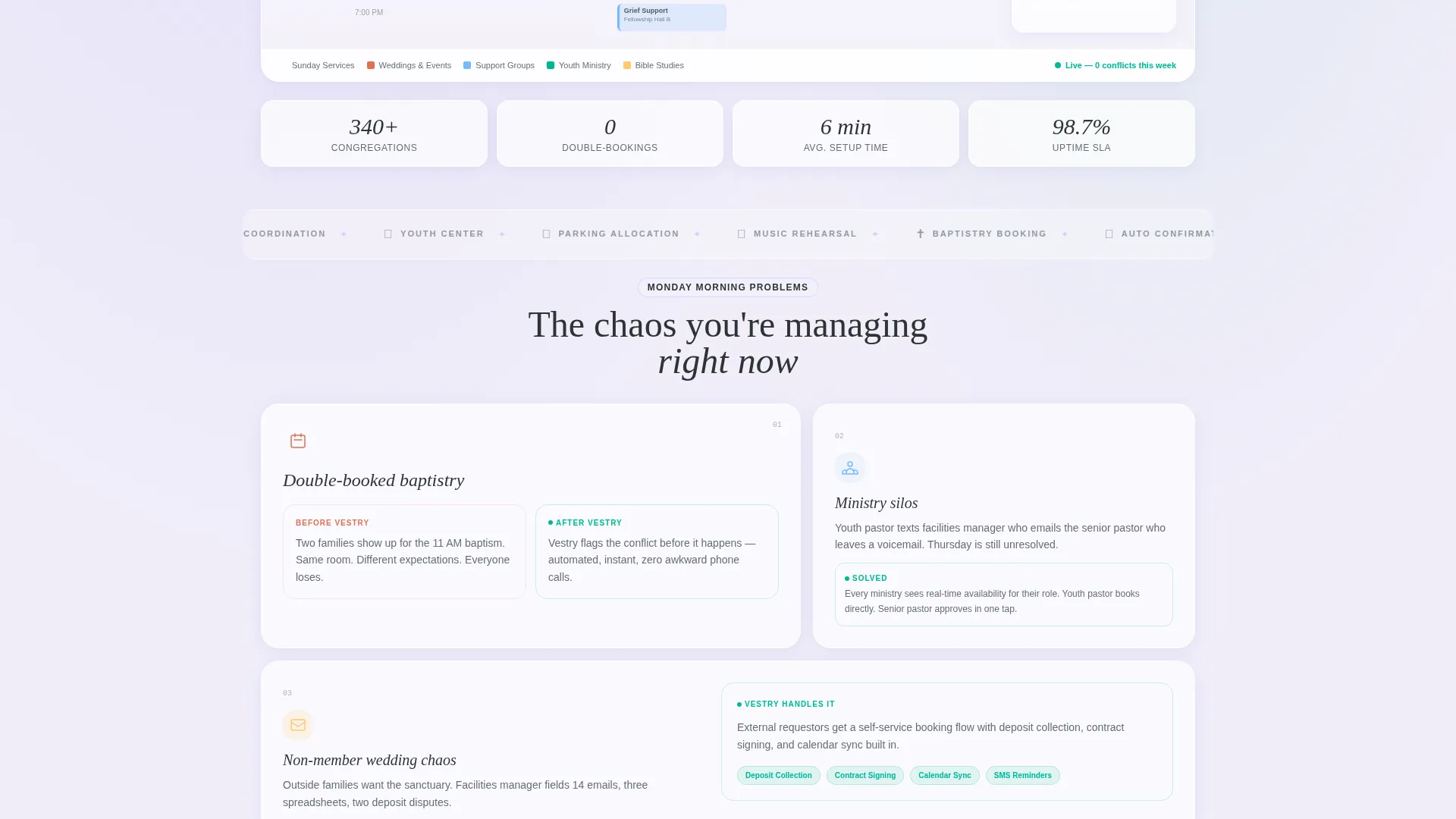
Vestry is built on a Dashboard Pro theme, which suits vertical software-as-a-service products that need to demonstrate a complex tool inside a single focused page. The template style is a bento grid, a layout pattern well suited to church vertical SaaS products where multiple features need equal visual weight without hierarchy confusion. The Interactive Explorer creative direction is central to the template's lead generation strategy, replacing static feature descriptions with touch-driven proof. The header concept follows a Product Screenshot approach, grounding the page in a real interface view rather than abstract illustration.
- Template style: Bento Grid with Dashboard Pro theme
- Color system: Glassmorphic with sanctuary violet, confirmation green, nave gray, and translucent white
- Creative direction: Interactive Explorer with clickable micro-experience tiles
- Header concept: Product Screenshot showing a live week view with real room and ministry labels
- Landing page direction: Lead Generation with a three-field form and a sandbox secondary path
Theme
Dashboard Pro
Creative direction
Interactive Explorer
Color system
Glassmorphic
Style
Bento Grid
Direction
Lead Generation
Page Sections
Full-width Dashboard Screenshot Header
Interactive Bento Grid Layout
Role-based Permissions Tile
Notification Preview Cycle
Dual-path Lead Generation Form
Anchored Repeat Call-to-action
Related questions
Who is the Vestry template designed for?
What does the bento grid layout include?
How does the lead generation form work?
Can I customize the room names and ministry labels in the template?
What visual style does this template use?



