Specialist AI & Machine Learning Comparison Website Template
Videoengine is a single-page landing page template built for AI video generation tools. It combines a floating product screenshot hero, a structured spec sheet, and a twelve-dimension comparison table to prove capability before asking for a click. The dark carbon fiber design and electric blue accents create a high-intensity feel that matches the speed of the product it showcases.
by Rocket studio
Quick summary
Videoengine is a click-through landing page template designed for AI video generator products. It leads with a mid-render product screenshot, walks visitors through six capability spec rows, then delivers a comparison table before a full-width call-to-action bar. The result is a page that earns each click through proof, not promises.
Who this template is for
This template is built for product teams and creators who need to convert skeptical visitors into active users fast. It suits anyone launching or promoting an AI-powered video tool that competes on speed and output quality.
- Solo content creators and growth marketers who need to demonstrate rapid video output
- Indie game studios replacing traditional post-production workflows with AI tooling
- AI SaaS founders and product marketers launching a video generation product
What problem this template solves
Most landing pages for AI tools describe features without showing them. Visitors leave unconvinced because words alone cannot prove that a tool generates cinematic video in under ninety seconds.
- There is no visual proof of the product working in real time
- Comparison against manual editing or competitor tools is missing or vague
- The page asks for sign-up before the visitor understands what the tool does
What you get with this template
This template gives you a fully structured, dark-themed landing page with every section built around demonstrating AI video capability. Each section feeds into the next, moving visitors from curiosity to confidence to click.
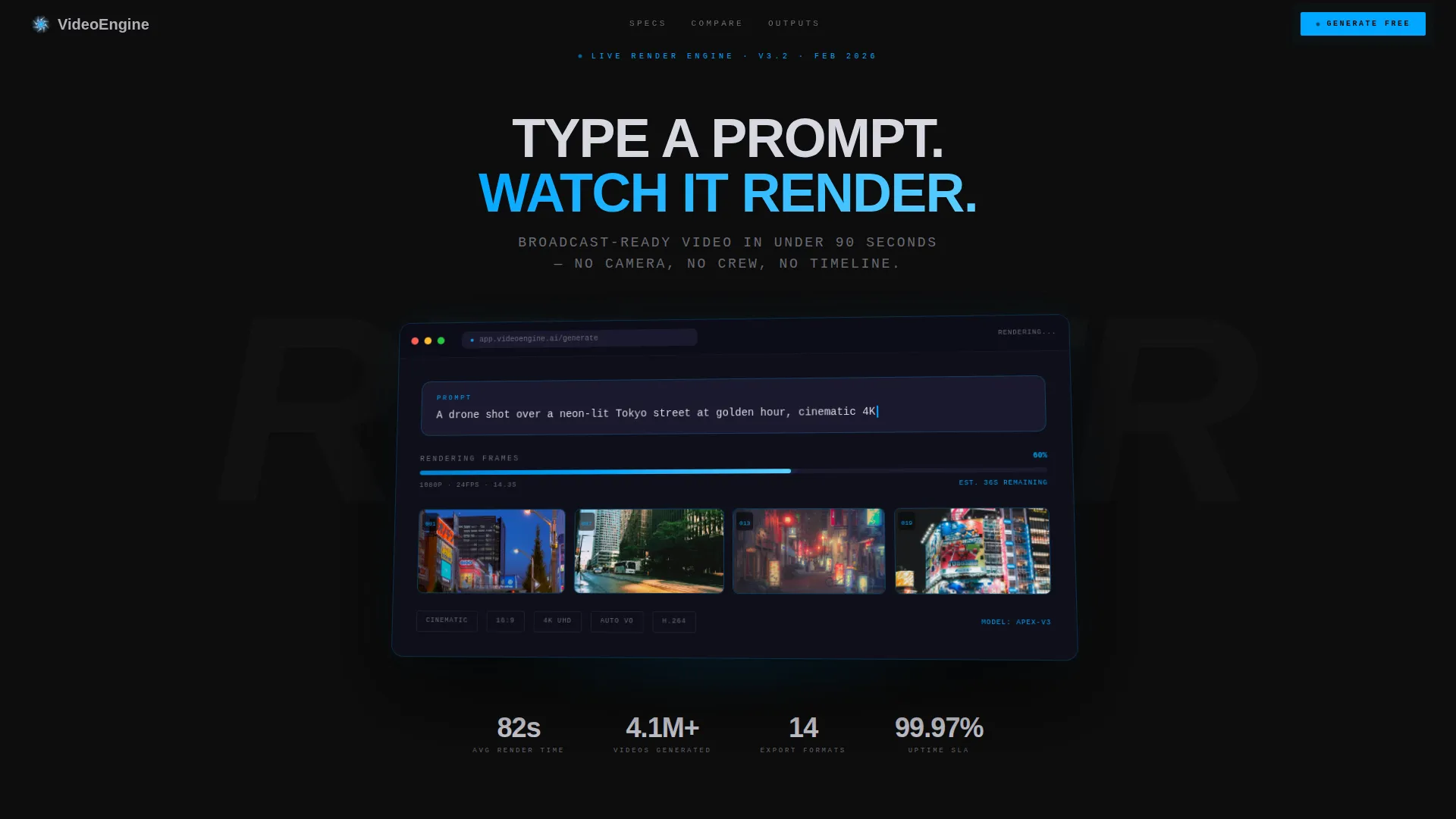
- A floating product screenshot hero showing the tool mid-render with a progress bar and four assembled thumbnail frames
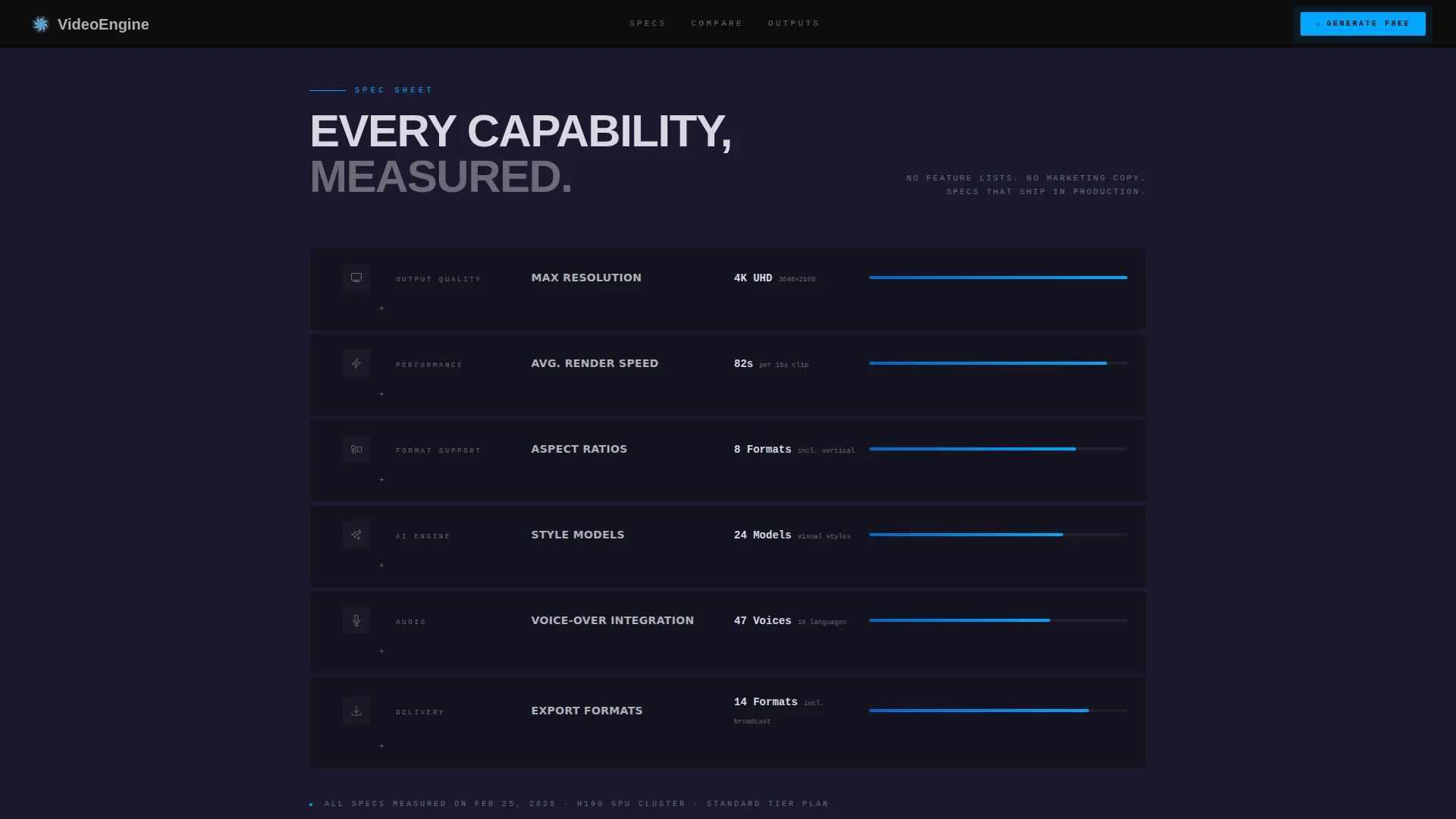
- A six-row spec sheet with looping micro-animation indicators covering resolution, render speed, aspect ratios, style models, voice-over integration, and export formats
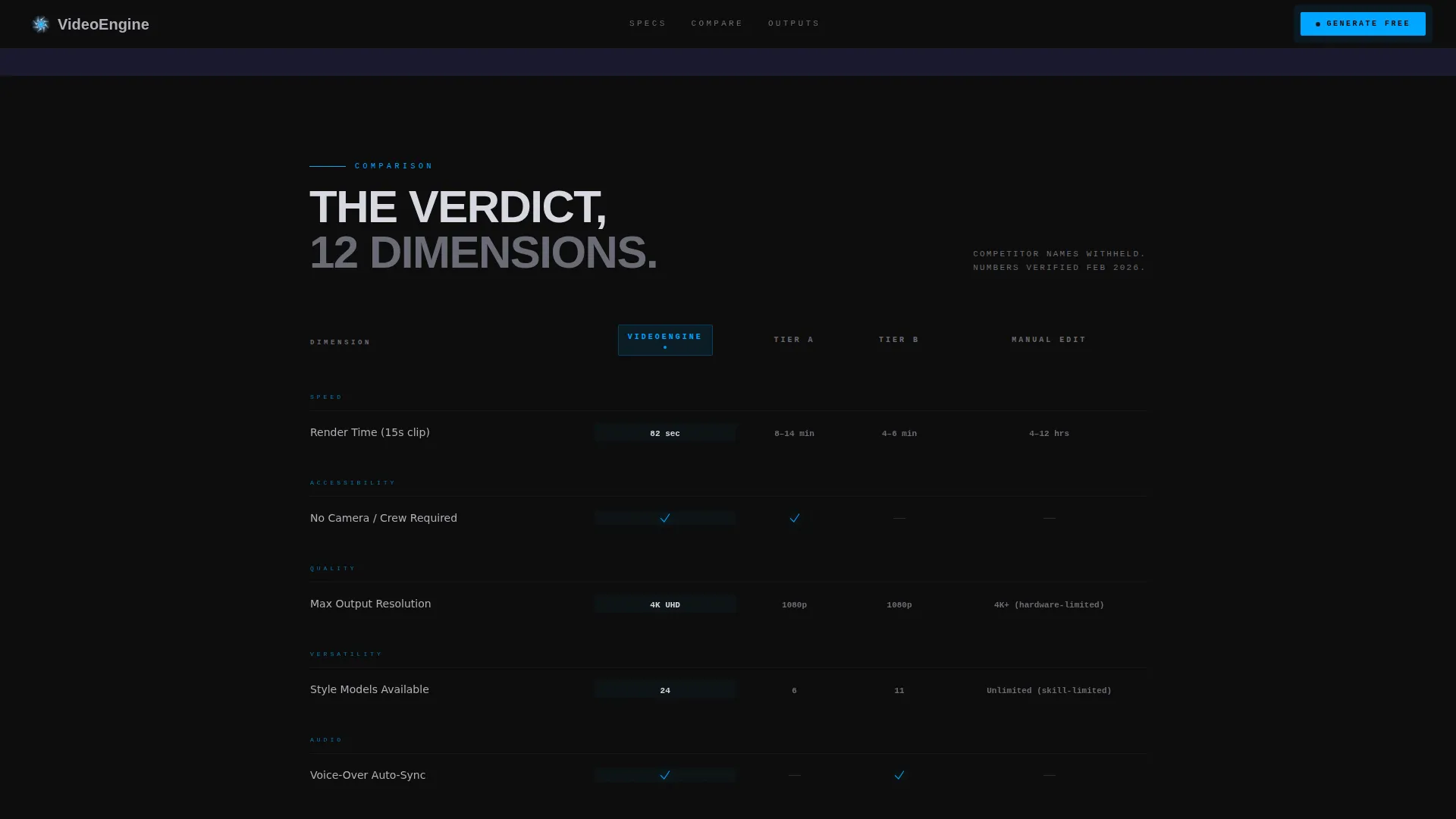
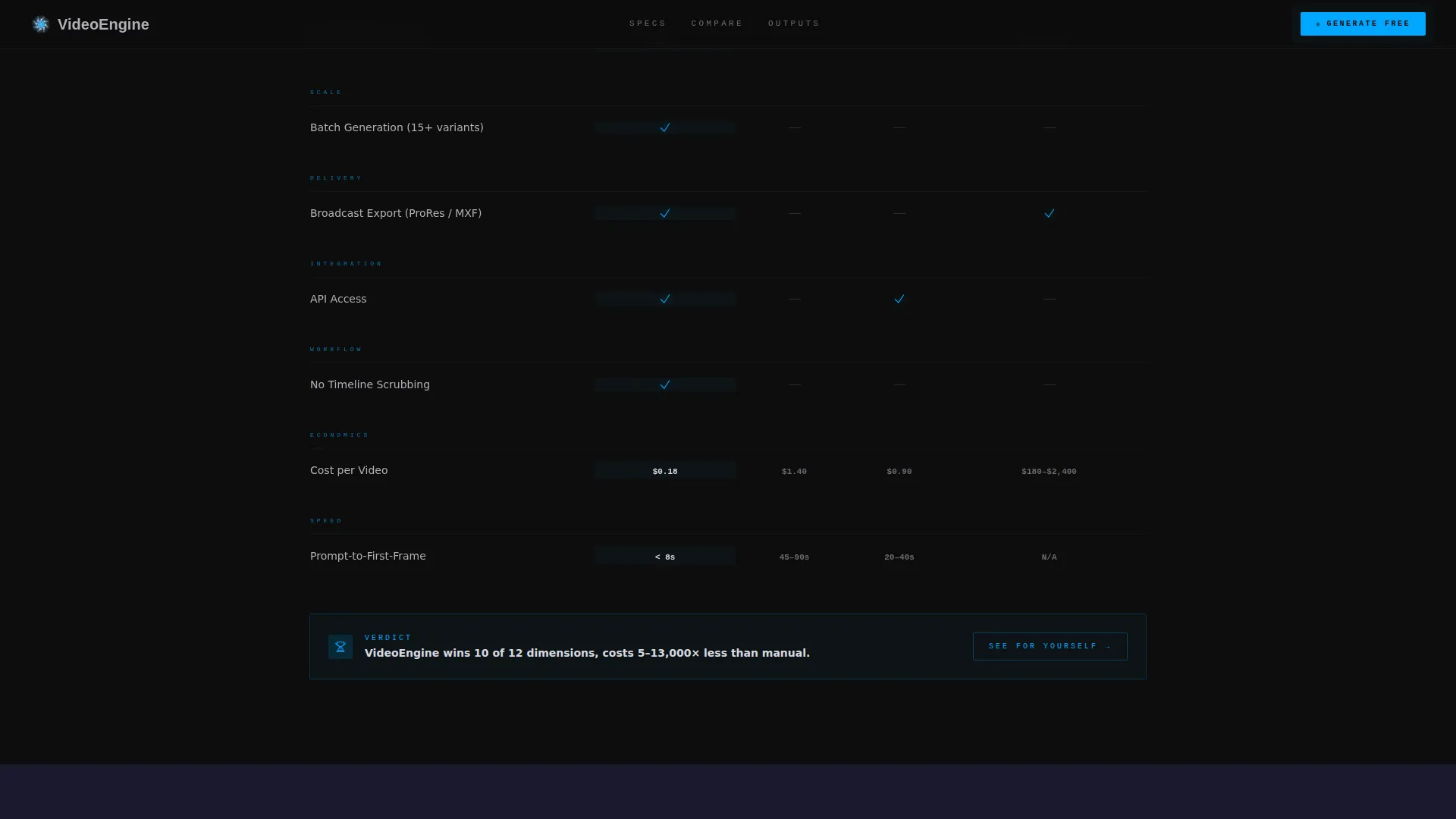
- A twelve-dimension comparison table pitting the tool against manual editing and two unnamed competitor tiers, with a full-width electric blue call-to-action bar below it
Feature list
This template includes purpose-built sections and interaction patterns designed for an AI video generation landing page.
Floating Product Screenshot Hero
The header displays a full-width product screenshot angled slightly and set against the carbon background. A faint blue ambient glow radiates beneath the interface image, showing the prompt field mid-render and four video thumbnail frames already populating. No lifestyle imagery is used; the product interface is the entire visual focus.
Six-Row Capability Spec Sheet
Below the hero, six structured spec rows break down every measurable capability: resolution options, render speed, supported aspect ratios, style models, voice-over integration, and export formats. Each row is paired with a looping two-second micro-animation or clip that demonstrates the feature in action, keeping the rhythm clinical and visual at once.
Twelve-Dimension Comparison Table
The comparison table sits mid-page and measures the tool against manual editing workflows and two unnamed competitor tiers across twelve dimensions. Confirmed capabilities appear in electric ignition blue checkmarks. Gaps in competitor columns appear in muted gray, making the advantage readable at a glance.
Full-Width Call-to-Action Bar
After the comparison table delivers its verdict, a full-width electric blue bar presents the primary call to action: "Generate Your First Video." There are no form fields on this page. The button routes directly to the free generation sandbox, with a single authentication gate on the other side.
Sticky Navigation with Secondary Call-to-Action
A secondary call-to-action in reduced size mirrors the primary button text and stays fixed in the top navigation bar throughout the entire scroll. Visitors always have a clear path to act without scrolling back to the top.
Bento Output Gallery
A bento-style gallery of generated video thumbnails follows the spec sheet, showing real output samples. This section lets visitors see the kind of content the tool produces before they reach the comparison table.
Page sections overview
| Section | Purpose |
|---|---|
| Hero Screenshot | Show the tool mid-render with ambient glow and populated thumbnail frames |
| Spec Sheet Rows | Break down six capabilities with looping micro-animation proof per row |
| Comparison Table | Compare twelve dimensions against manual workflows and two competitor tiers |
| Output Bento Gallery | Display generated video thumbnail samples in a grid layout |
| Call-to-Action Bar | Drive clicks to the free generation sandbox with a full-width blue button |
| Minimal Footer | Provide a single-row developer-minimal footer with essential links |
Design & branding system
The visual identity follows a Dynamic Motion theme grounded in a Carbon Fiber color system. Every surface is matte and recessed until an interactive element is triggered, then it lights up with surgical precision using electric ignition blue.
- Color palette: deep cockpit black (#0D0D0D) for the background, woven carbon gray (#1A1A2E) for section containers, machined aluminum (#B0B0B8) for body text, and electric ignition blue (#00A6FF) reserved for active states, toggle highlights, and call-to-action pulses
- Typography: DM Sans in ultra-bold weights for headings, JetBrains Mono for specs and data fields, creating a contrast between commanding headlines and precise technical detail
- Animation system: scan line effects, progress bar pulse, comparison row scroll reveals, and a pulsing call-to-action bar driven by CSS animations and Intersection Observer triggers
Mobile & speed optimization
The template is designed desktop-first to support the complexity of the comparison table. A mobile fallback layout is included to ensure the page remains functional and readable on smaller screens.
- Desktop-first layout prioritizes the full twelve-column comparison table experience without horizontal overflow
- CSS animations are used throughout rather than heavy JavaScript libraries, keeping the animation footprint light
- Intersection Observer powers scroll-reveal effects on spec rows and the comparison table, so animations trigger only when sections enter the viewport
How this template helps you convert
This template is structured as a deliberate click-through funnel. Every section builds confidence before the call to action appears.
- The hero screenshot establishes instant product credibility by showing the tool already at work, eliminating the need for abstract marketing claims before the visitor scrolls.
- The spec sheet and comparison table answer every performance question a skeptical visitor might have, so by the time they reach the call-to-action bar, the decision is already made.
- The frictionless click-through structure sends visitors directly to the free generation sandbox with no form fields on the landing page itself, removing every barrier between interest and first use.
Other information about this template
This template is built as a standalone single-page landing page, not a multi-page site. It is designed for English-language markets with United States dollar pricing references in mind. The template uses no external image or video hosting dependencies for its layout components.
- Template style: Comparison Table layout within a Dynamic Motion theme
- Creative direction: Spec Sheet visual storytelling
- Header concept: Product Screenshot with ambient glow and mid-render interface state
- Intended conversion flow: Click-Through routing to a free generation sandbox
- Built for the AI video generator niche within the broader AI and machine learning product category
- Compatible with teams building or marketing tools similar to AI video creation platforms, text-to-video generators, and prompt-based video production software
Theme
Dynamic Motion
Creative direction
Spec Sheet
Color system
Carbon Fiber
Style
Comparison Table
Direction
Click-Through
Page Sections
Mid-render Product Screenshot Hero
Six-row Capability Spec Sheet
Twelve-dimension Comparison Table
Frictionless Click-through Call-to-action
Bento Output Gallery
Sticky Navigation Call-to-action
Related questions
Does this template include the actual AI video generation engine?
Can I update the comparison table to reflect my own product specs?
What animation effects are included in this template?
Is there a sticky call-to-action included?
Who is this landing page template best suited for?



