Visora - Precision Hospitality Landing Page Template
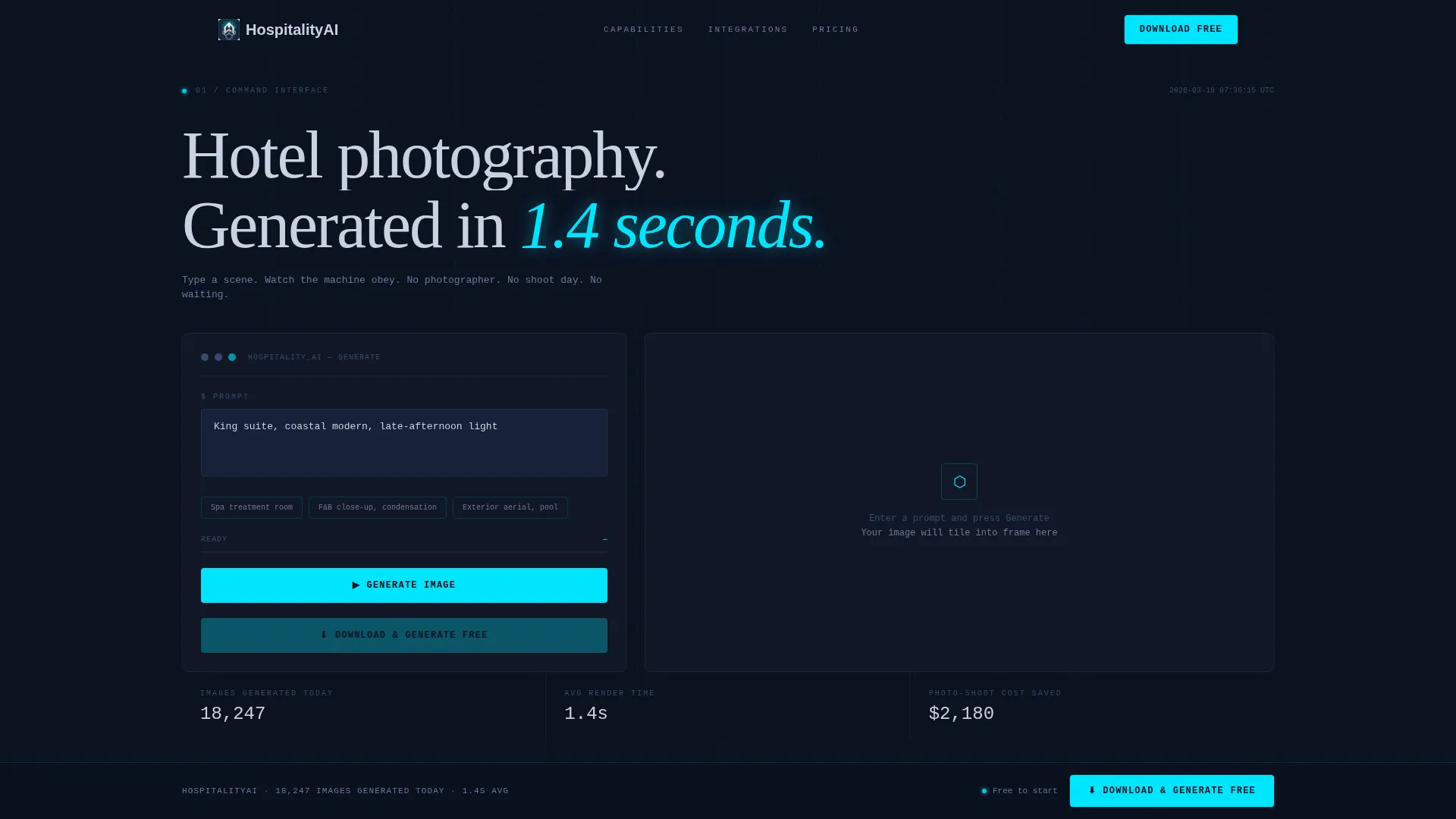
Visora is a scroll-reveal landing page template built for an AI-powered hotel image generator. It opens with a live prompt estimator that simulates the generation experience before the visitor scrolls. The Data Command visual theme, midnight navy palette, and spec-sheet layout guide hospitality professionals toward a single, frictionless app download action.
by Rocket studio
Quick summary
Visora is a single-page, scroll-reveal template designed for a hospitality AI image generator. It places a working prompt estimator in the header, then walks visitors through capability spec cards as they scroll. The midnight navy and electric cyan palette signals precision. Every section builds on the last until the visitor reaches a persistent download call to action.
Who this template is for
This template is built for teams and founders marketing an AI tool that generates hotel photography from text prompts. It speaks to the people who need professional imagery fast and without a traditional photo shoot.
- Revenue managers who refresh online travel agency listings and need fresh room visuals quickly
- Boutique hotel owners who cannot justify a two-day commercial photo shoot
- Marketing directors at mid-tier hotel chains who need dozens of room-type image variants by a deadline
What problem this template solves
Professional hotel photography is expensive, slow, and hard to scale. A marketing director who needs sixty room variants by Friday cannot wait for a photographer. This template positions the AI generator as the immediate, practical fix.
- It removes the hesitation of downloading an unfamiliar tool by letting visitors experience the product inside the header before committing
- It replaces a passive hero image with a live estimator that shows render speed and projected cost savings in real time
- It answers the "is this tool actually powerful enough?" question through scrollable spec cards before the download prompt appears
What you get with this template
You get a fully structured, scroll-reveal landing page with a working interactive header, animated section reveals, and a persistent download bar. Every layout decision is grounded in the hospitality AI use case.
- A prompt estimator header with a pre-filled example, an animated progress bar, and a tile-by-tile image reveal
- Discrete performance spec cards covering resolution output, scene types, style controls, and integration details
- A persistent bottom call-to-action bar with a platform selector and a single-field email fallback for waitlist capture
Feature list
This template ships with components that match the hospitality AI image generator use case precisely. Each section below describes a distinct functional element included in the layout.
Live Prompt Estimator Header
The header acts as the product itself. A prompt field pre-filled with "King suite, coastal modern, late-afternoon light" sits above a generate button. Pressing it triggers an animated progress bar, then reveals a photorealistic AI image sliding into frame tile by tile. Three real-time counters tick beneath it showing images generated today, average render time, and estimated photo-shoot cost saved.
Scroll-Reveal Spec Card Sections
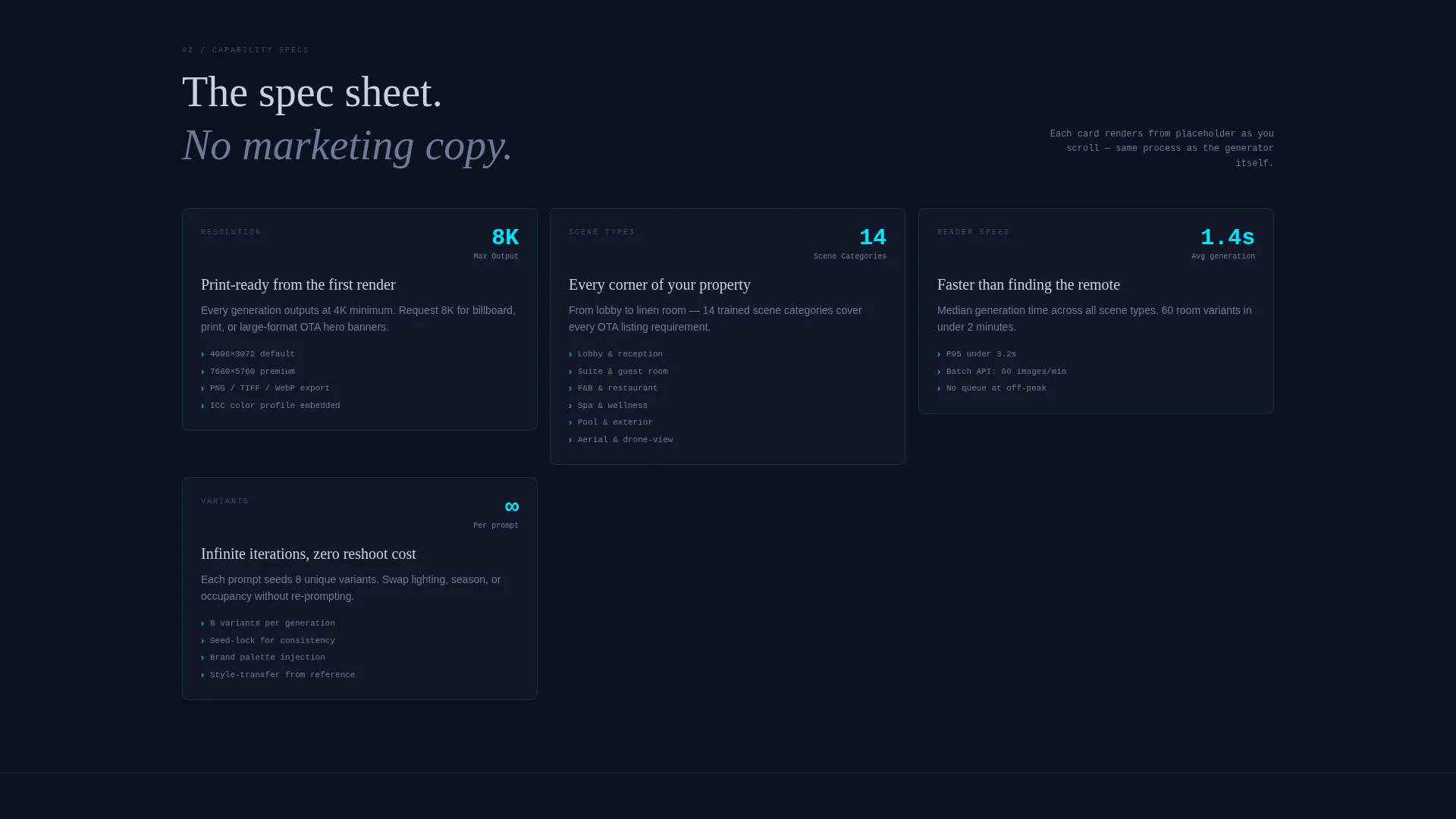
Each content section materializes one stat block at a time as the visitor scrolls. Cards flip from a blurred placeholder to sharp data, mimicking the AI generation process. This additive rhythm lets visitors mentally assemble the full capability stack before reaching the download prompt.
Resolution and Scene Type Spec Blocks
Dedicated performance cards display resolution output options including 4K, 8K, and print-ready formats. Supported scene types are listed clearly: lobby, suite, food and beverage, spa, exterior, and aerial. Visitors get the technical specifics without having to search for them.
Style and Brand Control Panel Block
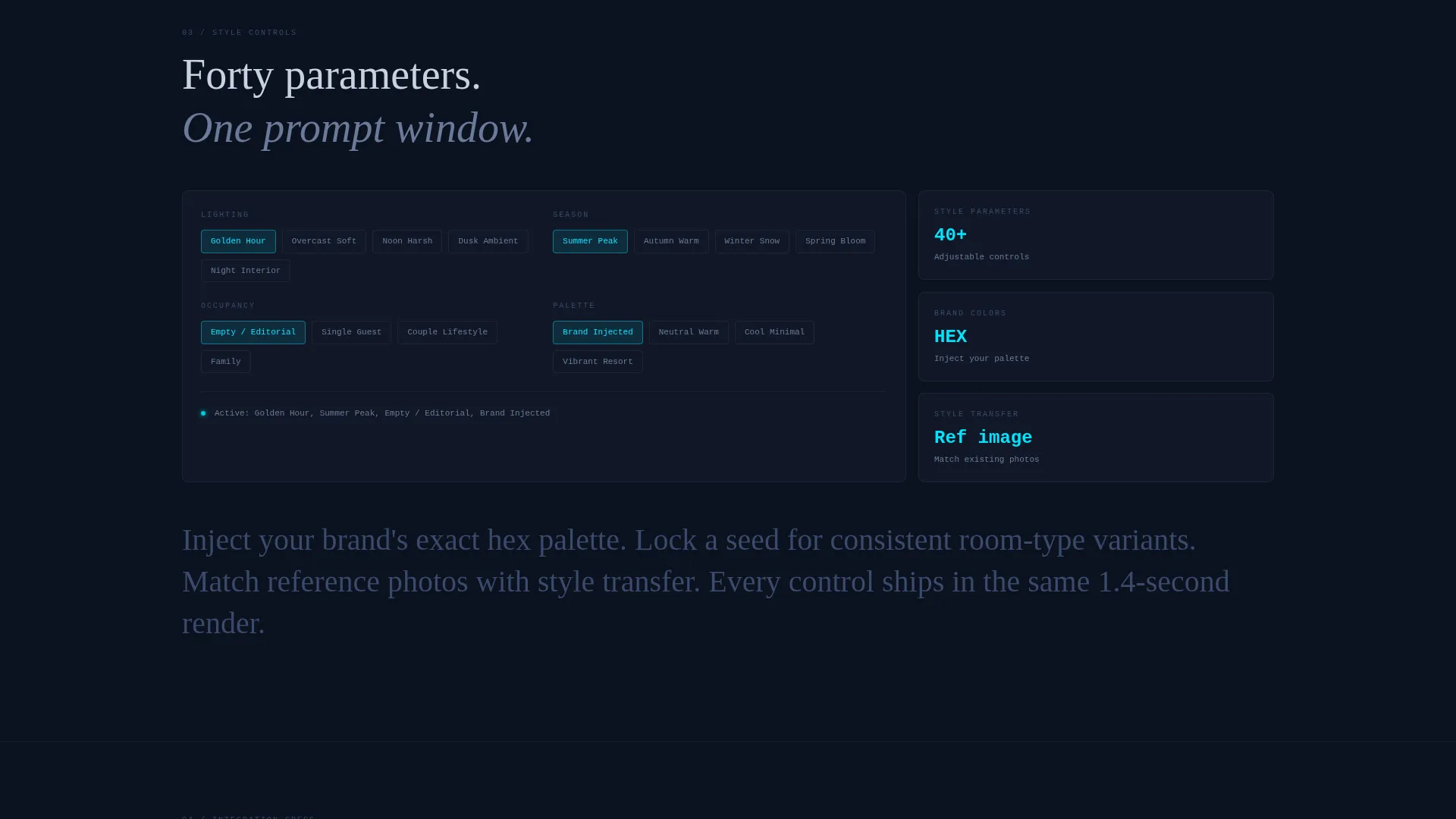
A spec card covers the style control layer: lighting, season, occupancy state, and brand palette injection. This section is aimed directly at marketing directors who need consistent, brand-aligned imagery across a large batch of renders.
Integration Spec Card
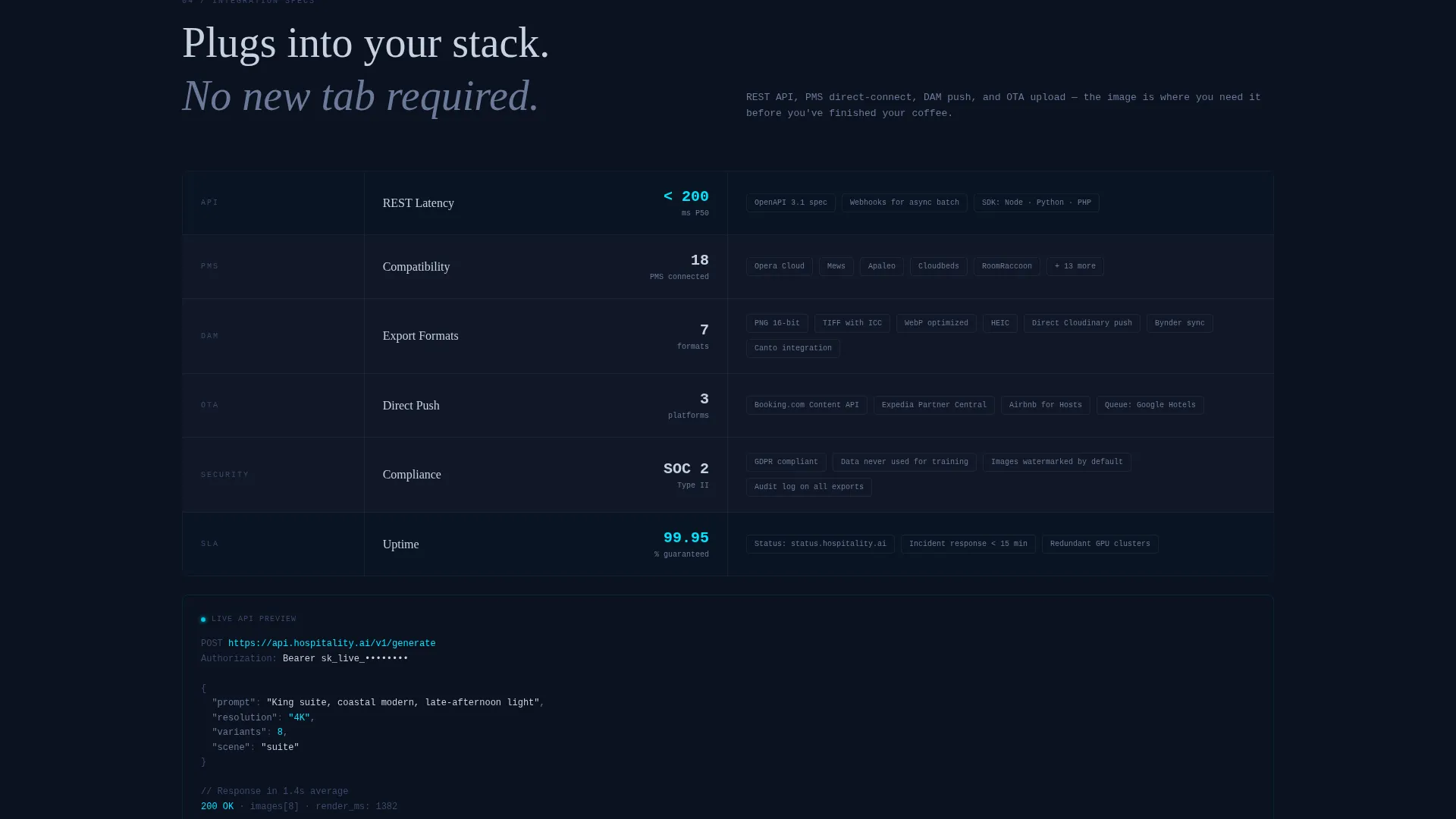
A dedicated card covers the technical integration layer including application programming interface latency, property management system compatibility, and digital asset management export formats. It gives technical evaluators the details they need to approve a download.
Persistent Download Call to Action
The primary call to action reads "Download and Generate Free" and appears first inside the header estimator result. After the third section, it locks into a persistent bottom bar. Tapping opens a platform selector for iOS, Android, and Desktop, with a single-field email fallback for waitlist capture.
Page sections overview
| Section | Purpose |
|---|---|
| Header Prompt Estimator | Simulate generation; show speed and cost savings counters |
| Resolution Output Card | Display 4K, 8K, and print-ready output specs |
| Scene Types Card | List all supported hotel photography scene categories |
| Style Controls Card | Show lighting, season, occupancy, and palette options |
| Integration Specs Card | Cover API latency, PMS compatibility, DAM export formats |
| Persistent Download Bar | Lock call to action after third section; present platform selector |
Design & branding system
The visual identity follows a Data Command theme built entirely around a Midnight Blue color system. The palette evokes the focused glow of a single monitor in a dark room: cold, precise, and alive at the edges.
- Deep terminal navy (#0B1120) dominates all backgrounds; status-bar blue (#1B2A4A) layers section depth; soft interface silver (#C8D1E0) carries all body text
- Electric cyan (#00E5FF) appears exclusively on active states, progress bars, and call-to-action pulses, keeping it visually charged and meaningful every time it appears
- The Spec Sheet creative direction means every section is a discrete, scannable card rather than a flowing narrative block
Mobile & speed optimization
The scroll-reveal, tile-by-tile animation pattern is designed to feel fast and responsive across devices. The template is structured so that each section loads progressively, supporting a smooth experience even on mobile connections.
- Section cards reveal one stat block at a time, reducing perceived load weight and keeping the scroll experience fluid on smaller screens
- The persistent bottom call-to-action bar is sized and positioned for thumb-friendly tapping on mobile devices
- The single-field email fallback on the platform selector minimizes friction for mobile visitors who want to join the waitlist without a long form
How this template helps you convert
Visora earns the download tap before it asks for one. The page is structured so that every scroll step adds evidence, and the visitor arrives at the call to action already convinced.
- The header estimator lets visitors use the product immediately, turning passive interest into active experience before a single section has loaded
- The progressive spec card rhythm builds trust additively, so by the time the persistent download bar appears, the visitor has seen resolution specs, scene coverage, style controls, and integration details
- The no-friction platform selector with an email fallback removes the last barrier, giving every visitor a path to act regardless of their device or readiness to install
Other information about this template
Visora is a single landing page template built in a scroll-reveal progressive style. It is suited for product teams launching or relaunching an AI image generation tool aimed at the hospitality industry. The template can support a direct app download flow or a waitlist capture flow depending on the product's launch stage.
- The template style is Scroll Reveal (Progressive), meaning each content block animates into view as the visitor reaches it
- The header concept is a Calculator and Estimator, which means no static hero image is used; the interactive tool occupies the full header viewport
- The landing page direction is App Download, and all call-to-action placements are designed to drive toward that single conversion goal
- The color system is Midnight Blue and the theme is Data Command, making it a strong fit for technology products that want to project speed, precision, and operational credibility
Theme
Data Command
Creative direction
Spec Sheet
Color system
Midnight Blue
Style
Scroll Reveal (Progressive)
Direction
App Download
Page Sections
Live Prompt Estimator Header
Scroll-reveal Spec Card Layout
Resolution and Scene Spec Blocks
Style and Brand Control Spec Card
Integration Details Card
Persistent Download Call to Action Bar
Related questions
Does this template include the actual AI image generation engine?
Can the header estimator be customized with different pre-filled prompts?
Is this template suitable for a waitlist launch before the app is live?
Who is the primary audience this landing page is designed to reach?
Can the color system and branding be adjusted?



