Healthcare Software Booking Website Template
Vitals is a hub-and-spoke landing page template built for healthcare property management firms. It opens with an interactive cost-estimator, locks an anchor navigation bar as visitors scroll, and guides facility directors, physician group partners, and portfolio owners toward downloading an owner portal app or booking a property audit.
by Rocket studio
Quick summary
Vitals is a single-page, anchor-navigated landing page template for healthcare property management companies. An interactive cost calculator anchors the header, animated spoke sections cover Compliance through Portfolio Analytics, and two conversion paths push visitors toward the owner portal app download or a scheduled property audit.
Who this template is for
This template is built for firms that manage the physical operations of medical real estate. It speaks directly to the decision-makers who carry the weight of keeping clinical spaces functional and profitable.
- Physician group partners managing lease renewals alongside patient-care responsibilities
- Hospital system facility directors overseeing multiple scattered properties at once
- Private equity healthcare portfolio owners focused on protecting net operating income across every asset
What problem this template solves
Healthcare property managers struggle to communicate complex, multi-service offerings without losing visitors to a wall of static text. A brochure-style page cannot show the speed and precision that clinical facility clients demand.
- Prospects cannot quickly see what a firm covers, from HVAC compliance to after-hours emergency dispatch
- Facility directors need instant proof of value before they commit to a conversation
- Portfolio owners want dashboards, not documents, and a static page fails to convey operational confidence
What you get with this template
You get a fully structured, motion-driven landing page that positions your firm as a living operations command center. Every section is purpose-built to match the expectations of a clinical audience.
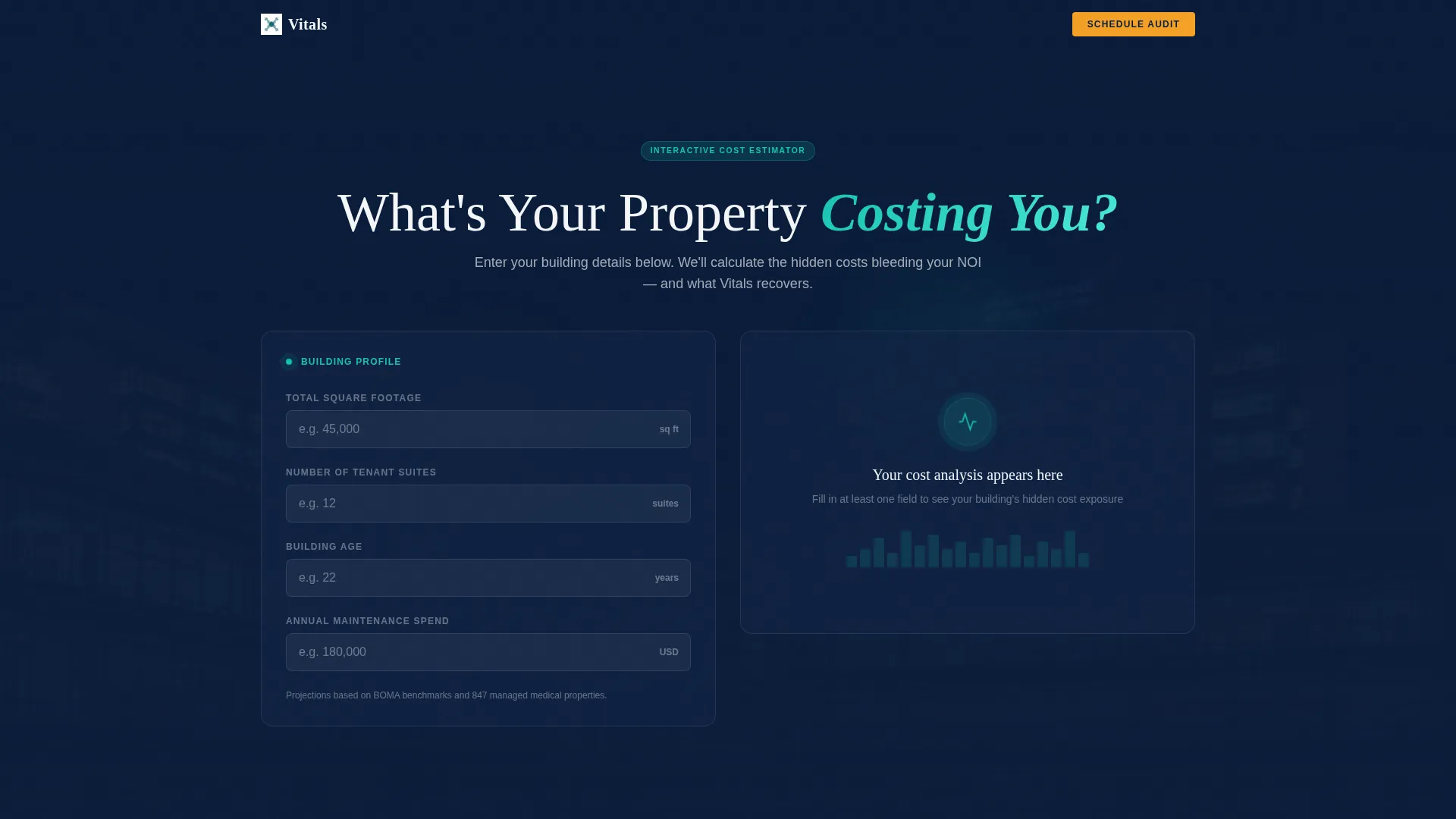
- An interactive calculator in the header that generates animated cost-saving projections tied to a visitor's own building data
- Five anchor-linked spoke sections, each with a motion-triggered entrance and one animated operational element
- Two conversion paths: a primary app-download flow with device selection and property pre-loading, and a secondary audit-booking form
Feature list
This template ships with six core features, each grounded in the brief and designed to carry a healthcare property management firm's credibility from first scroll to final conversion.
Interactive Cost-Estimator Header
Visitors input square footage, number of tenant suites, building age, and current maintenance spend. As each field is completed, animated number counters slide cost-saving projections into frame, with a teal pulse ripple radiating from each result like a stabilizing vitals readout.
Anchor Navigation with Hub-and-Spoke Structure
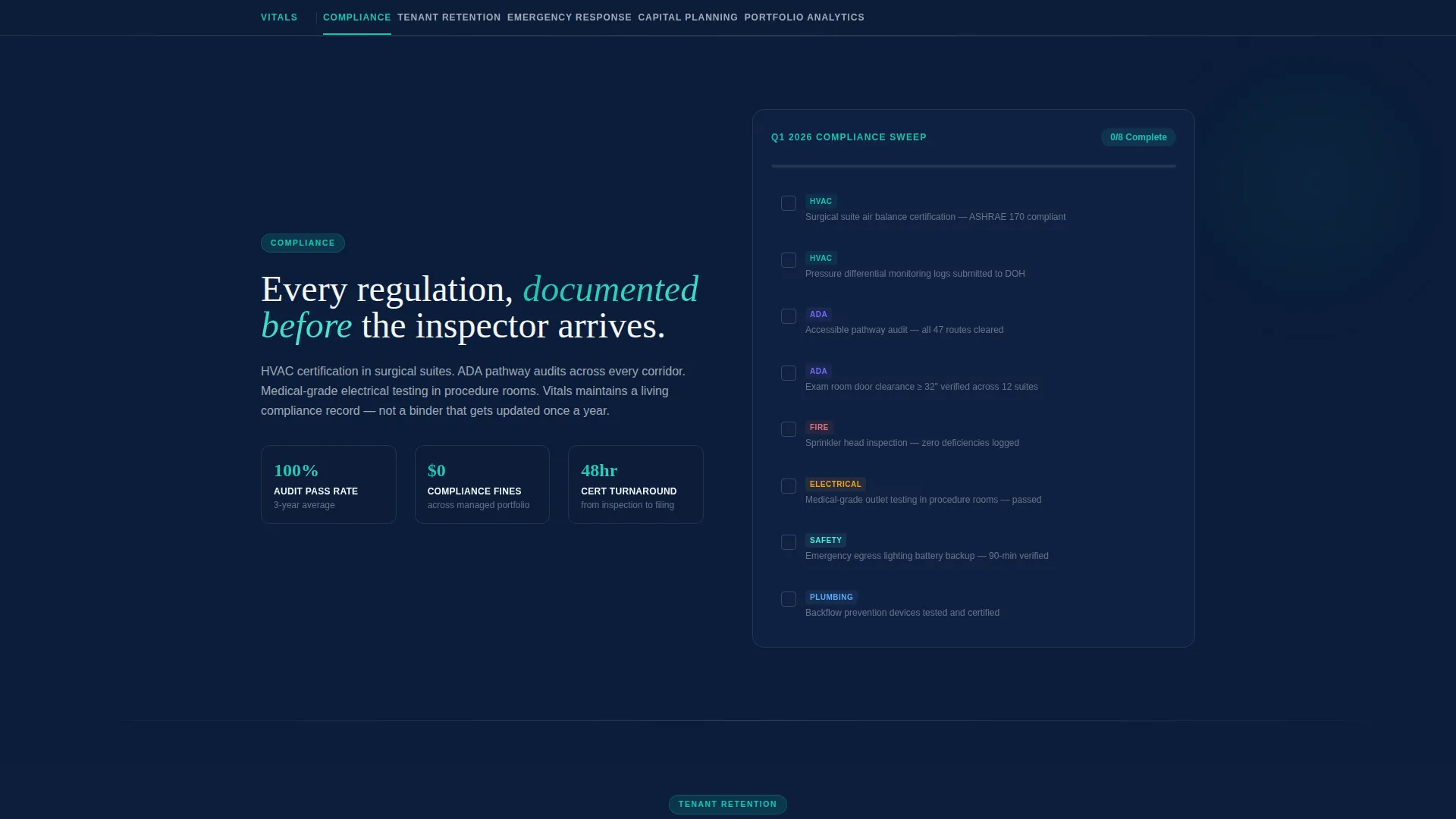
Once the calculator result appears, the anchor navigation bar locks to the top of the page. Five labeled spokes, Compliance, Tenant Retention, Emergency Response, Capital Planning, and Portfolio Analytics, let visitors jump directly to the section most relevant to their role.
Motion-Triggered Spoke Sections
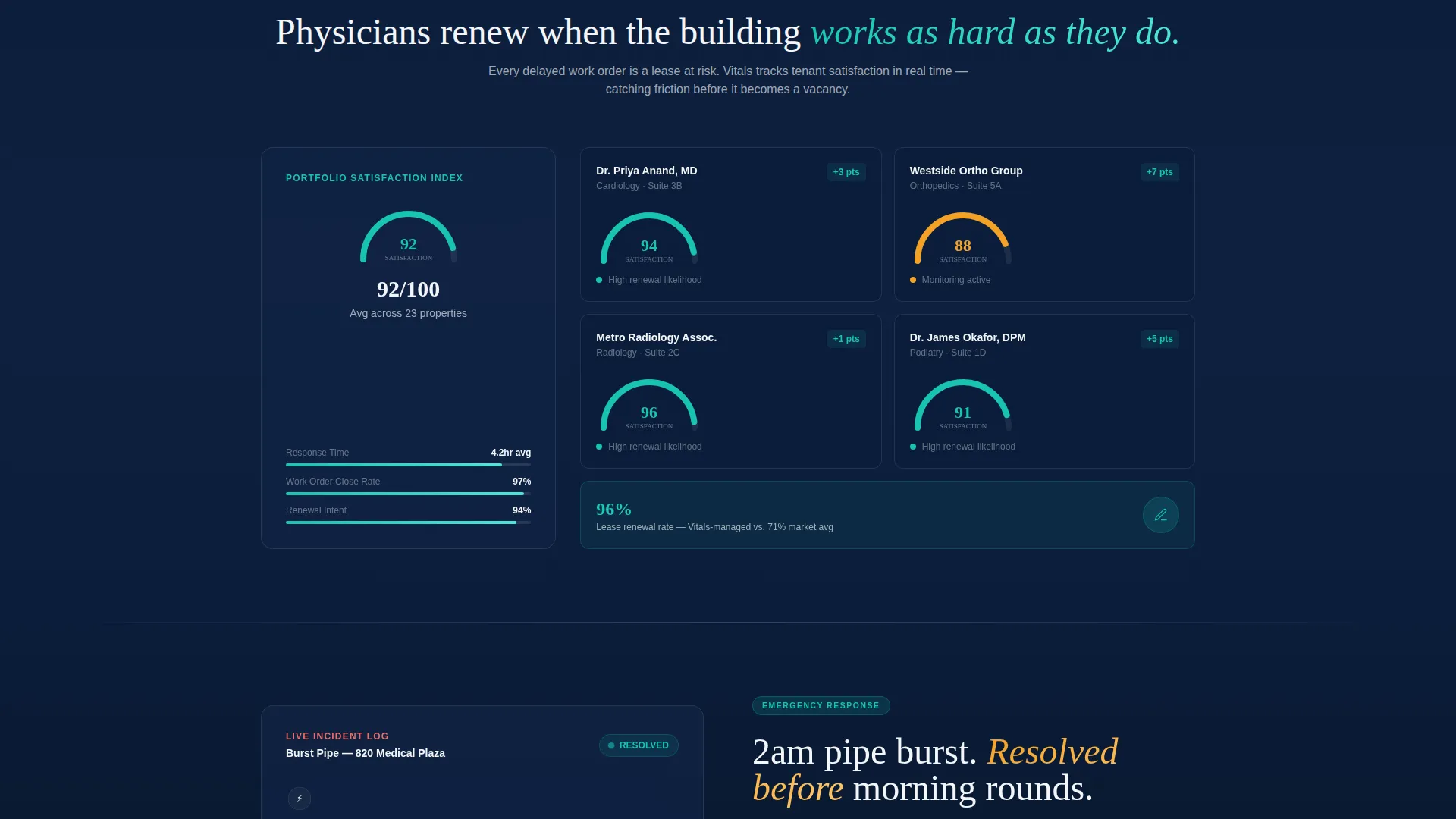
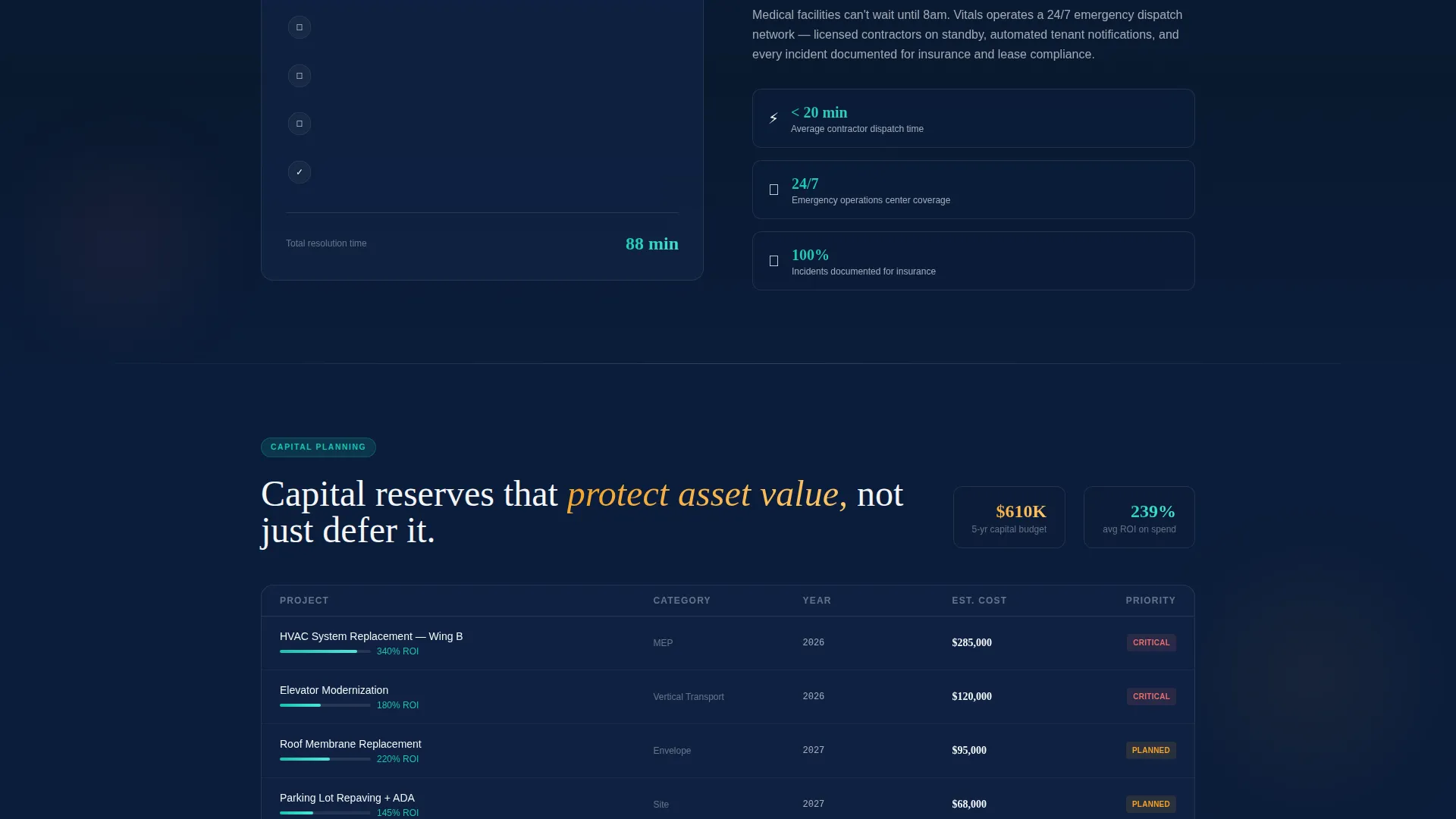
Each spoke section launches into view on scroll with its own animated element. Examples include compliance checklists that check themselves off, a tenant satisfaction gauge that fills in real time, and a dispatch timeline that animates a midnight emergency from alert to resolution in under ninety minutes.
Persistent Floating App-Download Button
A floating amber call-to-action button pulses on scroll throughout the entire page. Tapping it opens a streamlined interstitial where visitors select their device platform, enter a property address to pre-load their building profile, and provide an email for login credentials.
Parallax Medical Campus Background
The header rests on a slow parallax drift across a darkened medical campus exterior. Building windows glow warmly in the background, grounding the calculator data in a recognizable physical environment without distracting from the input fields.
Secondary Audit-Booking Conversion Path
At the final spoke section, a secondary form captures visitors not yet ready to download the app. It collects name, portfolio size, and preferred contact window, creating a lower-commitment entry point for mid-funnel prospects.
Page sections overview
| Section | Purpose |
|---|---|
| Calculator / Estimator Header | Captures building data and delivers animated cost-saving projections to hook facility directors immediately |
| Anchor Navigation Bar | Locks to the top after calculator completion, linking all five spoke sections for fast in-page navigation |
| Compliance Spoke | Presents animated self-checking compliance checklists covering surgical suite HVAC and ADA pathway audits |
| Tenant Retention Spoke | Shows a real-time-style tenant satisfaction gauge to demonstrate occupancy and retention focus |
| Emergency Response Spoke | Animates a full dispatch timeline from after-hours alert to resolution in under ninety minutes |
| Capital Planning Spoke | Covers long-range capital planning services for medical office and outpatient center portfolios |
| Portfolio Analytics Spoke | Displays portfolio-level data to support net operating income protection across multiple assets |
| App Download Interstitial | Streamlines the owner portal app sign-up with device selection, property address input, and email capture |
| Schedule Property Audit | Secondary conversion form collecting name, portfolio size, and preferred contact window |
Design & branding system
The visual identity follows a Dynamic Motion theme built around a Midnight Blue color system. The palette is designed to feel clinical and alive at the same time, like a hospital corridor at midnight where everything is calm but nothing is idle.
- Deep clinical navy (#0B1D3A) as the primary background, sterile corridor white (#F4F6F9) for content panels, pulse-monitor teal (#17C3B2) on animated accents and active navigation states
- Urgent amber (#F4A127) reserved exclusively for calls to action and alert-style callouts, keeping the eye drawn to conversion points
- Motion design language uses kinetic number counters, ripple pulse effects, parallax drifts, and scroll-triggered entrance animations to maintain a living dashboard feel throughout
Mobile & speed optimization
The template is designed so that the motion-driven experience translates clearly on smaller screens. Floating buttons, anchor navigation, and animated sections are all structured to remain functional and readable on mobile devices.
- The persistent floating app-download button is tap-friendly and maintains its amber pulse behavior on scroll across device sizes
- The calculator input fields and animated result panels are laid out for single-column mobile flow without losing the kinetic feedback on each completed field
How this template helps you convert
Every design and layout decision in this template is pointed toward one of two conversion outcomes: downloading the owner portal app or booking a property audit.
- The calculator result becomes a personalized proof point. Visitors see projected savings tied to their own building data, which makes the app-download call to action feel like the logical next step rather than a cold ask.
- The motion-triggered spoke sections maintain engagement across the full scroll path, so visitors who are not ready to download are still exposed to the audit-booking form at the final section before they leave.
Other information about this template
This template is categorized under Technology and Healthcare Software, making it a strong fit for firms operating at the intersection of clinical real estate and digital operations tools. The hub-and-spoke layout with anchor navigation is particularly well-suited for audiences who arrive with a specific concern, such as compliance or emergency response, and need to find that section without scrolling through unrelated content.
- The Launch Energy creative direction means no section is treated as passive; every spoke is built to demonstrate capability through motion rather than describe it through text
- The App Download landing-page direction shapes the entire conversion architecture, from the calculator result panel to the persistent floating button to the interstitial device-selection flow
- The template is built to serve as a credibility asset for firms pitching physician groups, hospital systems, and private equity healthcare portfolios simultaneously on a single page
Theme
Dynamic Motion
Creative direction
Launch Energy
Color system
Midnight Blue
Style
Hub & Spoke (Anchor Nav)
Direction
App Download
Page Sections
Interactive Property Cost Estimator
Hub-and-spoke Anchor Navigation
Scroll-triggered Animated Sections
Persistent Floating App-download Button
Parallax Medical Campus Background
Secondary Audit-booking Form
Related questions
Who is the primary audience for this landing page template?
What does the interactive cost calculator do?
What are the two conversion paths on this page?
Can the five spoke sections be adapted to a different service scope?
What makes this template different from a standard property management page?



