Healthcare Digital Presence Cost Calculator Website Template
Vitals is a hub-and-spoke landing page template built for healthcare digital menu platforms. It combines a live savings calculator, a sticky anchor navigation, and spec-sheet content sections to guide hospital facility managers, senior living directors, and clinic administrators from first impression to lead form submission, efficiently and without friction.
by Rocket studio
Quick summary
Vitals is a precision-designed landing page template for healthcare digital menu systems. It replaces paper-board menus with a real-time digital platform that updates calories, allergens, and dietary tags instantly. The template is structured around a hub-and-spoke architecture with sticky anchor navigation, a lead-capture calculator header, and a spec-sheet content rhythm built for procurement-minded healthcare buyers.
Who this template is for
This template is purpose-built for organizations offering digital menu technology to healthcare and senior care facilities. It speaks directly to procurement decision-makers who evaluate software on measurable outcomes.
- Hospital facility managers responsible for cafeteria operations and compliance requirements such as Hazard Analysis and Critical Control Points (HACCP)
- Senior living directors who need renal-friendly, texture-modified, and allergen-flagged menu options updated instantly for residents
- Clinic administrators tired of reprinting laminated menu sheets every time a food vendor or nutritionist makes a change
What problem this template solves
Managing dietary information in healthcare environments is high-stakes and time-sensitive. Paper menus cannot update in real time, and errors can have serious consequences for patients and residents with complex dietary needs.
- Static print menus lag behind nutritionist changes, creating compliance gaps and unnecessary reprint costs
- Facility managers have no fast, centralized way to push allergen or calorie updates across multiple dining locations simultaneously
- Procurement teams struggle to quantify the business case for switching to digital without concrete cost and compliance data upfront
What you get with this template
You get a fully structured single-page layout with every section mapped to the healthcare facility buyer's decision journey. The template provides both a persuasion architecture and a visual system ready to customize.
- A header calculator that generates personalized savings estimates, compliance-error reduction figures, and monthly cost projections for each visitor
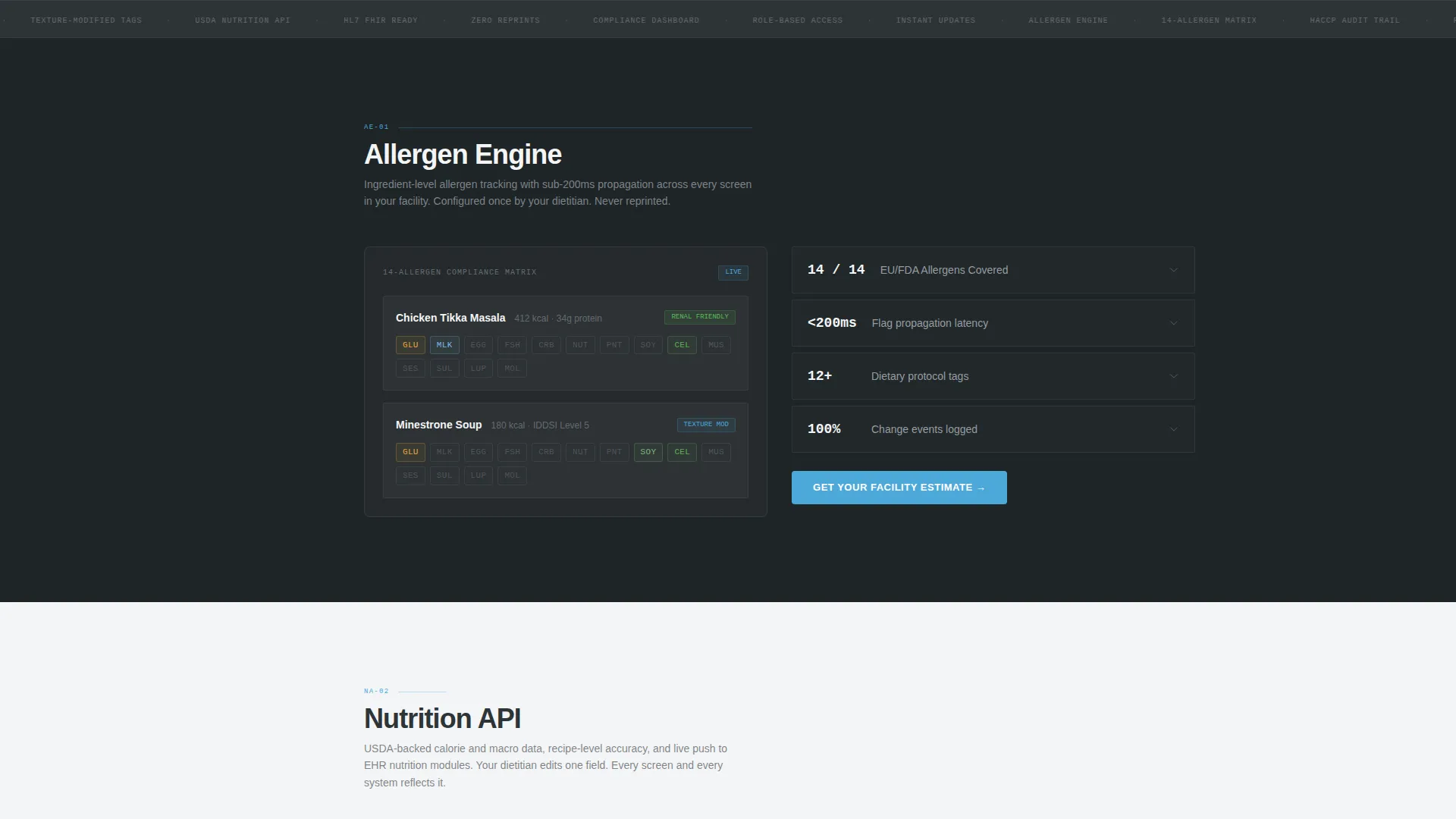
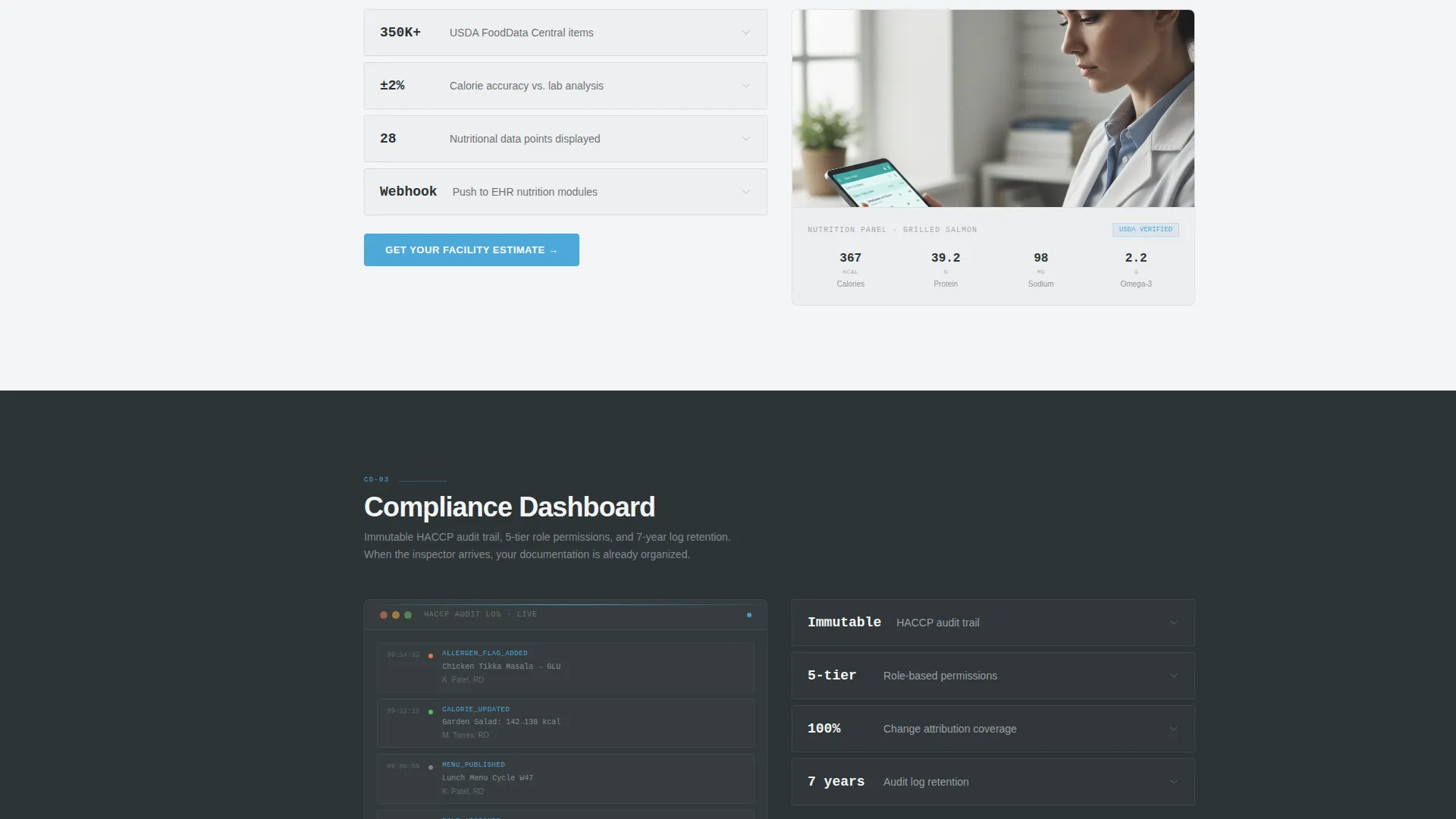
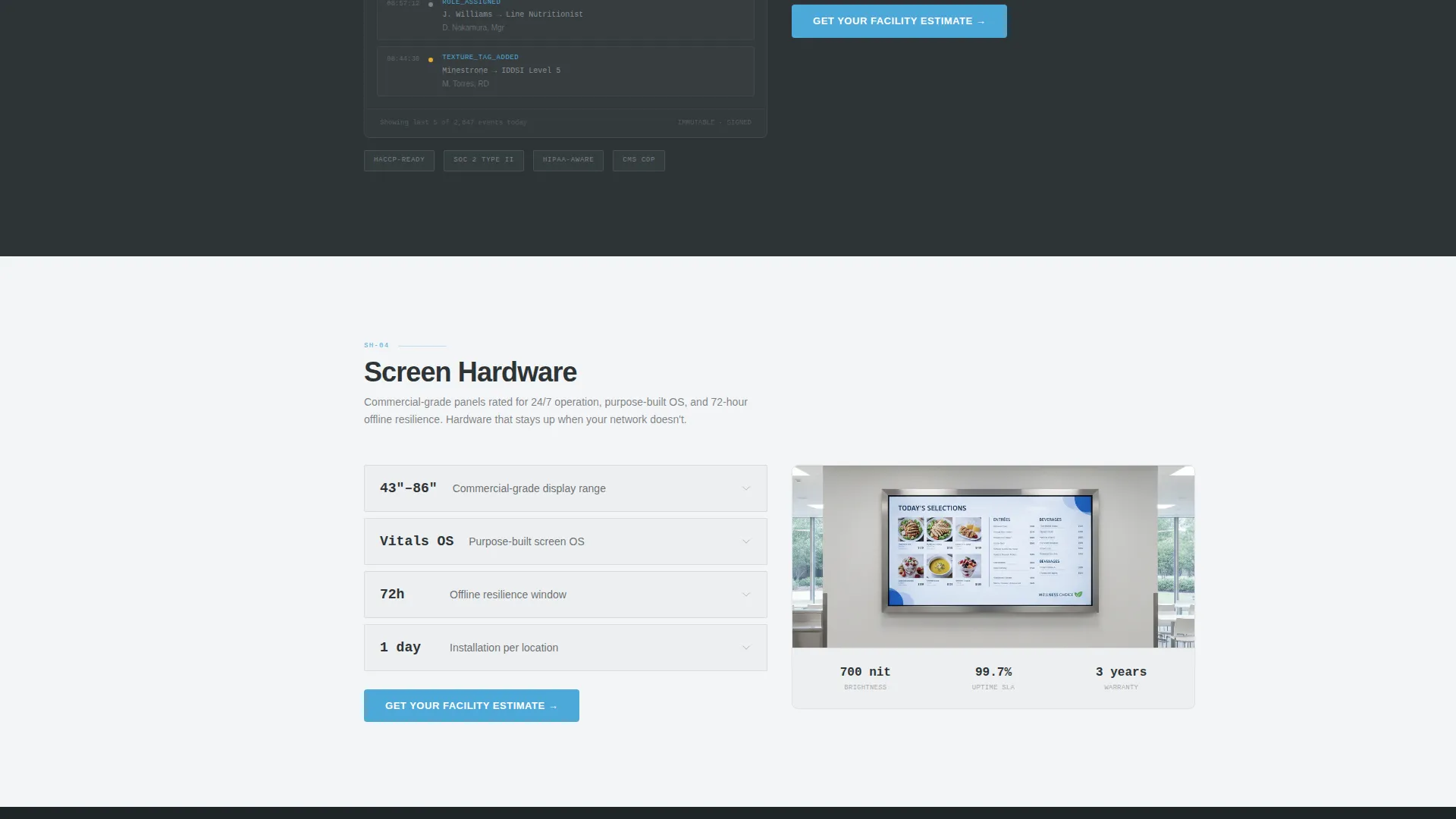
- Five spoke sections covering Allergen Engine, Nutrition API, Compliance Dashboard, Screen Hardware, and Integration, each formatted as a scannable technical data sheet
- Two lead capture paths: a primary "Get Your Facility Estimate" form and a secondary gated "Download Compliance Checklist" PDF offer
Feature list
This template ships with a tightly scoped set of interactive and structural features, each grounded in the healthcare procurement context.
Live Facility Savings Calculator
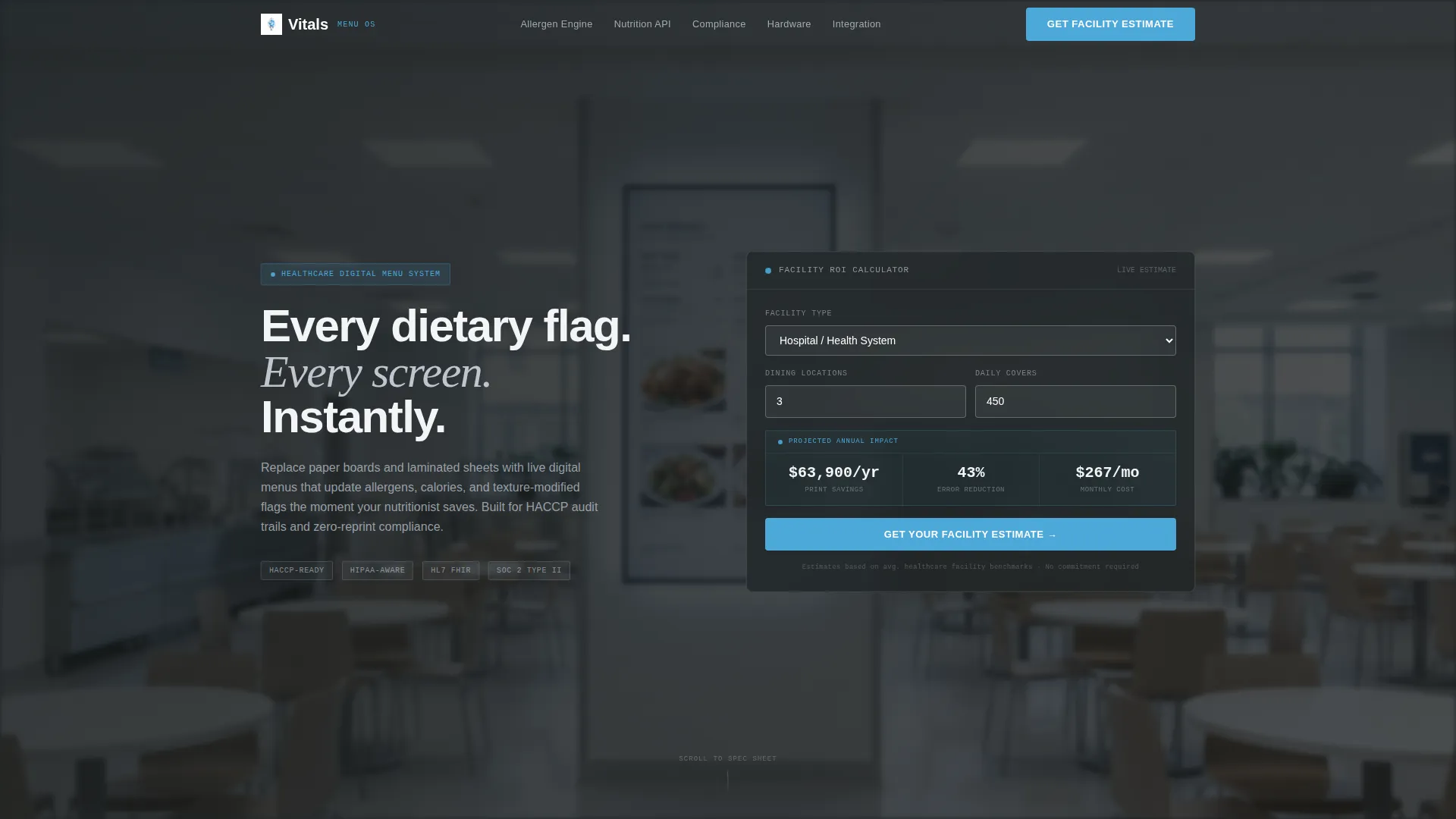
The header features a glass-card calculator interface. Visitors select facility type, enter the number of dining locations and average daily covers, and immediately see projected annual print savings, estimated compliance-error reduction percentage, and a monthly cost estimate. Numbers animate upward like a heart-rate readout to reinforce the product's real-time character.
Hub-and-Spoke Anchor Navigation
A sticky left-side navigation bar labels each content spoke: Allergen Engine, Nutrition API, Compliance Dashboard, Screen Hardware, and Integration. Facility managers can jump directly to the section relevant to their procurement checklist without scrolling the entire page.
Spec-Sheet Content Architecture
Each spoke section follows a clinical data-sheet format with an icon, a headline metric, a one-line specification, and an expandable detail block. This rhythm lets procurement teams scan evidence fast and drill into specifics only when needed.
Dual Lead Capture System
The primary call to action, "Get Your Facility Estimate," echoes the header calculator and collects facility name, type, number of screens needed, and current menu method. A secondary path offers a gated compliance checklist PDF, capturing email address and role from visitors not yet ready to speak with sales.
Tech Glass Visual System
The layout uses a frosted-glass card style with a Monochrome Steel palette. Surgical white, instrument-tray silver, and charcoal scrub gray form the base. A single pulse-blue accent is reserved for interactive states, active navigation indicators, and call-to-action buttons, keeping the visual environment sterile and focused.
Background Depth-of-Field Photography
The header section uses a shallow depth-of-field photograph of a real digital menu screen glowing in a clean dining environment. The image is slightly blurred so the calculator floats above it on a frosted glass layer, grounding the page in a real facility context without distracting from the interactive element.
Page sections overview
| Section | Purpose |
|---|---|
| Calculator Header | Generates personalized facility savings and compliance estimates |
| Allergen Engine Spoke | Details real-time allergen flagging and dietary tag functionality |
| Nutrition API Spoke | Covers live calorie and nutrient data update capabilities |
| Compliance Dashboard Spoke | Shows HACCP and dietary compliance monitoring features |
| Screen Hardware Spoke | Presents physical display options for cafeterias and waiting rooms |
| Integration Spoke | Outlines connectivity with existing nutrition and facility systems |
| Sticky Anchor Nav | Lets users jump directly to any spoke section from any scroll position |
| Primary Lead Form | Captures facility details and screen requirements for a sales estimate |
| Compliance Checklist Gate | Collects email and role in exchange for a downloadable PDF resource |
Design & branding system
The visual identity follows a Tech Glass theme built on a Monochrome Steel color system. Every design choice reinforces the sterile, high-trust environment of a modern healthcare facility.
- Color palette: surgical white (#F4F5F7) as the page base, instrument-tray silver (#BFC5CE) for structural elements, charcoal scrub gray (#2D3436) for body text, and pulse-blue (#4DA8DA) reserved exclusively for interactive states, active nav indicators, and call-to-action buttons
- Frosted glass card components, brushed steel panel textures, and a shallow depth-of-field header photograph combine to create a visual language that feels clinical, credible, and zero-noise
Mobile & speed optimization
The template layout is designed to remain fully navigable and readable on smaller screens, preserving the spec-sheet rhythm and lead capture functionality at every viewport size.
- The sticky anchor navigation collapses gracefully on mobile, keeping spoke access available without consuming vertical space
- Calculator inputs, spoke sections, and both lead capture forms are structured for tap-friendly interaction on touch devices
How this template helps you convert
The template's conversion architecture is deliberate. Every structural element moves a skeptical procurement buyer closer to submitting their details.
- The header calculator personalizes the value proposition immediately. Visitors enter their own facility data and see their own projected savings, making the decision feel data-driven rather than sales-driven.
- The sticky anchor navigation keeps the "Get Your Facility Estimate" call to action visible at every scroll position, reinforcing the primary action throughout the entire page without interrupting the content flow.
- The dual lead path removes a common friction point. Visitors who are not ready to request an estimate can download the compliance checklist instead, entering the lead funnel at a lower commitment level while still providing contact information.
Other information about this template
This template is categorized under Technology with a subcategory of Healthcare Digital Presence, reflecting its niche focus on healthcare digital menu systems. It is built as a single-page hub-and-spoke layout, not a multi-page website, making it well-suited for focused campaign traffic and direct outreach landing scenarios.
- The template style is Hub and Spoke with Anchor Navigation, a format that suits complex B2B products where different buyers care about different features
- The creative direction follows a Spec Sheet approach, which aligns with the evidence-accumulation buying behavior typical of hospital and senior care procurement teams
- The header concept is a Calculator or Estimator, a high-engagement interactive element that front-loads personalized value before any sales conversation begins
- The lead generation direction means every section ends with a call to action, keeping conversion momentum consistent from the first scroll to the final form
Theme
Tech Glass
Creative direction
Spec Sheet
Color system
Monochrome Steel
Style
Hub & Spoke (Anchor Nav)
Direction
Lead Generation
Page Sections
Live Facility Savings Calculator
Sticky Hub-and-spoke Anchor Navigation
Clinical Spec-sheet Section Format
Dual Lead Capture Architecture
Tech Glass Visual Identity
Related questions
Who is the primary audience for this landing page template?
Can I customize the calculator fields for my specific pricing model?
What are the two lead capture paths included in this template?
Does the template cover multiple product features or just one?
Is this template suitable for a product launch or an ongoing lead generation campaign?



