Electrical Digital Presence Reviews Website Template
Volt is a pre-built email landing page template made specifically for electricians, solar installers, and panel shops. It includes pre-written copy blocks, a compliance footer with auto-fill fields, and a seasonal campaign library. A side-by-side comparison table, before-and-after toggle, and a two-field preview form make the offer clear and easy to act on in under four minutes.
by Rocket studio
Quick summary
Volt is a pre-built email template landing page built for electrical trades professionals. It converts visitors by showing a direct comparison between Volt and generic email options, backed by concrete performance stats. The page targets one-truck electricians, solar installers, and office managers who need a fast, professional email without writing or coding anything from scratch.
Who this template is for
This template is designed for small and mid-size businesses in the electrical trades industry. If your current email process involves copying text from a word processor into a generic platform, this is built for you.
- One-truck electricians and solar installers sending monthly promos or service follow-ups
- Office managers at mid-size electrical contractors managing permit updates and referral campaigns
- Panel shops and solar companies pushing seasonal rebate deadlines to their customer lists
What problem this template solves
Most generic email platforms offer no trade-specific copy, no compliance footer support, and no seasonal structure for electrical businesses. The result is emails that look amateurish, take too long to build, and fail to reflect the credibility of a licensed contractor.
- No pre-written electrical copy means every email starts from a blank page
- Generic templates lack license, bond, and insurance footer fields that trades clients expect
- Without a seasonal campaign structure, reminders and rebate pushes get sent late or skipped entirely
What you get with this template
Volt delivers a complete, ready-to-use landing page that sells the email template itself. Every section is purposefully ordered to earn trust, show proof, and remove friction before the visitor reaches the form.
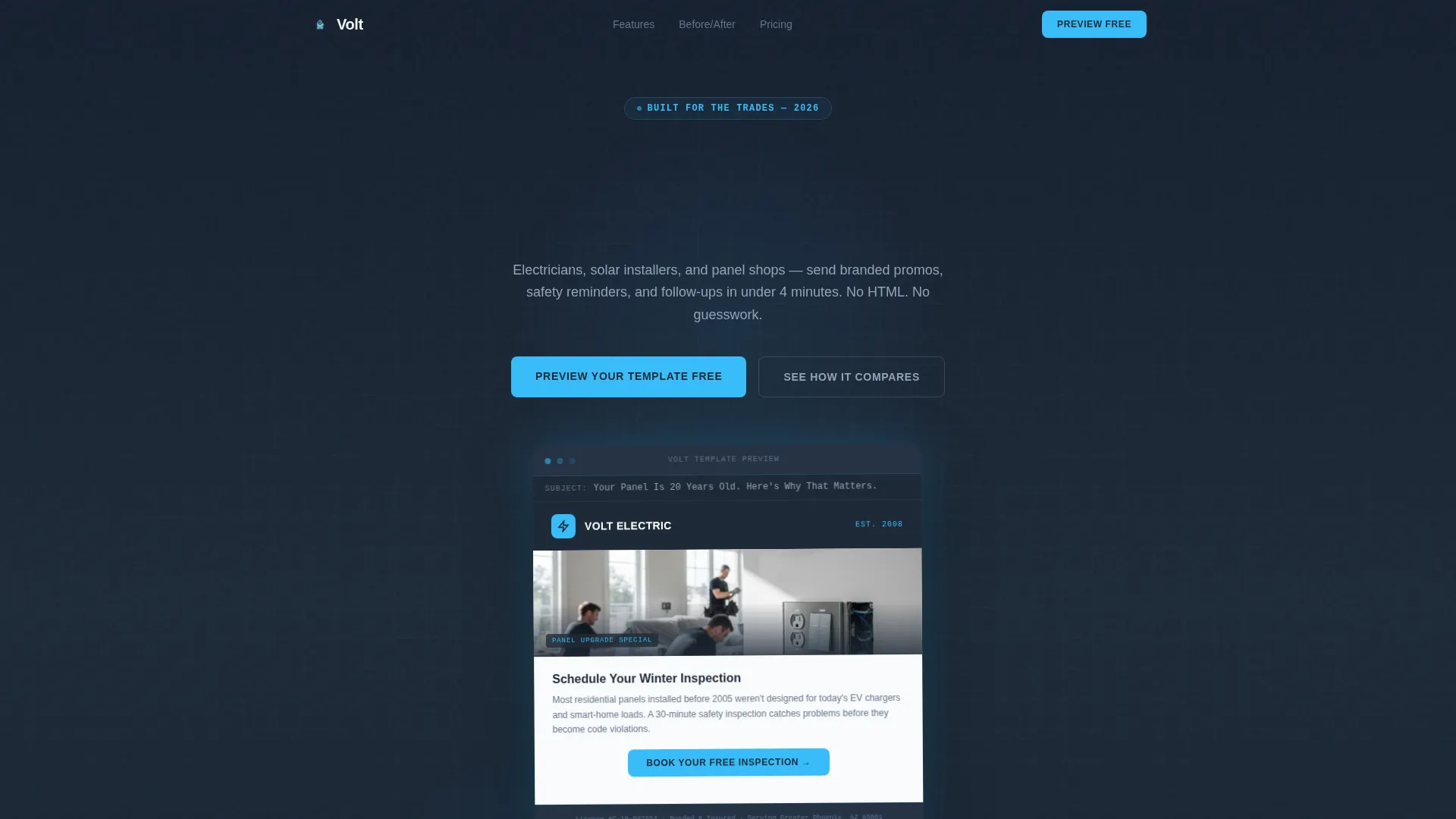
- A dark full-bleed hero with a glowing floating email mockup and a headline fade-in animation
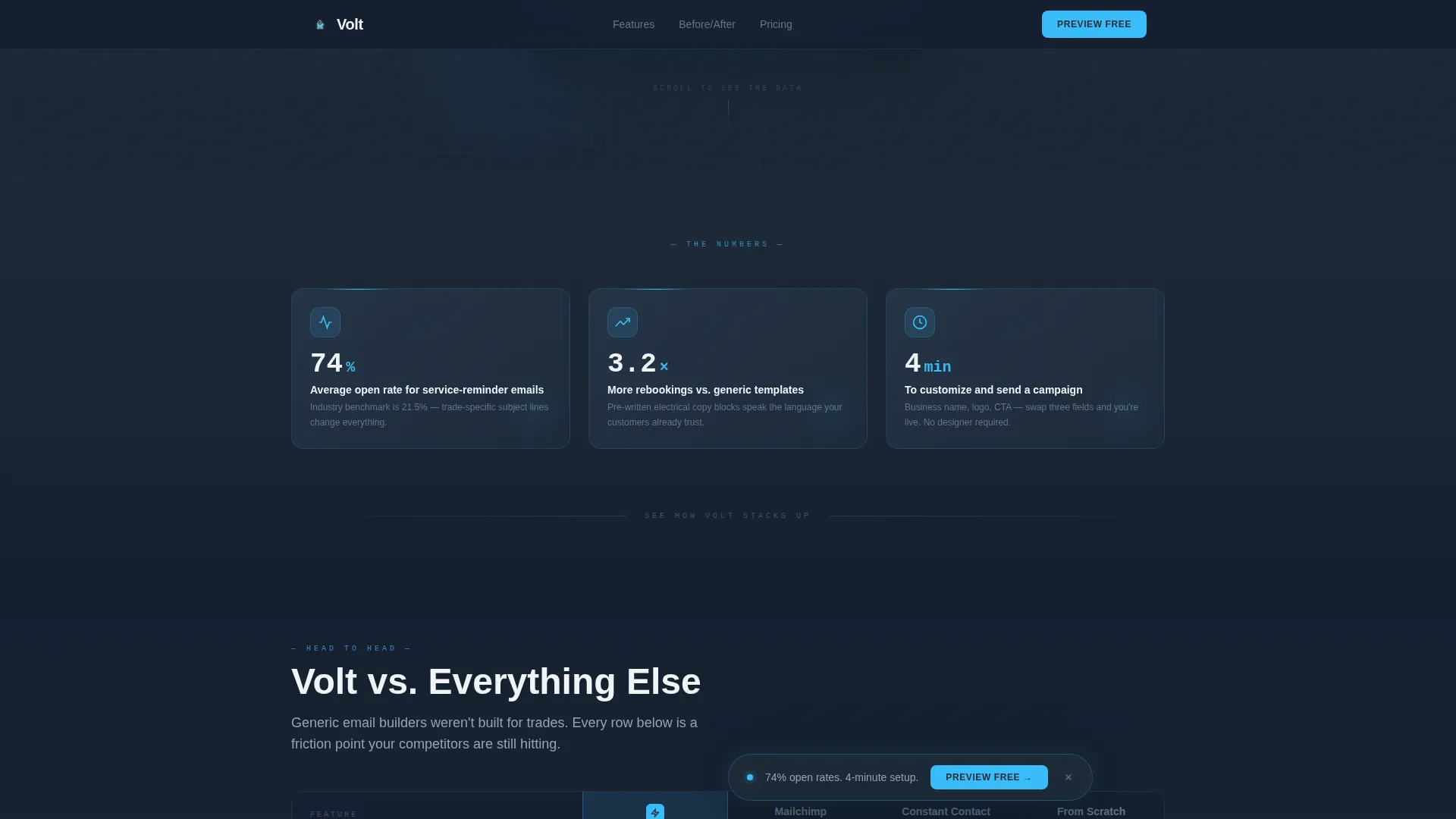
- Three dashboard-style stat cards showing open rate, rebooking lift, and time-to-send metrics
- A side-by-side comparison table, a before-and-after toggle, and a two-field preview form with a secondary gated offer
Feature list
This section covers the core built-in capabilities included in the Volt template as described in the project brief.
Floating Email Mockup Hero
The header displays a realistic email preview floating on a deep charcoal canvas. The mockup includes a company logo, a hero image of a residential panel upgrade, a call-to-action button, and a visible subject line. A soft sky-blue glow radiates from the template edges, making the preview the immediate focal point on arrival.
Dashboard-Style Stat Cards
Three stat cards appear directly beneath the hero with specific performance figures: 74% average open rate for service-reminder emails, 3.2 times more rebookings compared to generic templates, and under four minutes to customize and send. Each card uses JetBrains Mono typography to reinforce a data-readout feel.
Interactive Comparison Table
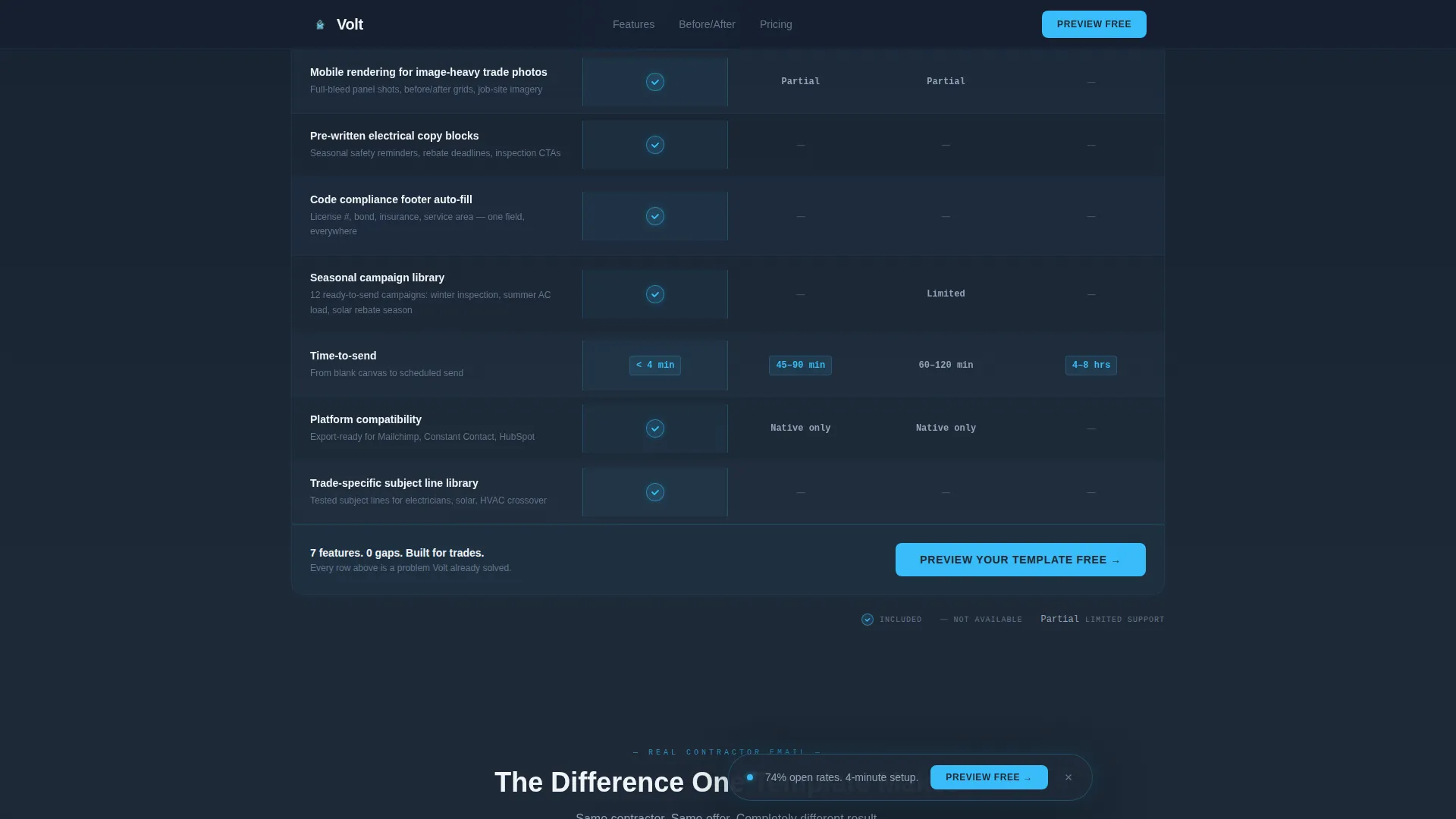
The core section compares Volt against generic email starter options and building from scratch across five criteria: mobile rendering for trade photos, pre-written electrical copy blocks, compliance footer auto-fill, seasonal campaign library, and time-to-send. Sky-blue checkmarks indicate Volt's advantages; muted gray dashes mark competitor gaps.
Before and After Toggle
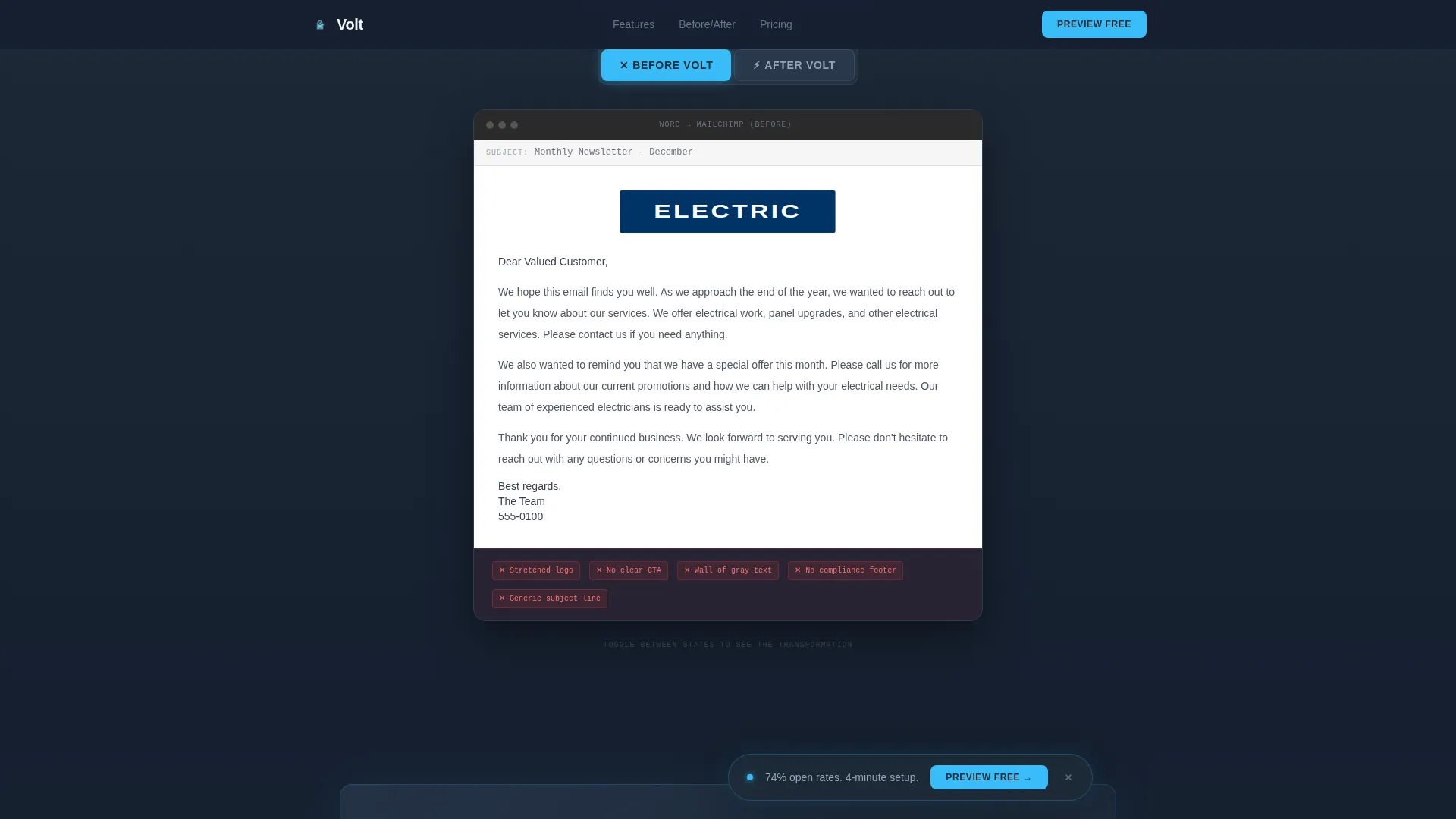
A side-by-side toggle lets visitors switch between a real contractor's original email, a wall of gray text with a stretched logo, and the Volt version, which is clean, branded, and anchored by a single sky-blue call-to-action button. The transition is animated to make the difference impossible to miss.
Two-Field Preview Form
The primary conversion form asks only for a business name and preferred email platform from a dropdown. No credit card and no account creation are required. The visitor receives a live-preview link with their business name pre-populated in the template header within sixty seconds of submitting.
Gated Seasonal Campaign Calendar
A secondary conversion path below the main form offers a downloadable Seasonal Campaign Calendar as a gated PDF. Visitors who are not ready to commit can enter their email and trade specialty to receive it, giving the page a second capture point for undecided buyers.
Page sections overview
| Section | Purpose |
|---|---|
| Dark hero header | Presents floating email mockup with glow effect and headline |
| Stat cards row | Delivers three concrete metrics to earn continued scrolling |
| Comparison table | Shows Volt advantages versus generic email options row by row |
| Before/after toggle | Demonstrates visual upgrade from generic to Volt template |
| Preview form | Captures business name and platform for free live preview |
| Gated PDF offer | Provides secondary lead capture for undecided visitors |
| Linear footer | Closes the page with a single-row minimal footer pattern |
Design & branding system
Volt uses a Dashboard Pro visual theme built on the Slate and Sky color system. The palette is designed to feel like professional instrumentation: dark backgrounds that focus attention, electric blue accents that signal action, and near-white text that stays easy to read in low-contrast conditions.
- Background and table rows use deep panel-box charcoal (#1E2A38); section dividers and secondary text use conduit gray (#64748B)
- Call-to-action elements, toggle states, and winning-column highlights fire in live-wire sky blue (#38BDF8)
- Body copy renders in arc-flash white (#F0F4F8); headings use DM Sans, body and interface text use Manrope, and stats use JetBrains Mono for a data-terminal feel
Mobile & speed optimization
The comparison table is designed desktop-first to give full side-by-side clarity, and the layout adapts to full mobile responsiveness for all other sections. Interactive elements are implemented as client-side components while static sections use a server-component approach to keep load behavior efficient.
- GSAP ScrollTrigger and IntersectionObserver power staggered reveals, glow pulses, and the floating call-to-action bar
- The before-and-after toggle, comparison table hover states, and the preview form are all interactive client components
- The floating call-to-action bar remains pinned on scroll so the primary conversion path stays visible at all times
How this template helps you convert
Volt is structured around a Comparison/Versus conversion strategy. Every section is sequenced to reduce doubt and lower the effort required to take the next step.
- The stat cards appear immediately after the hero to establish credibility before any sales claim is made, earning the visitor's attention for the comparison table that follows.
- The comparison table does the selling row by row, so the preview form only needs to open the door. Two fields and sixty seconds are all that stand between a visitor and a personalized preview.
Other information about this template
Volt is a single landing page template, not a multi-page website build. It is suited for direct use on any standard web hosting environment that supports the included component structure.
- The template is localized for English (US) with USD formatting and MM/DD/YYYY date conventions
- Animation intensity is set to high, using GSAP ScrollTrigger for scroll-driven reveals and glow pulse effects throughout
- The footer follows a Pattern 1 linear single-row layout, keeping the page close clean and uncluttered
- The template targets the electrical email newsletter niche within the broader electrical digital presence subcategory
Theme
Dashboard Pro
Creative direction
Stats-First Impact
Color system
Slate & Sky
Style
Comparison Table
Direction
Comparison/Versus
Page Sections
Floating Email Mockup Hero
Dashboard Stat Cards
Interactive Comparison Table
Before and After Toggle
Two-field Preview Form
Gated Campaign Calendar Offer
Related questions
Do I need to write any email copy to use this template?
What email platforms does the preview form support?
Is the comparison table readable on a phone?
What is included in the Seasonal Campaign Calendar PDF?
Does using the preview form require a credit card or account?



