Storage Forum Landing Page Template with ZFS Calculator
Volumes is a landing page template built for storage community forums. It leads with a live ZFS storage calculator, then flows into interactive comparison tables for RAID types and NAS operating systems. The Carbon Fiber color system and terminal-style header give it a raw, technical identity that resonates immediately with homelab builders, sysadmins, and serious data hoarders.
by Rocket studio
Quick summary
Volumes is a single-page, comparison-table-led landing page template designed for a storage enthusiast forum. It opens with a working ZFS pool calculator, moves through interactive RAID and NAS comparison tables, and closes with a freemium signup flow. The design is industrial and terminal-inspired, built to earn trust from technically demanding visitors before asking them to register.
Who this template is for
This template is built for communities where the audience already knows what they are talking about. It respects technical fluency and delivers substance before asking for anything in return.
- NAS builders and homelab operators who want a community organized around real data, not marketing copy
- Sysadmins, photographers, and small-business owners managing large, redundant storage arrays
- Forum founders or community managers launching a freemium membership model for a technically advanced audience
What problem this template solves
Most community landing pages rely on stock photography and vague benefit statements. For a storage forum audience, that approach kills credibility instantly. Visitors who label their backup drives with a label maker need proof, not promises.
- Generic forum templates do not deliver value before asking for a signup, losing technically minded visitors immediately
- There is no standard layout that combines a live calculation tool with structured, expandable comparison tables in one scroll
- Freemium forum models often lack a segmentation mechanism at signup to route new members into relevant discussions
What you get with this template
This template gives you a full single-page layout built around a central interactive tool and a series of data-rich comparison tables. Every section is designed to deepen engagement as the visitor scrolls further.
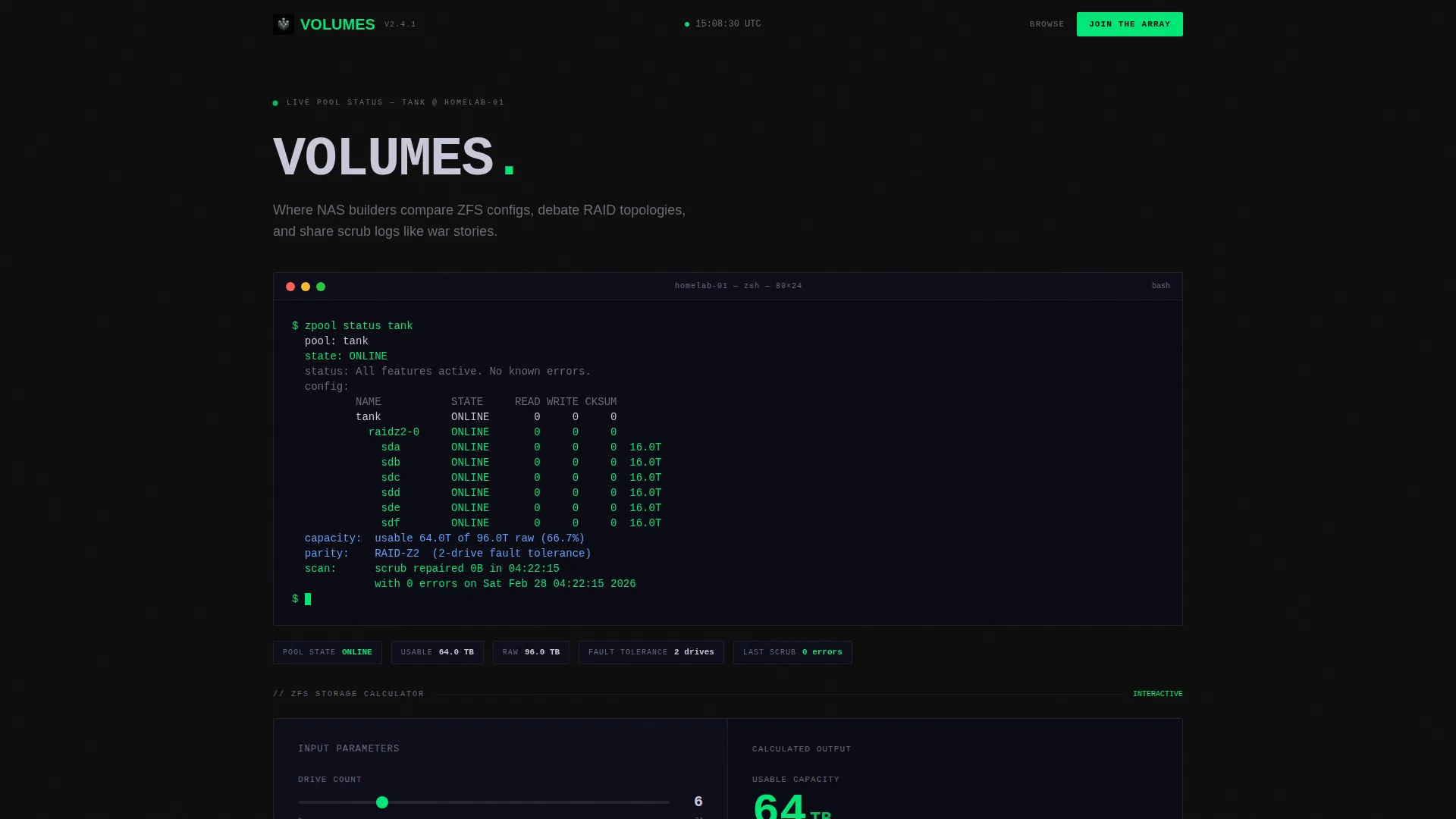
- A terminal-style header with a rendered ZFS pool status code block and a live, interactive storage capacity calculator
- Multiple interactive comparison tables covering RAID configurations and NAS operating system options, each row expandable with forum thread excerpts
- A freemium conversion flow with a minimal signup form, a "Join the Array" call to action, and a secondary email-capture path for PDF config exports
Feature list
This template is built around a focused set of functional components derived directly from the brief. Each one earns its place in the scroll.
Live ZFS Storage Calculator
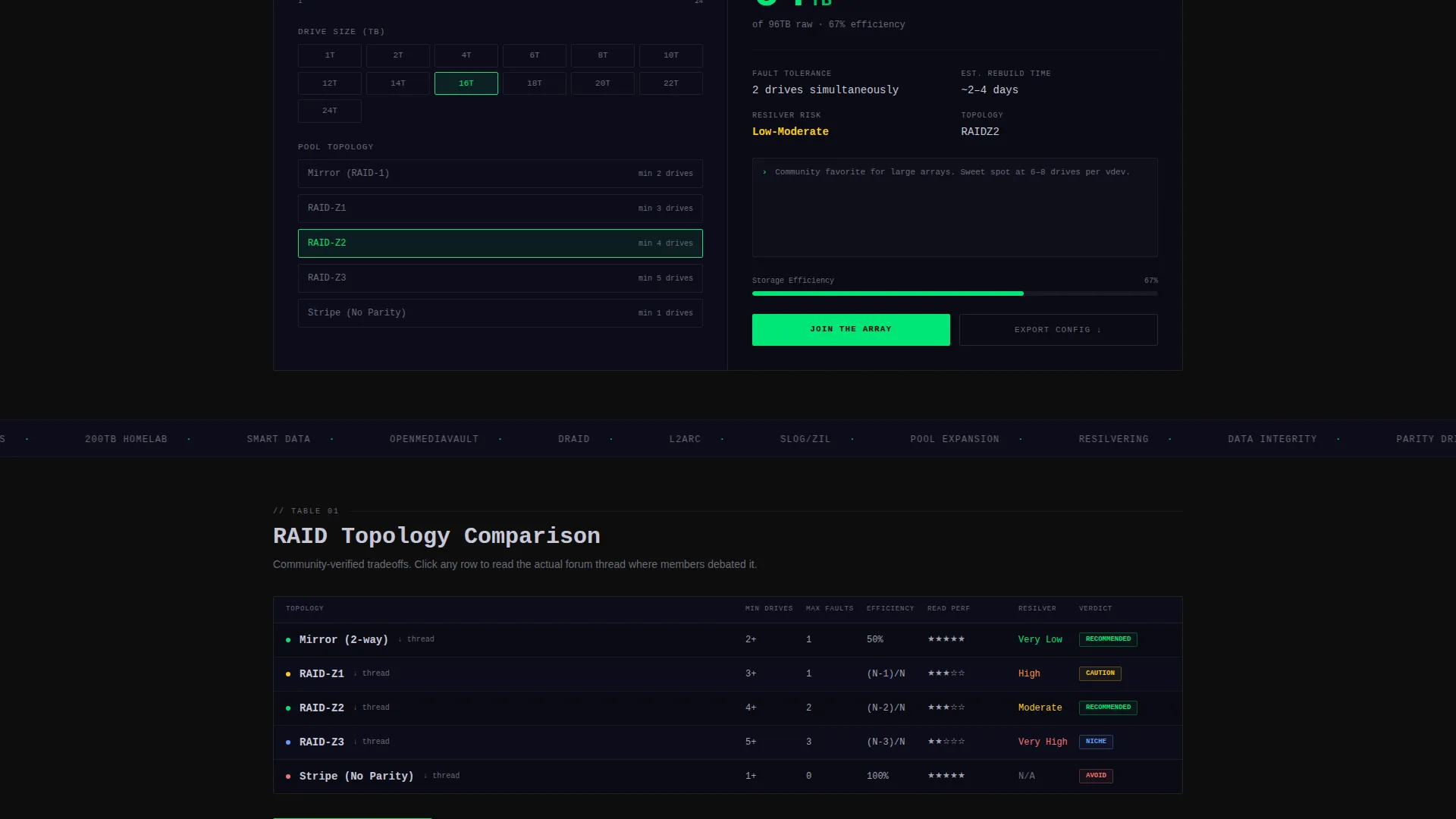
The hero section is a functional input tool. Visitors enter drive count, drive size, and RAID level, then instantly receive usable capacity, fault tolerance rating, and estimated rebuild time. Value is delivered before the visitor has scrolled past the header.
Terminal Code Snippet Header
The page opens with a fully rendered monospaced terminal block displaying a real ZFS pool status output, including capacity, redundancy level, and usable space after parity. Syntax highlighting and a blinking cursor make it feel alive and authentic.
Interactive Comparison Tables
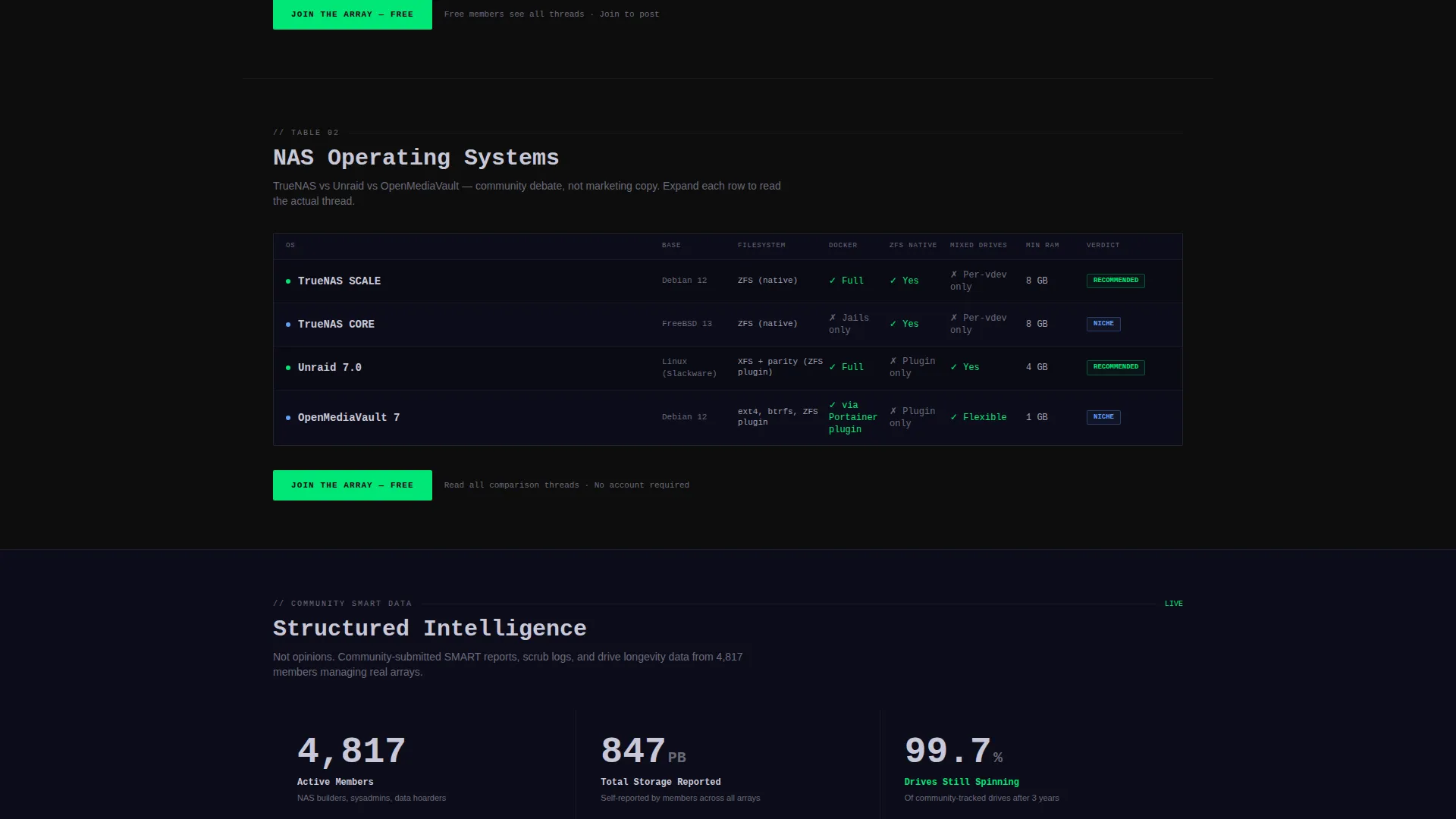
Side-by-side tables cover RAID type comparisons and NAS operating system options. Each table row is expandable and reveals excerpts from real forum threads. The tables move from raw data into community voice, reinforcing credibility.
Freemium Signup with Segmentation
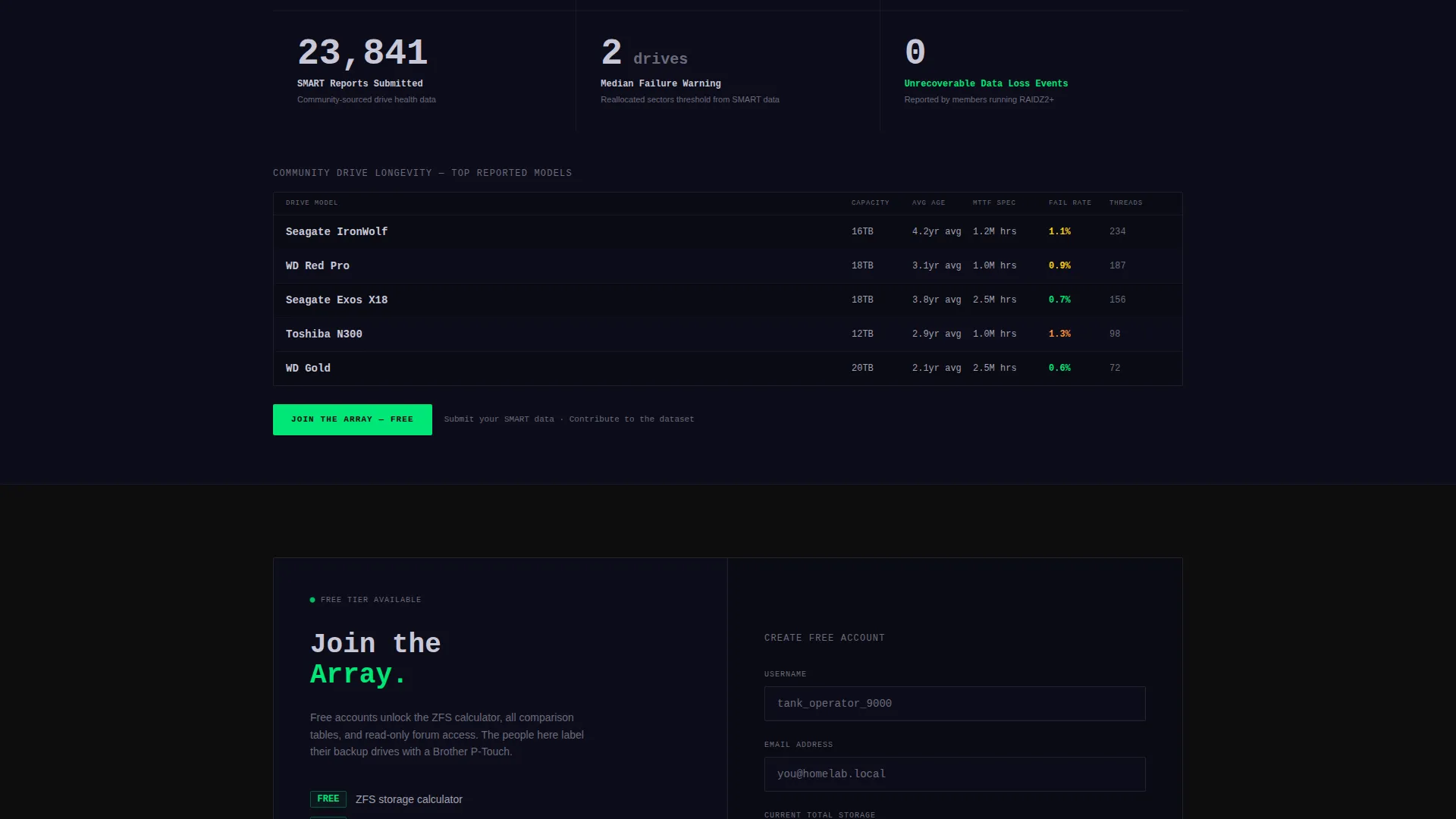
The primary signup form collects only a username, email address, and a single dropdown asking for current total storage. This segments new members by experience level and seeds their first forum recommendations without friction.
Repeating Contextual Call to Action
The "Join the Array" call to action appears immediately after the calculator output and repeats after each comparison table. Placement is tied to moments of peak engagement, not forced into a fixed footer.
Secondary Email Capture for Config Export
Visitors who complete the calculator but are not ready to register can choose to export their configuration results as a PDF. This path requires only an email address, giving the page a second conversion touchpoint without adding pressure.
Page sections overview
| Section | Purpose |
|---|---|
| Terminal Code Header | Opens with a ZFS pool status block to establish technical credibility immediately |
| ZFS Storage Calculator | Interactive tool delivering usable capacity, fault tolerance, and rebuild time estimates |
| RAID Comparison Table | Side-by-side breakdown of RAID types with expandable forum thread excerpts per row |
| NAS OS Comparison | Compares NAS operating system options with community-submitted perspective built in |
| Drive Longevity Stats | Community-sourced SMART data displayed in structured table format |
| Primary Signup call to action | "Join the Array" freemium registration form with storage-level segmentation dropdown |
| Config Export Gate | Secondary email capture offering a PDF export of the visitor's calculator results |
Design & branding system
The visual identity follows a Data Command theme built on the Carbon Fiber color system. Every palette choice references the physical feel of rack-mounted server hardware, matte surfaces, and indicator lights.
- Deep carbon black (#0D0D0D) and brushed graphite (#1A1A2E) cover all backgrounds, keeping the focus on data rather than decoration
- Drive-bay silver (#A0A0B0) handles all body text and table content, delivering high contrast without harsh white
- Status-green (#00E676) appears exclusively on interactive elements, active states, and calls to action, functioning like a drive power indicator that only lights when something is live
Mobile & speed optimization
The layout is structured for clarity at any screen width. Comparison tables and calculator inputs are arranged to remain readable and usable on smaller viewports without sacrificing the industrial aesthetic.
- The terminal header block and calculator inputs adapt to single-column stacking on mobile without breaking the monospaced visual style
- Comparison tables are designed to scroll horizontally or collapse gracefully on narrower screens, keeping row-level data accessible
- The minimal signup form with its three fields loads quickly and stays functional even on constrained connections
How this template helps you convert
The conversion strategy is built on a principle of earning trust before asking for anything. Each scroll position is designed to raise confidence and lower friction at the moment of decision.
- The calculator delivers immediate, personal value before any registration prompt appears, creating a sense of reciprocity that makes the signup feel natural rather than extractive
- Comparison tables reinforced by real forum thread excerpts transform the page from a sales pitch into a knowledge resource, making the free account feel like access to something genuinely useful
- The secondary PDF export path captures email addresses from visitors who complete the tool but hesitate on full signup, widening the conversion funnel without adding a hard barrier
Other information about this template
This template is purpose-built for the intersection of storage technology communities and freemium membership models. A few additional details are worth noting for anyone evaluating it.
- The template style is Comparison Table, meaning structured data presentation is the core layout pattern throughout the page
- The creative direction is Calculator First, so the interactive ZFS tool is positioned as the primary hero element, not a supporting widget
- The header concept is Code Snippet, using a terminal block as the opening visual rather than imagery or illustration
- The theme is Data Command, a design language that prioritizes function, contrast, and industrial precision over decorative flourishes
- The landing page is optimized for a freemium or trial membership model, with conversion paths designed around low-commitment entry points
Theme
Data Command
Creative direction
Calculator/Tool First
Color system
Carbon Fiber
Style
Comparison Table
Direction
Freemium/Trial
Page Sections
Live ZFS Storage Calculator
Terminal Code Snippet Header
Interactive Comparison Tables
Freemium Signup with Segmentation
Repeating Contextual Call to Action
Secondary Config Export Path
Related questions
Does this template include a working calculator or just a visual mockup?
Can I customize the comparison table content for my specific community?
How does the freemium signup flow work?
Who is this template designed for?
Is this a single-page layout or a multi-page site?



