Vow - Powerful Wedding AI Landing Page Template
Vow is a comparison-table landing page template built for an AI-powered wedding document processing platform. It opens with a stat bar, leads into a structured feature comparison, and closes with a clear call to action. Designed in a Dashboard Pro style with an Electric Indigo color system, it turns complex workflow evidence into a persuasive, scannable page.
by Rocket studio
Quick summary
Vow is a single-page comparison landing page template for a wedding AI document processing platform. It leads with hard stats, walks visitors through a structured side-by-side comparison table, and closes with a focused sign-up form. The Dashboard Pro design uses Electric Indigo as its dominant accent, giving the page the authority of a professional data tool without losing warmth.
Who this template is for
This template was built for teams marketing a specialized AI platform to the wedding planning industry. It speaks directly to people who live inside document chaos every week.
- Independent wedding planners managing ten or more concurrent events at once
- Boutique event firms whose coordinators process stacks of vendor PDF attachments every Monday
- Venue managers who need vendor compliance documents reviewed before a walkthrough begins
What problem this template solves
Wedding professionals spend hours each week manually reading vendor contracts, reconciling invoice line items, and chasing document compliance. Generic tools do not understand the specific structure of wedding paperwork. This template gives the platform a page that makes that gap impossible to ignore.
- No clear side-by-side proof that existing tools fall short of what planners actually need
- No credible data-first opening to earn visitor attention before asking for sign-up
- No structured conversion path that moves a skeptical planner from curiosity to first action
What you get with this template
The template delivers a full single-page layout with every section pre-built and visually consistent. Each block is designed to deepen visitor confidence before the call to action appears.
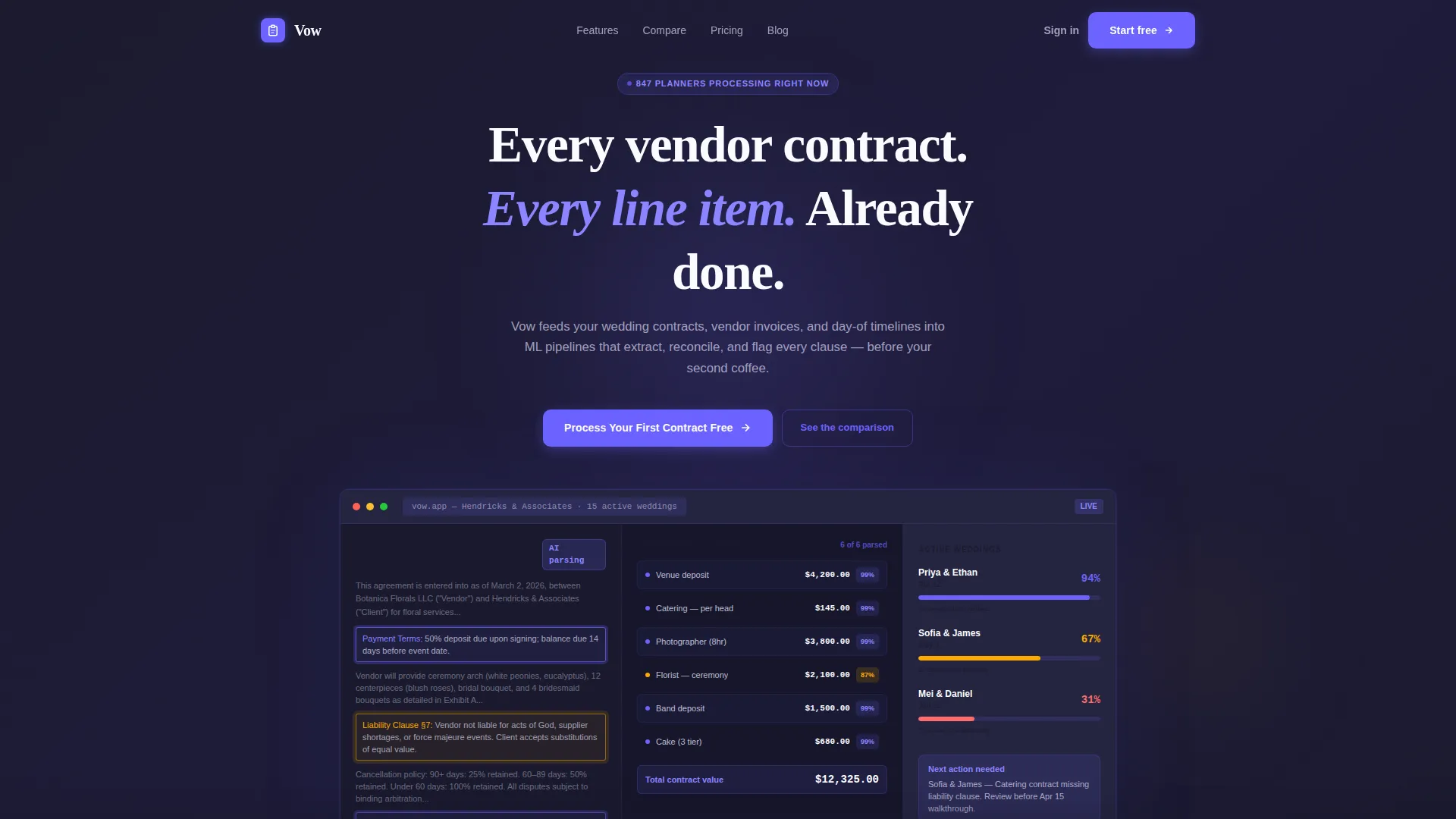
- A full-width product screenshot header with an indigo-to-charcoal gradient and a single commanding headline
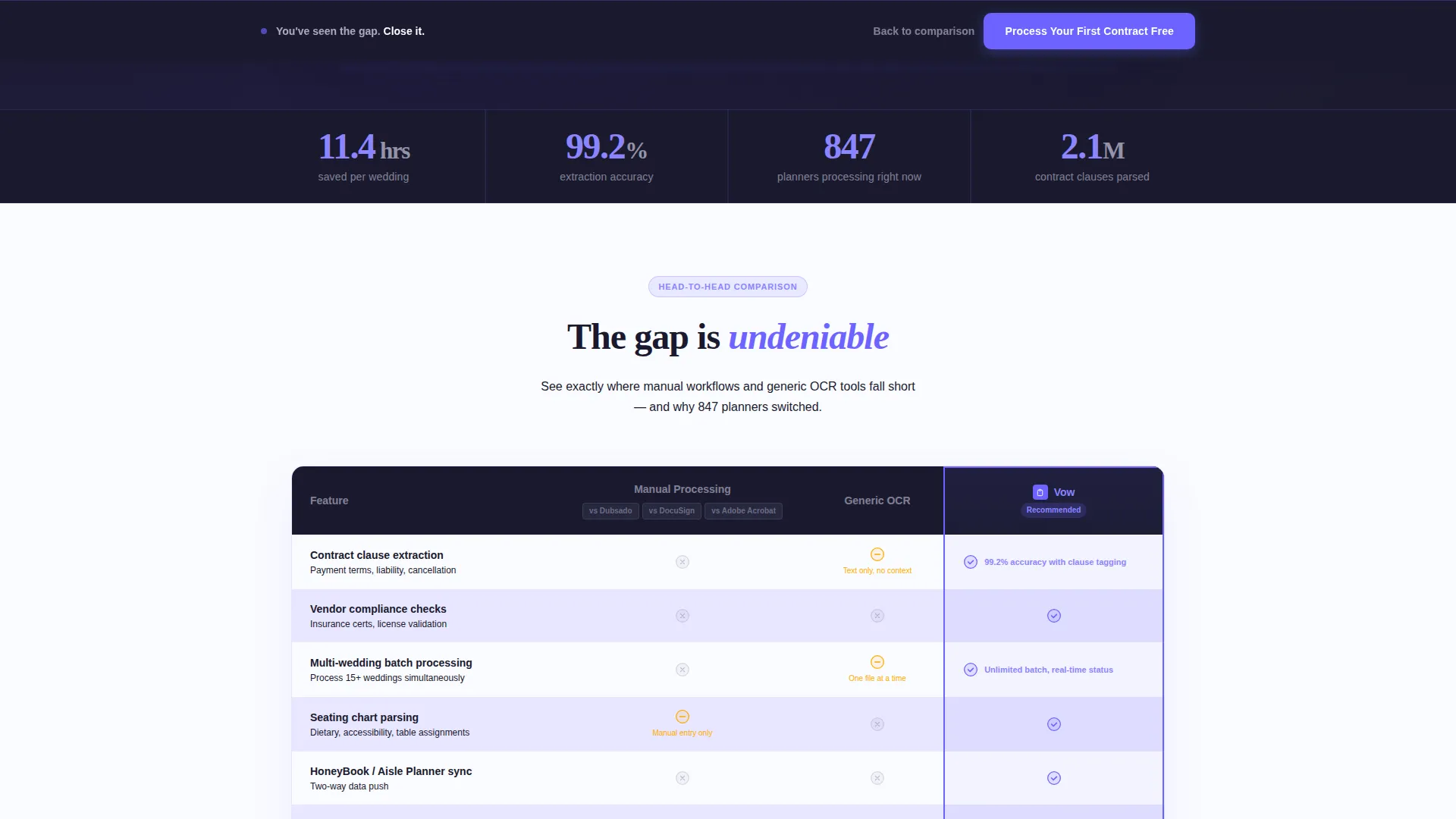
- A horizontal stat bar showing extraction accuracy, time saved per wedding, and active planner count
- A three-column comparison table with indigo checkmarks, amber partial-support icons, and charcoal rejection marks
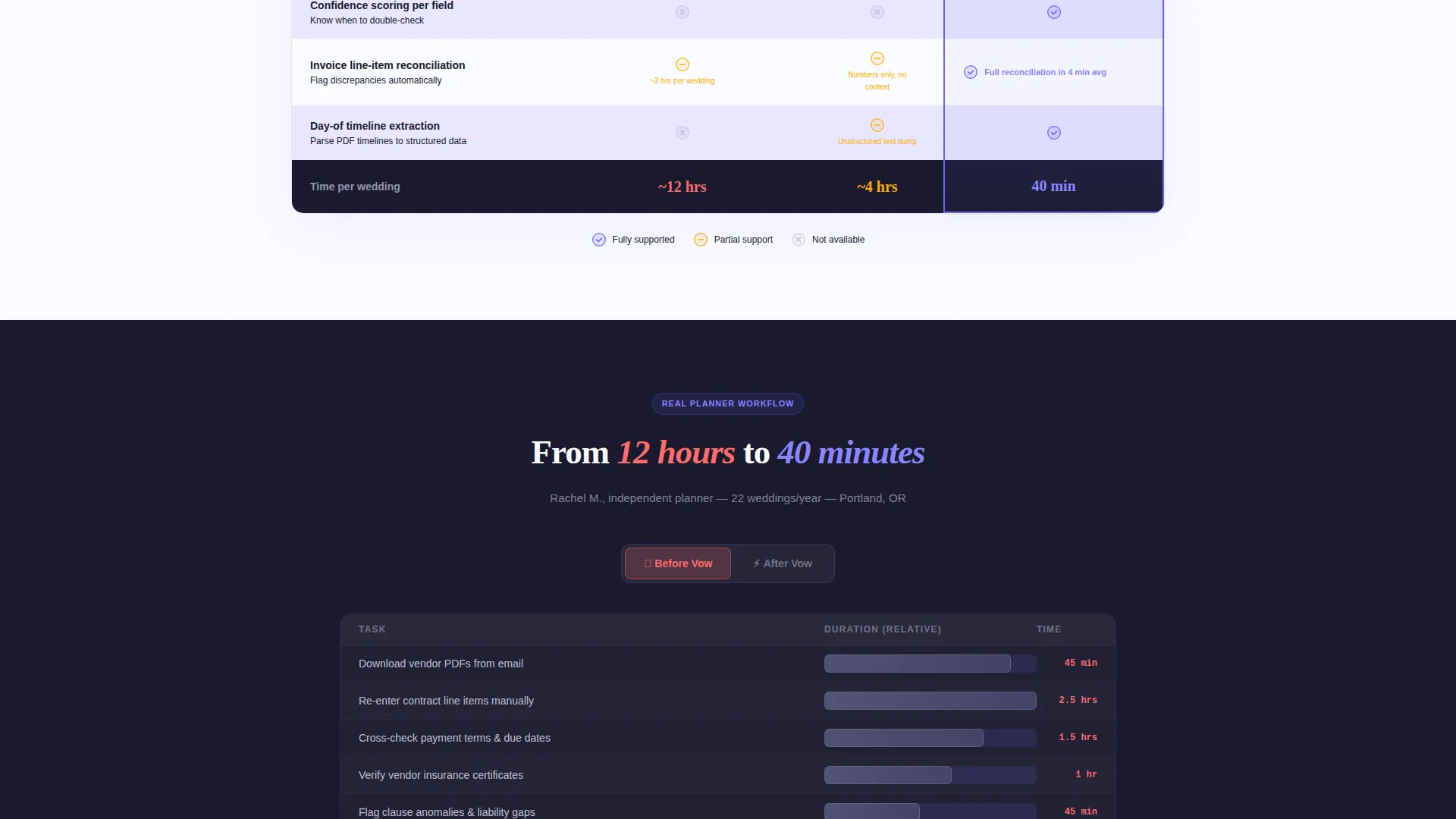
- A toggling case study block rendered as an animated Gantt chart showing a planner's before-and-after workflow
- A sticky bottom call-to-action bar and a sign-up form with role-specific dropdown fields
Feature list
This section describes the core built-in components that make the Vow template work as a conversion tool.
Stats-First Impact Bar
A horizontal bar placed directly below the header headline displays three proof-point statistics: 11.4 hours saved per wedding, 99.2 percent extraction accuracy, and 847 planners processing documents in real time. It creates immediate curiosity and earns the scroll before any explanation begins.
Three-Column Comparison Table
The table compares Manual Processing, Generic OCR Tools, and the platform across six rows: extraction accuracy, contract clause detection, vendor compliance checks, multi-wedding batch processing, seating chart parsing, and planning tool integration. Each cell uses a consistent icon system so the gap between options is visible at a glance.
Product Screenshot Header
The header fills the full viewport width with a pixel-perfect dashboard screenshot. It shows a vendor contract with AI-highlighted extraction fields, a center column of parsed line items with confidence scores, and a right sidebar tracking document completion across three active weddings.
Toggling Case Study Block
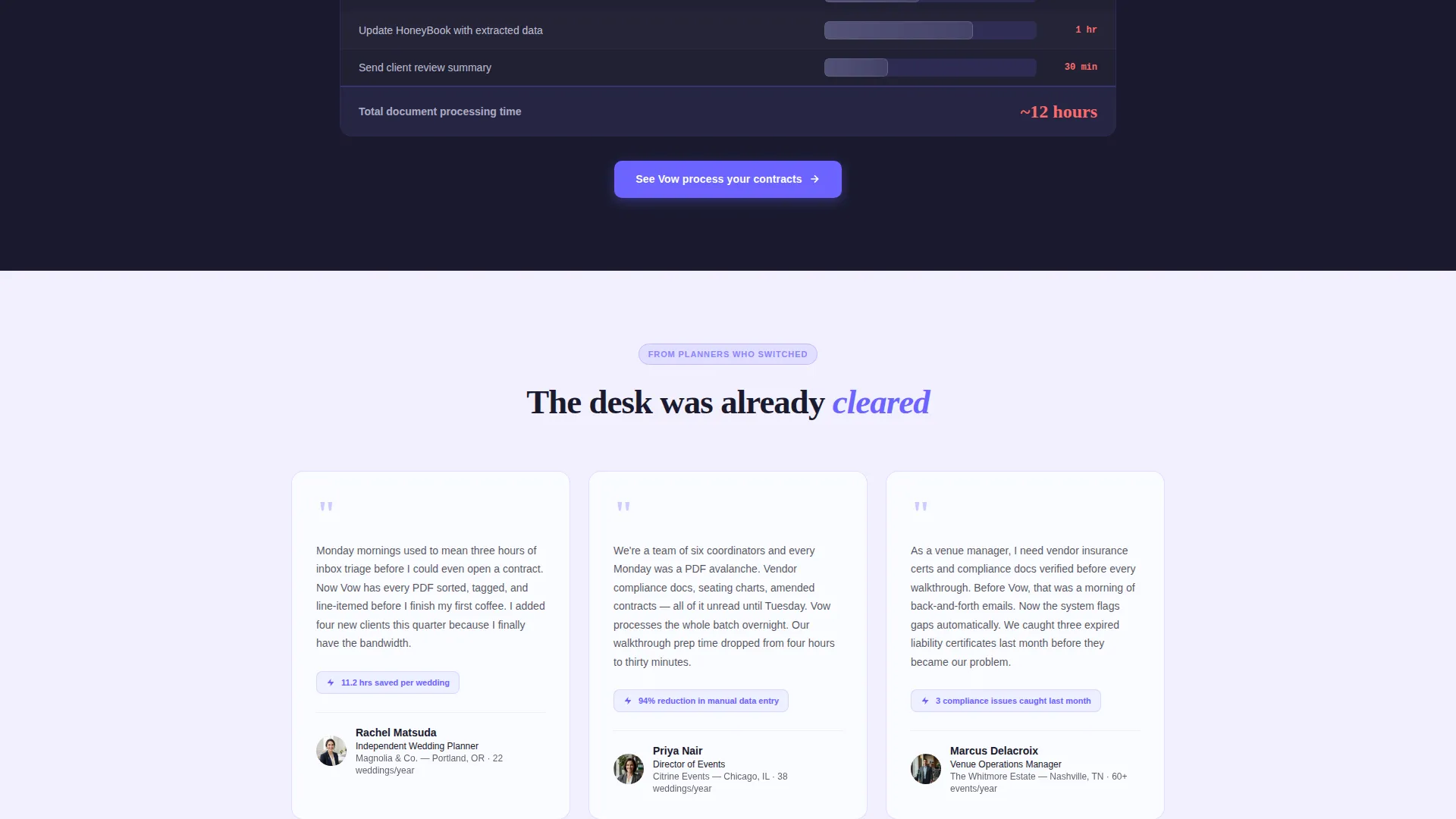
A collapsible before-and-after section shows a real planner workflow condensed from twelve hours to forty minutes. It is rendered as an animated Gantt chart, giving visitors a concrete, time-stamped proof point rather than a generic testimonial.
Sticky Call-to-Action Bar
After the comparison table scrolls into view, a persistent bottom bar appears carrying the primary call to action. This keeps the conversion prompt visible without interrupting the reading flow of the evidence sections above it.
Role-Aware Sign-Up Form
The inline form captures email address, number of weddings managed per year via a three-tier dropdown, and primary planning tool preference. The fields are designed to qualify leads and personalize follow-up without adding friction to the sign-up step.
Page sections overview
| Section | Purpose |
|---|---|
| Full-width header | Display dashboard screenshot and primary headline |
| Stats impact bar | Lead with three proof-point metrics |
| Comparison table | Show platform advantage across six criteria |
| Case study block | Animate a real before-and-after workflow timeline |
| Sign-up form | Capture email and role details for lead qualification |
| Sticky call to action bar | Keep primary call to action visible after table scroll |
Design & branding system
The visual identity follows a Dashboard Pro theme that pairs the precision of a data terminal with the warmth of the wedding industry context it serves. Every color choice is intentional and functional.
- Deep workspace charcoal (#1A1A2E) forms the primary background and grounds the data-heavy layout
- Electric indigo (#6C63FF) accents every interactive element, checkmark, and data highlight across the page
- Soft lavender mist (#E8E6FF) alternates table row backgrounds and card surfaces for easy scanning
- Crisp signal white (#FAFBFF) serves as the primary canvas color, keeping contrast clean and text readable
- Amber (#FFAB00) marks partial-support indicators in the comparison table and highlights contract clause boxes in the header screenshot
Mobile & speed optimization
The Vow template is structured to remain fully readable and functional at every common screen width. The layout hierarchy is preserved whether the visitor is on a desktop workstation or a phone screen.
- The comparison table is horizontally scrollable on smaller screens so no column is clipped or hidden
- The sticky call-to-action bar adapts to mobile viewport height without covering critical table content
- The product screenshot header scales responsively, keeping the dashboard detail legible at reduced sizes
How this template helps you convert
The page is built around a Comparison/Versus conversion strategy. Every design and copy decision is sequenced to reduce doubt before asking for commitment.
- The stat bar opens with hard numbers that create immediate credibility, encouraging visitors to keep reading and reach the comparison table.
- The comparison table makes the shortfall of manual methods and generic tools visible in a single view, removing the need for a visitor to do their own research.
- The animated case study and sticky call-to-action bar close the loop by pairing emotional proof with a low-friction entry point, turning a convinced reader into a registered user.
Other information about this template
The Vow template is built specifically for the wedding AI document processing niche, where platform trust depends heavily on showing accuracy and time savings before asking for personal data.
- The secondary conversion path offers a focused one-on-one competitor breakdown accessible via a text link inside each table column header
- The form dropdown tiers (5 to 15, 16 to 40, and 41 or more weddings per year) are designed to segment planners by volume without adding form length
- The template is compatible with planning tool workflows including those centered around spreadsheet-based processes or dedicated event planning software
- The indigo glow effect on interactive surfaces is a deliberate visual metaphor: it mirrors the read-receipt confirmation feeling that the platform delivers when a document is fully processed
- The overall tone of the page, from headline to form label, is calibrated for the independent wedding planner audience, not a generic software buyer
Theme
Dashboard Pro
Creative direction
Stats-First Impact
Color system
Electric Indigo
Style
Comparison Table
Direction
Comparison/Versus
Page Sections
Stats-first Impact Bar
Three-column Comparison Table
Product Screenshot Header
Animated Case Study Block
Sticky Call-to-action Bar
Role-aware Sign-up Form
Related questions
Who is the Vow landing page template designed for?
What sections are included in this template?
Can I customize the comparison table rows and columns?
What is the primary call to action in this template?
Does the template include the animated Gantt chart as a built-in component?



