Specialist AI for SaaS B2B Pricing & Packages Website Template
Vox is a dashboard-style landing page template built for SaaS B2B AI voice assistant platforms. It pairs a live code snippet header with scrolling data panels, latency benchmarks, an integration matrix, and a pricing calculator. The design uses a Monochrome Steel palette and targets operations, sales, and customer experience leaders ready to deploy an AI voice agent.
by Rocket studio
Quick summary
Vox is a single-page, data-first landing page template for AI voice assistant platforms targeting mid-market SaaS businesses. It opens with a syntax-highlighted API snippet and builds its case panel by panel: live call metrics, latency benchmarks, an integration matrix, and a cost calculator. Every scroll increment earns trust before the visitor ever sees a form.
Who this template is for
This template is built for SaaS companies and product teams that need to convert technically minded buyers. It works best when the audience evaluates tools by inspecting code, reading benchmarks, and running the numbers before committing.
- Operations managers overseeing inbound call queues at mid-market SaaS companies
- Sales directors losing after-hours leads to voicemail or slow response times
- Customer experience leads looking for a reliable, self-managing call resolution platform
What problem this template solves
Most SaaS landing pages lead with marketing claims and save the proof for a demo call. Technical buyers ignore that pattern. They need to see the API structure, the benchmark numbers, and the cost math before they trust the product enough to sign up.
- Visitors leave without converting because the page never proves competence upfront
- Engineers click away when there is no code or documentation path visible above the fold
- Decision-makers cannot justify a trial without seeing latency, resolution rates, and integration support in one place
What you get with this template
You get a fully structured, dashboard-style landing page that presents your AI voice platform as a production-ready system from the first scroll. Every section is designed to carry a single hard metric or capability proof point.
- A live code snippet header showing a real API call with syntax highlighting and a simulated terminal response
- Four scrolling data panels covering call metrics, latency benchmarks, integration logos, and a pricing calculator
- A two-step inline conversion form with a sticky bottom call-to-action bar that appears after the second panel
Feature list
This template ships with purpose-built components that match how technical SaaS buyers evaluate and adopt new tools.
Live API Code Snippet Header
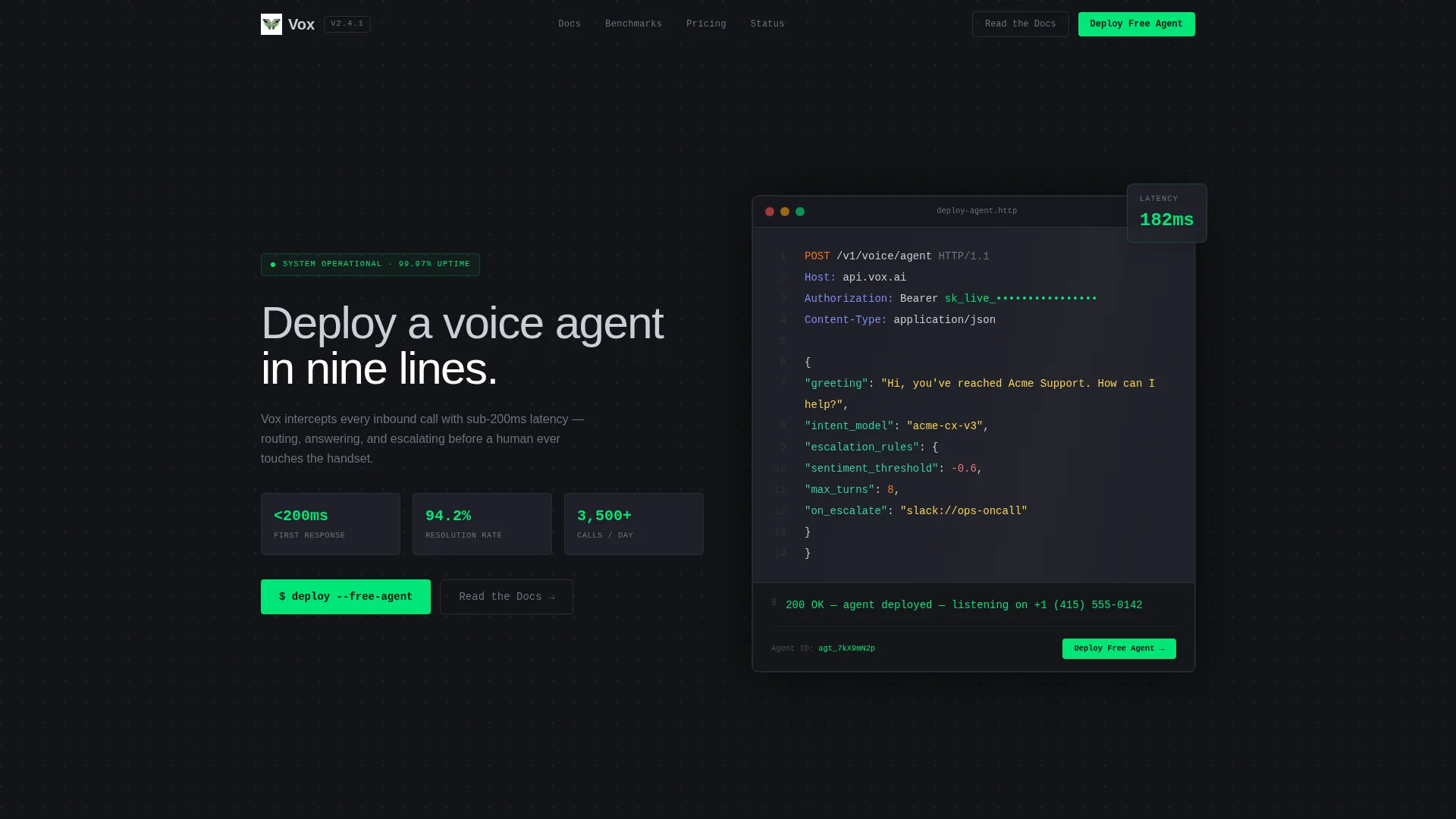
The header occupies 70% of the viewport as a dark IDE window. It displays a syntax-highlighted POST request to /v1/voice/agent with a JSON payload. Below it, a simulated terminal streams a 200 OK response character by character, ending with a live phone number. A headline in 56px weight-300 type sits left of the code block.
Live Call Metrics Grid
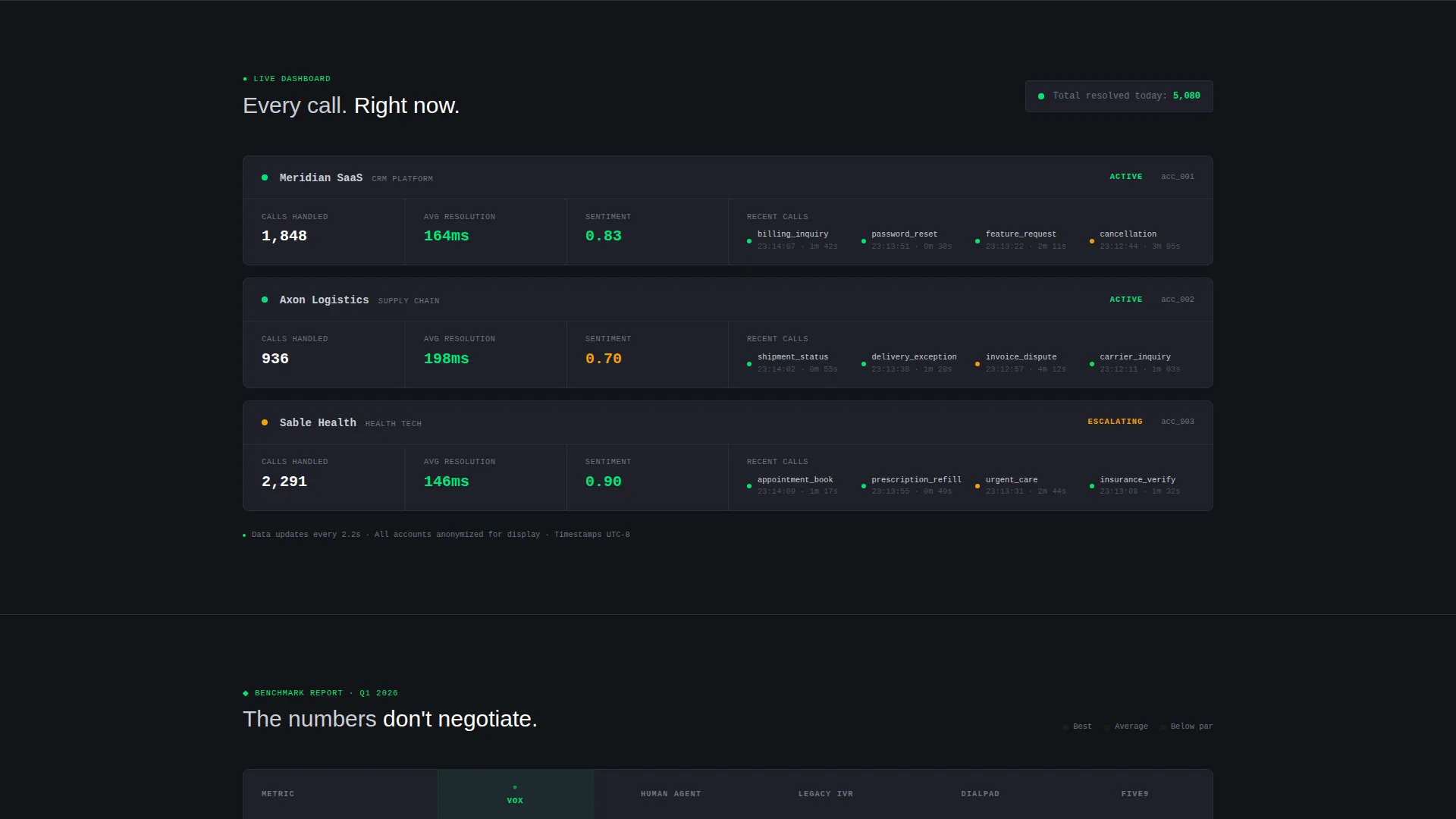
The first data panel displays a live-updating grid across three dummy accounts. It shows calls handled, average resolution time, and sentiment score. The grid gives visitors an immediate, scannable proof of platform throughput before any explanatory copy is needed.
Latency Benchmark Table
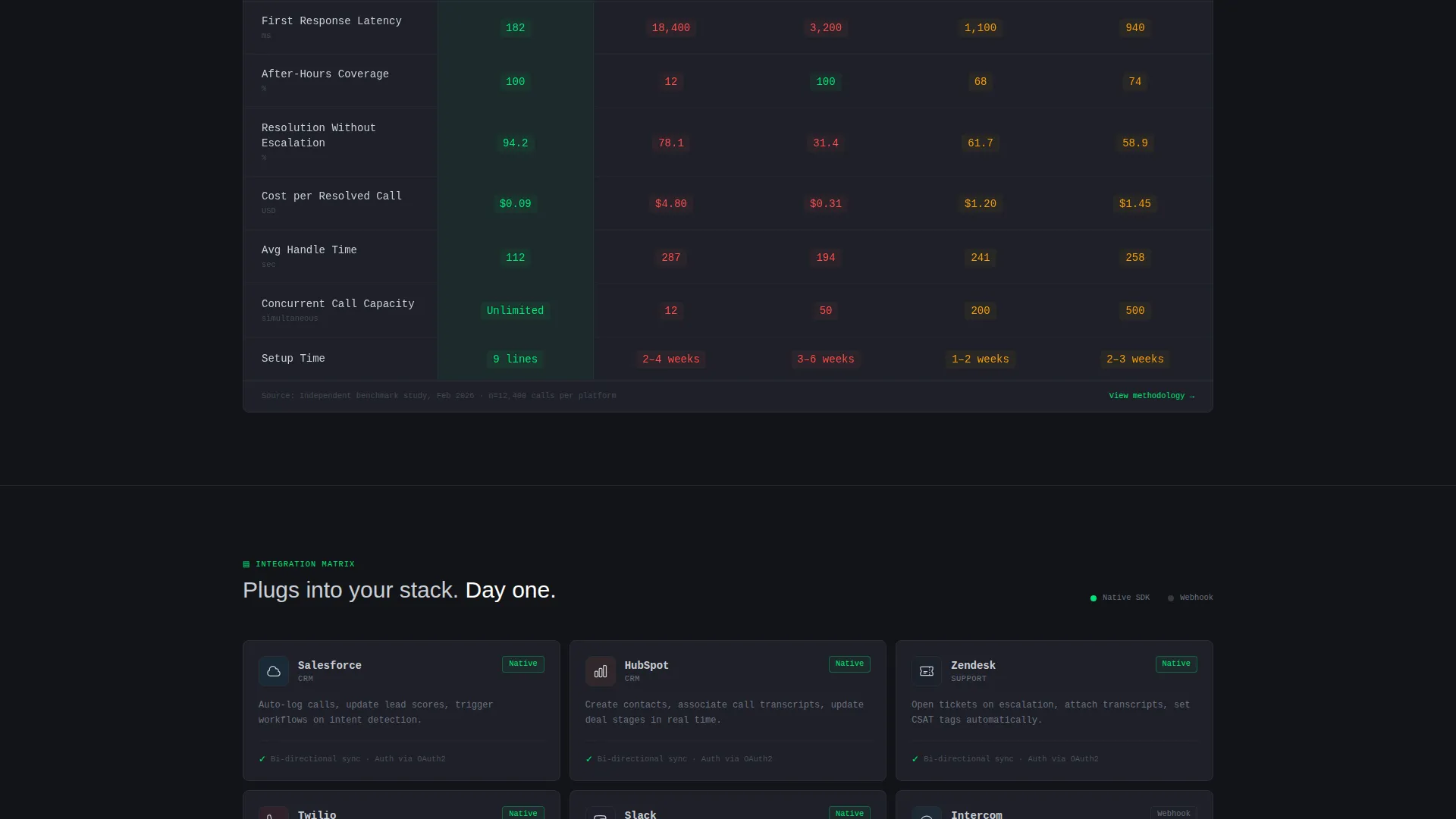
A color-coded comparison table pits the platform against human pickup time, legacy interactive voice response systems, and two named competitor columns. Cells shade from green to red so the performance advantage reads instantly without requiring the visitor to do any math.
Integration Matrix Panel
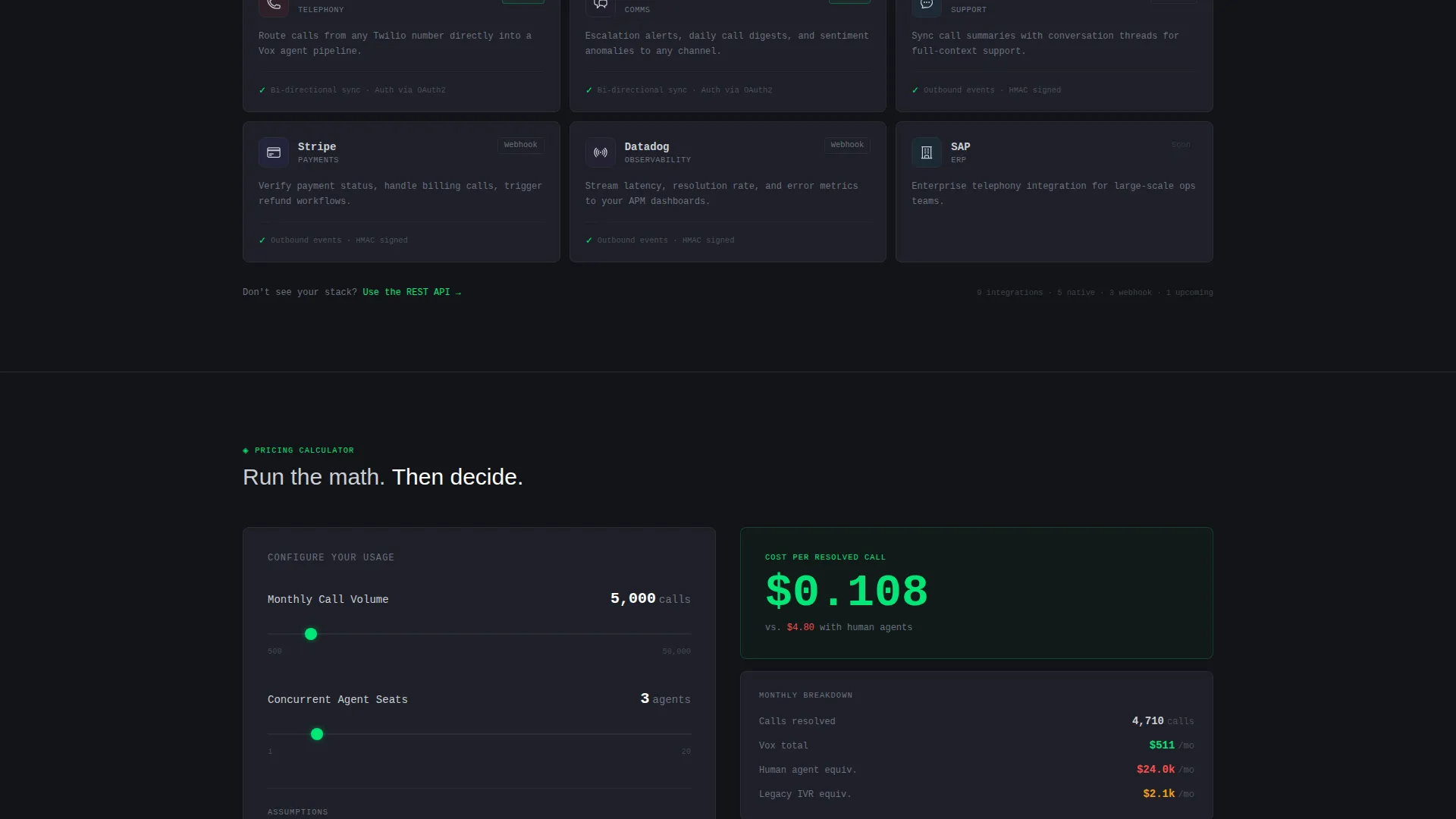
A structured grid displays partner logos including customer relationship management, helpdesk, telephony, and messaging platforms. Each logo carries a one-line description of how the integration works. This panel answers the "does it connect to our stack?" question directly and visually.
Pricing Calculator with Sliders
Visitors adjust sliders for monthly call volume and agent count. The calculator outputs a live cost-per-resolved-call figure. This component lets operations and finance stakeholders run their own scenario before speaking to sales, removing a common blocker in the evaluation process.
Two-Step Inline Conversion Form
Step one captures work email and estimated monthly call volume. Step two asks for a phone number so the visitor can receive a live test call from the AI agent within 60 seconds. The form is embedded inline and also anchored to a sticky bottom bar that appears after the second data panel.
Page sections overview
| Section | Purpose |
|---|---|
| API Snippet Header | Proves technical credibility above the fold |
| Live Metrics Grid | Shows real-time call handling across accounts |
| Latency Benchmark Table | Compares response speed against alternatives |
| Integration Matrix | Confirms compatibility with existing tools |
| Pricing Calculator | Lets buyers calculate cost per resolved call |
| Sticky call to action Bar | Keeps the primary action visible on every scroll |
| Two-Step Signup Form | Captures email, volume, and phone for live test |
Design & branding system
The visual system follows a Monochrome Steel palette. The aesthetic is deliberately utilitarian: it feels like the inside of a server rack at midnight, with no decorative warmth and no distracting color noise. Data surfaces are elevated with 1px card borders, and typography shifts between monospaced and sans-serif depending on context.
- Carbon background (#121417) paired with gunmetal panel surfaces (#1E2028) and 1px borders at #2A2D37 for card separation
- Brushed aluminum text (#C9CED6) for all body copy, with electric signal-green (#00E676) reserved exclusively for live-state indicators, active calls-to-action, and success metrics
- Monospaced typefaces for all data, code, and terminal output; sans-serif for all human-readable headlines and explanatory copy
Mobile & speed optimization
The template is structured so that its data-dense panels remain readable and functional at smaller screen widths. Dashboard grids, benchmark tables, and the pricing calculator are all designed to reflow cleanly without hiding critical information.
- Horizontal benchmark tables and integration grids adapt to narrower viewports without truncating key data cells
- The sticky bottom call-to-action bar remains anchored and tappable on mobile, keeping the primary conversion path accessible at every scroll position
How this template helps you convert
The Vox template is built around the principle that technical buyers convert after seeing proof, not promises. Every section is ordered to eliminate a specific objection before the visitor reaches the signup form.
- The API code snippet header establishes platform credibility in the first five seconds. Visitors see a real request structure and a live response, which removes the "is this actually built?" doubt before any marketing copy appears.
- The sequential data panels, latency table, and pricing calculator each close a specific evaluation gap. By the time the sticky call-to-action bar appears, the visitor has already seen throughput data, competitive benchmarks, integration coverage, and their own cost estimate.
Other information about this template
This template was designed within the Dashboard Pro theme framework, using the Spec Sheet creative direction to structure content as a progressive case rather than a narrative story. The header concept follows a Code Snippet pattern, which is specifically effective for developer-adjacent and technical operations audiences.
- The landing page direction is Freemium and Trial conversion, with a secondary path labeled "Read the Docs" for engineers who prefer to inspect the API documentation before committing
- The template style is Dashboard and Data Grid, making it suitable for AI voice assistant platforms, call intelligence tools, and similar SaaS B2B automation products where metrics are the primary sales argument
- The color system and component structure are fully customizable within the Monochrome Steel palette framework to match your platform's branding
Theme
Dashboard Pro
Creative direction
Spec Sheet
Color system
Monochrome Steel
Style
Dashboard/Data Grid
Direction
Freemium/Trial
Page Sections
Live API Code Snippet Header
Live Call Metrics Grid
Latency Benchmark Table
Integration Matrix Panel
Interactive Pricing Calculator
Two-step Inline Conversion Form
Related questions
Who is this landing page template designed for?
Can I customize the placeholder data in the metrics grid and benchmark table?
What does the two-step conversion form collect?
Is there a path for technical visitors who are not ready to sign up?
What visual style does this template use?



