Live Accommodation Management Landing Page Template
The InventorySync Live Travel Inventory Management Landing Page Template is a scroll-reveal, single-page layout built for travel operators who need one command center to track hotel blocks, airline allotments, and tour seats in real time. It opens with a live inventory health calculator, moves through a progressive chaos-to-clarity narrative, and closes with a dual conversion path designed to capture demo requests and email leads.
by Rocket studio
Quick summary
This landing page template gives travel technology companies a dark-cockpit, instrument-lit showcase for a live inventory management platform. Visitors arrive at an interactive calculator that makes revenue leakage personal, then scroll through a progressive reveal that moves from inventory chaos to synchronized clarity. Two conversion points anchor the page: a demo request form and a gated PDF download.
Who this template is for
Travel operators and software teams who market live inventory management tools will find this template purpose-built for their audience. The layout speaks directly to professionals who juggle stock levels across dozens of supplier contracts every single day. Real-time inventory management is at the core of their business needs, and this page reflects that urgency from the very first pixel.
- Inbound tour operators managing 200-room hotel blocks across multiple suppliers and booking channels
- Online travel agency (OTA) channel managers monitoring allocation expiry across multiple locations and sales channels
- Destination management companies (DMCs) and revenue managers who need instant stock visibility to prevent costly overselling
What problem this template solves
Managing inventory across multiple channels without the right technology creates compounding losses. Retailers lose hundreds of billions annually to phantom stock and inaccurate inventory entries. Travel operators face the same structural problem: inventory data lives in spreadsheets, email threads, and disconnected management systems. A sold-out departure discovered at the airport is the most expensive version of that failure.
Poor inventory management is a recognized two-trillion-dollar problem today, made worse by a lack of automation, centralization, and real-time visibility. This template is designed to communicate that pain clearly, then position an inventory management platform as the resolution. The structure guides the visitor from identifying the problem to recognizing the software as the answer, which is exactly how a high-converting landing page structure should work.
- Revenue leakage from untracked inventory levels, expired allotments, and uncoordinated sales channels
- Overbooking risk that damages customer satisfaction and triggers costly refund processing
- Manual reconciliation across multiple warehouses, vendors, and booking platforms that wastes staff time and introduces data inconsistencies
What you get with this template
This template ships as a fully designed, scroll-reveal landing page with high interactivity and a dark Tech Glass visual identity. Every section is production-ready, including the animated calculator, the progressive inventory card reveal, and the dual lead-capture forms. Teams can customize the copy and product data to match their platform and launch quickly.
The page is built desktop-first, reflecting the reality that OTA channel managers and tour operators typically manage inventory operations from desktop dashboards. Mobile responsiveness is included so that inventory tracking on the go remains accessible for field staff.
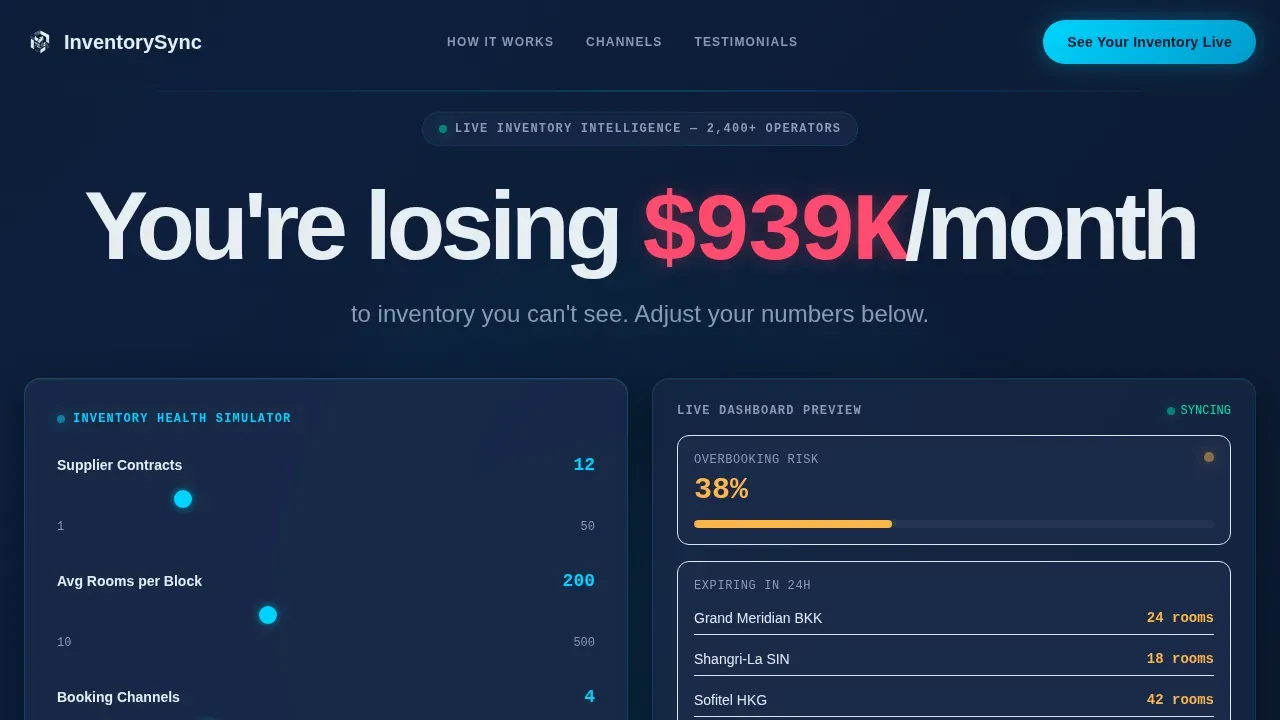
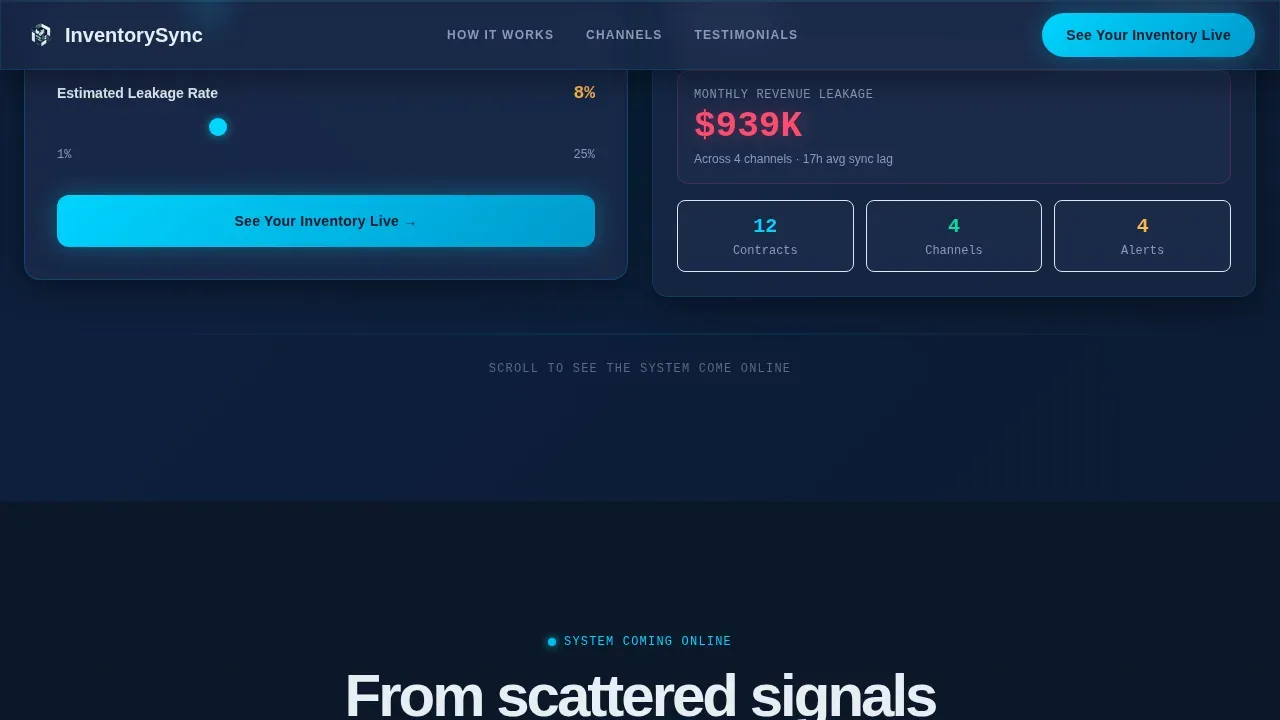
- A live inventory health calculator in the hero, complete with animated glass-panel dashboard and a revenue leakage counter personalized to each visitor's inputs
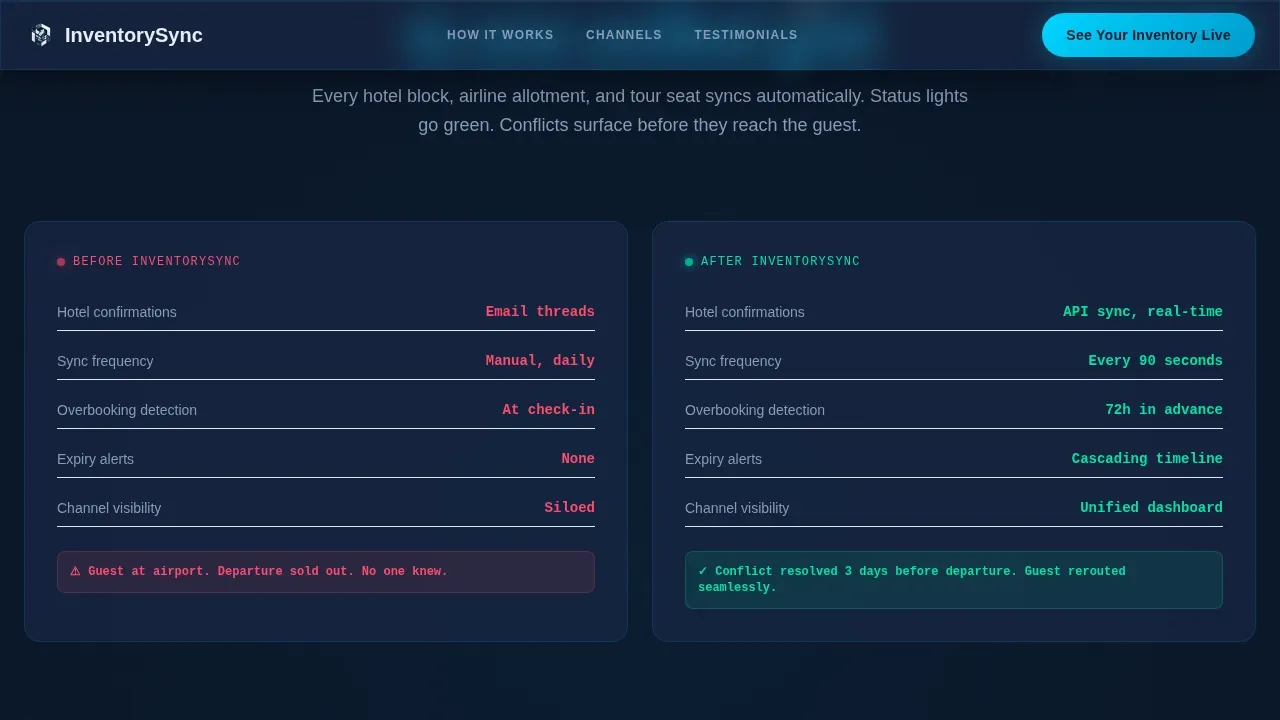
- A progressive scroll narrative that moves from chaos (spreadsheets, manual reconciliation) to clarity (automated inventory sync, real-time availability, instant reallocation), section by section
- A dual conversion system: a primary demo request form pre-filled from calculator inputs, and a secondary gated PDF download for visitors earlier in the decision cycle
Feature list
This template packages several technically ambitious components into one cohesive, launch-ready layout. The key features below reflect what is built into the template as described in the source brief.
Live Inventory Health Calculator
The hero opens with an interactive estimator where visitors input the number of supplier contracts, average rooms per block, and active booking channels. As they move the sliders, an animated glass-panel dashboard populates behind them: overbooking risk percentages pulse in live-data cyan, expiring allotments cascade down a timeline, and a revenue leakage figure counts upward in real time. The headline responds to their inputs, making the cost of unmanaged inventory visible before they scroll once. This kind of urgency element, grounded in the visitor's own numbers, is one of the most effective tools for converting inventory management software prospects.
Progressive Scroll Reveal Narrative
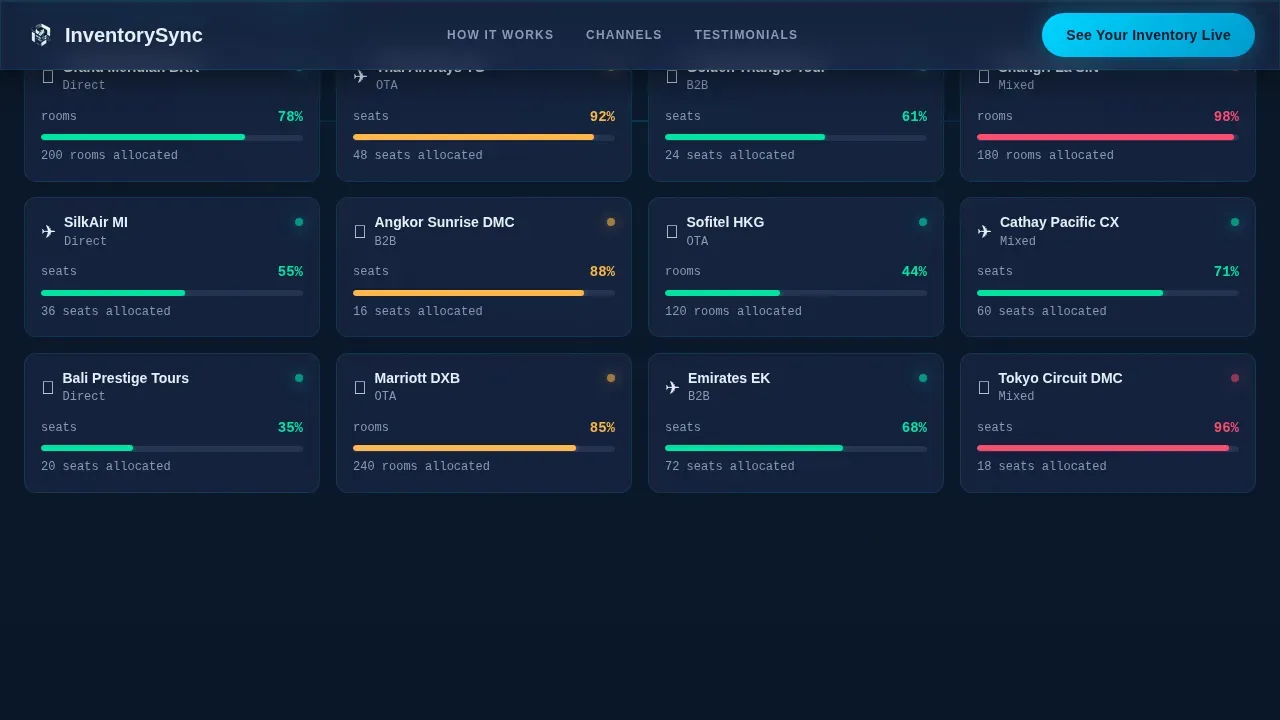
Each section detonates into view like a system coming online for the first time. A single allocation card appears alone in darkness, then multiplies into dozens across multiple vendors, then organizes itself into a synchronized grid with status lights blinking green. This Launch Energy creative direction is deliberate: it mirrors the exact journey from inventory chaos to inventory clarity that the platform delivers. The narrative accelerates through layers of capability, including channel distribution, expiry alerts, and dynamic pricing rules, each animating as if powered on by the visitor's scroll. Visual product demonstrations of this kind help potential users visualize the software inside their own workflow before they ever speak to sales.
Multi-Channel Inventory Sync Showcase
A bento-grid section displays how the inventory system connects across direct, OTA, business-to-business (B2B), and mixed booking channels. Automated multi-channel synchronization updates inventory data across all sales platforms as sales occur, which is the core promise of real-time inventory synchronization. The template presents this coverage visually through a channel matrix, making it easy for OTA channel managers to see their specific environment reflected. Connected sales channels are shown as live status nodes, reinforcing that inventory updates flow without delay. Accurate, real-time inventory information is essential for effective order fulfillment and customer satisfaction, and this section communicates that directly.
Social Proof Section with Operator Metrics
A dedicated testimonials section displays specific revenue recovery figures and operator names alongside company types. Credibility built through recognizable partner logos and customer testimonials with quantifiable metrics is one of the clearest ways to convert skeptical B2B buyers. Trust elements of this kind, combined with inventory management software that demonstrates transparent, accurate product data, reduce buyer anxiety and build confidence that the platform can handle real-world complexity.
Dual Conversion Lead Capture
Two conversion points anchor the page. The primary call to action, "See Your Inventory Live," appears first beneath the calculator and again at the final section. The form collects company name, number of supplier contracts (pre-filled from calculator inputs if used), primary booking channels (checkboxes for direct, OTA, B2B, and mixed), and a work email address. A secondary path offers a downloadable PDF report on overbooking costs, gated behind email only. A clear, repeated call to action is essential for landing page effectiveness, and this dual structure ensures both high-intent and mid-funnel visitors have a natural next step.
Tech Glass Dark Cockpit Design System
The visual identity uses a Midnight Blue color system with deep terminal navy as the background, translucent panel blue for card surfaces, live-data cyan for real-time indicators and interactive accents, and frosted white for typography and dividers. The palette feels like a glass cockpit at cruising altitude: dark, calm, every glow intentional and every number load-bearing. Typography pairs Plus Jakarta Sans for body copy with JetBrains Mono for data readouts, reinforcing the instrument-lit aesthetic throughout every inventory data display.
Page sections overview
| Section | Purpose |
|---|---|
| Hero Calculator | Interactive revenue leakage estimator with animated glass dashboard and personalized headline |
| System Online Reveal | Progressive allocation card animation moving from chaos to synchronized inventory clarity |
| Channel Sync Grid | Bento-grid showcase of multi-channel inventory coverage across direct, OTA, B2B, and mixed channels |
| Social Proof | Testimonials with specific revenue recovery metrics and operator company details |
| Lead Generation | Dual conversion: demo request form with calculator pre-fill and gated PDF download |
| Footer | Linear single-row footer pattern with navigation and legal copy |
Design & branding system
The template uses a Tech Glass visual identity that communicates calm authority and instrument-level precision. Every design decision reinforces the feeling that the inventory system is already running: surfaces glow, data pulses, and each status indicator carries weight. The dark cockpit aesthetic is not decorative; it signals that the platform behind it is built for professionals who make high-stakes decisions with real-time data.
- Color system: deep terminal navy (#0A1628) as the primary background, translucent panel blue (#1B2A4A) for card surfaces, live-data cyan (#00D4FF) for inventory indicators and interactive accents, and frosted white (#E8EDF3) for all typography and dividers
- Typography: Plus Jakarta Sans for all body and heading copy, JetBrains Mono for data readouts and inventory counters, maintaining a clear visual language between narrative text and live inventory data
- Animation: high-fidelity GSAP ScrollTrigger staggered reveals, counter animations for the revenue leakage calculator, parallax depth on card layers, and per-section "system online" detonation timing
Mobile & speed optimization
The template is designed desktop-first, reflecting the primary workflow of OTA channel managers and tour operators who manage inventory from large-screen dashboards. Desktop priority ensures that the calculator, bento grid, and glass-panel animations render at their intended fidelity for the core audience. Mobile accessibility remains a consideration, as a measurable percentage of travel bookings are mobile-driven and field staff need to track inventory updates on the go.
- Responsive layout adapts the glass-panel calculator, bento grid, and card reveal sections to tablet and mobile viewports without breaking the dark cockpit aesthetic
- Static sections use server components for faster initial load, while the interactive calculator and GSAP animations are handled client-side to protect system performance under high interactivity
- Mobile-accessible form fields and checkbox channel selectors ensure that lead capture works cleanly on smaller screens, supporting the secondary PDF download conversion path for on-the-go visitors
How this template helps you convert
A landing page for inventory management software lives or dies on its ability to make the buyer's pain feel real before the pitch begins. This template is structured to do exactly that, from the first slider moved in the calculator to the final call to action at the bottom of the page. Higher conversion rates are consistently associated with clean designs that minimize navigation and emphasize high-contrast calls to action, both of which are built into this template's layout.
- The hero calculator makes revenue leakage personal by computing a dollar figure from the visitor's own inputs, anchoring the conversation in their specific inventory operations before any feature has been mentioned. This approach converts faster than generic headlines because the visitor sees their own problem reflected back at them.
- The progressive scroll narrative builds trust incrementally by showing the journey from manual chaos to automated clarity layer by layer, with each section adding a new capability. This structure guides professionals from identifying a pain point to recognizing the platform as the solution, which is the fundamental arc of an effective B2B software landing page.
- The dual conversion system captures visitors at two different readiness levels: those ready for a live demo submit the pre-filled form, while mid-funnel visitors download the overbooking cost report and enter the email nurture path. Neither conversion point is wasted.
Other information about this template
This template is the InventorySync Live Travel Inventory Management Landing Page Template, built specifically for the travel technology niche where inventory management systems must handle complex, time-sensitive allocation data across multiple suppliers and booking environments. The template is designed to support real-world advanced inventory management scenarios where a platform must communicate its depth without overwhelming a first-time visitor.
Understanding how inventory management systems work at a technical level helps contextualize what this template is built to showcase. Webhooks are lightweight callbacks triggered by events in one system and sent to another via HTTP. They allow an inventory management system to send real-time updates to external services when specific events occur, such as stock level changes or order creation. Robust webhook implementation includes retry logic for failed deliveries to ensure no critical inventory update is lost. Data validation and consistency are crucial for real-time inventory reconciliation, ensuring that any product data arriving from external systems is accurate and matches internal identifiers. Immediate data exchange is required so that a trigger sends information to the other system without significant delay, which is why real-time inventory synchronization connects directly via API to supplier systems.
Multichannel inventory management refers to the oversight of stock levels, reorders, and inventory forecasting across sales channels. A centralized inventory management system helps businesses maintain accurate stock levels across multiple locations and sales channels. Managing inventory across multiple stores and marketplaces is not merely about synchronizing stock; it is about operating a business that is efficient, scalable, and customer-oriented. Inaccurate forecasting can lead to significant issues in inventory management, as many operators still lack proper forecasting software. A centralized dashboard is vital for monitoring inventory, tracking orders, and managing product listings in one place.
This template's layout supports showcasing several practical capabilities that mature inventory management systems typically include:
- Integration readiness for external systems, including support for purchase orders, purchase order generation, and manage purchase orders workflows between multiple vendors and multiple suppliers
- Compatibility framing for accounting software and accounting tools, as well as point-of-sale (POS) system connections, which are common in hybrid travel retail and brick and mortar stores contexts alongside online store operations
- Warehouse management system framing for operators who manage inventory across multiple warehouses or need multi-warehouse visibility, including warehouse management and warehouse operations coverage
- Support for inventory adjustments, automatic stock updates, inventory counts, and low stock alerts, which keep stock count accurate and reduce manual error handling across connected sales channels
- Inventory turnover reporting and revenue tracking contexts that help operators reduce carrying costs and improve cash flow across complex workflows
- Third party tools integration framing, including e-commerce platforms and ecommerce platforms, for operators who sell through an online store or multiple channels simultaneously
- Data integrity and data validation coverage for operators who need ensure data consistency across external systems and avoid data inconsistencies in live inventory reconciliation
- Barcode scanning context for operators who conduct physical inventory counts or manage brick and mortar stores alongside digital booking channels
- Secure authentication and security considerations framing for enterprise buyers evaluating whether an inventory system can protect their product data and inventory records
- Multi location inventory and multi-warehouse tracking framing for large-scale DMCs managing inventory quantities across multiple locations
- Real time inventory, inventory visibility, and inventory levels framing throughout the page ensure that the platform's inventory tracking capabilities are communicated with specificity and stock visibility context
- Inventory data accuracy, inventory changes documentation, and inventory records management are positioned as core performance benefits of the automated inventory sync architecture
- For operators running connected sales channels across retail stores, the template's channel showcase section can reflect inventory sync across all active product listings and sales environments
- Demand forecasting and scalable inventory management language supports enterprise buyers who need to manage purchase orders from multiple vendors and maintain accurate stock levels during high-demand periods
Theme
Tech Glass
Creative direction
Launch Energy
Color system
Midnight Blue
Style
Scroll Reveal (Progressive)
Direction
Lead Generation
Page Sections
Live Inventory Health Calculator Hero
Progressive Scroll Reveal Narrative
Multi-channel Inventory Sync Showcase
Social Proof with Operator Metrics
Dual Conversion Lead Capture System
Tech Glass Dark Cockpit Design System
Related questions
What type of business is this template designed for?
Does the template include the interactive calculator functionality?
How does the dual conversion system work?
Can the template showcase inventory sync across multiple booking channels?
Is this template optimized for desktop users?



