Speech Recognition Technology Professional Website Template
The Whisper Precision Transcription Framework landing page template is a dark, data-dense dashboard layout built for developer audiences. It showcases speech recognition benchmarks, model size comparisons, multi-language coverage grids, and a zero-friction install path. The design uses a void-navy and cyan monitoring aesthetic to make every data point feel live, precise, and ready to run.
by Rocket studio
Quick summary
This template gives ML engineers, indie developers, and researchers a sharp landing page that communicates technical authority from the first scroll. The layout follows a terminal-dashboard aesthetic and drives visitors straight to a single install command. No forms, no gates, no noise. Just benchmarks, model data, and the shortest possible path from curiosity to running code.
Who this template is for
This template is purpose-built for technical builders who need a landing page that earns trust through data. It speaks to people who read latency tables before they read taglines, and who treat a clean install command as a stronger call to action than any marketing headline.
- ML engineers wiring speech to text pipelines into production systems
- Indie developers building podcast tools, subtitle generators, or transcription apps from a local file
- Researchers who need to transcribe audio from field recordings across different languages at any hour
What problem this template solves
Generic product pages fail developer audiences. They bury the model details, skip the benchmarks, and hide the install path behind a demo request form. Developers close those tabs fast. This template solves that problem by leading with hard data and treating the install line as the conversion event.
- No clear model size comparison means engineers guess at accuracy versus. speed tradeoffs
- Missing word error rate tables leave developers unable to compare transcription quality against competing tools
- Long sign-up flows kill momentum for users who just want to run pip install and start building
What you get with this template
This template delivers a fully structured, data-driven landing page for a speech recognition framework. Every section is a precisely formatted data grid row. The design is ready to present multilingual speech recognition capabilities, hardware benchmarks, and a live install path in one clean scroll.
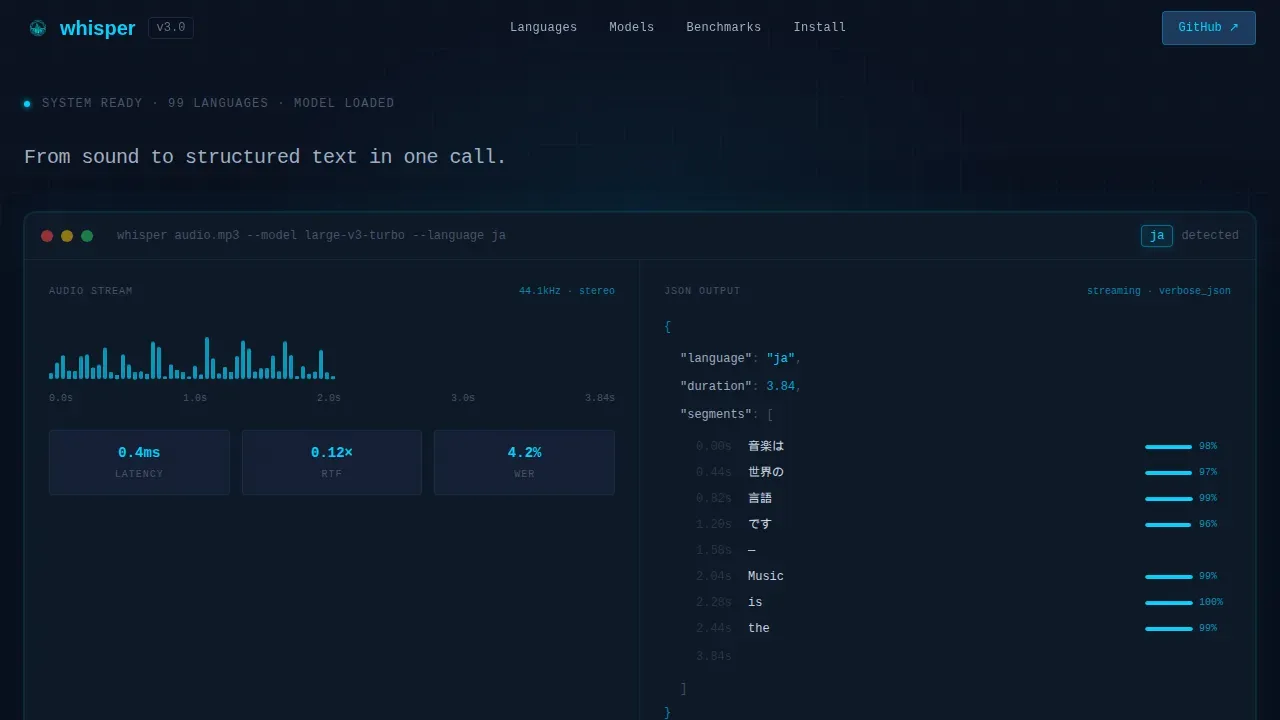
- A hero section with a full-width product screenshot showing waveform visualization, streaming JSON output, confidence scores, and a language detection badge
- Filterable language coverage grids, sortable benchmark tables, and a hardware latency data grid
- A tabbed install section with pip install commands, conda and Docker options, a copy-to-clipboard line, and a secondary "Try in Browser" path
Feature list
This template is built around six core feature areas that convert developer curiosity into action.
Full-Width Terminal Hero
The hero section displays a pixel-sharp product screenshot mid-transcription. A waveform sits on the left, a streaming JSON response on the right, and cyan-glowing confidence scores beside each word. A language detection badge in the corner reads a two-letter language code. A single silver headline sits above it: "From sound to structured text in one call." This section immediately signals precision and sets the technical tone for every section that follows.
Filterable Language Coverage Grid
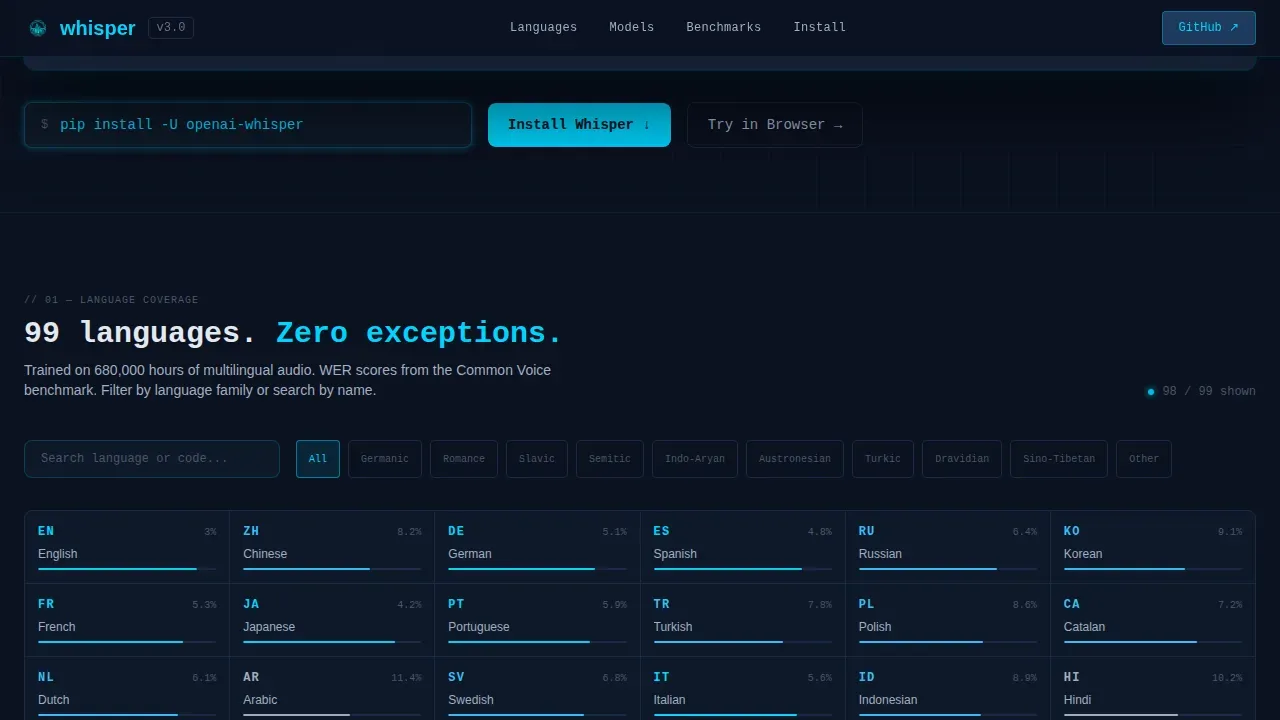
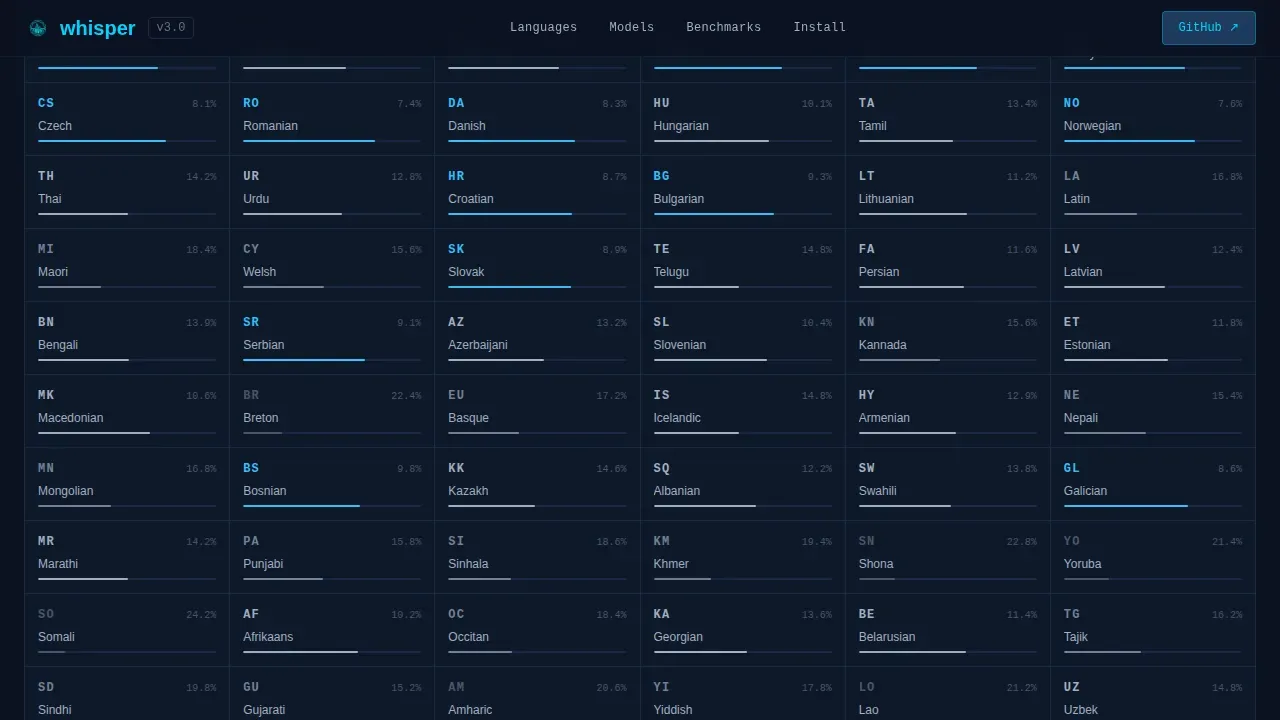
This section presents supported languages in an interactive, filterable grid. Visitors can scan or search across the full list to find the languages they care about, including options like traditional chinese, Arabic, Spanish, and dozens more. Each entry can display associated accuracy data. This is where the template proves that multilingual models are not just a feature claim but a measurable, browseable fact.
Sortable Model Benchmark Table
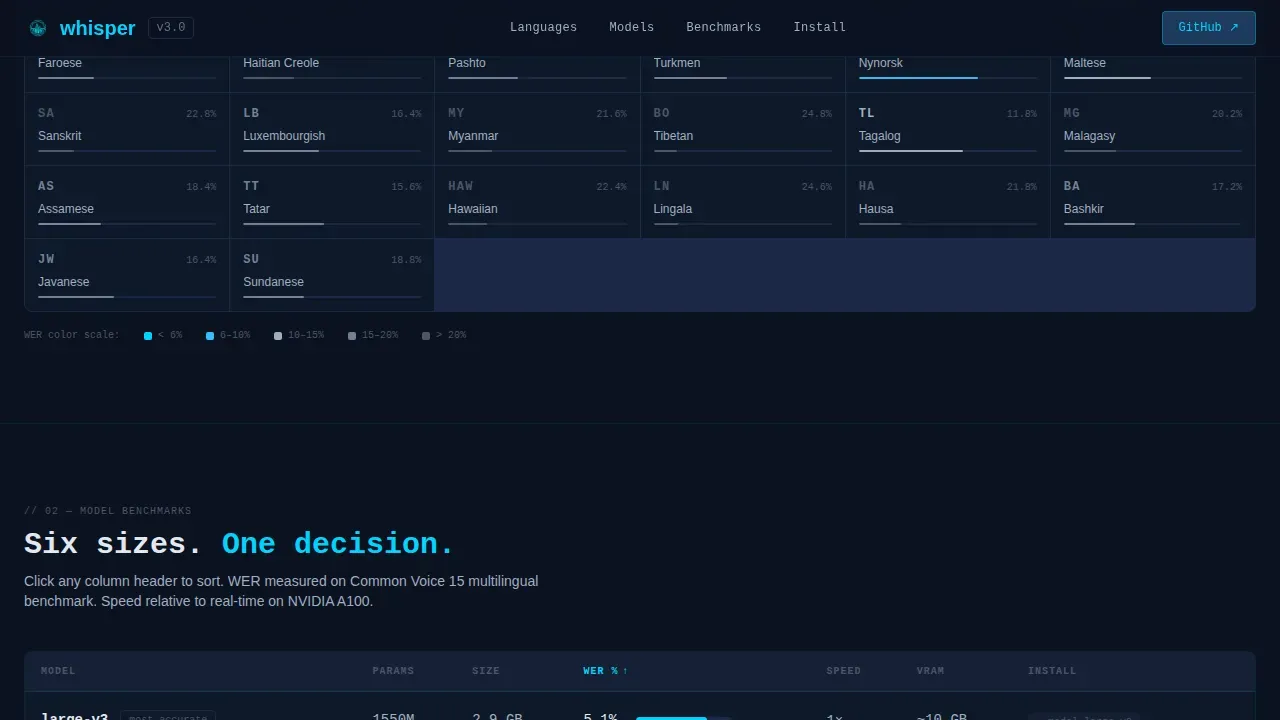
The benchmark table lets visitors sort by model size, parameter count, word error rate, and speed multiplier. It covers the full range from a small model to the large model tier, showing the real tradeoff at every step. Developers can instantly see which whisper model fits their latency budget and accuracy requirement. The table uses JetBrains Mono for all data values to reinforce the technical, precise format.
Hardware Latency Data Grid
This data grid maps transcription latency across CPU, GPU T4, A100, and Apple M-series hardware tiers. It gives engineers the exact numbers they need to spec their infrastructure before they commit. The output is structured so each row is scannable and each column is immediately comparable. Researchers processing hours of audio data in notebooks will find this section especially useful when planning compute budgets.
Competitor Comparison Grid
A side-by-side comparison grid shows how the framework performs against other speech recognition tools. Rows cover word error rate metrics across representative test sets. The grid does not ask visitors to believe a claim. It asks them to read a number and draw their own conclusion. This is one of the most persuasive sections on the page because it replaces marketing language with direct evidence.
Zero-Friction Install Section
The install section is the conversion centerpiece. It uses platform-detect tabs for pip install, conda, and Docker. Each tab displays a one-line install command the visitor can copy instantly. A secondary path labeled "Try in Browser" links to an interactive demo. No api key required, no account gate, no form. The install command is the call to action, and everything else on the page exists to earn the click to this section.
Page sections overview
| Section | Purpose |
|---|---|
| Hero Screenshot | Display live transcription output and set technical tone |
| Language Coverage Grid | Show filterable supported languages with accuracy data |
| Model Benchmark Table | Compare model size, params, WER, and speed |
| Latency by Hardware | Map transcription speed across CPU and GPU tiers |
| Competitor Comparison | Prove accuracy advantage with direct WER data |
| Install Call to Action | Deliver one-line pip install with tab switching and copy |
| Footer | Minimal GitHub-style links and social references |
Design & branding system
The visual identity follows a Directory and Discovery theme executed through a Midnight Blue color system. The palette reads like a monitoring dashboard running quietly in the dark: deep enough to disappear behind the data, bright enough at the edges to signal that something is live and listening.
- Color system: void-dark navy (#0B1120) as background, console-glow blue (#1E3A5F) for panel surfaces, active-stream cyan (#00D4FF) for highlights and confidence score glows, muted silver (#A0AEC0) for secondary text and borders
- Typography: DM Sans for prose and body sections, JetBrains Mono for all code blocks, data table values, and install commands
- Animation: animated waveform in the hero, a streaming text cursor effect, staggered table row reveals on scroll, and scroll-linked section transitions; font size is set precisely across breakpoints to maintain data readability at every level
Mobile & speed optimization
This template is built desktop-first, reflecting the reality that ML engineers and researchers work on large screens with multiple panels open. The layout prioritizes data density on wide viewports without breaking usability on smaller devices.
- Desktop-first layout ensures sortable tables, filterable grids, and side-by-side comparison panels render with full clarity on wide screens
- Functional mobile layout preserves the install section, the hero, and core benchmark data so the page remains useful on any device
- Server components handle static sections for fast initial load; client components power the interactive grids, tab switching, and copy-to-clipboard function
How this template helps you convert
This template is designed around a single, compelling call to action: get developers to run the install command. Every scroll reveals harder evidence, and every section removes a reason to hesitate.
- The hero section prints authority immediately with a live-output product screenshot and a precise single-line headline, so developers trust the tool before they read a word of copy
- The benchmark and comparison sections let visitors process, compare, and self-qualify based on real model data, so by the time they reach the install section they are already convinced
- The tabbed install block with pip install, conda, and Docker paths removes all friction at the moment of commitment, making it easy to download and run the framework in seconds
Other information about this template
This section covers additional context about what the template is built to present and how the underlying framework details inform the page structure.
- Whisper AI is a general-purpose speech recognition model trained on 680,000 hours of audio data across 96 languages plus English; the template is designed to surface that scale convincingly
- OpenAI's Whisper AI supports various speech processing tasks in a single model, including multilingual speech recognition, speech translation, spoken language identification, and voice activity detection
- The multitask training format uses special tokens and task specifiers as classification targets, allowing the model to switch between transcription and translation tasks from the same inputted audio
- OpenAI's Whisper includes six model sizes; the template's benchmark table is structured to present all of them, from a small model to the large model, alongside additional parameters and speed data
- The transcriptions input takes the audio file you want to transcribe and the desired output format; the template's install section mirrors this workflow by showing a clear following command example users can copy
- Whisper AI can transcribe audio from a local file, a video file, or streamed input; the page can present all these input paths in the install and usage example section
- To set up on Linux, developers run sudo apt update before installing dependencies; the template's install block is designed to show the full following command sequence in a readable monospace format
- Whisper can generate subtitles for a video file by transcribing the audio and overlaying the transcribed text onto the original video; tools like MoviePy can automate this post processing step
- YouTube content creators and podcast producers can use the framework to transcribe audio and produce timestamped transcripts; the template can present these use cases in the hero or usage example blocks
- File uploads to an interactive demo module let visitors test transcription quality directly; the "Try in Browser" secondary path on this template supports that discovery moment
- Speaker labels, language codes, and additional parameters can all be passed as input to refine the transcript output; the template's usage section can present more examples of these options clearly
- The whisper model can be integrated with Flask to create web applications, or used with MoviePy to handle video file subtitle generation; this template is a powerful tool for presenting those integration paths to developers
- Print-ready transcript output, local file processing, and cloud deployment are all use cases the template can credibly present based on the framework's documented capabilities
Theme
Directory & Discovery
Creative direction
Spec Sheet
Color system
Midnight Blue
Style
Dashboard/Data Grid
Direction
App Download
Page Sections
Terminal-style Hero with Live Output Screenshot
Filterable Language Coverage Grid
Sortable Model Benchmark Table
Hardware Latency Data Grid
Competitor WER Comparison Grid
Zero-friction Tabbed Install Block
Related questions
What kind of developer is this template designed for?
Does the template include the interactive filterable grids and sortable tables?
Can I use this template to present a framework that handles multiple languages?
What does the install section actually include?
Is this template suitable for presenting speech translation as well as transcription?



