Coaching Digital Presence Reviews Website Template
Whistle is a bento grid landing page built for a coaching job board. It combines an interactive job card preview, live-count stats tiles, and a swipe-to-save animation into one dark-mode dashboard layout. The design targets coaches, coordinators, and athletic staff who are actively looking for their next role and need a platform that proves its value before asking for a commitment.
by Rocket studio
Quick summary
Whistle is a single-page coaching job board landing page built on a bento grid layout. It opens with a live, interactive job card grid visitors can hover and filter before signing up. Dark-mode visuals, staggered animations, and real-time job count tiles make the platform feel active and credible from the first scroll.
Who this template is for
This template is built for founders or product teams launching a coaching-focused job board. It speaks directly to the people on both sides of that board: those posting roles and those hunting for them.
- Athletic directors and program staff sourcing coaching hires quietly before a role goes public
- Graduate assistants, retired coordinators, and volunteer coaches actively browsing open positions by sport, division, and start date
- Job board creators who need a landing page that proves inventory and drives app downloads before asking for a sign-up
What problem this template solves
Coaching job boards often look generic and fail to communicate real activity. Visitors arrive, see a static list, and leave without converting. Whistle solves that trust gap by leading with proof.
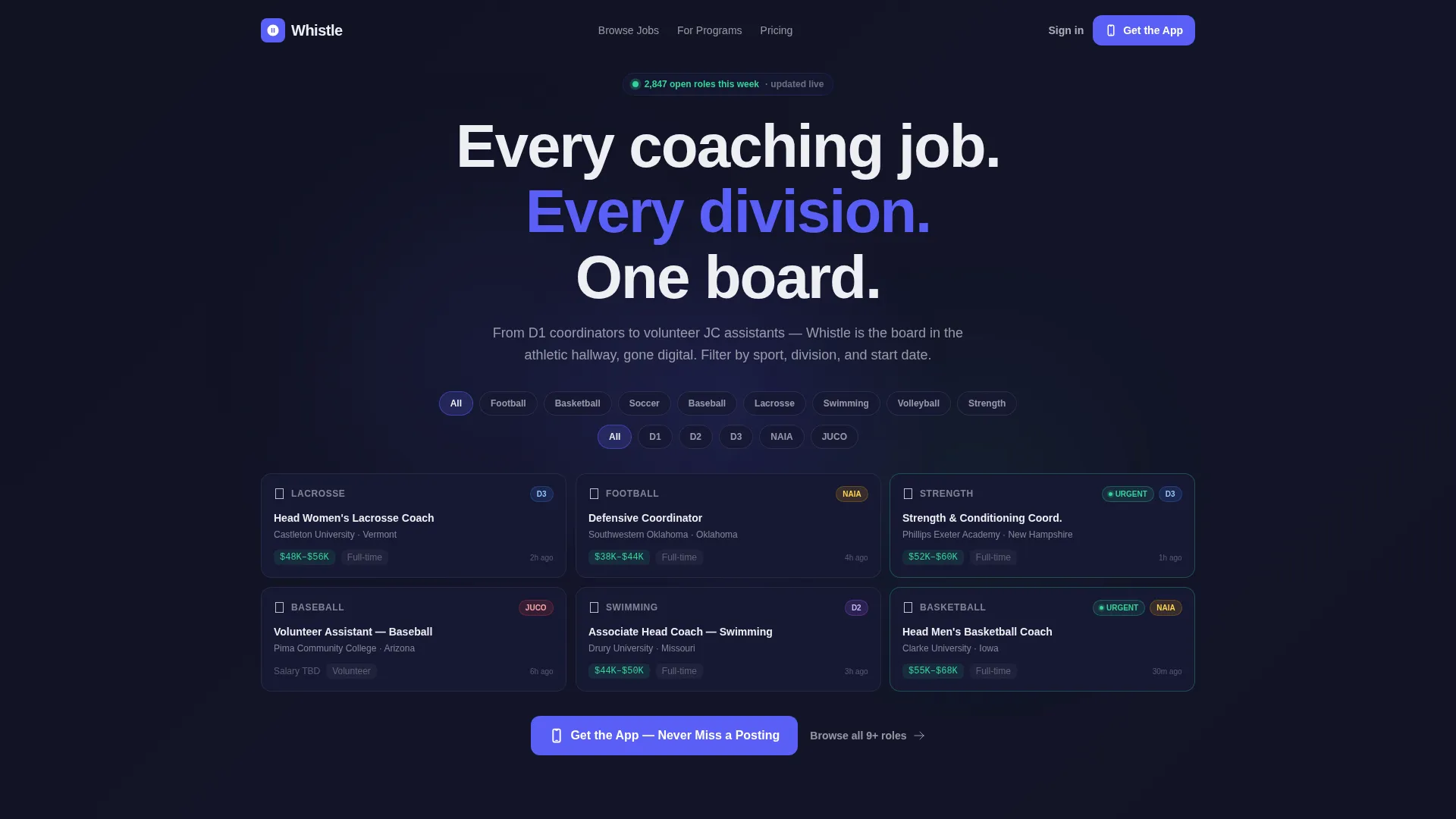
- The interactive header lets visitors filter and tap real job cards before committing, so the platform earns its download request
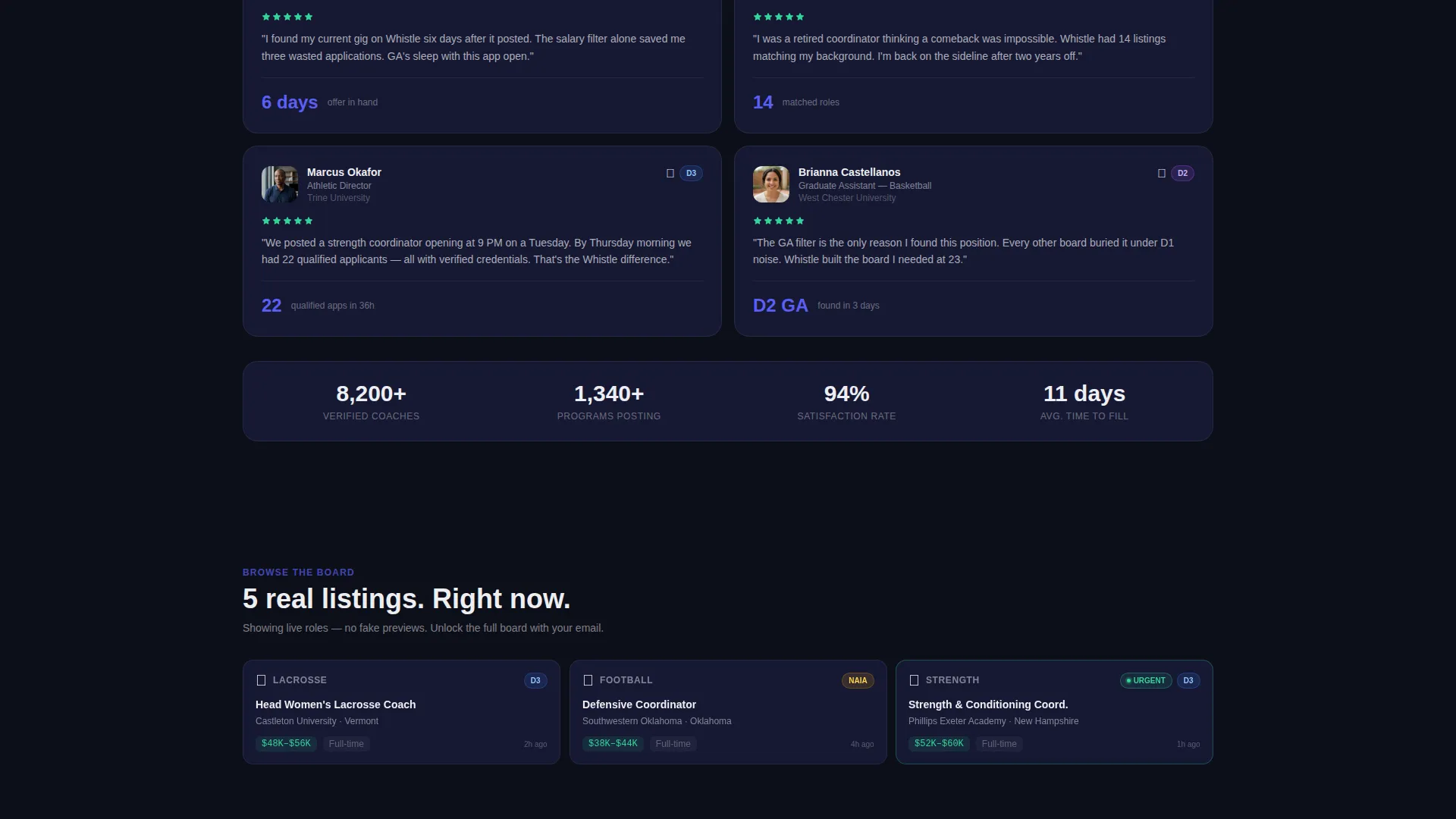
- A soft email gate after five browsable listings captures leads without friction
- Asymmetric bento tiles show live job counts, real-time post feeds, and key features side by side, making the board feel populated and moving
What you get with this template
You get a fully structured, single-page layout with every section pre-built and visually connected. No guesswork on layout order or content hierarchy.
- A functioning interactive bento grid header with hoverable job cards, sport icons, salary badges, division pills, and an "Urgent" tag in live-status green
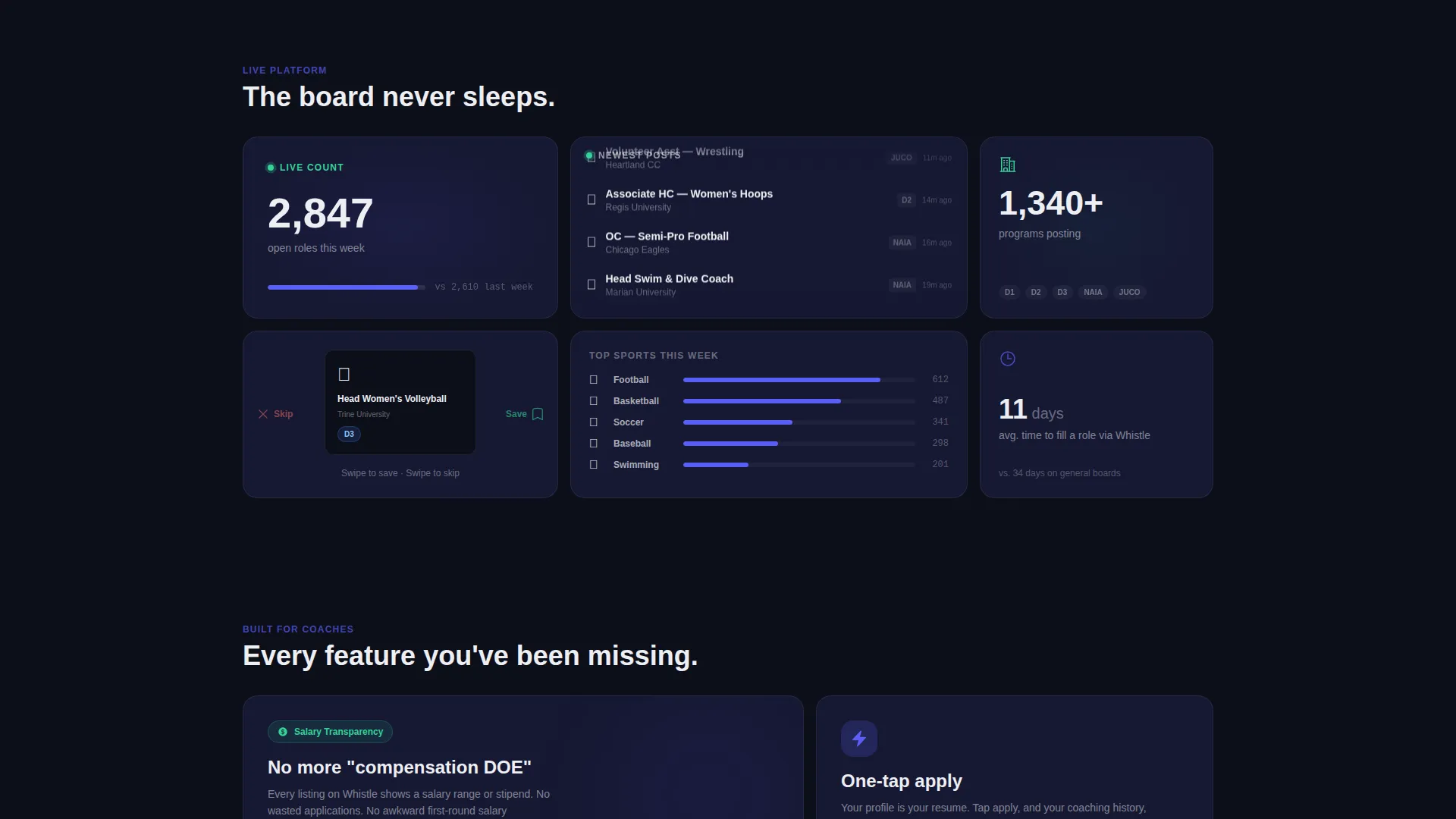
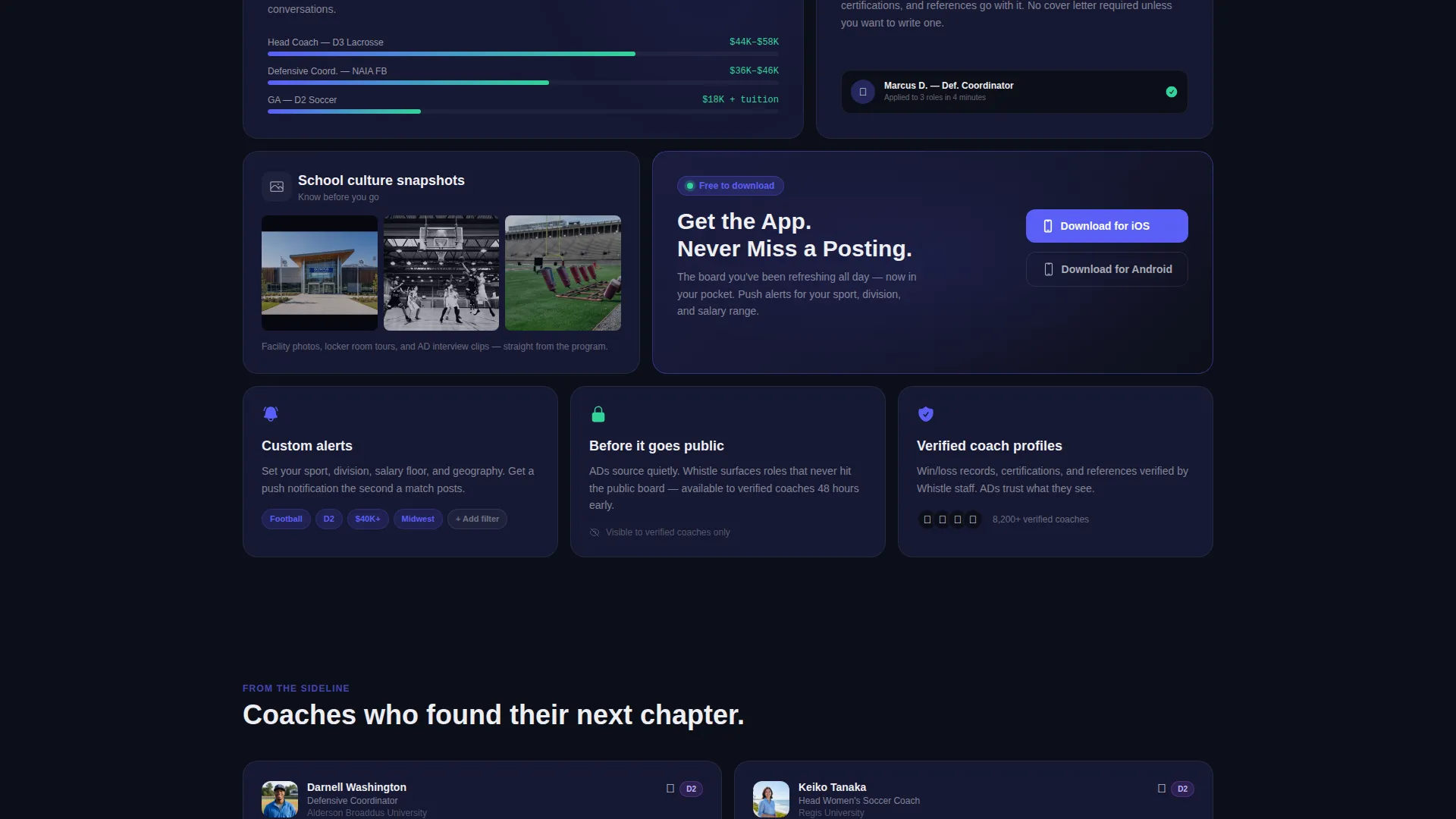
- Asymmetric feature tiles covering live job count display, a real-time newest-posts feed, swipe-to-save mechanic animation, salary transparency filters, school culture snapshots, and one-tap application user interface
- A pinned floating mobile bottom bar and an accent-indigo in-grid tile, both carrying the primary app download call to action
Feature list
This template ships with a focused set of interactive and visual features. Each one maps directly to a specific job in the conversion flow.
Interactive Job Card Grid Header
Visitors land on a bento grid of real job cards they can hover, filter by sport and division, and tap before any sign-up prompt appears. Cards include sport icons, salary badges, division pills, and an urgent status tag. Staggered load-in animations introduce each card like a starting lineup, building energy from the first second.
Live Job Count and Real-Time Feed Tiles
A large bento tile displays the current open role count, styled as a live dashboard stat. A slim tile beside it shows a real-time feed of the newest postings, auto-updating to reinforce that the board is active and fresh.
Swipe-to-Save Mechanic Animation
A square tile animates the platform's swipe-to-save gesture, letting visitors understand the core mobile interaction before they download the app. It communicates product behavior without requiring a demo or explainer copy.
Soft Email Gate with Browse Preview
Visitors can browse five real listings freely. After that, a soft gate prompts an email address to unlock the full board. This sequence earns the lead by showing value first, reducing drop-off compared to a hard sign-up wall.
Dual App Download Call-to-Action Placement
The primary call to action appears as a floating bottom bar on mobile and as a dedicated accent-indigo tile inside the bento grid. Repeated, contextual placement keeps the download path visible without feeling aggressive.
Sport, Division, and Start Date Filters
Filterable parameters are built into the header grid so visitors self-segment immediately. Filtering by sport, division level (ranging from Division 2 programs down to junior college posts), and start date makes the board feel relevant to each visitor's specific situation.
Page sections overview
| Section | Purpose |
|---|---|
| Interactive Job Card Header | Lets visitors filter and tap real job cards before signing up |
| Live Job Count Tile | Shows total open roles this week as a dashboard stat |
| Real-Time Feed Tile | Auto-updates with newest postings to signal board activity |
| Swipe-to-Save Tile | Animates the core mobile save mechanic for product clarity |
| Feature Bento Tiles | Covers salary filters, culture snapshots, and one-tap apply user interface |
| In-Grid Download Tile | Accent-indigo tile with the primary app download call to action |
| Soft Email Gate | Unlocks full board access after five freely browsed listings |
| Floating Mobile Bar | Pins the app download call to action to the bottom of mobile screens |
Design & branding system
The visual identity follows a Dashboard Pro theme built around an Electric Indigo color system. Every color choice serves a function: background tones reduce eye strain for late-night browsing, accent colors signal interactivity, and status colors carry meaning.
- Deep app-shell black (#0D0F1A) for the page background, primary indigo (#5B5FF6) for interactive elements and the download tile, muted card surface (#161833) for job card backgrounds, live-status green (#34D399) for urgent tags and real-time indicators, and crisp interface white (#EDEEF2) for all body and heading typography
- The palette is calibrated for dark-mode-only display, giving the page the feel of a recruiting coordinator's second monitor during a late-night film session
- Staggered card animations and subtle tile load-ins add kinetic energy without distracting from the job content
Mobile & speed optimization
The template is designed with mobile coaching staff in mind. Graduate assistants refresh job boards between film sessions on their phones, not desktops.
- The floating bottom bar pins the app download call to action to mobile screens at all scroll depths, keeping conversion accessible without interrupting browsing
- The bento grid layout adapts its asymmetric tile structure for smaller screens, maintaining visual hierarchy and touch-friendly tap targets across card and filter interactions
- Staggered animations are lightweight by design, keeping the page feeling fast even as multiple tiles animate into frame on load
How this template helps you convert
Every section is sequenced to build proof before asking for action. Conversion is earned, not assumed.
- The interactive job card header gives visitors immediate, tangible evidence of real inventory, so by the time they scroll, they already believe the board is worth their time.
- The live job count tile and real-time feed tile compound that trust mid-scroll, showing the board is active right now and not a static archive.
- The soft email gate and dual-placement download call to action close the loop at exactly the right moment, after proof has been established and intent is high.
Other information about this template
This template is part of a broader set of bento grid landing page templates built for app-first products. A few additional details are worth knowing before you customize and launch.
- The template is categorized under Technology and Coaching Digital Presence, making it relevant beyond traditional job boards for any coaching-adjacent platform that needs to communicate live inventory and drive app adoption
- The bento grid structure is modular, so individual tiles can be reordered or replaced to reflect different feature priorities without breaking the overall layout logic
- The "Urgent" tag, salary badge, and division pill components inside job cards are styled elements included in the template and can be adapted to match whatever taxonomy your board uses
- The template is built as a single landing page flow, not a multi-page site, so all content and calls to action live within one scrollable experience
Theme
Dashboard Pro
Creative direction
Launch Energy
Color system
Electric Indigo
Style
Bento Grid
Direction
App Download
Page Sections
Interactive Bento Grid Job Cards
Live Job Count and Feed Tiles
Swipe-to-save Animation Tile
Soft Gate with Browse Preview
Dual App Download Call-to-action
Sport, Division, and Date Filters
Related questions
Can I customize the job card content shown in the header?
Does the template include the soft email gate logic?
Is this template suitable for a niche coaching board, such as strength and conditioning or prep school roles?
How does the floating mobile bar work?
Can this template be adapted for a web sign-up instead of an app download?



