White-Label - High-Converting ERP Landing Page Template
Forge is a split-screen white-label ERP landing page template built for agencies and consultancies that want to resell a full enterprise resource planning suite under their own brand. It combines a live code-snippet header, an interactive ROI calculator, and animated comparison sections to turn first-time visitors into qualified leads fast.
by Rocket studio
Quick summary
Forge is a high-converting, split-screen landing page template designed for agencies and consultancies entering the white-label ERP market. It opens with a self-demoing code-snippet header, moves immediately into an ROI calculator, and builds conviction through animated comparison sections. Every section is engineered to show projected value before asking for a commitment.
Who this template is for
This template is built for businesses that want to package and resell an enterprise resource planning suite without building one from scratch. It speaks directly to operators who already serve business clients and need a recurring revenue angle.
- Mid-tier IT consultancies tired of stitching together multiple software-as-a-service tools for each client
- Digital agencies whose clients are outgrowing spreadsheets and need a proper platform fast
- Regional managed service providers looking to add recurring revenue beyond break-fix contracts
What problem this template solves
Reselling white-label enterprise software is a credible growth move, but convincing a prospect takes more than a brochure. Agencies need to show real margin, real differentiation, and a clear path to launch. Most templates leave that work to the sales team.
- Prospects leave before they understand the revenue opportunity or deployment speed
- No easy way to visualize ROI before a sales call, so deal cycles stretch out
- Generic competitor pages make every ERP reseller look the same
What you get with this template
Forge gives you a complete, single-page layout built around proof and momentum. Every section is designed to carry the visitor forward, from first impression to form submission, without a single static filler block.
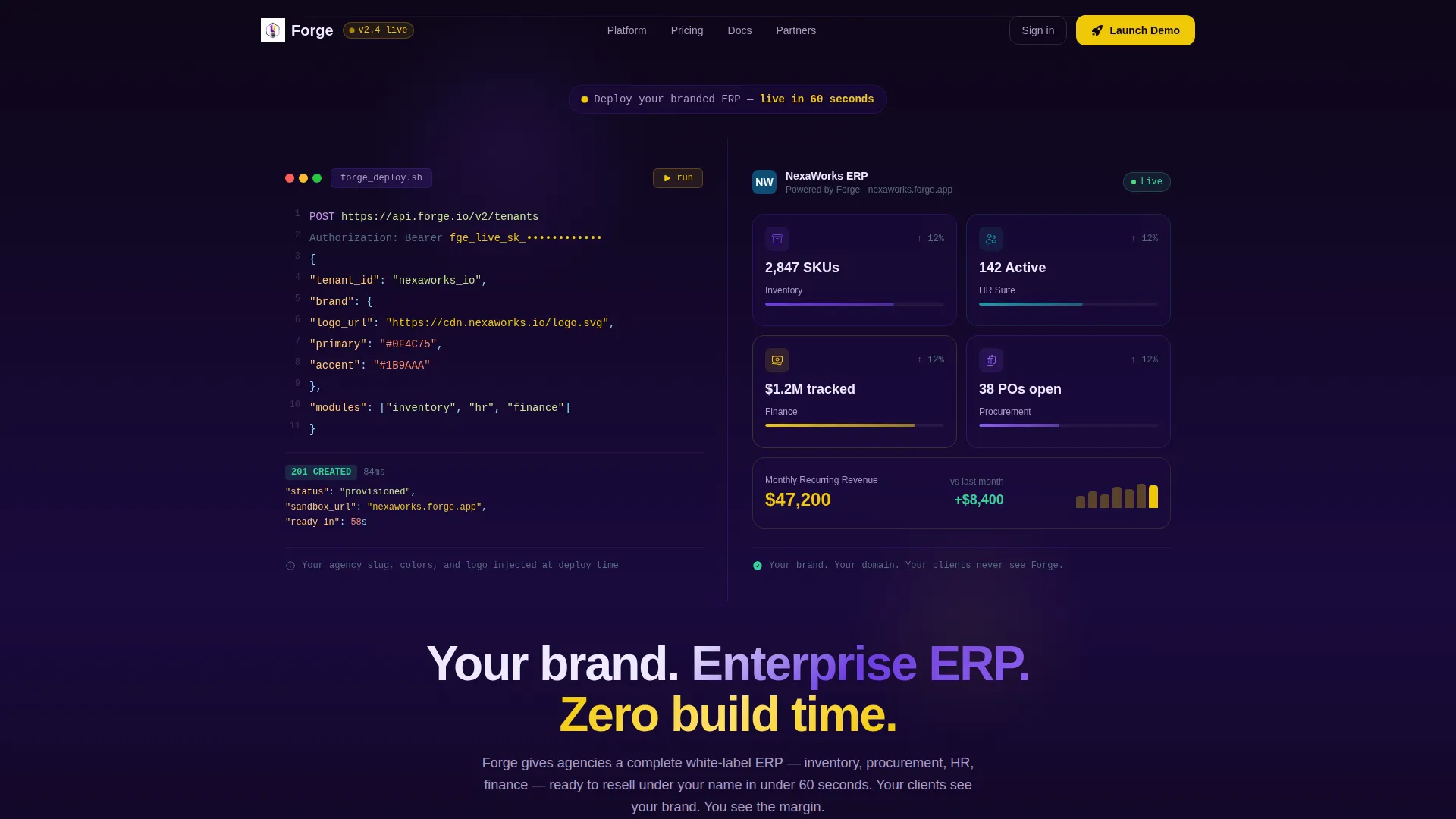
- A split-screen header where a live code snippet auto-types an agency-branded API call while the resulting dashboard materializes in real time on the right
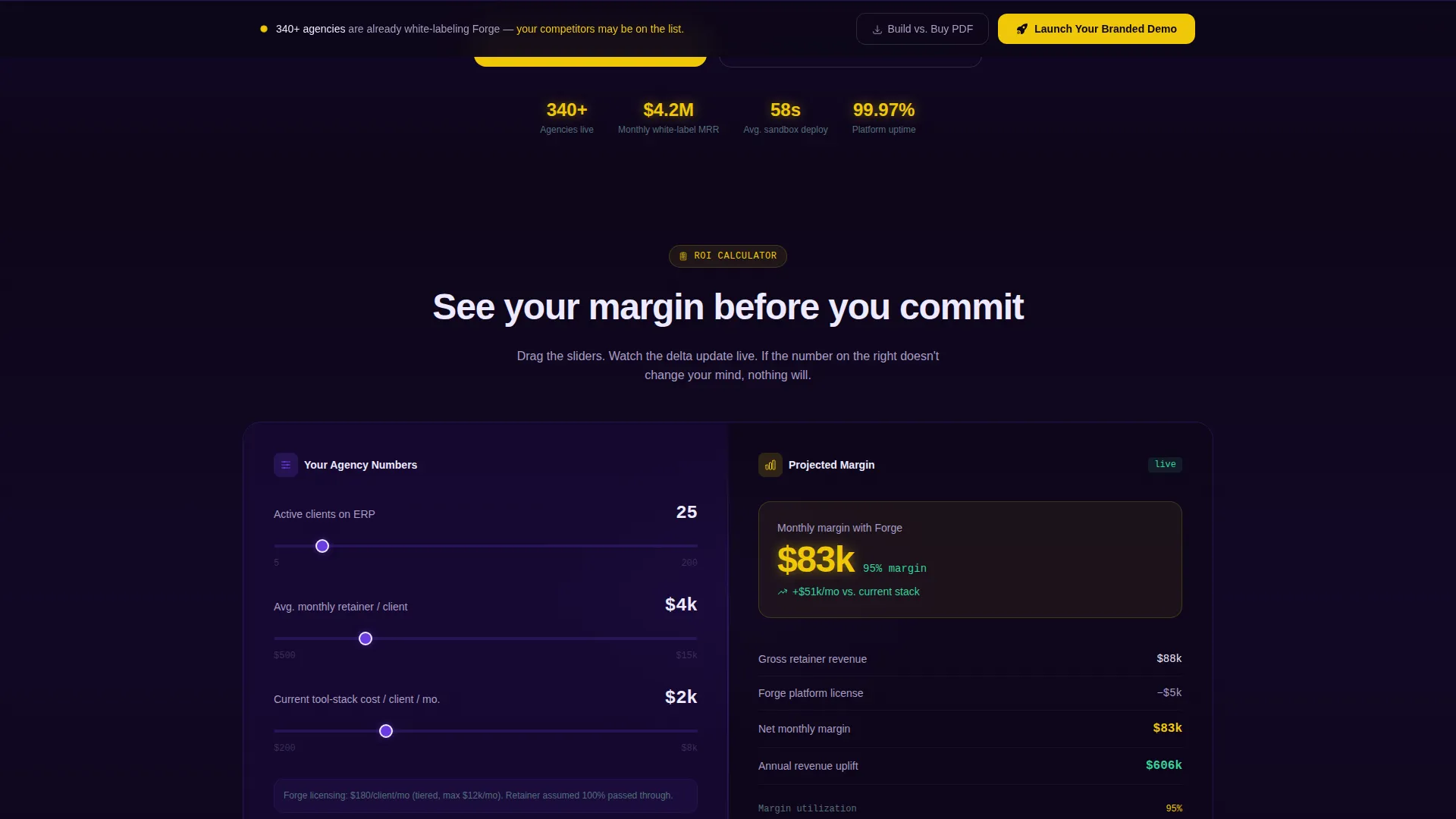
- An interactive ROI calculator that animates projected white-label margin as sliders move, with the revenue delta highlighted in arc yellow
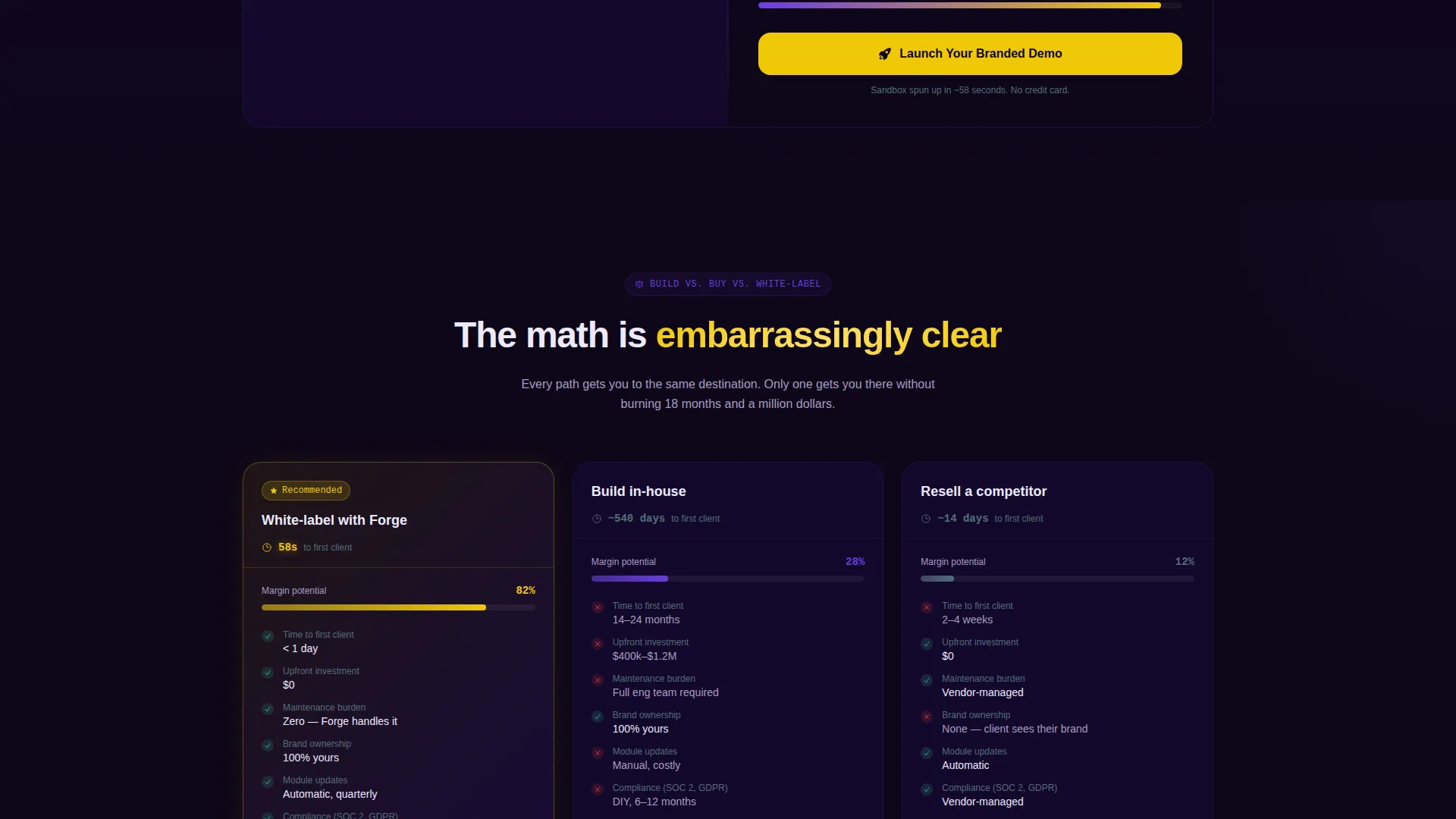
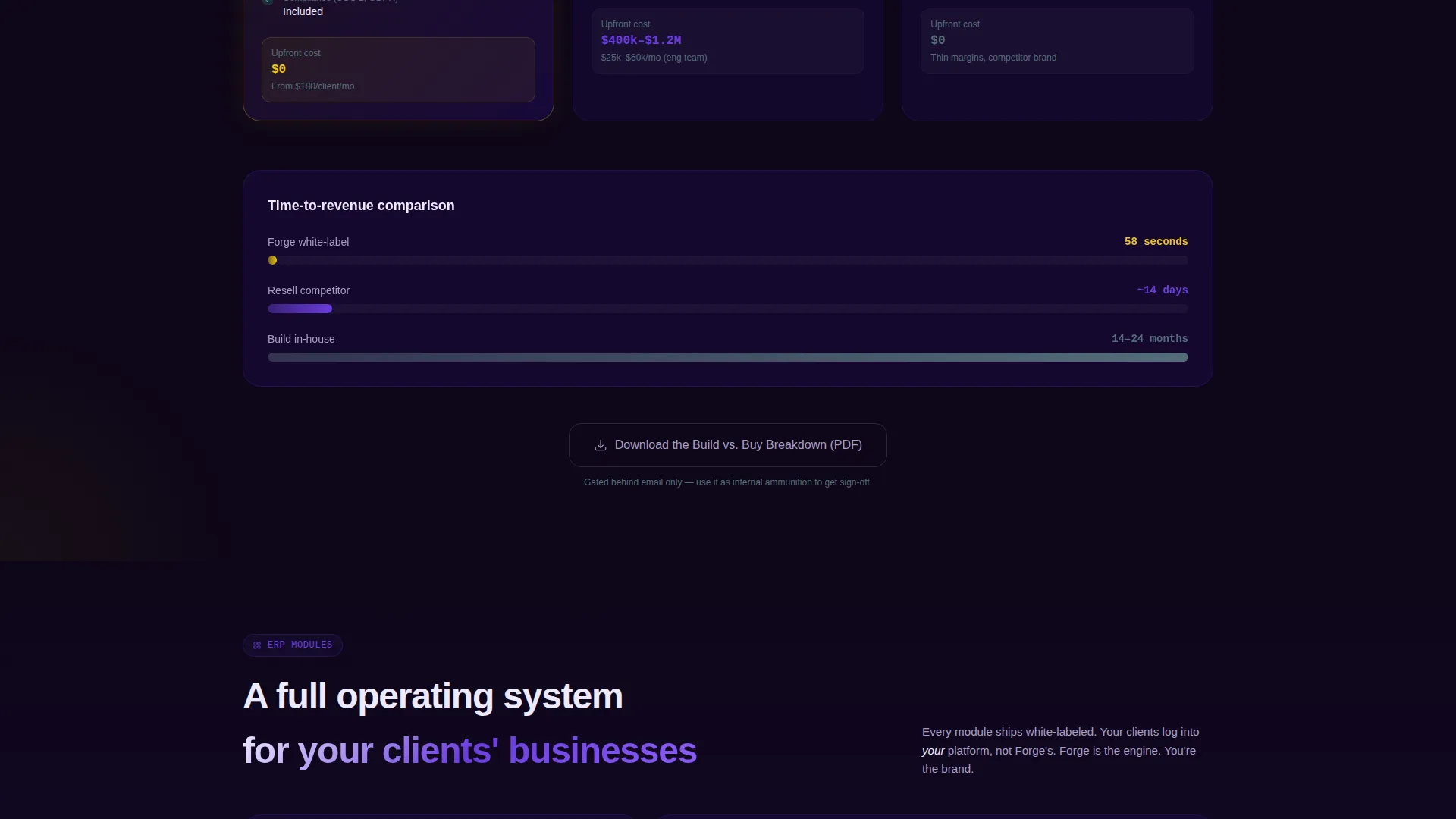
- Animated comparison sections that pit white-label against build-in-house and against reselling a competitor, using progress bars, cost timelines, and deployment clocks
Feature list
This template ships as a cohesive, motion-driven layout. Each feature below maps directly to a named component described in the brief.
Live Code-Snippet Header
The header splits 50/50. The left pane shows a syntax-highlighted API call with the agency's logo URL, color tokens, and tenant ID auto-typing in real time. The right pane renders the branded dashboard as the code completes. No stock photography is used; the product demonstrates itself within the first three seconds.
Interactive ROI Calculator
Immediately below the fold, a two-pane calculator lets visitors enter their number of clients, average monthly retainer, and current tool-stack cost. The right pane animates a live margin projection, showing white-label revenue minus platform licensing. The growing delta is rendered in arc yellow to draw the eye exactly where it matters.
Animated Comparison Sections
After the calculator, the page shifts into structured comparison territory. Each section shows the white-label approach alongside building in-house and reselling a branded competitor. Animated progress bars, cost timelines, and deployment clocks tick in real time as each block enters the viewport.
Two-Step Conversion Form
The primary call to action, "Launch Your Branded Demo," opens a two-step form. Step one captures agency name, number of clients, and work email. Step two lets the visitor select three ERP modules to include in a sandbox instance.
Sticky Secondary call to action Bar
A sticky bottom bar keeps the primary call to action visible after the visitor scrolls past the comparison tables. A secondary path, "Download the Build versus. Buy Breakdown," gates a PDF behind a single email field to capture visitors who need internal proof before committing.
Dynamic Motion Design System
Every data point enters the viewport with velocity. Spring-eased animations move dashboard modules into place, progress bars fill on scroll, and deployment clocks tick live. Motion is the connective tissue across every section, making static content almost nonexistent.
Page sections overview
| Section | Purpose |
|---|---|
| Split-screen header | Auto-typing API snippet reveals branded ERP dashboard in real time |
| ROI calculator | Animates white-label margin projection as visitors adjust sliders |
| Comparison: build versus. buy | Shows cost and time difference against building in-house |
| Comparison: competitor resell | Contrasts white-label ownership against reselling a named rival |
| Primary call to action block | Contextual "Launch Your Branded Demo" button after calculator results |
| Two-step demo form | Captures agency details, then lets visitor choose ERP modules |
| Sticky call to action bar | Keeps demo and PDF download calls to action visible across scroll depth |
| PDF gated download | Secondary conversion path for visitors needing internal ammunition |
Design & branding system
The Electric Indigo color system gives the page a server-room atmosphere. Every shade is chosen so that critical signals stand out against a deep, receding background.
- Deep void indigo (#1A0A3E) as the primary background, charged violet (#6C3CE1) on interactive surfaces and hover states, and plasma white (#EDEAFF) for body text and card fills
- Arc yellow (#F0C808) reserved exclusively for calls to action and live data accents, ensuring those elements command immediate attention
- Dynamic Motion theme drives every transition: spring-eased module reveals, velocity-based viewport entries, and live-ticking data elements replace static decoration throughout
Mobile & speed optimization
The split-screen layout is built to adapt across screen sizes while preserving the motion-first design intent. Each interactive component is structured for responsive reflow without breaking the visual logic of the 50/50 split.
- The 50/50 split-screen sections reflow gracefully on smaller viewports so the code snippet and dashboard demo remain readable on mobile
- Interactive calculator sliders and animated data elements are touch-friendly and retain their live-update behavior on mobile browsers
- Sticky call to action bar and two-step form remain accessible at all scroll depths across device sizes
How this template helps you convert
Forge is structured so that every scroll step increases visitor commitment before any form appears. Conversion happens through demonstrated value, not persuasion copy.
- The ROI calculator creates a personalized margin number early in the session. The "Launch Your Branded Demo" call to action appears in context, right after the visitor sees their own projected revenue, making the click feel like a logical next step rather than a sales push.
- The animated comparison sections replace objections with data. By the time the sticky call to action bar appears, visitors have already seen cost timelines, deployment clocks, and side-by-side breakdowns. The secondary PDF download gives fence-sitters a low-friction way to gather internal proof without leaving empty-handed.
Other information about this template
Forge is a single-page layout designed specifically for the white-label enterprise resource planning niche. It covers the full buyer journey from curiosity to qualified demo request within one continuous scroll.
- The template covers four core ERP module categories shown in the demo: inventory, procurement, human resources, and finance
- The sandbox demo flow is built into the two-step form, letting the agency's prospect experience a real module selection before the first sales call
- The PDF gated download is designed as a leave-behind for internal stakeholders, reducing the friction of multi-stakeholder buying decisions
- This template is well-suited for agencies pitching enterprise resource planning solutions to mid-market business clients who are moving off spreadsheets
Theme
Dynamic Motion
Creative direction
Calculator/Tool First
Color system
Electric Indigo
Style
Split Screen (50/50)
Direction
Comparison/Versus
Page Sections
Live Code-snippet Header
Interactive ROI Calculator
Animated Comparison Sections
Two-step Demo Conversion Form
Sticky Call to Action Bar and PDF Gate
Dynamic Motion Design System
Related questions
What kind of agency is this template best suited for?
Does the template include a working ROI calculator?
How does the two-step demo form work?
Can the PDF download be used as a standalone conversion path?
What ERP modules does the template reference in the demo flow?



