Specialist Directory & Marketplace Platforms Reviews & Social Proof Website Template
Workgrid is a modular card grid landing page template built for coworking space directories. It features a tab-switching header, a filterable amenity matrix, testimonial cards, and a freemium conversion flow. The Tech Glass visual theme pairs deep charcoal backgrounds with catalyst teal and signal green to create a crisp, high-trust browsing experience for freelancers, founders, and remote teams.
by Rocket studio
Quick summary
Workgrid is a single-page coworking space directory template built around a modular card grid layout. It opens with a live-feeling tab switcher header, moves through a structured amenity comparison matrix, and closes with clear freemium conversion prompts. The design follows a Tech Glass aesthetic with a Teal Catalyst color system that feels clean, modern, and immediately trustworthy.
Who this template is for
This template is built for anyone launching or promoting a coworking space directory. It speaks directly to the people who browse those directories every day, and it is designed to convert them.
- Freelance developers looking for a reliable four-day-per-week workspace base
- Startup founders who need several desks quickly after closing a funding round
- Remote corporate teams searching for satellite office space in a new city
What problem this template solves
Finding shared workspace online is often frustrating. Most directory pages bury the useful details behind registration walls or present spaces in a way that makes comparison nearly impossible.
- Visitors cannot quickly compare amenities like Wi-Fi speed, noise level, or printer availability across multiple spaces
- Browsers leave before signing up because the page asks for credentials before proving its value
- Freelancers, small teams, and enterprise remote workers all have different needs, and a one-size layout fails all three groups
What you get with this template
This template delivers a complete, ready-to-customise landing page structured around real browsing and decision behaviour. Every section earns the next click before asking for anything in return.
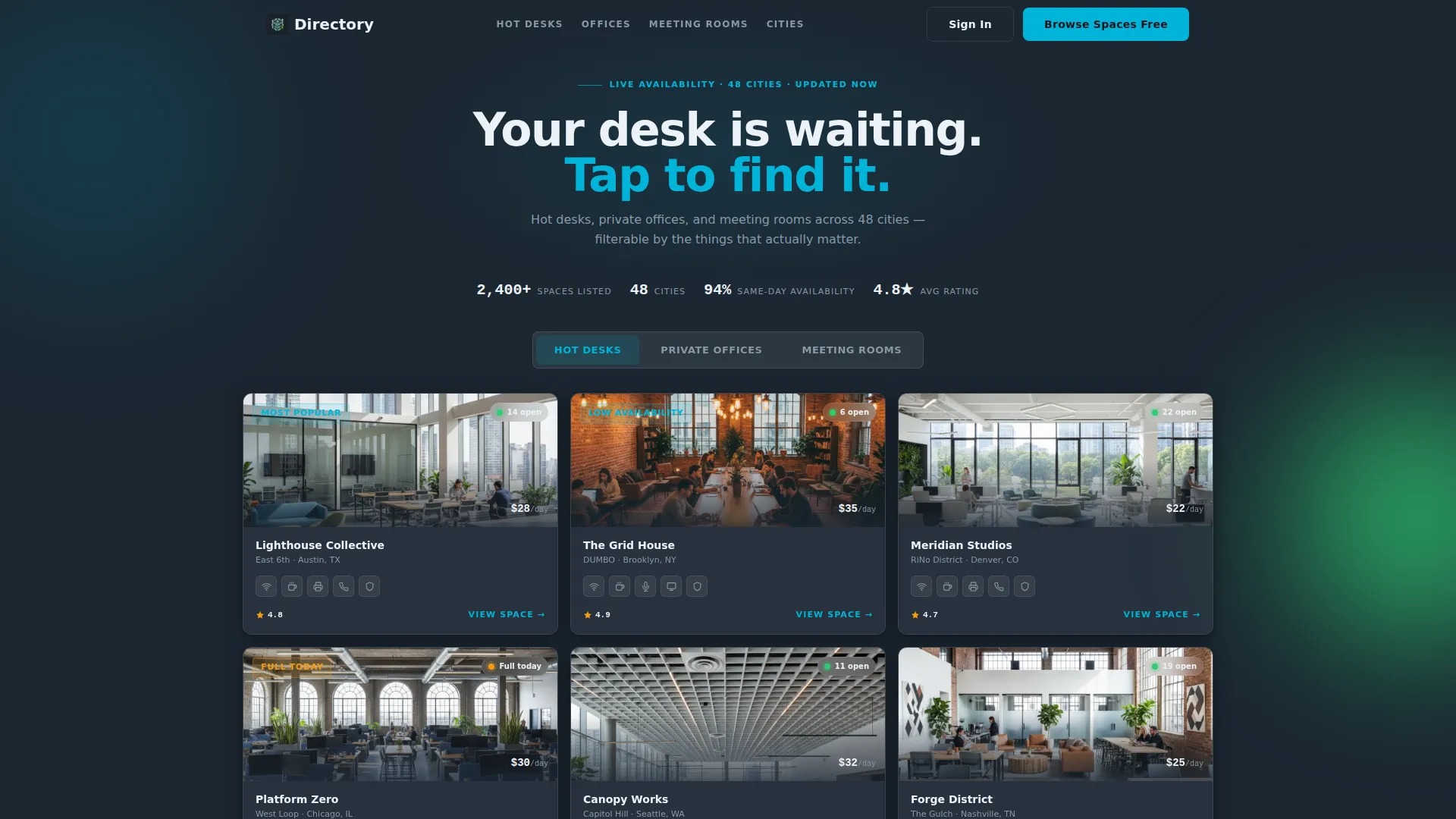
- A tab-switching header mosaic showing hot desks, private offices, and meeting rooms as live-feeling space cards
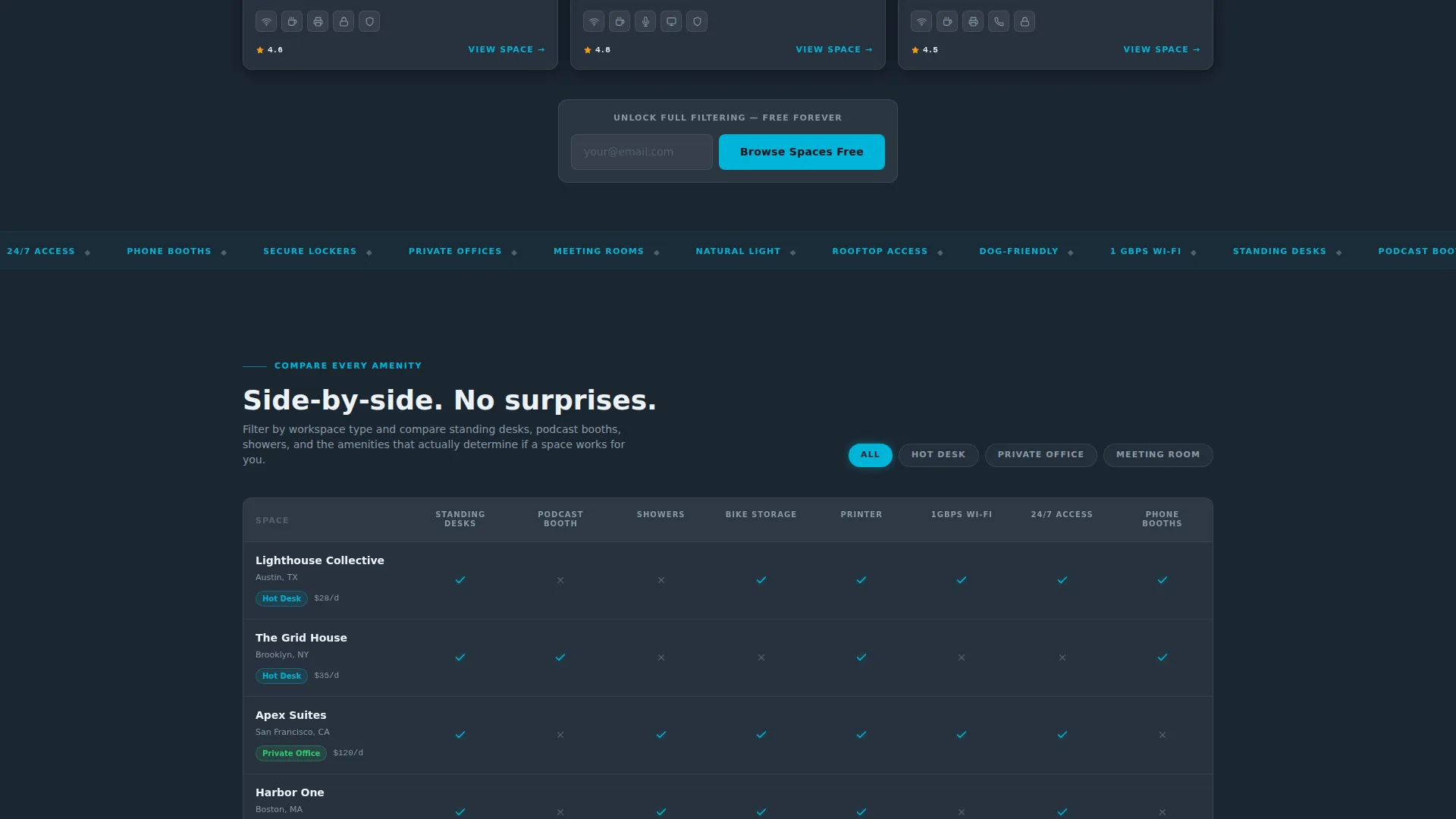
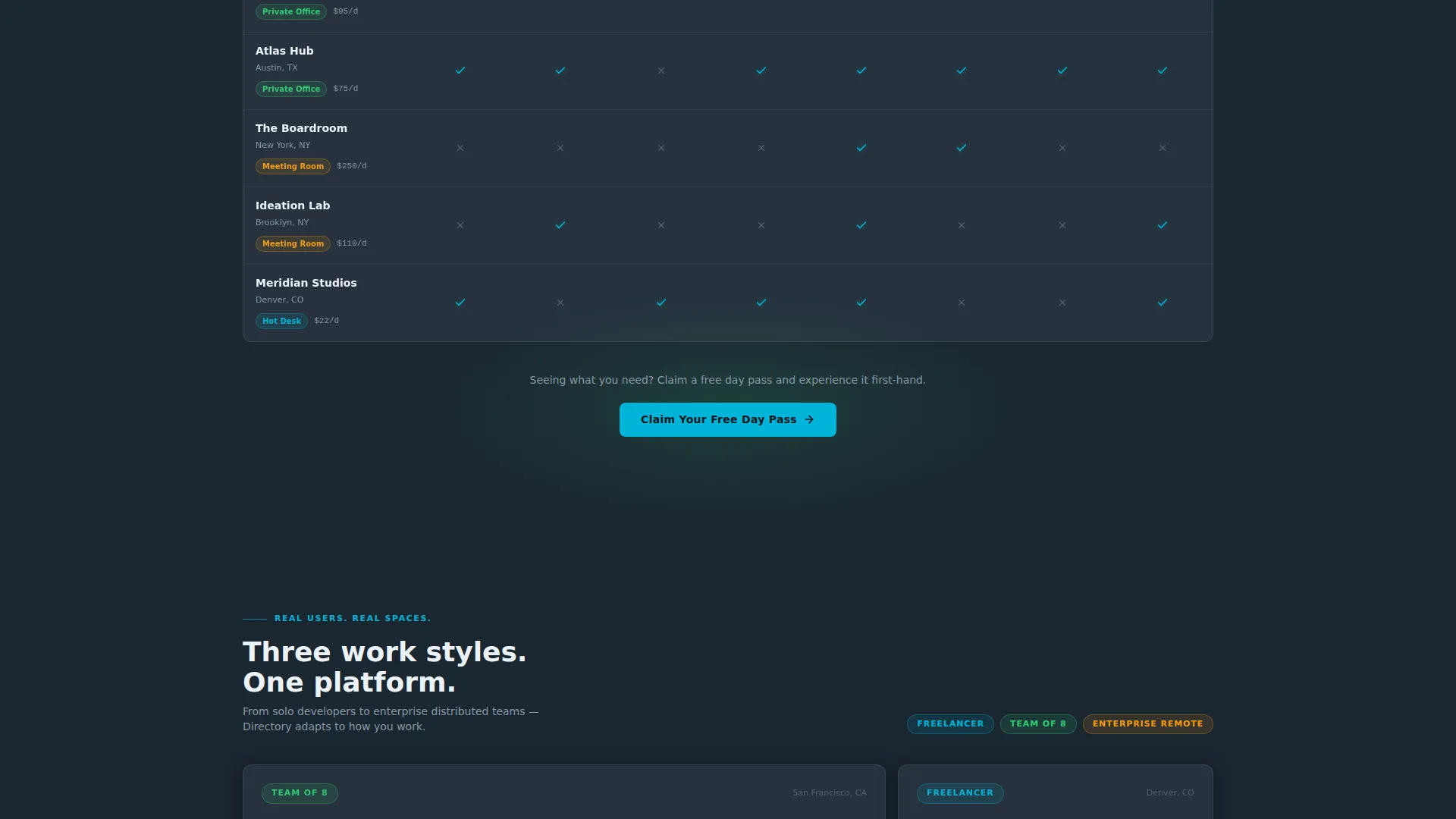
- A filterable amenity comparison matrix with checkmark rows for standing desks, podcast booths, showers, and bike storage
- A dual-path freemium conversion system with a primary email-only sign-up and a secondary day-pass claim form
Feature list
This template is built around a modular card grid system with purpose-designed sections. Each feature below reflects a prompt-specified component delivered in the layout.
Tab-Switching Space Mosaic Header
Three clickable tabs labeled "Hot Desks," "Private Offices," and "Meeting Rooms" sit above a grid of space cards. Switching tabs reshuffles the mosaic with a stagger animation. Each card shows a cropped interior photo, a five-point amenity icon row, a price-per-day figure, and a glowing availability dot in green or amber. There is no static hero image; the directory itself is the header.
Filterable Amenity Comparison Matrix
Scrolling past the header reveals a structured feature matrix. Each row represents a coworking space and each column represents an amenity such as standing desks, podcast booths, showers, and bike storage. Checkmarks glow in catalyst teal, making it easy to scan and compare spaces at a glance without clicking into individual listings.
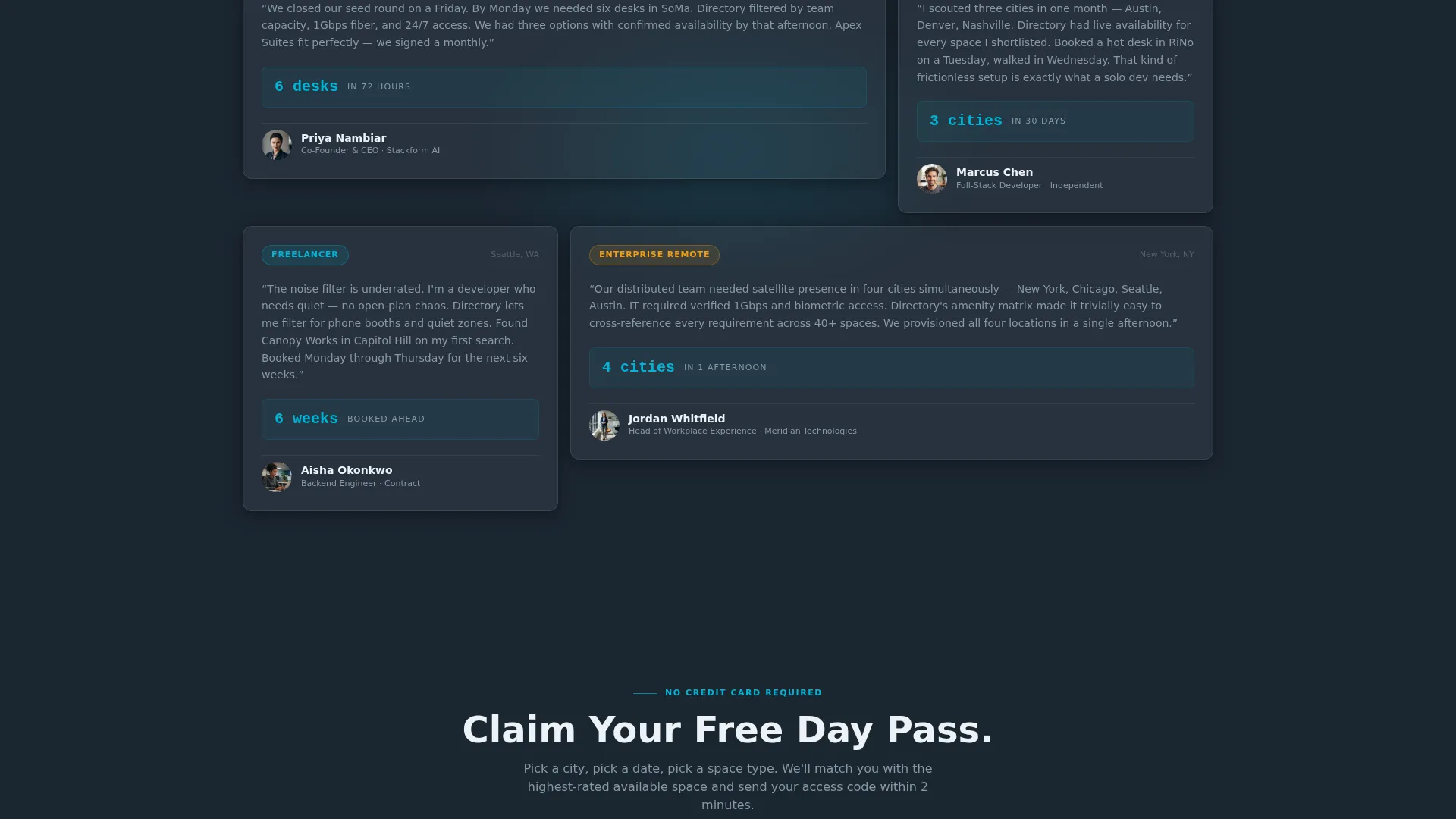
Work-Style Testimonial Cards
A testimonial section stacks cards from real-user perspectives tagged by work style. Tags include labels like "Freelancer," "Team of 8," and "Enterprise Remote." This section builds trust through structured social proof and shows prospective users that the directory serves people like them.
Sticky Navigation with Primary call to action
A sticky navigation bar keeps the "Browse Spaces Free" call to action visible throughout the scroll. Visitors can act on the primary prompt at any point without scrolling back to the top. The sticky bar uses catalyst teal on interactive elements to stay visually consistent with the rest of the page.
Dual Conversion Path Flow
The primary conversion path asks only for an email address in exchange for full filtering, saved searches, and real-time availability alerts. The secondary path, labeled "Claim Your Free Day Pass," appears after the comparison matrix and collects city, preferred date, and workspace type. Both paths are designed to lower friction and convert browsers into active users.
Space Card Grid with Availability Badges
Space cards float against the deep charcoal background on subtle box-shadows. Each card face uses frosted-panel white and carries a signal green or amber availability badge. Cards use teal edge highlights on hover, creating a screen-wake interaction that reinforces the Tech Glass visual identity.
Page sections overview
| Section | Purpose |
|---|---|
| Tab Switcher Header | Browse spaces by type with animated card reshuffling |
| Sticky Navigation Bar | Keep primary call to action accessible throughout the full scroll |
| Space Card Grid | Display filterable listings with photos, amenities, and pricing |
| Primary call to action Block | Prompt email sign-up below the first card grid |
| Amenity Matrix | Compare workspace features across listings in one view |
| Testimonial Cards | Build trust with work-style-tagged user perspectives |
| Day Pass call to action | Collect city, date, and workspace type for trial conversion |
Design & branding system
The visual identity follows a Tech Glass theme powered by the Teal Catalyst color system. The palette feels like a glass partition catching overhead LEDs in a freshly built tech hub.
- Deep workspace charcoal (#1B2631) fills the primary background; frosted-panel white (#EDF2F7) surfaces every card face
- Catalyst teal (#00B4D8) activates all interactive elements, hover states, and teal checkmark glows in the matrix
- Signal green (#2ECC71) marks availability badges and confirmation states, with amber used for limited-availability indicators
Mobile & speed optimization
The modular card grid layout is structured to reflow cleanly across screen sizes. The template is built with a responsive-first approach so the directory remains usable on smaller devices.
- Card grids restack into single or double columns on narrower viewports, keeping photos and amenity icons legible
- The sticky navigation and dual call to action placement are designed to stay accessible on touch screens without overlapping content
How this template helps you convert
Every section of this landing page is designed to move a visitor one step closer to signing up, without forcing the decision before they are ready.
- The tab-switching header lets visitors interact with real space cards immediately, proving the directory's value before any sign-up prompt appears
- The amenity matrix and testimonial section add layers of structured evidence as the visitor scrolls, building confidence through comparison and social proof
- The dual conversion paths lower the commitment barrier by offering a free email sign-up first and a day pass trial second, meeting visitors at different levels of readiness
Other information about this template
This template sits within the Technology category and the Directory and Marketplace Platforms subcategory. It is purpose-built for the coworking space directory niche.
- The template style is Card Grid (Modular), making individual space cards easy to add, remove, or reorder during customisation
- The creative direction is Feature Matrix, meaning structured comparison evidence is the primary persuasion engine across the scroll
- The header concept is a Feature Tab Switcher, which replaces a traditional static hero with an interactive product-first experience
- The landing page direction follows a Freemium and Trial model, prioritising value demonstration before credential collection
- The theme is Tech Glass and the color system is Teal Catalyst, both defined in the matched intersection context for this template
Theme
Tech Glass
Creative direction
Feature Matrix
Color system
Teal Catalyst
Style
Card Grid (Modular)
Direction
Freemium/Trial
Page Sections
Tab-switching Space Mosaic Header
Filterable Amenity Comparison Matrix
Work-style Testimonial Cards
Sticky Navigation with Primary Call to Action
Dual Freemium Conversion Paths
Space Cards with Availability Badges
Related questions
Can I customise the filter categories shown in the amenity matrix?
Does the template support listings for both solo users and teams?
How does the freemium conversion flow work in this template?
Is this template designed to handle a multi-city coworking directory?
What makes the header different from a standard hero section?



