
How can non-developers build real apps in 2026? Explore AI app builders, no-code platforms, key features, and top tools enabling founders and teams to create products quickly without coding expertise.
Want to build an app but don’t know how to code?
The best AI app builder for non-developers 2026 lets people create real products using simple prompts and visual tools instead of writing code.
The rise of AI app builders and no-code tools has changed how app development works. According to Gartner, more than 70% of new applications will be built using low-code or no-code platforms by 2025, compared to less than 25% in 2020.
So what does that mean for founders, creators, and small teams?
It means you can build web apps, mobile app products, and even client portals without hiring developers or spending months on setup.
Let’s walk through how modern AI app builders work, what features matter, and which tools stand out in 2026.
Why AI App Builders Are Growing Fast?
Traditional app development has always required developers. That means long timelines, expensive teams, and lots of writing code.
For non-technical founders, this creates a problem. You might have a strong app idea, but you cannot build it without help.
That is where AI app builders and no-code platforms come in.
Instead of writing code, users describe their idea using natural language or natural language prompts. The AI builder converts that into an AI app with working screens, backend logic, and structured data.
This approach makes app creation accessible for non-technical users.
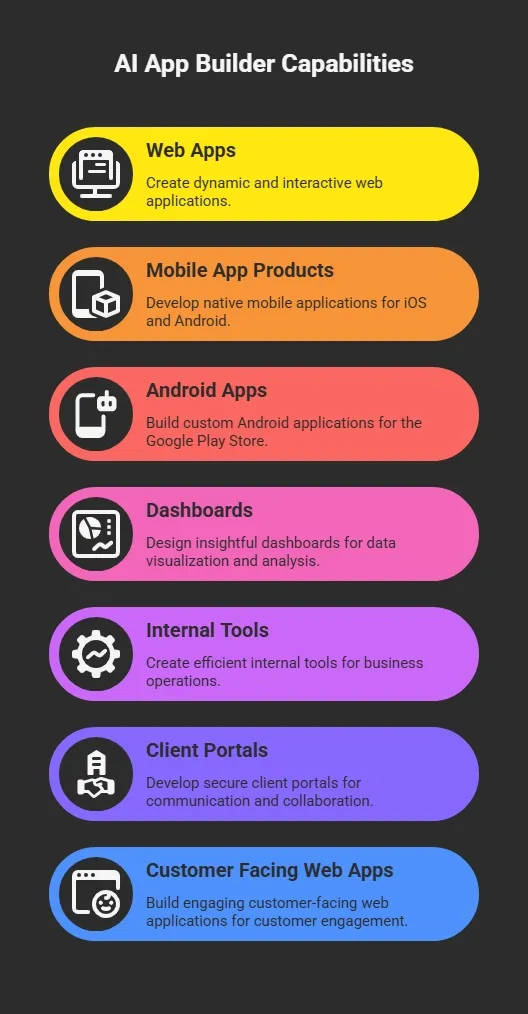
Many of these tools generate fully functional web apps within minutes. No developer required.
What an AI App Builder Actually Does?
So, you’ve got an app idea. You might be wondering: what really happens when I type it into a code AI app builder?
Well, modern AI app builders handle most of the heavy lifting automatically.
Here’s how they usually work:
- Interface generation: The visual editor and visual builder create layouts for your app using drag-and-drop components and drag-and-drop blocks. You can tweak everything visually without ever writing code.
- Backend setup: Good AI app builders automatically set up backend services, authentication, and user accounts. Your backend logic runs quietly in the background so you don’t have to worry about servers or databases.
- Data handling: Many platforms connect to structured data sources, like Google Sheets, making it easy to power dashboards, internal tools, and client portals without complex coding.
- Mobile publishing: Some AI app builders generate native or cross-platform mobile apps, ready to be published on Google Play or the Apple App Store once your app is finished.
- Code access: Advanced platforms often provide direct code access or code export, so if you want, you or a developer can modify the underlying code later.
In short, a modern AI app builder turns your idea into a working app with minimal effort. From visual design to backend setup to mobile publishing, it gives you the tools to launch faster without learning to code.
Key Features to Look for in the Best AI App Builder
Choosing the best AI app builder depends on several factors. Here are the most useful key features to evaluate.
| Feature | Why It Matters |
|---|---|
| Visual editor | Makes app creation simple using drag and drop components |
| Natural language prompts | Lets users describe features without writing code |
| Backend logic automation | Generates backend services and data workflows |
| Code export | Lets developers extend apps later |
| Custom domains | Allows publishing with branded URLs |
| Code editor | Provides access to real code if needed |
| Google Sheets support | Easy database option for internal tools |
These key features help quickly turn ideas into generated apps. They also reduce the need to hire developers during the early product stages.
Community Insight From Builders
Here’s a real comment from LinkedIn about Rocket.new:
“I gave an AI builder just one sentence and it built a complete working app. No setup. No coding. It just worked. The tool? Rocket (by DhiWise) → rocket.new. I’ve already used it to build multiple apps from one‑liners.”
That’s exactly why non-technical founders are using no-code tools instead of waiting months for development.
Rocket.new- Makes App Creation Easy as Typing
Rocket.new is a modern code AI app builder designed for non technical founders who want to build real products without writing code. You simply describe your idea using natural language, and the platform generates a working AI app with UI, backend logic, and data handling already set up.
It focuses on rapid app creation, making it easier to build web apps, mobile apps, and internal tools without going through traditional app development steps.
Top Features
- Prompt-to-app app generation using natural language prompts
- AI powered backend logic and automated workflows
- Flexible code export options for scaling later
- Support for custom domains for publishing
- Live preview while building your working app
The platform also includes an AI native code editor, along with optional code access for teams that want more control.
Use Cases
- Startup MVPs: Quickly build web apps to test an app idea with real users and validate concepts early.
- Internal tools: Create dashboards and workflows that leverage structured data from Google Sheets to support daily operations.
- Client portals: Build secure portals with login systems, user accounts, and analytics.
- AI product prototypes: Develop an AI app using built-in AI features and AI assistance for faster experimentation.
Most users start with a free plan or free tier, then move to paid plans as their apps grow.
Rocket.new shows how far AI app builders have come. It allows non-technical founders to go from idea to a working app in a short time without dealing with complex setups.
If you are serious about building apps without coding in 2026, tools like this make the process simple, fast, and practical.
How Much Control Do You Really Have?
A common question is how much control these tools provide. The answer depends on the app builder. Some platforms focus entirely on no-code workflows. Others allow deeper access.
For example, advanced tools provide:
- Direct code access
- A built-in code editor
- Code export
- Access to the source code
This means developers can refine complex apps later. For non technical founders, this hybrid model works well. You start with no code and switch to real code when needed.
Limitations of AI App Builders
AI tools have made building apps much easier. Still, they are not perfect.
Before choosing an AI app builder, it helps to understand where these tools may fall short, especially for more advanced use cases.
Common Challenges
- Handling complex business logic: Some AI app builders struggle with apps that require deep workflows or highly specific rules. Managing complex business logic can still be tricky without developer support.
- Advanced customization limits: While you can easily build many web apps, certain complex web applications still require custom development. Full flexibility is not always available in no code environments.
- Learning curve with tools: Even though these platforms are built for non-technical users, there can still be a small learning curve, especially when using a visual editor or setting up workflows.
So, while AI app builders are great for simple apps, dashboards, and internal tools, they may not fully replace traditional app development in every case.
The smart approach is to use them for speed and early growth, then bring in deeper customization only when your product really needs it.
Building Apps Without Coding in 2026
Many non technical founders have strong ideas but cannot turn them into real products without writing code. Traditional app development often requires teams, long timelines, and high costs. That slows things down and makes it harder to test ideas early.
Modern AI app builders and no-code platform tools change that. The best AI app builder for non-developers in 2026 helps creators build web apps, mobile apps, and internal tools using natural language prompts, a visual editor, and automated backend logic. This makes it easier to quickly launch a working app and reduces the need to hire developers in the early stages.
Table of contents
- -Why AI App Builders Are Growing Fast?
- -What an AI App Builder Actually Does?
- -Key Features to Look for in the Best AI App Builder
- -Community Insight From Builders
- -Rocket.new- Makes App Creation Easy as Typing
- -Top Features
- -Use Cases
- -How Much Control Do You Really Have?
- -Limitations of AI App Builders
- -Common Challenges
- -Building Apps Without Coding in 2026