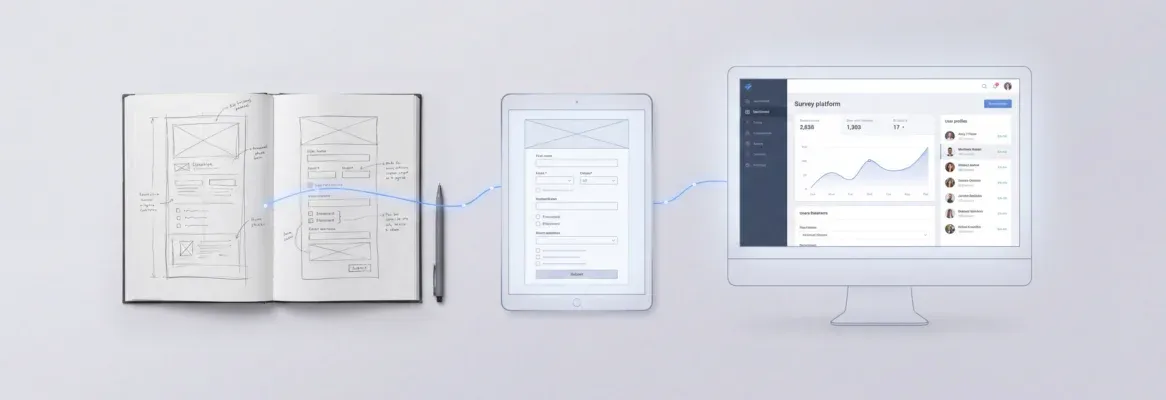
Want to build apps faster without coding hurdles? Use smart prompts and AI tools to guide development, reduce errors, and speed up progress, helping turn ideas into functional apps quickly and efficiently.
How to build an app faster without getting stuck in code?
You can do it by using the right prompts and smart AI tools. Instead of writing every line of code, you guide the system using simple instructions in natural language. This makes the process faster and much easier to handle.
Recent GitHub reports show that AI tools can help developers code up to 55% faster, accelerating app development and reducing errors.
So, if you're serious about creating apps quickly, learning the best prompts for app building can make a huge difference. It helps you move from idea to a working app without getting stuck.
What are Prompts in App Building?
So, what exactly are prompts in app building?
Think of them as simple instructions you give to an AI app builder. Instead of writing complex code, you describe what you want using natural language, and the tool handles the heavy lifting for you.
👉Worth a Quick Read: Best AI App Builder Tools to Create Apps Faster in 2026
Key Points to Understand
-
Prompts are instructions that guide the app builder
-
You can use natural language to describe your app idea
-
The tool can generate code, layouts, and features based on your input
-
A good prompt is clear, simple, and direct
-
You don’t need deep coding experience to get started
-
Natural language prompts make the process faster and more beginner-friendly
Example Prompt
“Create a fitness app with user profiles, progress tracking, and a clean dashboard.”
This single prompt already gives the tool enough direction to start building a functional app.
Well, once you understand how prompts work, app building becomes much easier. You just focus on your idea and give clear instructions. The better your prompt, the better your results.
Why Prompts Matter in App Development
In modern app development, prompts act like your blueprint. Instead of writing every line of code, you guide the system with instructions.
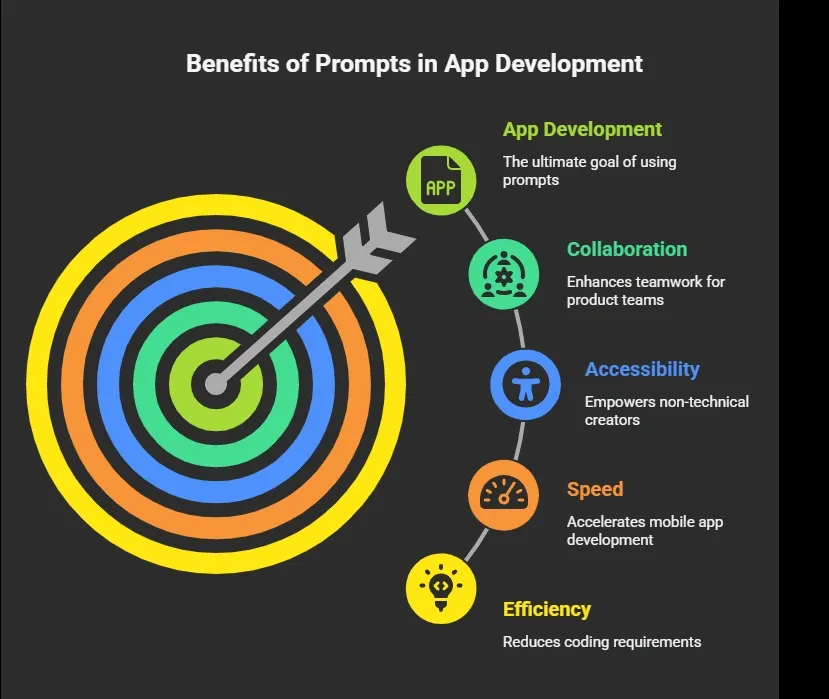
Also, with AI, the ability to write effective prompts is becoming a core skill in software development.
Types of Prompts You Should Know
So, not all prompts work the same way. Some are quick and simple, while others give you more control over your app. The type you choose depends on how detailed you want your results to be. Let’s break them down in a clear and practical way.
1. Single Prompt Approach
You give one single prompt and let the tool create the full app.
Example:
“Create an e-commerce app with product listing, cart, order history, and user authentication.”
This works well for a quick first version.
2. Structured Prompts
Here, you break your instructions into parts. These are structured prompts.
Example:
-
Create user accounts
-
Add user profiles with profile pictures
-
Add order history
-
Connect to data sources
This gives you more control over features and functionality.
3. Few-Shot Prompting
You show examples before asking the tool to create something new. This is called few-shot prompting.
Example:
“Here is an example of a dashboard layout… Now create a similar interface for a fitness app.”
This improves results and gives better design consistency.
Then, once you understand these types, you can choose the right approach based on your goal. Start with simple prompts and, when needed, move to more detailed ones. The smarter your approach, the smoother your app-building process will feel.
Best Prompts for App Building
Alright, let’s get practical.
Once you understand how prompts work, the next step is using them the right way. Below are some of the best app-building prompts you can try right away.
These are simple, clear, and designed to help you create real apps faster.
1. Fitness App Prompt
-
Create a fitness app for busy professionals
-
Add user profiles for a personalized experience
-
Include progress tracking and daily workout plans
-
Use large touch targets for better usability
-
Apply a soft color palette so the app feels calming
2. e-Commerce App Prompt
-
Build an e-commerce app with a product catalog
-
Add cart and checkout functionality
-
Include order history for users
-
Set up user authentication for secure access
-
Add user profiles with quick access to previous orders
3. Internal Tools Prompt
-
Create internal tools for managing employee tasks
-
Add dashboards and reporting features
-
Include user accounts with role-based access
-
Use data visualization for better insights
4. Mental Health App Prompt
-
Create a mental health app with mood tracking
-
Add journaling features for daily reflections
-
Include reminders for consistency
-
Use interactive elements for better engagement
-
Keep navigation simple and clean
5. Savings App Prompt
-
Build an app to track savings goals
-
Add expense tracking and financial insights
-
Include user profiles for personalization
-
Show visual reports for better understanding
So, these examples give you a strong starting point. You can always tweak them based on your idea or target audience. Keep your prompts clear, stay focused on core features, and test what works best. The more you practice, the better your prompts and results will get.
Prompt Structure That Works
A good prompt usually follows this structure:
| Element | Description | Example |
|---|---|---|
| App Idea | What do you want to create | Fitness app |
| Target Audience | Who will use it | Busy professionals |
| Core Features | Main features | Progress tracking |
| Design Style | Look and feel | Soft color palette |
| Data | What to store | User profiles |
This helps the AI understand the complete picture.
Tips for Writing Effective Prompts
So, if you want better results from your app builder, it all comes down to how you write your prompts. You don’t need complex words or long explanations. You just need clarity and a simple approach.
-
Be clear and direct: Use clear instructions and avoid unnecessary technical jargon so the tool understands exactly what to create
-
Focus on core functionality: Start with the main features of your app, then expand step by step
-
Use natural language: Write prompts the way you would explain your idea to a person
-
Avoid sending multiple separate requests: Too many inputs can confuse the system, so group minor adjustments together
-
Test and improve: Always test your app after each change and refine your prompts based on results
Then, as you keep practicing, your prompts will get sharper and more effective. The simpler and clearer you are, the better your app will turn out.
Common Mistakes to Avoid
Even good creators make mistakes, especially when starting out with prompts. The good part is that most of these are easy to fix once you notice them.
-
Writing vague prompts
-
Ignoring the target audience
-
Adding too many features at once
-
Not testing the app properly
-
Using too much technical jargon
Once you avoid these mistakes, your prompts become cleaner and your results improve quickly.
How AI App Builders Change the Game
So, what makes an AI app builder so useful? It simplifies the entire app-creation process, especially if you don’t have deep coding knowledge.
These tools:
-
Generate native code
-
Provide visual editor support
-
Help create scalable apps
-
Allow quick layout tweaks
Finally, with the right tool and good prompts, building apps becomes faster, smoother, and much more accessible.
Community Insight
Sometimes, the best tips come from people actually building with AI every day. Here’s a practical insight shared on LinkedIn:
“Prompt engineering is less about the tool and more about how clearly you define the problem.” Linkedin
This keeps it simple and real. When your instructions are clear, your results improve. It’s not about complex prompts; it’s about saying exactly what you want your app to do.
Rocket.new and Smarter App Building
Rocket.new is a vibe solutioning platform that focuses on turning simple ideas into real apps without heavy coding. It helps creators move from concept to execution using natural language, making the whole process feel more intuitive and less technical.
It’s designed for speed and clarity. You describe what you want, and the app builder translates that into structure, interface, and working features. This makes it a great fit for creators who want results without getting stuck in complex code.
Key Features
-
Prompt to App Creation: Builds apps directly from single prompts
-
Figma Import: Converts design files into live, editable layouts
-
Reusable Components: Speeds up building with ready-to-use elements
-
Command-based actions: Use / and @ to run actions and quickly scope edits.
-
AI-Powered Backend: Automatically handles logic, data, and workflows
-
Custom Domain Support: Publishes projects with a branded domain
-
Live Preview: Shows instant updates while editing
-
Code Export: Allows developers to extend or customize later
How It Makes App Building Easy
So, how does it actually simplify things? It all comes down to prompts.
With Rocket.new, you can create an app just by describing your idea in natural language. You don’t need deep coding experience or long setup processes. You give clear instructions, and the tool handles the rest.
For example, you can type something like:
“Create a fitness app with user profiles, progress tracking, and a clean interface.”
The platform takes that prompt and starts building your app structure, features, and interface. From there, you can make small changes, test functionality, and improve step by step.
It also lets you refine your app without starting over. You can easily adjust features, update layouts, and connect data sources. This makes the whole process smooth and practical, especially when you’re working on real ideas.
So, if your goal is to create apps quickly and stay focused on your idea instead of the code, Rocket.new makes the process much easier and more manageable.
Bringing It All Together
Many people struggle with app development because of complex code, unclear instructions, and slow progress. This makes building mobile apps feel confusing and hard to manage, especially if you don’t have much coding experience. When the focus shifts too much toward technical details, it becomes difficult to move from an idea to a working app.
The solution is simple. Use AI app builder tools with structured prompts and clear instructions. Focus on simple ideas, build step by step, and keep testing along the way. The best prompts for app building are clear, direct, and focused on users. Start small, improve gradually, and you’ll be able to create apps faster without getting stuck.
Table of contents
- -What are Prompts in App Building?
- -Key Points to Understand
- -Example Prompt
- -Why Prompts Matter in App Development
- -Types of Prompts You Should Know
- -1\. Single Prompt Approach
- -2\. Structured Prompts
- -3\. Few-Shot Prompting
- -Best Prompts for App Building
- -1\. Fitness App Prompt
- -2\. e-Commerce App Prompt
- -3\. Internal Tools Prompt
- -4\. Mental Health App Prompt
- -5\. Savings App Prompt
- -Prompt Structure That Works
- -Tips for Writing Effective Prompts
- -Common Mistakes to Avoid
- -How AI App Builders Change the Game
- -Community Insight
- -Rocket.new and Smarter App Building
- -Key Features
- -How It Makes App Building Easy
- -Bringing It All Together