
Want to launch web apps with minimal effort? Discover how AI and no-code tools enable small teams to build, design, and deploy applications efficiently without large budgets or technical expertise.
How can small teams ship web apps faster using AI?
Today’s AI tools and no-code platforms let you turn an idea into a working app using plain language and simple steps. Modern AI can handle design, backend, and logic without heavy coding experience, and you don’t need a big budget or a tech team anymore.
In fact, a report by Gartner low-code forecast report predicts that over 70% of new applications will use low-code or no-code tools by 2025.
This blog gives you a simple, step-by-step path to turn your idea into a working app using AI and no-code tools, without needing a team or technical background.
Why AI is Changing the Way We Create Apps?
Let’s be real. A few years ago, building a web app meant writing code, hiring developers, and waiting months. Now? Things are very different.
AI app builder platforms and no-code builder tools are making app development simple. You can describe your idea using natural language prompts, and the system will generate the app’s code, backend, and UI.
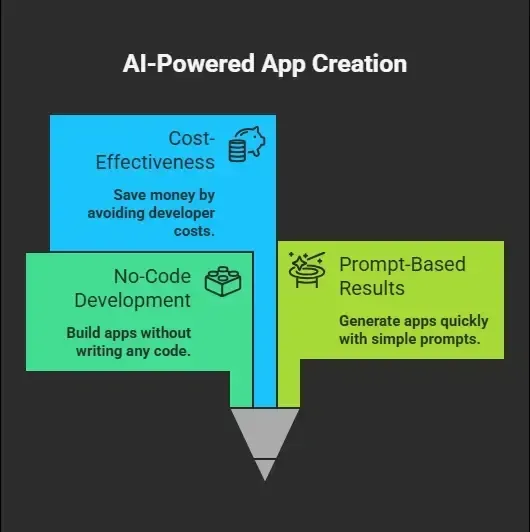
And yes, many of these tools also support mobile apps and native mobile outputs.
What You Actually Need to Get Started
Before you start building, you need a few basics.
1. A Clear Idea
Every app starts with an idea. Keep it simple. Don’t try to build the next big thing on day one.
Think about:
-
What problem does your app solve
-
Who will use it
-
What features matter most
Good app ideas are simple and focused.
2. The Right Tools
You’ll need AI coding tools or an AI app builder. These tools handle most of the technical implementation.
Some popular categories:
-
No code app builder platforms
-
AI powered app generators
-
Visual editor based tools
The best AI app builder platforms combine all three.
Step-by-Step: Build Your First Web App
You don’t need any coding experience to follow these steps. Just focus on your idea and use simple prompts. The tools will handle most of the work for you.
Don’t overthink the process. Start with a simple idea, use clear prompts, and let the app builder guide you step by step
Step 1: Describe Your App in Plain English
Start with a single prompt.
For example: “I want a web app for calendar management with user roles and reminders.”
That’s it. No writing code needed. Modern AI builds the structure using natural language.
Step 2: Let AI Generate the App
Once you enter your prompt, the AI app builder creates:
-
UI layout using a visual editor
-
Backend logic
-
Database schemas
-
Basic workflows
You now have a working prototype or even a full app.
Step 3: Customize and Fine Tune
Next, you can fine tune your app.
Change things like:
-
Design using a visual editor
-
Features and workflows
-
Data structure
You still don’t need coding required knowledge here.
Step 4: Connect Third Party Services
Want maps? Payments? Emails?
You can connect third party services like:
-
Google Maps
-
Payment gateways
-
Analytics tools
This step helps your app feel complete.
Step 5: Deploy Your App
Now comes the fun part. Click deploy and your deployed app goes live.
Most platforms offer:
-
Custom domain support
-
Global CDN
-
Hosting deploy options
You now have a real web app running online.
Don’t try to make everything perfect in one go. Start simple, test your app, and keep improving step by step.
Types of Apps You Can Build
You’re not limited here. You can create many types of apps:
| App Type | Example Use |
|---|---|
| Internal tools | Team dashboards, CRM systems |
| Mobile apps | Fitness tracking, habit apps |
| AI app | Chatbots, recommendation engines |
| Business intelligence | Data dashboards |
| SaaS tool | Subscription platforms |
Many tools even support full stack applications and mobile applications from the same backend.
Community Insight
Here’s a real Reddit insight from someone using AI app builders:
“I built my first working app in a weekend using just a prompt. No coding experience. It’s not perfect, but it works.”
This shows how fast things are moving. People are building apps without writing code or technical implementation stress.
Key Features to Look For in the Best AI App Builder
Choosing the right app builder can make your entire app-building journey smooth or stressful, so pick wisely.
Not all tools are equal. Look for these features:
-
AI agent support for automation
-
Visual editor for easy changes
-
Enterprise grade security
-
User roles and permissions
-
Data handling and backend logic
-
Free plan and paid plans
-
AI credits or monthly credits
Some platforms even offer full access to the app’s code if you want more control. A good tool should feel simple, flexible, and powerful enough to grow with your app.
Pricing: Free vs Paid Plans
Don’t worry about spending money at the start. Most platforms let you begin for free.
Most tools follow this structure:
-
Free plan with limited AI credits
-
Team plan for collaboration
-
Higher tiers with more features
You may also see:
-
One time payments
-
Paid plans with more data storage
-
Commercial rights for business use
Start with free. Upgrade when needed.
Closing Note: Spend only when your app starts growing or needs more features. Until then, free plans are more than enough.
Rocket Your Way Into App Building
Rocket.new is more than just an AI app builder. It’s a vibe solutioning platform where you can take an idea and turn it into a real app using natural language and simple prompts. You don’t need coding experience or a design background to get started.
If you want to build a web app without a team, Rocket.new gives you the tools to do it fast. From idea to deployed app, everything happens in one place with minimal effort.
Let’s talk about Rocket.new.
Rocket.new is an AI app builder that fits perfectly into this space. It helps you create a web app using just a prompt. You describe your idea, and the platform builds the app.
Top Features
-
Prompt to app creation using natural language
-
Support for web app and native mobile
-
Visual editor for easy updates
-
Integration with third party services
-
Custom domain and hosting deploy
-
Enterprise grade security
-
Allows developers to extend or customize later
-
Use / and @ to run actions and quickly scope edits.
Rocket.new is often seen as one of the best AI app builder options for beginners and creators.
If you want a simple way to turn your idea into a real app without stress, Rocket.new is a solid place to start building.
Common Mistakes to Avoid
Even with no code tools, small mistakes can slow you down. The good part is, they’re easy to fix once you know them.
-
Trying to Build Too Much: Keep your idea simple. Start small and grow step by step.
-
Ignoring Data Structure: A clean data setup helps your app run smoothly and avoids issues later.
-
Not Testing the App: Always test your deployed app before sharing it with others.
Stay focused on progress, not perfection. Fix things as you go.
Tips to Build Faster
Want to speed things up? A few smart habits can make your app building process much quicker.
-
Start with Simple App Ideas: Don’t complicate things in the beginning.
-
Use a Single Prompt First: Begin with one clear instruction and build from there.
-
Fine Tune Step by Step: Make small changes instead of big ones all at once.
-
Use AI Tools Wisely: Let the tools handle the heavy work.
-
Learn from Other Builders: See what others are doing and apply it to your app.
And yes, vibe coding helps. Just go with the flow and build. The faster you start, the faster you learn. Keep building and improving.
From Idea to App Without the Usual Struggle
Building an app once meant time, money, and strong coding experience. Many people had to depend on hiring developers, which made the process slow and expensive. Now, AI app builder tools and no code platforms have changed how things work. You can create, test, and launch a web app using natural language and simple tools, without dealing with complex technical steps.
If you have an idea, you don’t need to wait anymore. Start building with what’s available today. The process is faster, simpler, and more practical. You can now build web app with AI without stress, without writing code, and without needing a full team.
Table of contents
- -Why AI is Changing the Way We Create Apps?
- -What You Actually Need to Get Started
- -1\. A Clear Idea
- -2\. The Right Tools
- -Step-by-Step: Build Your First Web App
- -Step 1: Describe Your App in Plain English
- -Step 2: Let AI Generate the App
- -Step 3: Customize and Fine Tune
- -Step 4: Connect Third Party Services
- -Step 5: Deploy Your App
- -Types of Apps You Can Build
- -Community Insight
- -Key Features to Look For in the Best AI App Builder
- -Pricing: Free vs Paid Plans
- -Rocket Your Way Into App Building
- -Top Features
- -Common Mistakes to Avoid
- -Tips to Build Faster
- -From Idea to App Without the Usual Struggle