
Want a smarter chat experience on your website? Discover how LangChain helps build frontend-facing conversational AI agents with prompts, tools, and integrations for responsive, scalable user interactions.
How to build a smart chat interface on a website?
With the right framework, LangChain helps developers create powerful conversational AI systems that connect language models, handle data, and respond naturally to user requests.
The rise of AI assistants is growing quickly. Research shows that 78% of global enterprises already use conversational AI in at least one customer-facing role, especially in customer support and sales.
That growth makes sense. Businesses want helpful chat systems that guide customers, answer questions, and handle tasks in real time. LangChain makes that possible by connecting models, tools, and data into one working platform.
So let’s walk through how to build a smart system step by step.
Understanding the Basics of Conversational AI
Before writing code, it helps to understand how conversational AI works.
A typical system includes several systems working together:
- Language models that generate responses
- Tools that perform actions
- Memory that stores conversation data
- A frontend web interface for the user
These pieces connect inside a framework that manages the conversation process.
When someone sends user input, the AI agent reads the message, decides on an action, and produces a helpful answer.
👉To learn more about the AI agents, read: Agentic AI vs AI Agents
The key difference between a simple chatbot and a modern agent system lies in reasoning. An agent can decide which tools to call, retrieve data, or break problems into smaller tasks.
That ability allows teams to build AI agents capable of handling complex tasks, rather than just replying with text.
Why LangChain is Popular for Agent Development
LangChain is a flexible framework for building agents that interact with language models, APIs, and external tools.
The main goal is simple. Help developers connect AI reasoning with real actions. Instead of writing complicated orchestration code, the framework manages the flow.
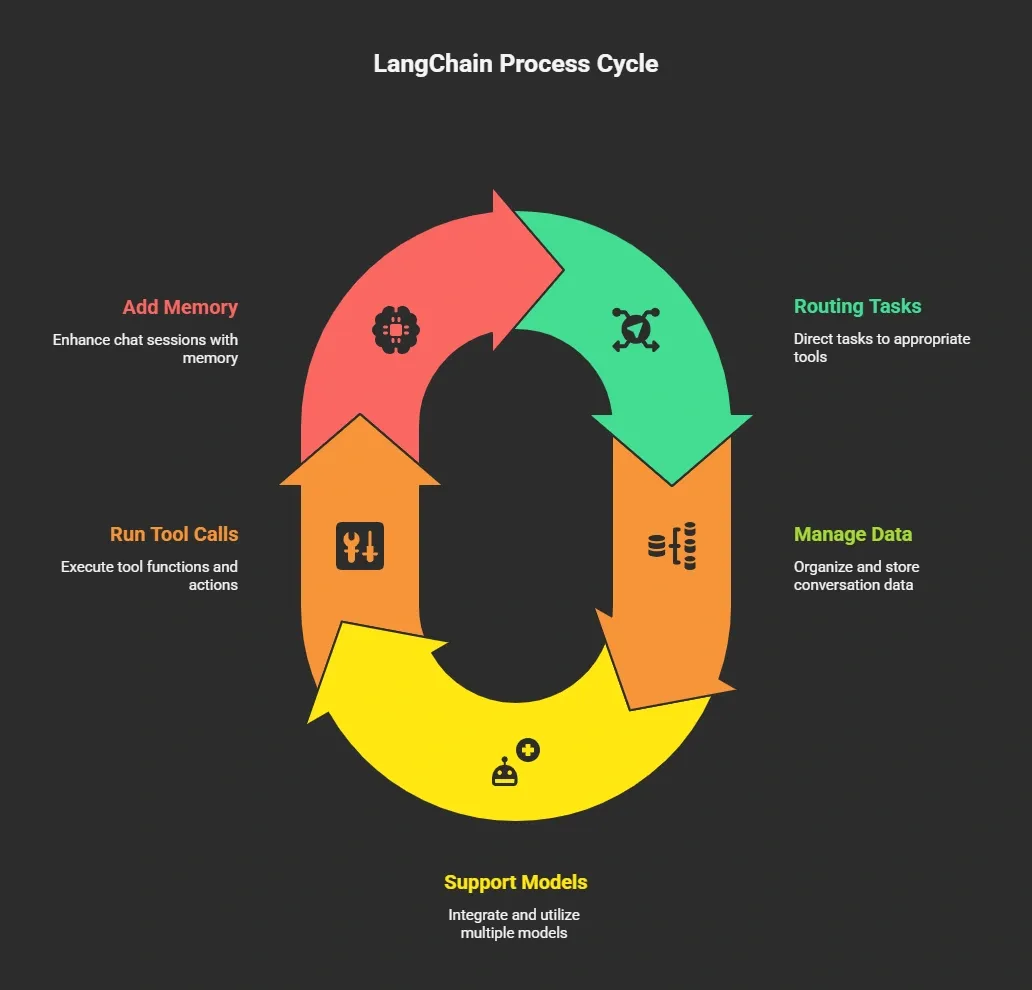
That flexibility makes it easier for teams to build AI agents that work in real apps.
The platform also supports JavaScript, which means frontend developers can easily connect the backend logic with a web interface written in HTML.
The Architecture of a Frontend Conversational System
When creating a frontend agent system, several pieces work together.
| Component | Purpose | Example |
|---|---|---|
| Language Models | Generate text responses | OpenAI or other models |
| Agent Logic | Handles reasoning and task flow | LangChain agent |
| Tools | Access APIs or services | Search, database queries |
| Memory | Stores conversation data | Chat history |
| Frontend Interface | User interaction layer | Web chat page |
Each part has a clear job.
The agent receives a message from the user, reviews previous conversations, selects the appropriate tools, and generates a helpful response.
This structure enables conversational AI systems to handle real business tasks, such as answering support questions or helping customers place orders.
How to Build an Agent with LangChain?
The steps below focus on creating a frontend-facing system in which the agent connects to language models, tools, and web interfaces. The goal is to help teams build AI agents that can interact with users, manage conversations, and perform real tasks for customers.
So how does the actual building process work?
Let’s break it down into simple steps.
Step 1: Choose Your Language Models
The first step is selecting language models. LangChain supports various models, including Microsoft's and other providers’.
Your choice depends on:
- Cost
- Performance
- Required reasoning capability
Some models perform better for support chat, while others handle deeper analysis tasks.
Step 2: Define the Tools the Agent Can Use
Next, define the tools available to the agent. These tools allow the system to interact with the outside world.
Examples include:
- Database search
- Product lookup
- Order tracking
- Knowledge retrieval
When the agent receives a customer question, it decides whether to respond directly or run one of these tools.
That decision improves agent performance and keeps answers accurate.
Step 3: Add Memory for Conversations
Memory helps the agent remember previous conversations. Without memory, each chat message would feel disconnected.
Memory allows the agent to:
- Track conversation data
- Maintain context
- Give better answer quality
This improves support experiences for customers who return with follow-up questions.
Step 4: Build the Agent Logic
Now comes the core logic. The LangChain framework helps developers write the orchestration code that decides how the agent behaves.
The agent engineering platform layer allows fine-grained control over reasoning steps.
This helps the system:
- Break down complex tasks
- Select the correct tools
- Produce structured response outputs
This stage is where the magic happens.
Step 5: Connect the Frontend Interface
Next, connect the backend with the web interface.
A typical setup includes:
- React or a simple HTML interface
- A backend API
- LangChain agent logic
The frontend page collects user messages and sends them to the backend. The agent processes the request and sends the final response back to the user.
That simple loop powers many modern conversational AI apps.
Step 6: Add Voice and Speech Support
Text chat is common, yet many systems now include voice. By adding speech recognition and text-to-voice tools, your agent can speak with customers.
This improves accessibility and creates more natural conversations. Some apps even support voice navigation for support or training courses.
Step 7: Test and Improve the System
Once the agent works, the next step is to test it. Teams often run multiple test cycles with real user interactions.
The goal is simple. Find gaps in the conversation process. Collect feedback from customers and teams, then adjust the logic.
Testing improves system performance and prepares it for production use. Many companies run a staging platform before launching into full production.
Building an agent with LangChain becomes easier when you follow a clear step-by-step process. Choose the right models, connect useful tools, and test the system with real users to improve performance and conversations.
Community Insight from Developers
A Reddit user shared a simple tip while working on a conversational agent project:
“Keep the agent focused on one job and test conversations often. Most issues come from context handling and prompt design.”
This insight reflects a common pattern in agent development. Building reliable systems is not only about selecting strong models. Teams also need to manage context, design prompts carefully, and run repeated test cycles.
Real Use Cases for Frontend AI Agents
Conversational AI agents aren’t just a tech trend; they’re actively helping businesses streamline interactions, save time, and improve customer experiences.
Here are some common ways teams use them in real-world applications:
- Customer Support Chat: AI agents handle FAQs, track orders, and guide customers through common problems. This frees human support teams to focus on more complex situations.
- Internal Knowledge Assistants: Organizations store vast amounts of knowledge in documents and databases. Agents can quickly search this data and provide instant answers to employees, improving productivity.
- Sales and Product Discovery: Online stores deploy agents to guide customers through product catalogs. The agent can recommend items, answer questions, and help customers make buying decisions that influence revenue.
These use cases show how conversational AI agents can save time, improve customer experience, and support business operations across industries. Starting with focused applications ensures the agent works reliably before scaling to more complex tasks.
The Rocket Platform That Helps Build AI Experiences
The platform world for building intelligent apps continues to grow, and one notable example is Rocket.new.
Rocket.new acts as an agent engineering platform designed to help teams build agents and connect them to real apps.
The idea is simple. Provide tools that enable teams to quickly connect AI logic to interfaces and systems.
Top Features
- Prompt to App Creation: Builds apps directly from single prompts
- Figma Import: Converts design files into live, editable layouts
- AI-Powered Backend: Automatically handles logic, data, and workflows
- Custom Domain Support: Publishes projects with a branded domain
- Code Export: Allows developers to extend or customize later
- Live Preview: Shows instant updates while editing
Use Cases
Customer support automation: Businesses build agents that answer support questions and guide customers through troubleshooting steps.
Internal knowledge assistants: Companies connect internal data, enabling employees to receive quick answers during their daily tasks.
Voice customer interaction: Organizations build systems that handle voice queries and provide spoken answers to customers.
Rocket also provides learning resources, including tutorials and a YouTube channel that explains how teams can design and manage these systems.
Challenges When Building AI Agents
Even with powerful frameworks like LangChain, creating reliable conversational AI agents comes with a few hurdles. Here are the main challenges teams face:
- Limited Context: Language models can only process a finite amount of data at a time. Too much information at once can reduce accuracy.
- Control Issues: Without clear rules, an agent might call the wrong tools or give inconsistent answers.
- Feedback Gaps: Conversations may feel off if the agent doesn’t adapt to real user inputs.
How teams overcome these challenges:
Adding monitoring systems, defining clear reasoning rules, and collecting frequent user feedback help refine responses and improve the conversational style.
Best Practices for Agent Development
Following a few key practices makes building agents smoother and ensures better performance.
- Start with Narrow Tasks: Focus on specific tasks before scaling to larger, more complex tasks.
- Use Clear Prompts: Well-crafted prompts guide the agent to produce accurate answers.
- Track Feedback: Regular customer input helps refine the conversation flow.
- Run Multiple Test Cycles: Repeated test rounds improve stability and prepare the system for production.
These practices help maintain control, ensure consistent agent performance, and create more natural and helpful conversations for users.
Building Your Frontend AI Agent
Many companies want chat systems that can interact with customers, handle support, and perform real tasks. Building such systems used to require complex orchestration across models, APIs, and backend systems, which made development slow and error-prone.
LangChain simplifies this by integrating language models, tools, and memory into a single structured workflow. With clear architecture, testing, and attention to user feedback, teams can deploy reliable, frontend-facing conversational AI agents that guide customers, answer questions, and manage real interactions smoothly.
Table of contents
- -Understanding the Basics of Conversational AI
- -Why LangChain is Popular for Agent Development
- -The Architecture of a Frontend Conversational System
- -How to Build an Agent with LangChain?
- -Step 1: Choose Your Language Models
- -Step 2: Define the Tools the Agent Can Use
- -Step 3: Add Memory for Conversations
- -Step 4: Build the Agent Logic
- -Step 5: Connect the Frontend Interface
- -Step 6: Add Voice and Speech Support
- -Step 7: Test and Improve the System
- -Community Insight from Developers
- -Real Use Cases for Frontend AI Agents
- -The Rocket Platform That Helps Build AI Experiences
- -Top Features
- -Use Cases
- -Challenges When Building AI Agents
- -Best Practices for Agent Development
- -Building Your Frontend AI Agent