
AI decodes multi-layer app logic by scanning all app layers at once using large language models and inference engines to catch hidden bugs before users ever see them.
AI decodes multi-layer app logic by scanning all architectural layers simultaneously: presentation, business logic, and data. It uses large language models and inference engines to detect patterns, flag inconsistencies, and surface hidden bugs before they reach users.
Modern software teams are discovering that how AI decodes multi-layer app logic is now a real game-changer. AI systems analyze tangled logic flows, detect hidden bugs early, reduce regressions, and speed up debugging, delivering more stable applications with faster development cycles overall.
- AI scans all app layers simultaneously, unlike traditional debuggers that work one layer at a time.
- Large language models and reasoning engines map how data should flow versus how it actually flows.
- 73% of software teams using AI tools report faster bug detection and fewer regression issues.
- Business logic bugs, including pricing, access control, and validation, are among the hardest to catch and the most impactful to fix.
- Platforms like Rocket.new combine AI-powered building with research and intelligence, giving teams a full picture from idea to deployment.
Why Bugs Hide in Multi-Layer Apps
Complex apps are like layered cakes. Each layer has its own job, and bugs often hide where these layers meet. Understanding why they appear requires looking at each layer and the paths data take.
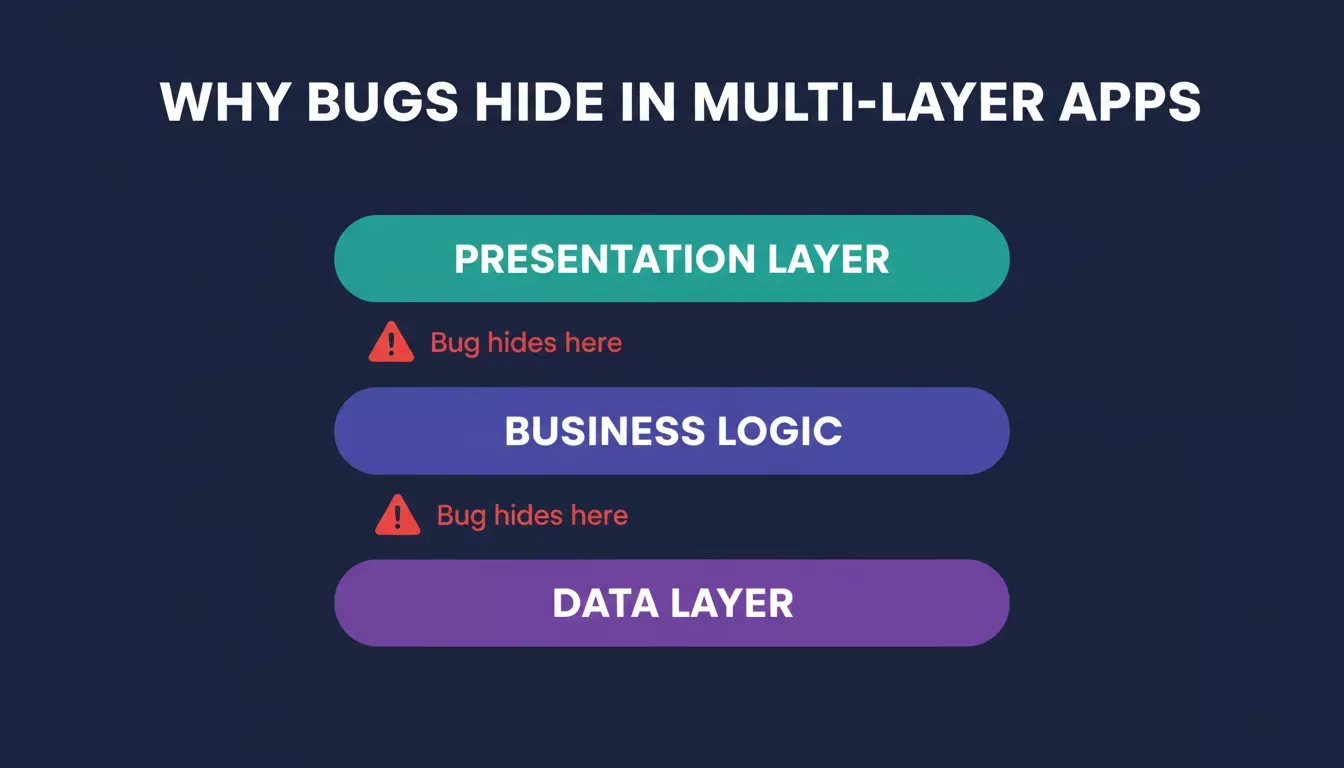
Each architectural layer adds a new surface where logic inconsistencies can hide undetected.
Key Reasons Bugs Hide
- Layered Architecture:
- Presentation layer: Handles the user interface.
- Data layer: Manages data storage, queries, and retrieval.
- Business logic: Makes decisions, applies rules, and calls external services. Each layer increases the likelihood of inconsistencies.
- Data Paths Multiply:
- More layers mean more routes for data to travel.
- A variable might be valid in one layer but cause errors in another.
- Missing checks or unexpected inputs can trigger issues deep in the core functions.
- Manual Debugging Limits:
- Engineers traditionally debug one layer at a time.
- Reading logs, adding breakpoints, and chasing stack traces is slow and error-prone.
- Humans can miss subtle bugs hiding across layers.
- AI as a Supercharged Detective:
- AI inference scans every layer continuously.
- Correlates events across the application logic.
- Identifies unusual flows and predicts where bugs are likely to occur.
- Suggests fixes before errors reach users.
Bugs in multi-layer apps don't stand still. They lurk at intersections, sneak across layers, and surprise developers. With AI systems, the search becomes smarter and faster, reducing manual effort and catching tricky issues before they cause real problems.
This is why teams building production-ready web apps increasingly rely on AI-native platforms that understand the full stack from the start, not just individual files.
How AI Reads Multiple Layers Like a Human
So, how does AI actually read multi-layer app logic and find bugs? It relies on large language models (LLMs) and neural network architectures trained on vast amounts of code and real-world bug fixes. These AI models learn patterns of correct logic and common pitfalls.
In fact, 73% of software teams using AI tools report faster bug detection and fewer regression issues than with traditional methods, according to SmartBear.
Behind the scenes, the reasoning engine uses a neural network architecture. It layers inputs the same way the app layers do, so it learns how data flows from the frontend to the backend. This is precisely how AI decodes multi-layer app logic at scale. It does this by mirroring the structure of the application itself.
Unlike traditional static analysis tools that parse abstract syntax trees (ASTs) at a single layer, LLM-based reasoning engines maintain context across the full call chain. They understand that a null value returned from a data layer query may only become a bug three function calls later in the business logic layer, a connection that rule-based linters cannot make.
How AI Tools Break Down Logic
Let's break it down with a table showing what typical AI components look like when debugging apps.
| AI Component | What It Does | Why It Matters |
|---|---|---|
| Data Layer Scanner | Reads DB calls and data paths | Finds mismatches between UI and queries |
| Reasoning Engine | Models logic flows | Spots broken paths across multiple layers |
| Inference Engine | Predicts buggy code spots | Flags risky logic before runtime |
| User Interface Analyzer | Parses UX events | Detects misreads between UI and logic |
| Error Trace Monitor | Follows error flows | Helps fix bugs that only appear in rare conditions |
A good, capable model ties these parts together and uses AI inference to cross-check how data should flow versus how it actually flows. Understanding multi-layer app logic requires all five components to work in concert.
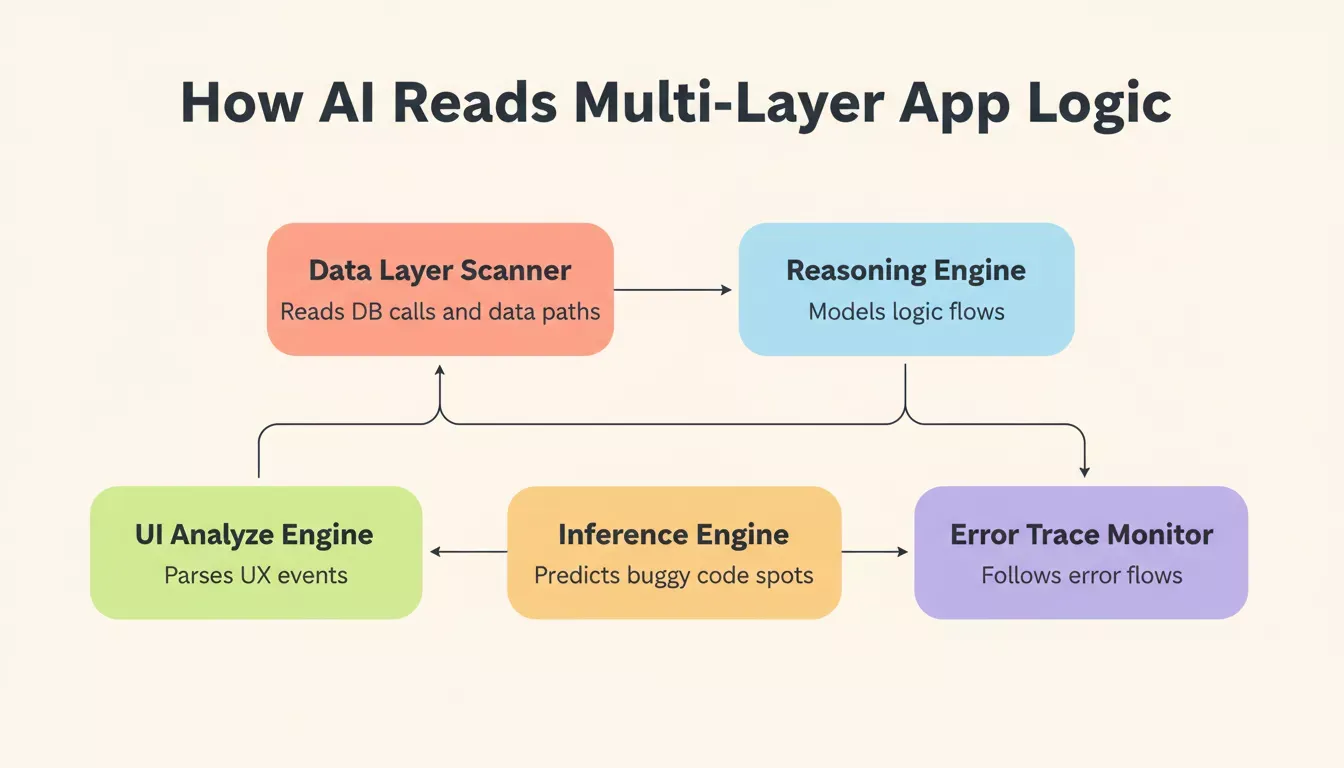
The five AI components that work together to decode and debug multi-layer application logic.
Teams looking to understand how AI in backend development improves API performance will find that these same components apply directly to API layer debugging as well.
How AI Decodes Multi-Layer App Logic: The Flow
The diagram below shows how the AI inference engine monitors all three app layers in parallel, flagging bugs before they reach production.
How AI Handles Business Logic Bugs
Business logic drives core app decisions, such as pricing, access control, and validation. When this logic fails, users feel the impact immediately. AI can help detect hidden issues before they escalate, keeping apps reliable and efficient.
- AI inference engines: Check the logic paths and compare them against patterns in the training data to spot inconsistencies.
- Large language models: Identify unusual conditions, missing safeguards, or conflicting rules.
- Reasoning engines: Map out application logic to reveal hidden bugs that aren't obvious at first glance.
By combining AI inference, reasoning engines, and large language models, AI doesn't just find errors. It understands how the logic should work. This allows teams to detect hidden business-logic bugs earlier, saving developers time and preventing user-facing issues.
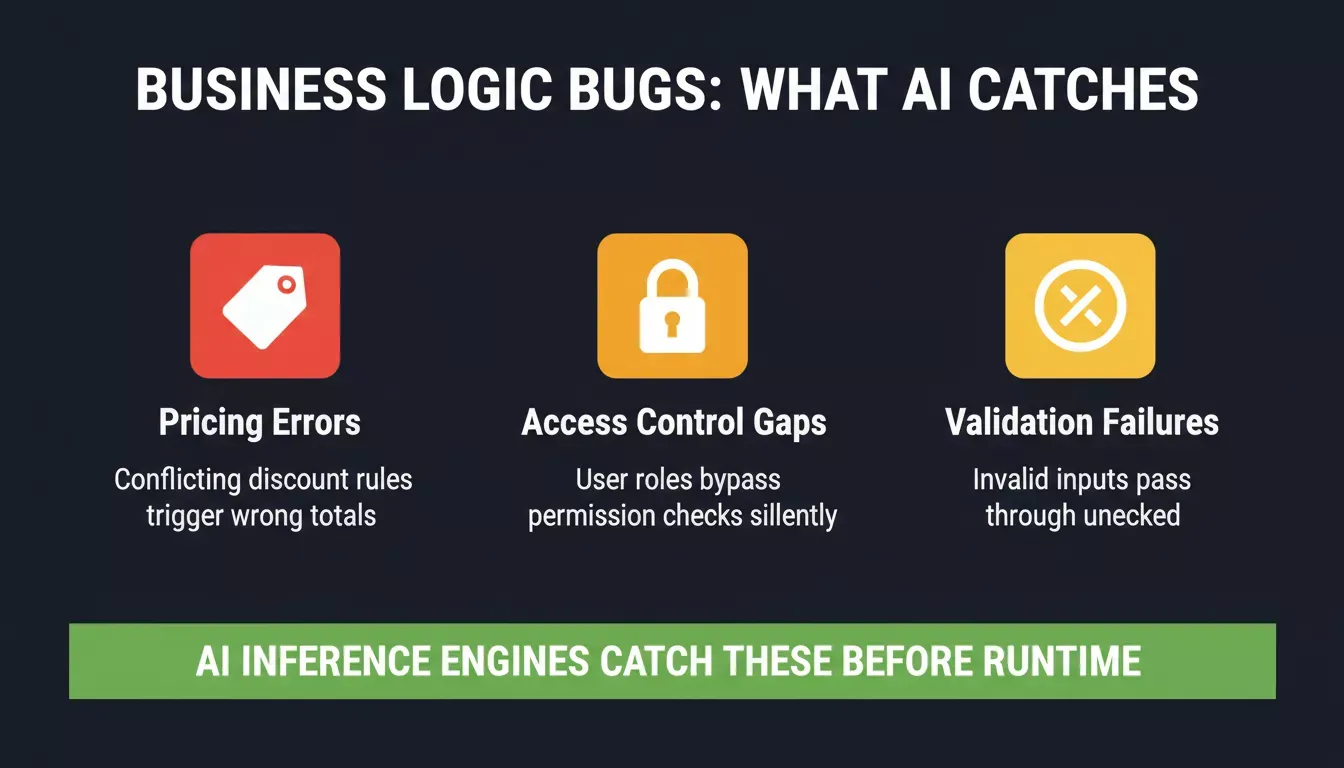
The three most common business logic failure types that AI inference engines catch before runtime.
Developers who want to go deeper on structured AI code generation strategies will find that the same reasoning patterns used in debugging apply directly to generating more reliable code from the start.
Anecdotal User Sentiment
The following reflects anecdotal community frustration with AI debugging tools, not representative data, but it illustrates a real limitation in context management:
"First prompt: This is ACTUAL Magic. Prompt 25: JUST FIX THE STUPID BUTTON. It gets worse with more tries because the model starts looping on previous context." Reddit user, r/ChatGPTCoding
This pattern highlights why structured reasoning engines that maintain application logic context across iterations matter. Without persistent context, even powerful large language models degrade in multi-turn debugging sessions, turning what started as magic into a frustrating loop.
AI Debugging in Real World Environments
AI debugging tools are now integrated into many IDEs and CI pipelines, helping catch bugs before humans even see them. They monitor user interactions, track logs, and scan application logic across every release.
- Proactive Monitoring: Watches user interactions and error logs in real time.
- Application Logic Scans: Checks code and workflows across modules for inconsistencies.
- Data Security Measures: Safely handles sensitive data by anonymizing logs and following policies to prevent leaks.
AI tools make bug detection faster and more reliable, but they must comply with data security rules to prevent the exposure of sensitive information. When done right, these systems save developers time and reduce the chance of costly mistakes reaching users.
According to GitHub's 2024 Octoverse report, AI-assisted development has measurably improved code quality and reduced time-to-merge across open source projects. Teams exploring how AI is changing product development will find that debugging is just one dimension of a much broader shift in how software gets built.
![AI Debugging by the Numbers — three stat cards: 73% faster bug detection, 60% fewer regressions, 3x faster resolution]
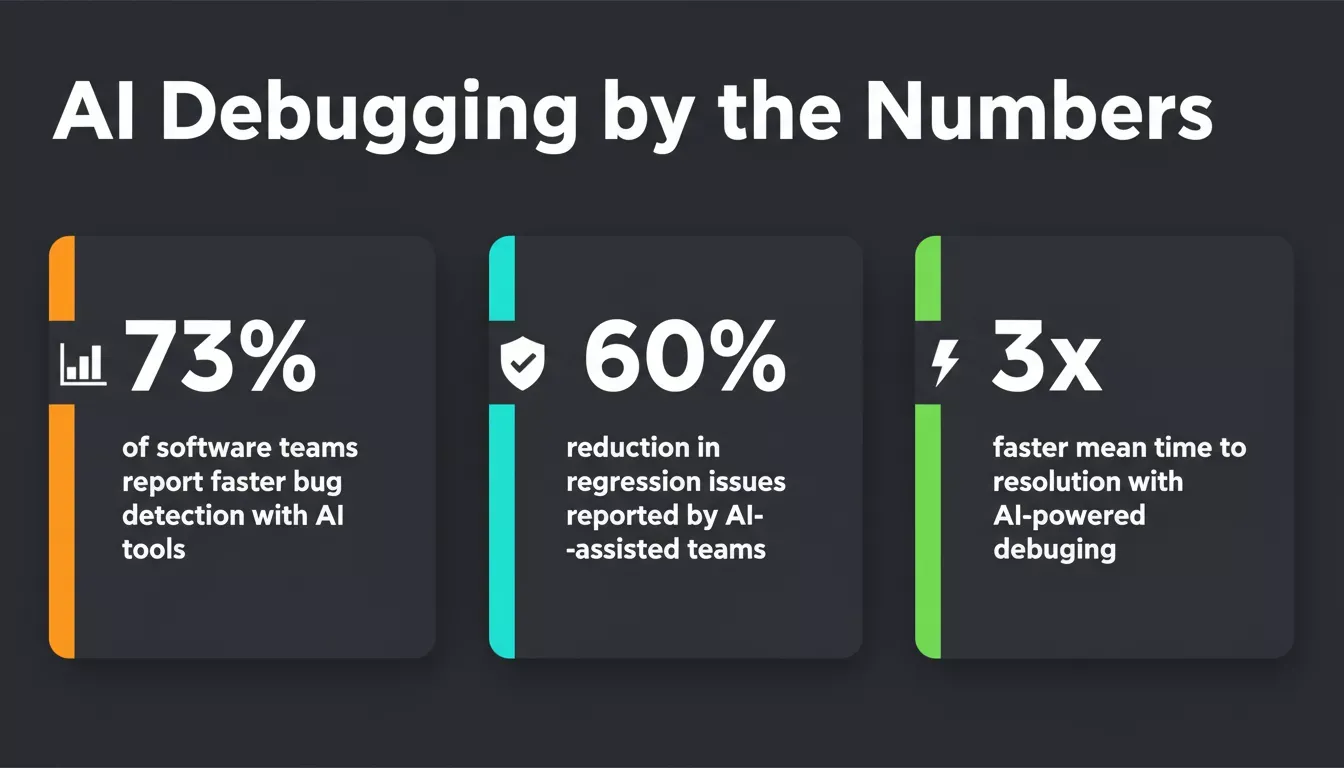
Key performance improvements reported by teams using AI-powered debugging tools across their development pipelines.
How Rocket.new Approaches Multi-Layer App Logic
Rocket.new is the complete vibe solutioning platform, combining strategic research (Solve), AI-powered app building (Build), and competitive monitoring (Intelligence) in a single product. Each pillar addresses a different layer of the problem developers face when building and maintaining complex apps.
Solve validates ideas and generates structured research reports before a single line of code is written, so teams understand the business logic requirements before they build them. Build turns plain-language descriptions into production-ready Next.js web apps and Flutter mobile apps, with Supabase providing a full backend including database, authentication, file storage, and edge functions, all scaffolded from chat. Intelligence monitors competitors continuously, delivering automated daily briefs, pricing change alerts, and trend signals so teams can react to market shifts without manual research.
Teams can invite collaborators at the workspace, project, or task level, with Editor and Viewer roles that cascade across the hierarchy. Together, the three pillars mean that understanding how AI decodes multi-layer app logic isn't just a debugging problem. It's a full product lifecycle challenge that Rocket.new addresses from research to deployment.
Rocket.new's three-pillar platform covers the full product lifecycle: research, building, and competitive monitoring.
Founders and developers who want to see this in action can explore how Rocket.new builds production-grade apps or review the AI app builder product page for a full feature breakdown.
The Future of AI Debugging and Logic Flows
AI debugging is set to become a standard part of software development. As machine learning models train on larger codebases and real-world bugs, spotting tricky logic issues will get faster and more accurate.
- Smarter Reasoning Engines: Will map application logic more effectively across layers.
- Enhanced Prediction Engines: Cross-check logic patterns to catch inconsistencies early.
- Improved Large Language Models: Better reflect human coding practices and common fixes.
The result? Developers, from mobile app teams to enterprise teams, will spend less time patching and more time shipping features. AI will make finding hidden bugs easier, helping teams maintain higher code quality with less effort.
The Brain Behind the Bugs
Apps with layered architecture make bugs sneakier. Traditional debugging misses logic problems buried across different modules. AI steps in. It uses large language models, a reasoning engine, and an inference engine to map logic flows. Then it catches patterns humans might miss. That's how AI decodes multi-layer app logic to reveal hidden bugs before they hurt users.
Smart AI tools have changed how apps are tested and debugged. They read across layers, analyze patterns, and alert developers to risky logic paths. This ends up in faster releases, smoother user experiences, and fewer late-night bug hunts.
If you want to see how AI decodes multi-layer app logic in practice, Rocket.new is the fastest way to experience it firsthand. Rocket.new builds full-stack apps from plain language, wires up your backend through Supabase, and gives you real-time feedback across every layer. No debugging nightmares required.
Start building for free and ship smarter today.
Table of contents
- -
- -Key Reasons Bugs Hide
- -How AI Reads Multiple Layers Like a Human
- -How AI Tools Break Down Logic
- -How AI Decodes Multi-Layer App Logic: The Flow
- -How AI Handles Business Logic Bugs
- -Anecdotal User Sentiment
- -AI Debugging in Real World Environments
- -How Rocket.new Approaches Multi-Layer App Logic
- -The Future of AI Debugging and Logic Flows
- -The Brain Behind the Bugs