
Rocket.new is the only vibe solutioning platform that combines research, building, and competitive intelligence in one place. The Figma import is just one of many ways it accelerates the journey from idea to live product.
Turning a Figma file into a working app used to mean weeks of handoff meetings, pixel matching, and backend wiring.
In 2026, Rocket.new changes that equation entirely. You paste a Figma link, wait a few minutes, and walk away with a full-stack application complete with production-ready code, data models, and deployment options.
Key Takeaways
-
Rocket.new can import a Figma design file and output a running full-stack app with real code in minutes, not just static HTML and CSS fragments.
-
The platform reads Figma structure, including frames, auto layout, and components using dev mode data, then maps them to Next.js for web or Flutter for mobile, plus backend logic automatically.
-
Unlike typical Figma to code exporters in 2026, Rocket.new also generates data models, APIs, and workflows, not only front-end code.
-
Designers keep working in Figma while developers get clean, editable code synced to GitHub, plus an instantly deployable app.
-
Rocket.new is the superior choice when teams want to move from design to production with minimal handoff friction.
How Rocket.new Turns a Figma File into a Real App
The app development experience feels almost too simple.
You open Rocket.new in your browser → Paste a Figma prototype or file URL, select your screens → Pick a tech stack → watch as the platform generates your web or mobile app, screen by screen.
 Within minutes, you have something that runs, not just a static mockup.
The process breaks down into four main stages:
-
Connecting Figma: You authorize Rocket.new to read your Figma account through OAuth, granting access to files, components, and styles, no API key required.
-
Analyzing the file: Rocket.new parses the document structure semantically, reading frames, layers, auto layout constraints, and design tokens.
-
Generating UI code: The platform produces responsive layouts using Next.js or Flutter with styled components and clean file organization.
-
Wiring backend logic: Beyond static markup, Rocket.new suggests CRUD operations, API connections, and data handling based on patterns it recognizes.
This workflow is already powering fast-moving teams building MVPs, dashboards, landing pages, and internal tools without the traditional development time delays.
Step by Step: Importing Your Figma File into Rocket.new
This walkthrough takes you from a Figma canvas to a running Rocket.new project.
-
Prepare your Figma file: Enable Figma dev mode on relevant pages. Ensure all app screens are inside named frames with descriptive labels like "Dashboard" or "Auth Flow" rather than "Frame 1."
-
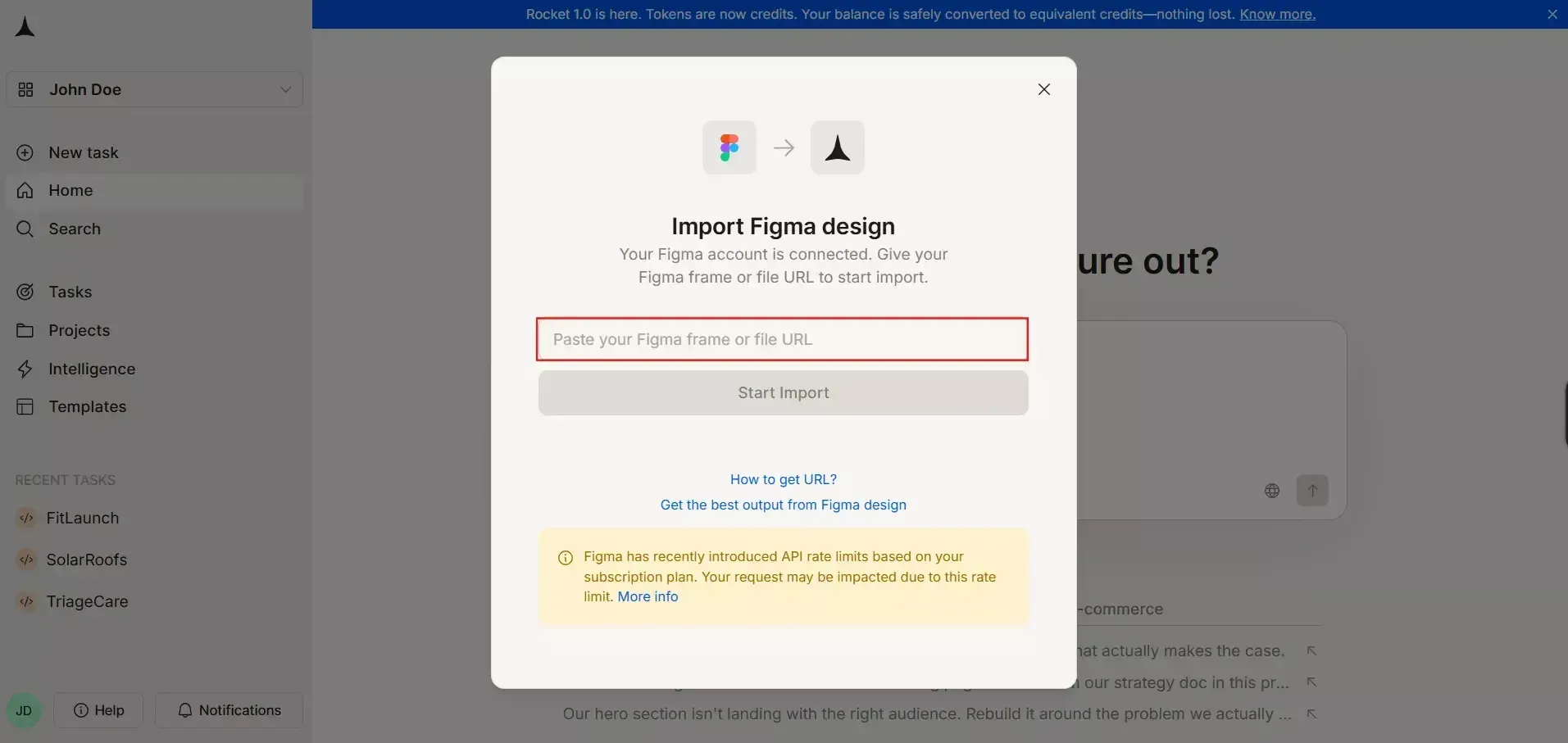
Copy the Figma link: Grab the file or frame URL from your browser. Rocket.new accepts both frame links and full file links. Note: prototype links are not valid; use the file or frame URL instead.
-
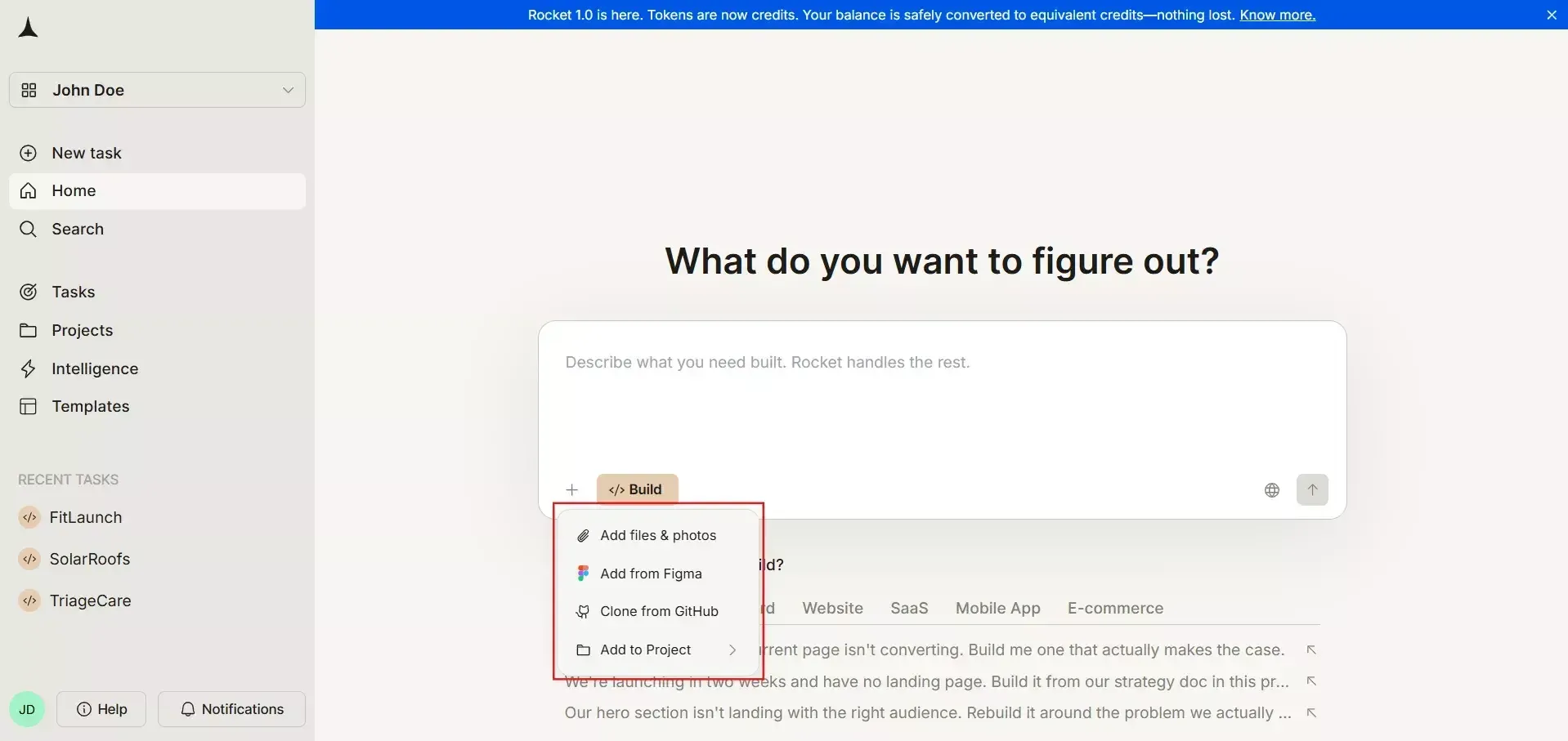
Start the import: In the Rocket.new editor, click the plus button at the lower left of the input box and select "Add from Figma." Paste your URL when prompted.
-
Choose your tech stack: Select your target framework. For web apps, options include Next.js. For mobile, Flutter generates native iOS and Android apps.
-
Select screens: You can import up to 40 screens per batch. Choose the ones that represent your core user flows.
-
Wait for generation: Rocket.new fetches assets, optimizes layers, and generates code screen by screen. All status checks turn green when your app is ready.
The entire process typically takes seconds to a few minutes, depending on file complexity and component count. For most projects, key screens are ready before you finish your coffee.
When to Use Figma Import vs Other Starting Methods
| Scenario | Best Starting Method |
|---|---|
| You have completed the Figma designs | Figma Import |
| You have a rough idea, but no designs | Start from an idea using a prompt |
| You have a screenshot, PDF, or spreadsheet | Start from an attachment |
| You have an existing live website to rebuild | Use the Redesign command |
| You have a Next.js TypeScript repo on GitHub | Clone from GitHub |
How Rocket.new Understands Your Figma Design
Rocket.new does not simply export layers as pixel coordinates. It builds a semantic model from your Figma document tree, understanding relationships between elements rather than treating everything as isolated shapes.
The platform reads frames, groups, components, and variants to detect pages, shared layouts, navigation structures, and reusable UI sections. It inspects auto layout constraints, minimum and maximum widths, padding, and alignment to infer responsive rules that translate into CSS rather than fixed-pixel layouts.
Text styles, color tokens, and effect styles are mapped to a theme file in the generated code. This maintains brand guidelines and design consistency across the final product.
Rocket.new uses AI to recognize common patterns like forms, tables, cards, dashboards, and modal dialogs, tagging them as higher-level components rather than a jumble of divs.
From Components to Reusable Code
This is where Figma components transform into actual production-ready apps with maintainable architecture.
-
Repeated Figma components become single-source component files with props for states like primary, secondary, disabled, or loading
-
Component names from Figma are preserved so designers and developers speak the same language
-
Interactive elements like buttons, tabs, and inputs become framework-friendly components rather than static markup
-
Prototype flows in Figma map to page routes and navigation links in the generated app
This mapping makes later refactors and design system updates significantly faster than raw layer exports from competing tools.
Handling Layout and Responsiveness
Mobile responsiveness starts in Figma and carries through to the generated code.
Horizontal and vertical auto layout stacks convert into flex or grid layouts with gaps, padding, and alignment that mirror the original design. Constraints like "left and right, scale" or "center" translate into responsive CSS rules using modern approaches like Tailwind CSS patterns.
Rocket.new uses breakpoints inferred from your design. If your desktop frame is 1440 pixels wide and your mobile frame is 390 pixels, those become practical breakpoint anchors for the generated responsive layout strategy.
From Static Screens to Live Data and Logic
Most Figma-to-code tools stop at HTML. Rocket.new continues into backend territory, transforming static Figma designs into apps that can actually create, read, update, and delete real records.
After building the UI, Rocket.new prompts you for data needs. If you have a project management app mockup, it might ask about entities like "projects, tasks, users" and create basic data models and database schemas accordingly.
The platform features AI-powered backend capabilities that automatically handle logic, data, and workflows, making it easier to build functional applications.
For forms and tables it recognizes in your Figma file, Rocket.new suggests CRUD flows and wires them to generated APIs and database operations.
Integrations like authentication, payments via Stripe, or analytics via Mixpanel can be added through chat after the initial import, leveraging the platform's 25+ built-in connectors.
AI-Assisted Workflow Mapping
Rocket.new uses AI to infer user flows from screen structure and navigation elements in your design.
The platform looks at buttons labeled "Continue," "Save," "Create project," or "Log in" and maps them to routes, actions, and API calls. Multi-step flows, like onboarding or checkout, are detected using ordered frames and shared progress indicators in Figma.
Example: If your Figma file shows a three-step signup flow with frames named "Step 1 Email," "Step 2 Profile," "Step 3 Confirm," Rocket.new preconfigures routing and state management so that navigation between these screens works immediately in your generated app.
Connecting to Real Backends and Databases
After basic data models are created, Rocket.new offers flexibility for data handling.
-
Generate a backend using platform defaults with automatic database schema creation through Supabase (auth, database, file storage, and edge functions included)
-
Connect to an existing API by providing documentation, a Postman collection, cURL, or an OpenAPI spec
-
Refine business rules, validations, and advanced workflows through chat
This combination of Figma UI import and instant backend wiring is what makes Rocket.new superior to front-end only tooling. You get real apps with persistent data, not just clickable prototypes.
Editing, Iterating, and Shipping After the Figma Import
Once the first version is generated, Rocket.new becomes an AI pair programmer for design changes and new features.
Designers can keep updating the Figma file while developers selectively add new screens or map changes inside Rocket.new without losing custom logic. Product teams use the chat interface to request layout tweaks, new components, or behavior changes on top of the imported design.
The generated code is accessible and editable. Teams can sync it to GitHub using two-way code sync for Next.js TypeScript projects, following their standard review and deployment pipelines. Rocket.new also supports staging and production environments, so apps can be tested before going live.
Using Rocket.new Chat Editor to Refine the Imported App
With Rocket’s Chat editor, the natural language editing workflow feels like working with a knowledgeable colleague. You describe what you want in plain English, and Rocket.new applies changes.
| Goal | Example Prompt |
|---|---|
| Layout refinement | "Make the sidebar collapsible on smaller screens." |
| Data integration | "Connect this dashboard to our analytics API." |
| Theming | "Add dark mode toggle to the settings page." |
| Payments | "Add Stripe checkout to the pricing page." |
| Authentication | "Add login and signup pages with email and password auth via Supabase." |
| Visual polish | "The hero section font size does not match my Figma design. Make it 48px bold." |
Rocket.new applies these changes across both UI and backend code where relevant, regenerating only the necessary parts. This loop allows non-specialist founders in 2026 to ship usable versions without writing manual JavaScript or SQL.
Visual Edit: Click to Change
Beyond chat, Rocket.new offers a Visual Edit mode where you click any element in your app preview to change text, style, spacing, or images without writing code. Combined with AI-generated images and SVG support, this lets you refine visuals at the speed of thought.
Deploying and Exporting Code
Moving from an imported Figma project to a live deployment involves two main paths.
Direct deployment: Deploy from Rocket.new to a managed environment with SSL, custom domain support, and built-in analytics. You can even purchase a domain directly inside Rocket.new with automatic DNS configuration.
GitHub export: Export the generated codebase to GitHub using two-way code sync for full control. Teams can extend it with their existing stack and use standard CI/CD pipelines.
This flexibility matters for agencies and engineering teams that want AI speed without vendor lock-in. Exported projects remain readable and maintainable, avoiding the "uneditable blob" problem common in simpler tools that generate code without structure.
Rocket.new vs Typical Figma to Code Tools in 2026
Common plugin-based exporters output static front-end code that requires manual gluing to any backend system. Rocket.new spans the entire stack: design import, UI code, backend logic, database, and deployment in one continuous flow.
Other tools usually require you to take generated HTML or React components and manually wire them to an existing backend. This slows down launch and creates handoff friction between designers and developers.
Rocket.new treats Figma as one of several inputs alongside prompts, templates (25,000+ available), GitHub repos, attachments, and URLs, which leads to better flexibility for larger apps and complex projects.
Detailed Comparison
| Capability | Rocket.new | Typical Figma Plugin |
|---|---|---|
| UI Generation | Responsive Next.js, Flutter, React Native | Static HTML/CSS or basic React |
| Live Preview | The preview feature allows users to view their original Figma design alongside the generated code to ensure accuracy. | Preview - Inconsistencies with Real Browsers |
| Backend Generation | AI chat with 25+ connectors (Supabase, Stripe, OpenAI, and more) | None; manual wiring required |
| Data Modeling | Suggested CRUD via prompts with Supabase integration | None |
| AI Chat Editing | Iterative refinements, add screens, and customize with visual edit or AI Chat Editor, no manual work | One-time export only |
| GitHub Integration | Two-way code sync for Next.js TypeScript | Code download only |
| Production Deploy | Direct deploy with custom domain, SSL, staging, and analytics | Not available |
| Screen Limit | Up to 40 per import batch | Varies; often messier output |
| Competitive Intelligence | Built-in monitoring via Intelligence | Not available |
| Research & Strategy | Solve: structured reports with citations | Not available |
| Mobile Apps | Native Flutter for iOS and Android | Rarely supported |
Rocket.new covers the full idea to ship pipeline, reducing launch times significantly compared to front-end-only alternatives. With the Rocket 1.0 release in April 2026, the platform now unifies Solve, Build, and Intelligence into one cohesive experience.
Best Practices When Preparing Figma Files for Rocket.new
Clean Figma files produce cleaner, more maintainable code. Following these guidelines based on the official design guidelines will improve your results.
-
Use a clear page structure with descriptive frame names like "Dashboard," "Settings," "Auth" rather than generic labels
-
Leverage components and variants heavily for reusable UI elements like buttons, inputs, and cards
-
Apply auto layout with consistent spacing and padding so Rocket.new can infer accurate responsive behavior
-
Define text styles and color styles so the platform can build a proper theme file
-
Remove unused layers, hidden elements, and outdated explorations from the import page
-
Group related vector elements into single groups for a clean image output
-
Keep all components inside the Figma frame; elements placed outside the frame boundary may not import correctly
-
Resize oversized text boxes using auto-width to avoid excess whitespace in the generated layout
Common Pitfalls to Avoid
-
Mixing dozens of unrelated design explorations on the same page used for import, which confuses layout detection
-
Using copy-pasted raster screenshots inside frames instead of real structured components
-
Missing text styles and color styles, making theme generation difficult
-
Inconsistent prototype links that misalign navigation flows in the generated app
-
Using prototype links instead of file or frame URLs (prototype links are not valid for import)
-
Leaving invisible or masked elements in the design can cause broken layouts in the generated code
From Design to Deployment, Without the Friction
Rocket.new redefines what it means to go from a Figma concept to a fully functional application. Instead of navigating fragmented workflows, handoffs, and manual backend setup, teams can now move in a straight line from idea to execution.
What truly sets it apart is not just speed, but completeness. You are not exporting static layouts; you are generating real, production-ready applications with clean code, connected backends, and scalable architecture from day one. That shift eliminates the traditional gap between design and development.
For startups, agencies, and product teams, the advantage is clear: less time translating designs, more time building impactful products. Whether you are launching your first MVP or delivering client projects at scale, the workflow stays simple and repeatable: import, refine, and ship.
If you have a Figma file ready, you are already closer to launch than you think.
👉The only step left is to put it into motion with Rocket.
Table of contents
- -Key Takeaways
- -How Rocket.new Turns a Figma File into a Real App
- -Step by Step: Importing Your Figma File into Rocket.new
- -When to Use Figma Import vs Other Starting Methods
- -How Rocket.new Understands Your Figma Design
- -From Components to Reusable Code
- -Handling Layout and Responsiveness
- -From Static Screens to Live Data and Logic
- -AI-Assisted Workflow Mapping
- -Connecting to Real Backends and Databases
- -Editing, Iterating, and Shipping After the Figma Import
- -Using Rocket.new Chat Editor to Refine the Imported App
- -Visual Edit: Click to Change
- -Deploying and Exporting Code
- -Rocket.new vs Typical Figma to Code Tools in 2026
- -Detailed Comparison
- -Best Practices When Preparing Figma Files for Rocket.new
- -Common Pitfalls to Avoid
- -From Design to Deployment, Without the Friction