
Curious about SaaS with AI costs? Building one ranges from tens to hundreds of thousands, influenced by complexity, goals, and AI depth, with trade-offs and smart savings shaping final budgets.
How much does it cost to build a SaaS with AI?
Costs can vary significantly. For most startups aiming for meaningful outcomes, budgets typically range from tens of thousands to several hundred thousand dollars.
The exact figure depends on your goals, the complexity of your SaaS product, and the depth of AI features involved.
There’s no one-size-fits-all price, but breaking down the components will clarify why estimates can differ so widely.
Let’s talk about costs, trade-offs, and ways you can save without sacrificing quality.
What You’re Really Paying For?
When you ask how much it costs, you’re really asking about a bunch of smaller pieces. A SaaS platform is made up of lots of bits: core features, backend setup, frontend, cloud services, integrations, and, if you add AI, model work, and extra infrastructure.
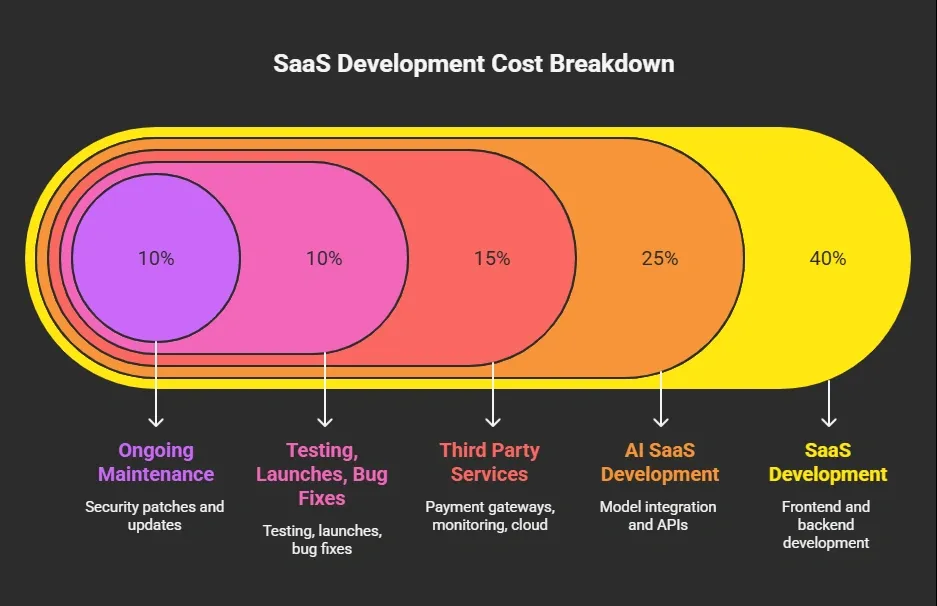
Even basic AI-powered features aren’t free. API calls to OpenAI or other LLMs add up. Most founders budget $500–$2,400/month or more if traffic grows.
Typical Cost Ranges You Should Know
There’s no fixed price tag, but industry estimates do help. Here’s a rough breakdown:
| Product Scope | Estimated Total Cost USD |
|---|---|
| Basic MVP SaaS with AI features | $30,000 – $150,000 |
| Mid-level full SaaS + AI model | $150,000 – $500,000 |
| Full-scale AI SaaS Platform + compliance | $300,000+ |
These numbers come from multiple industry reports and real startup cost guides. They include cloud services, skilled developers, testing, and initial development costs.
Break Down the Big Pieces
Before you start throwing numbers around, it helps to see where your dollars actually go. Building a SaaS app is more than just coding it’s a mix of design, logic, AI, and coordination. Let’s break it down so you know what to expect.
Core SaaS Development Costs
Let’s break down the biggest parts of building a SaaS app:
1. Frontend & UX/UI
This is what users see: pages, dashboards, login screens, and menus. A clean SaaS app with moderate design usually takes $8,000–$25,000+ to develop.
2. Backend & Server Setup
This includes databases, user accounts, business logic, and secure APIs. Expect $15,000–$50,000 or more.
3. AI Model Integration
This is the “AI” part of your SaaS. Integrating a language model or analytics feature costs $10,000–$30,000+ depending on complexity.
4. Project Management
Planning, scheduling, and coordination don’t show up in code, but they are critical. On average, founders spend $5,000–$12,000 just on project managers and workflow.
5. Testing & QA
Good testing prevents bugs and outages. QA and usability testing often runs $3,000–$7,000+ before launch.
Keep in mind that these costs are cumulative and can fluctuate based on your team, region, and the level of AI integration. Having a clear breakdown upfront helps you budget smart and avoid nasty surprises later.
Startup Insight: What Builders Say
Here’s a real peek into what founders are talking:
“AI is easy to add. Hard to sustain. We built AI wrappers on LLMs and within a few months the AI costs nearly matched our annual revenue because we didn’t forecast usage or pricing correctly.”- LinkedIn
Real founders are dealing with variable costs that scale with usage, and that can seriously reshape your pricing and planning.
Ways Startups Cut SaaS Costs
Creating a SaaS doesn’t have to burn your runway fast. Here are common levers that successful founders pull:
Use mature cloud services: AWS, Google Cloud, and Azure let you pay as you go. Free credits for startups can knock thousands off in the first year.
Build a Minimum Viable Product first: An MVP has just enough core features to test with real users. This reduces initial development time and helps validate your SaaS idea before full investment.
Mix teams smartly: Hybrid teams, fractional AI experts + offshore developers are now common and can cut staff costs by 40–60%.
Pick existing AI APIs over custom models: Training your own model is hugely expensive. Using the GPT or Claude APIs gets you going faster and more cheaply.
Plan for ongoing maintenance: Budget monthly for upkeep, bug fixes, and cloud usage. A neglected SaaS app gets expensive and unstable over time.
By combining smart planning, the right tools, and lean development strategies, startups can significantly reduce SaaS development costs without sacrificing quality. Small, intentional choices early on often save big headaches and big dollars later.
Rocket.new: Build Your SaaS Faster
Rocket.new lets founders turn ideas into working SaaS apps without a full development team. You describe your product in plain language, and it automatically generates the backend, frontend, database, and integrations.
Cost & Time Benefits
By automating so much of the development process, Rocket.new can dramatically reduce saas development costs and shorten development time. Early-stage teams can launch MVPs faster, get user feedback, and iterate without hiring a large team.
Key Features
- Prompt to App Creation: Builds apps directly from single prompts
- Figma Import: Converts design files into live, editable layouts
- AI-Powered Backend: Automatically handles logic, data, and workflows
- Custom Domain Support: Publishes projects with a branded domain
- Code Export: Allows developers to extend or customize later
- Live Preview: Shows instant updates while editing
Use Cases
- Early SaaS Prototyping: Perfect for founders without a dev team to test concepts quickly.
- Landing Pages & Dashboards: Build key screens fast before funding rounds.
- Multi-Platform Apps: Deploy across web and mobile with standard integrations like payments.
Pricing
Rocket.new offers tiered plans to match your project scale:
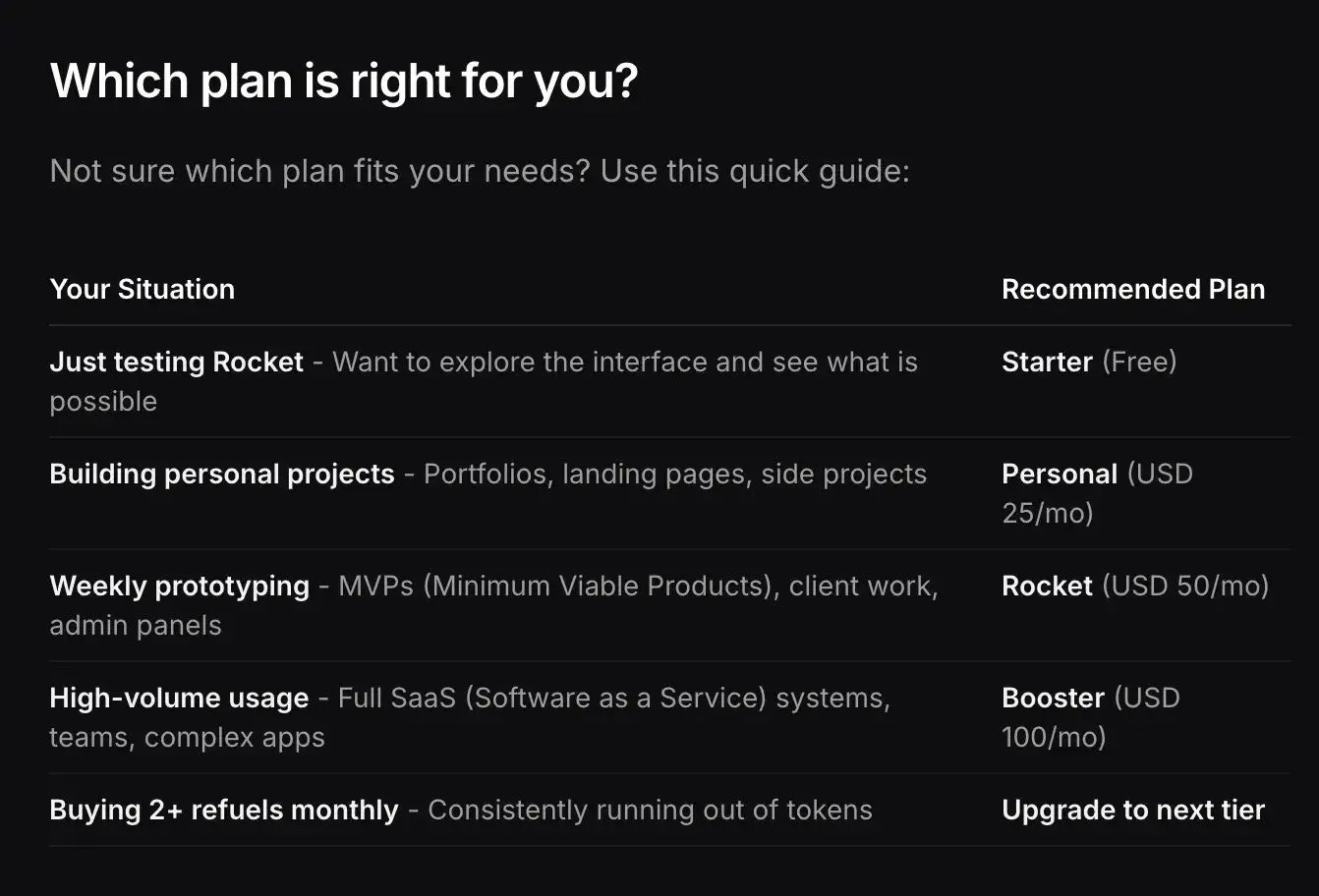
- Free Plan: Limited tokens to experiment and build simple MVPs.
- Personal Plan ($25/month): Suitable for early MVPs with modest app complexity.
- Pro Plan ($50/month): Supports larger projects, more screens, and heavier token usage.
- Team Plan ($100/month): Ideal for multi-user collaboration and complex SaaS flows.
For full details, check the official pricing docs: Rocket Pricing
What Often Gets Missed in Budgets
Even when you plan carefully, some costs can slip under the radar. Many founders focus on development but overlook expenses that grow quickly as their SaaS scales.
Common Hidden Costs
- Hidden Ongoing Cloud Fees: As user traffic increases, cloud services like AWS, Google Cloud, or Azure can charge significantly more, especially with heavy AI workloads.
- Customer Acquisition Cost (CAC): Marketing your SaaS to attract users often ends up costing more than development itself.
- Compliance & Security: Certifications and regulations such as SOC 2, penetration testing, GDPR, and HIPAA can add unexpected expenses.
Budgeting for these often-overlooked costs early on can prevent unpleasant surprises. By accounting for cloud scaling, marketing, and compliance upfront, you keep your SaaS project financially healthy and sustainable.
Building a Real Budget: Work Backwards
Before you start throwing numbers at developers, it helps to plan your budget from the end goal backwards.
By thinking about what you actually need, you can control costs and avoid overspending on unnecessary features.
A practical way to budget is:
- Pick your target user and core problem.
- List only the core features you need.
- Estimate how many AI calls or model endpoints you’ll use.
- Add cloud pricing and growth expectations.
- Factor in ongoing maintenance and marketing.
When you do this, you’ll find that your total cost to build a SaaS platform with AI might be lower or higher than initial guides, but you’ll know why.
How Much Does It Cost to Build SaaS with AI
Many founders assume that building a SaaS has a fixed price. In reality, costs vary depending on project complexity, team size, and the amount of AI you include. Surprises often come from hidden fees, cloud usage, and AI workloads.
Break your project into phases, focus on core features, and use tools like Rocket.new or cloud services. Starting small and planning wisely helps manage expenses while still building a strong, AI-powered SaaS app.
Table of contents
- -What You’re Really Paying For?
- -Typical Cost Ranges You Should Know
- -Break Down the Big Pieces
- -Core SaaS Development Costs
- -Startup Insight: What Builders Say
- -Ways Startups Cut SaaS Costs
- -Rocket.new: Build Your SaaS Faster
- -Key Features
- -Use Cases
- -Pricing
- -What Often Gets Missed in Budgets
- -Common Hidden Costs
- -Building a Real Budget: Work Backwards
- -How Much Does It Cost to Build SaaS with AI