
Building a ChatGPT clone requires a Node.js backend, a React frontend, and an OpenAI API connection. This blog covers both the code and no-code paths, including security, deployment, and scaling.
Can you build your own ChatGPT clone?
Yes, with clear steps, the right tools, and a bit of patience.
ChatGPT alone handles 2.5 billion user prompts per day and has hundreds of millions of users worldwide each week. That is not a small club.
Whether you want to write every line of code yourself or describe your idea and ship a working app, this guide covers both paths. It takes you from backend setup and conversation flow all the way to security, deployment, and scaling.
What is a ChatGPT Clone?
A ChatGPT clone is an app that behaves like ChatGPT. It lets users type messages, view conversation history, and receive AI-driven replies.
It needs four things:
- A chat interface where users type and read messages
- A backend server to handle request routing and API calls
- A connection to a language model via API
- A conversation history array that gives the AI context across turns
Start simple. Get the basic chat interface and AI connection working first. Once that foundation is solid, you can layer in streaming, authentication, custom personas, and scalability. It is better to have a working app that grows than a perfect idea that never launches.
Who Should Build a ChatGPT Clone?
Before writing a line of code, it helps to identify which path fits your situation. The table below makes that choice straightforward.
| Profile | Best Approach | Time to Launch |
|---|---|---|
| Developer with Node.js experience | Manual build (this guide) | 1 to 3 days |
| Non-technical founder or product manager | No-code AI builder | Under 1 hour |
| Designer with a Figma mockup | Figma-to-code generation | Under 30 minutes |
| Startup team validating an idea | Template plus customization | Same day |
| Enterprise team with existing codebase | GitHub import plus AI iteration | 1 to 2 days |
Both paths are covered below. Jump to the section that matches your situation.
How a ChatGPT Clone Works: Architecture Overview
Before building, it is worth understanding what you are actually assembling. A ChatGPT clone has three layers: a frontend chat interface, a backend API server, and a language model API.
The key insight is the conversation history array. Every message, both user and assistant, gets sent back to the model on each turn. This is what creates the illusion of memory. The model has no persistent state. You send the entire conversation context with every request.
What You Will Need First
Before jumping into code, get your tools lined up. Think of this as packing your bag before a trip. You do not want to start building a ChatGPT clone without the essentials.
Tools and Accounts
- OpenAI account: You will use an API key to connect to language models. Understanding what an API key is and why it matters for app security is an important first step before you write a single line.
- Code environment: Use Node.js with Express for the server. Use React or plain HTML/CSS for the frontend.
- Hosting: Select a place to host your app, such as Vercel, Netlify, or Railway.
- Basic JavaScript knowledge: No advanced moves yet. Just the basics.
With these ready, you are set to start coding confidently. A proper setup saves headaches later and makes the building process smoother and faster.
AI Model Options for Your ChatGPT Clone
Choosing the right language model affects cost, quality, speed, and privacy. The table below compares the main options available today.
| Model | Provider | Best For | Approx. Cost |
|---|---|---|---|
| GPT-4o-mini | OpenAI | Cost-effective production apps | ~$0.15/1M input tokens |
| GPT-4o | OpenAI | High-quality responses | ~$2.50/1M input tokens |
| Claude 3.5 Haiku | Anthropic | Fast, affordable alternative | ~$0.25/1M input tokens |
| Claude 3.5 Sonnet | Anthropic | High-quality reasoning | ~$3/1M input tokens |
| Gemini 1.5 Flash | Multimodal, long context | ~$0.075/1M input tokens | |
| Llama 3.1 (self-hosted) | Meta (open source) | Privacy-first, no API costs | Infrastructure cost only |
Start with gpt-4o-mini. It is fast, inexpensive, and produces high-quality conversational responses. Upgrade to GPT-4o or Claude Sonnet for use cases that require deeper reasoning.
Build the Backend
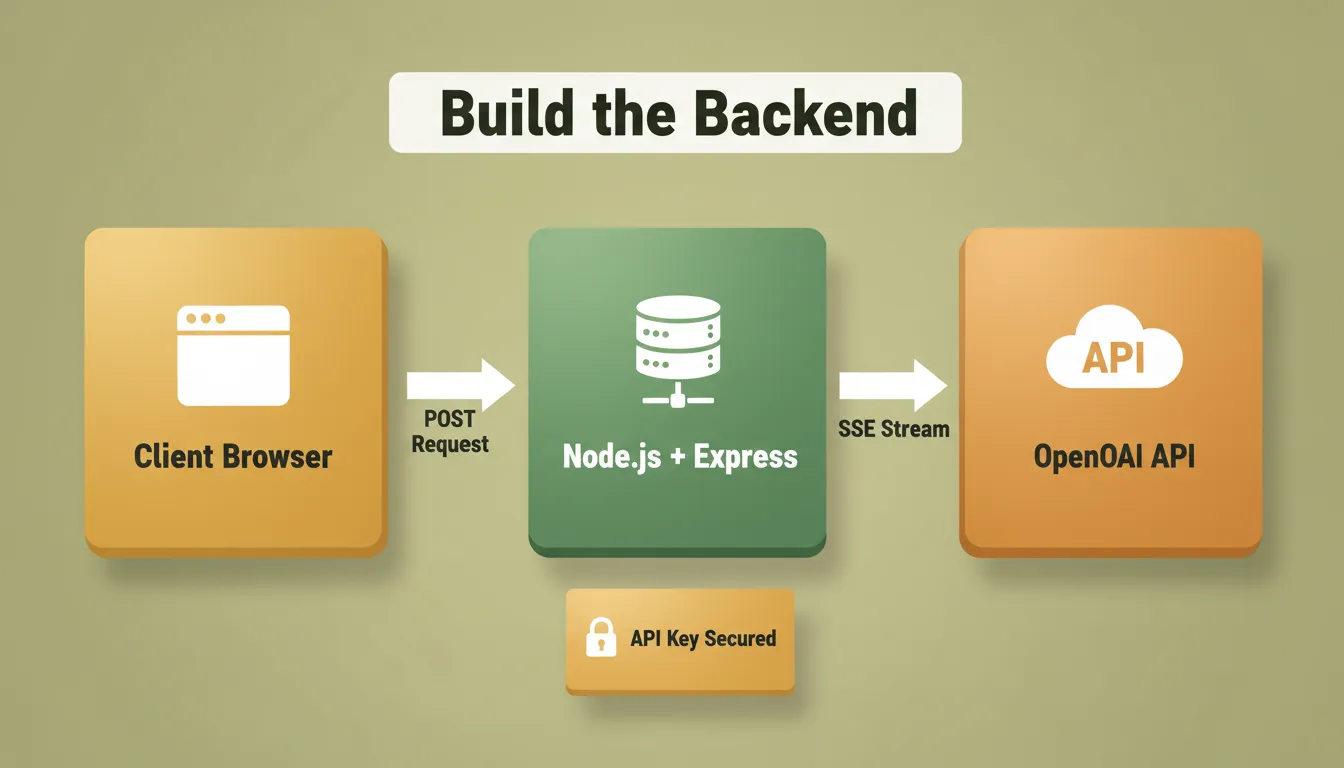
The backend is the brain of your ChatGPT clone. This is where messages get processed, conversation context gets managed, and API calls go to the language model. Getting this right sets the stage for a smooth chat experience.
Understanding how AI in backend development improves API performance helps you make better architectural decisions from the start.
Step 1: Initialize the Project
1npm init -y
2npm install express dotenv openai corsCreate a .env file to store your API key securely. Never commit this file to version control:
1OPENAI_API_KEY=your_openai_api_key_hereStep 2: Build the Server with Streaming
Streaming makes your chatgpt clone feel alive. Users see tokens appear as the model generates them, just like ChatGPT itself:
1import express from "express";
2import OpenAI from "openai";
3import cors from "cors";
4import dotenv from "dotenv";
5
6dotenv.config();
7
8const app = express();
9app.use(cors());
10app.use(express.json());
11
12const openai = new OpenAI({ apiKey: process.env.OPENAI_API_KEY });
13
14// Streaming endpoint (recommended for production)
15app.post("/message/stream", async (req, res) => {
16 const { messages } = req.body;
17 res.setHeader("Content-Type", "text/event-stream");
18 res.setHeader("Cache-Control", "no-cache");
19
20 const stream = await openai.chat.completions.create({
21 model: "gpt-4o-mini",
22 messages,
23 stream: true
24 });
25
26 for await (const chunk of stream) {
27 const content = chunk.choices[0]?.delta?.content || "";
28 if (content) res.write(`data: ${JSON.stringify({ content })}\n\n`);
29 }
30 res.write("data: [DONE]\n\n");
31 res.end();
32});
33
34app.listen(4000, () => console.log("Server running on <http://localhost:4000>"));Once your server runs and connects to the OpenAI API, your bot can start responding to messages. The backend may seem simple here, but it is the foundation your chatgpt clone relies on for every conversation.
Build the Frontend
The frontend is what users actually see and interact with. A clean, simple chat interface makes your ChatGPT clone feel alive and easy to use.
Step 1: Simple HTML
1<div id="messages"></div>
2<input type="text" id="input" placeholder="Type your message...">
3<button id="send">Send</button>Step 2: JavaScript with Conversation State
The conversation history array is the memory of your ChatGPT clone. Send it with every request:
1let conversationHistory = [
2 { role: "system", content: "You are a helpful assistant." }
3];
4
5async function sendMessage() {
6 const userMessage = document.getElementById("input").value.trim();
7 if (!userMessage) return;
8
9 conversationHistory.push({ role: "user", content: userMessage });
10
11 const response = await fetch("<http://localhost:4000/message/stream>", {
12 method: "POST",
13 headers: { "Content-Type": "application/json" },
14 body: JSON.stringify({ messages: conversationHistory })
15 });
16
17 // Handle streamed response and update UI
18 conversationHistory.push({ role: "assistant", content: assistantMessage });
19}With this setup, users can type messages, press Enter, or click Send to receive AI responses. From here, you can add styling, avatars, and other features to make the chat more engaging.
Conversation Flow That Works
Conversation flow matters. It keeps the ChatGPT clone feeling alive. In your backend, send messages as an array so context stays intact:
1[
2 { "role": "system", "content": "You are a helpful assistant." },
3 { "role": "user", "content": "What is the capital of France?" },
4 { "role": "assistant", "content": "The capital of France is Paris." },
5 { "role": "user", "content": "What is its population?" }
6]The model uses the full array to understand that "its population" refers to Paris. This natural language processing loop is what makes conversational AI feel human.
Every model has a maximum context window. Both GPT-4o and GPT-4o-mini support up to 128,000 tokens. When conversation history grows long, trim older messages while always keeping the system prompt.
Security: Protecting Your ChatGPT Clone
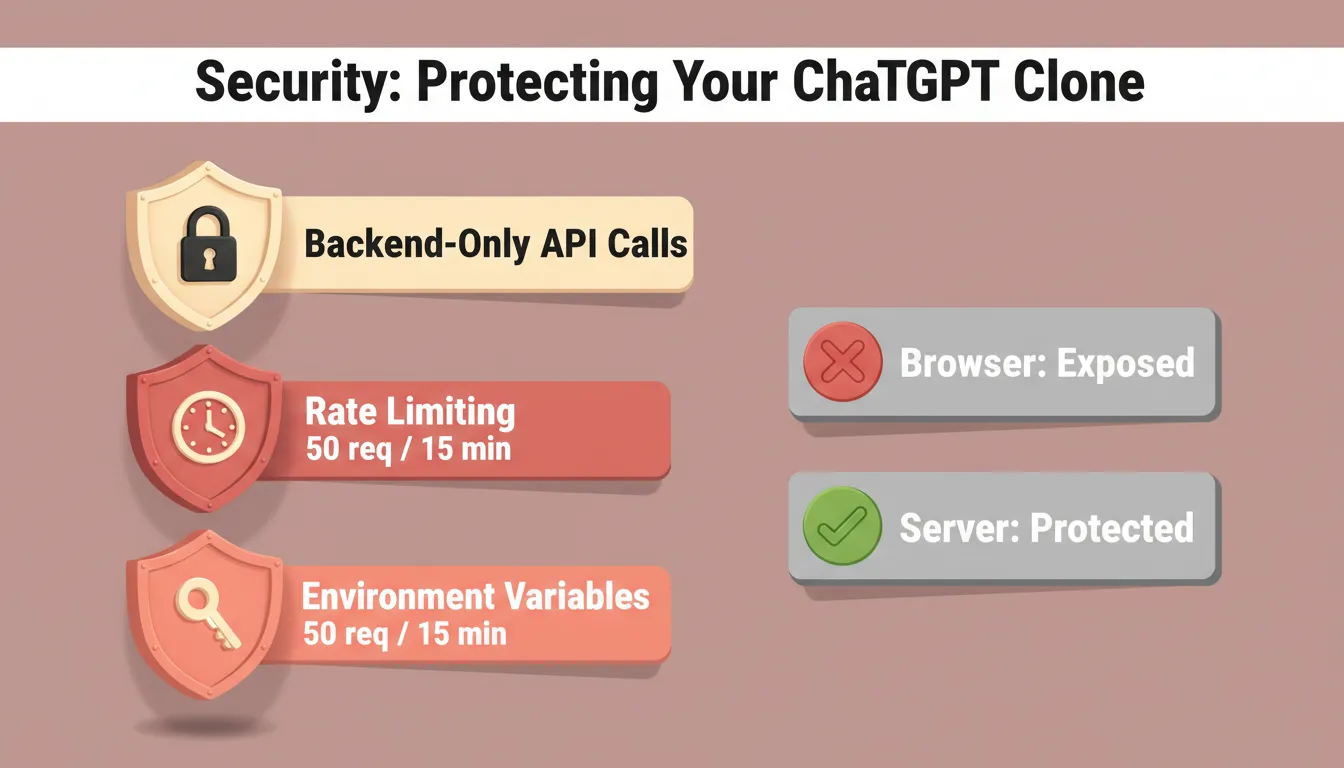
Security is the most commonly skipped step in ChatGPT clone tutorials. As a result, many developers expose their API keys or leave their backends unprotected. Following web application security best practices from the start prevents the most common and costly mistakes.
Three non-negotiable rules:
1. Never expose your API key on the frontend. Route all OpenAI calls through your backend server. If you call the API directly from browser JavaScript, your key becomes visible to anyone who opens DevTools.
2. Add rate limiting to your backend. Without it, a single user can exhaust your entire API budget:
1import rateLimit from "express-rate-limit";
2
3const limiter = rateLimit({
4 windowMs: 15 * 60 * 1000, // 15 minutes
5 max: 50 // 50 requests per window per IP
6});
7
8app.use("/message", limiter);3. Use environment variables for all secrets. In production, use your hosting platform's secret management rather than .env files.
Adding Rich Features
Once your basic ChatGPT clone works, you can expand it significantly. Understanding generative AI vs conversational AI helps you decide which features align with your product direction.
| Feature | Tools Needed | Complexity |
|---|---|---|
| Streaming responses | Server-sent events | Low |
| Image generation | DALL-E API | Medium |
| File upload and analysis | OpenAI Files API | Medium |
| User accounts | Supabase Auth | Medium |
| Persistent chat history | PostgreSQL / Supabase | Medium |
| Multiple AI models | OpenAI, Anthropic, Gemini APIs | Medium |
| Custom personas | System prompt engineering | Low |
| RAG (document search) | Vector database and embeddings | High |
You can switch between models by changing the model parameter in your API call. Connecting to Anthropic's Claude or Google's Gemini follows the same pattern with their respective SDKs.
Testing and Deployment
Testing is what separates a demo from a deployable product. Before launching, cover these scenarios: normal multi-turn conversations, long conversations with context trimming, rate limit simulation, empty input handling, network failure recovery, and mobile responsiveness.
When you are ready to deploy, choosing the right platform matters. Reviewing the best AI app deployment tools helps you match your infrastructure needs to the right option.
| Platform | Best For | Free Tier | Setup Complexity |
|---|---|---|---|
| Vercel | Next.js frontends | Yes | Very low |
| Railway | Full-stack Node.js | Yes (limited) | Low |
| Render | Backend APIs | Yes (spins down) | Low |
| Fly.io | Always-on backends | Yes (limited) | Medium |
| AWS / GCP / Azure | Production scale | No | High |
For a basic chatgpt clone, deploy your backend to Railway or Render and your frontend to Vercel. Both have tiers sufficient for testing and early users.
How Rocket Builds a ChatGPT Clone Without Code
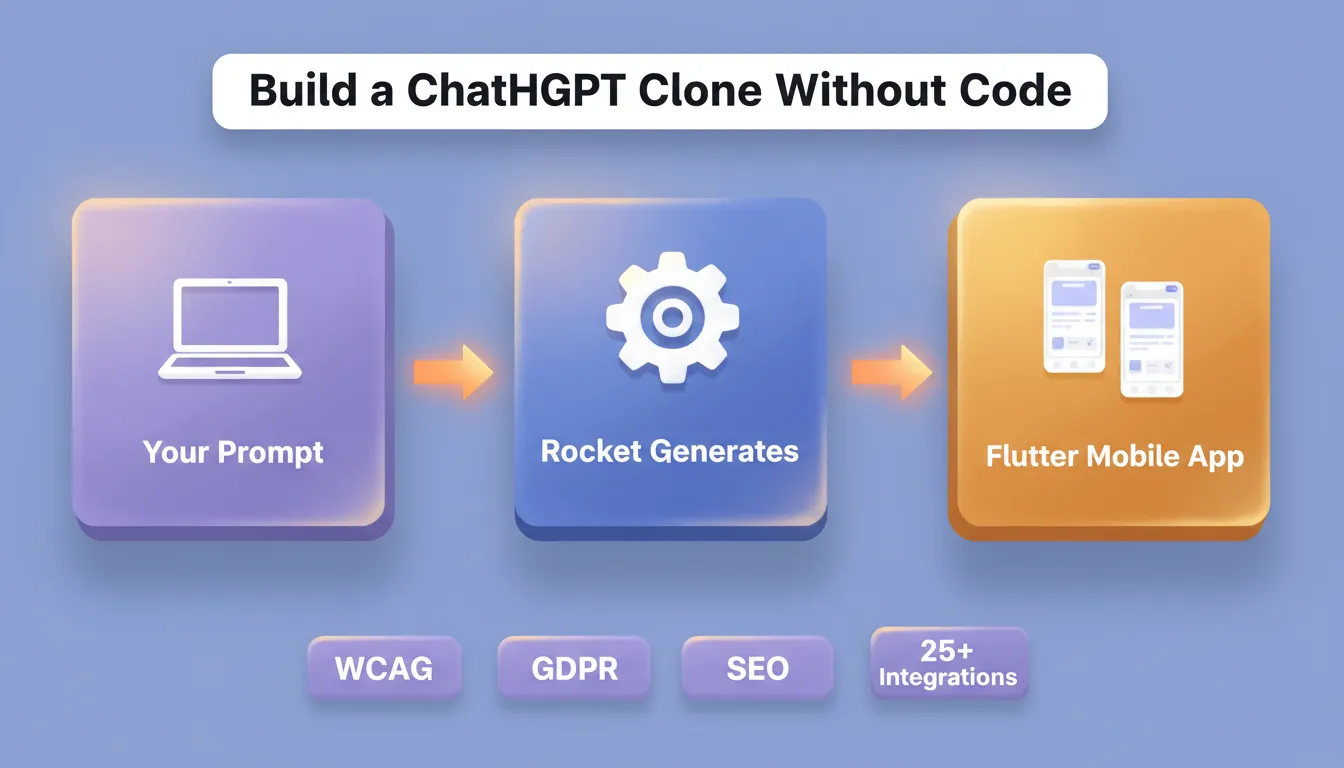
If you are a non-technical founder, product manager, or designer, you do not need to write any of the code above. Rocket's Build feature generates production-ready web apps and mobile apps from a plain language description, including AI-powered chat applications.
What Rocket generates for you:
- A complete Next.js web app (or Flutter mobile app) with a working chat interface
- Backend API routes with OpenAI integration already wired in
- User authentication via Supabase
- A database schema for storing conversation history
- Deployment to a live URL with one click
Rocket also offers a Chat Flow template. This is a pre-built real-time chat application with group management, message editing, media sharing, and read receipts. Start from this template and connect it to the OpenAI API to have a working ChatGPT clone in minutes, not hours.
Templates like Chat Flow reduce repetitive setup. They let you focus on customizing your bot's behavior and overall user chat experience.
Rocket's Build connects to 25+ integrations including OpenAI, Anthropic, Gemini, Supabase, and Stripe. Every app ships with SEO-ready structure, WCAG accessibility compliance, and GDPR coverage by default. 1.5 million people have tried Rocket across 180 countries.
You can also use Solve to validate your ChatGPT clone idea before building. It researches the market, maps competitors, and delivers a structured recommendation. And Intelligence monitors what competing AI chat products are shipping, so you always know what to build next.
Common Challenges and What to Expect
Building a ChatGPT clone sounds exciting, but practical hurdles appear along the way. Knowing what to expect makes the process less stressful and more manageable.
Managing token costs: GPT-4o-mini costs approximately $0.15 per million input tokens. A chatgpt clone with 100 daily active users generating 20 messages each typically costs $1 to $5 per month in API fees at moderate usage.
Keeping the UI responsive: Streaming responses are essential for a good user experience. Without streaming, users stare at a blank screen for 2 to 5 seconds before seeing any response.
Handling long conversations: Implement history trimming for conversations that exceed 50 to 100 turns. Always preserve the system prompt when trimming.
Scaling to many users: A single Node.js server handles hundreds of concurrent connections. For thousands of concurrent users, use a process manager like PM2 or a managed platform.
The ChatGPT Clone Blueprint
ChatGPT alone handles 2.5 billion user prompts per day and has hundreds of millions of users worldwide each week. That is not a small club.
The gap between a toy demo and a production ChatGPT clone comes down to three things: proper conversation state management, streaming responses, and backend security. Everything else, including custom personas, file uploads, voice, and RAG, is additive.
Here is the complete stack for a production-ready ChatGPT clone:
| Layer | Technology | Purpose |
|---|---|---|
| Frontend | React / Next.js | Chat UI, state management |
| Backend | Node.js + Express | API routing, security |
| AI Model | OpenAI GPT-4o-mini | Language model responses |
| Database | PostgreSQL (Supabase) | Conversation history |
| Auth | Supabase Auth | User accounts |
| Deployment | Vercel + Railway | Hosting |
| Streaming | Server-sent events | Real-time response rendering |
Start Building Your ChatGPT Clone
Building a ChatGPT clone from scratch teaches you exactly how conversational AI works under the hood. As language models grow more capable and context windows expand, the same architecture you build today will support voice input, document analysis, and multi-agent workflows tomorrow.
You have two paths: write the code yourself using this guide, or describe your idea and ship a working app today. Rocket handles the full stack, including the Next.js frontend, Node.js backend, Supabase database, and OpenAI integration, from a single description. Start building with Rocket and go from idea to deployed app in minutes.
Table of contents
- -What is a ChatGPT Clone?
- -Who Should Build a ChatGPT Clone?
- -How a ChatGPT Clone Works: Architecture Overview
- -What You Will Need First
- -Tools and Accounts
- -AI Model Options for Your ChatGPT Clone
- -Build the Backend
- -Step 1: Initialize the Project
- -Step 2: Build the Server with Streaming
- -Build the Frontend
- -Step 1: Simple HTML
- -Step 2: JavaScript with Conversation State
- -Conversation Flow That Works
- -Security: Protecting Your ChatGPT Clone
- -Adding Rich Features
- -Testing and Deployment
- -How Rocket Builds a ChatGPT Clone Without Code
- -Common Challenges and What to Expect
- -The ChatGPT Clone Blueprint
- -Start Building Your ChatGPT Clone