
Can a mobile app be built faster using smart automation? See how to build a mobile app with AI through practical workflows, tools, and calm, human development choices.
Can a mobile app be built faster with smart automation and prompts?
Statista reports that the global AI software market exceeded $240 billion in 2024, with much of that growth driven by mobile and business use cases. That surge reflects a real shift in how teams plan, build, and launch products today.
Let's walk through that process step by step, focusing on practical choices, real workflows, and a calm, human approach.
Start With the Right Problem and a Clear Idea
So, everything starts with the idea.
Not a feature-packed vision board or a long roadmap, but one clear problem worth solving. Strong app ideas usually grow from everyday friction. Missed handoffs, scattered data, slow approvals, or repetitive manual work often signal opportunity.
Most early-stage teams explore a few directions before settling on one. That breathing room helps narrow the scope without pressure.
AI fits best where repetition exists. Sorting text, tagging images, predicting outcomes, or generating summaries tend to deliver value quickly. Writing the idea in plain language keeps thinking clear and sets up stronger prompts later.
Choose the Platform and App Builder Carefully
Next comes the platform decision, which shapes nearly everything that follows.
Some teams start with web apps to validate quickly, while others go straight to iOS and Android for mobile-first audiences.
A modern app builder now handles layout, backend logic, and data connections in one place. Many include an AI app builder that converts natural-language prompts into functional screens and flows. The best AI app builders offer a visual editor, flexible backend logic, and API integrations with external tools.
React native options help teams target iOS and Android from a shared setup. That saves time without giving up control. Native apps still matter when deeper phone access is needed, especially for sensors or offline behavior. Paid plans start small, and most platforms include a free plan for testing and early experiments.
Shape the App Using Prompts, Not Endless Menus
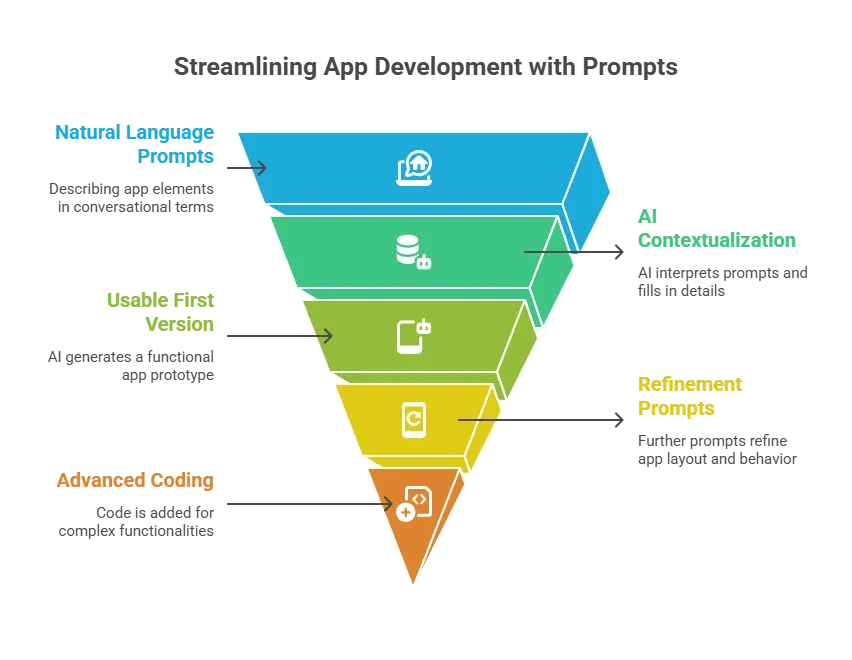
Once the platform is set up, app building typically begins with prompts rather than configuration screens. Natural language prompts describe layouts, actions, and logic in a way that feels closer to conversation than setup.
Design Screens With Visual Control
After structure comes polish. A visual editor makes it easy to adjust spacing, colors, and layout without touching code. Figma often connects workflows directly, which reduces friction between design and build.
Live previews update in real time, speeding feedback loops. Images, icons, and fonts remain editable at all times. Phone previews help catch layout issues before release. Later on, custom domain support becomes useful, especially for client portals or business-facing apps.
Set Up Backend Logic and Data Flow
With screens in place, attention turns to backend logic. This layer controls how the app behaves behind the scenes. Most platforms include backend tools for rules, conditions, and workflows.
Database setup usually takes minutes. Tables clearly define users, actions, and permissions. Many tools integrate with Google Sheets, enabling teams to sync data quickly. Since spreadsheets still power many internal tools, this connection saves time. API keys open doors to payments, messaging, or mapping services. Access rules help manage data visibility safely.
Add AI Powered Features That Actually Help
Now is the time to add AI-powered features, but restraint is essential. Smart search, text summaries, auto-tagging, or recommendations work best when tied to real needs. An AI app delivers more value when a single feature performs extremely well than when many features perform poorly.
Natural language input feels familiar and lowers friction for users. AI tools also help with moderation and error detection. These features quietly support users rather than distract them.
Build, Test, and Refine in Short Cycles
Then comes testing, which runs throughout the app's lifecycle. Teams test flows on Android apps and iOS builds while closely monitoring load times and data behavior. Regular test cycles catch issues early and keep changes manageable.
Early users provide insight that assumptions never match. Prompts often need adjustment when behavior drifts. Even small wording changes can shift outcomes. More control comes from iteration, not complexity.
Prepare for Launch and Stay Connected
Finally, launch preparation begins. Store listings should stay clear and honest, focusing on real features rather than buzzwords. Analytics tools help teams understand how users move through the app. Support channels matter, especially for business tools. A smooth launch usually feels quiet because improvement continues afterward.
Rocket.new and AI-Driven App Building
Rocket.new focusing on fast creation with flexible control. Teams use it to build internal tools, client portals, and early product versions without heavy setup.
Key features include:
- Prompt-based app building
- Visual editor for layout
- Backend logic tools
- Database setup in minutes
- API connections with keys
- Support for web and mobile
👉Build Your Mobile App with Rocket.new
A Simple Comparison at a Glance
| Approach | Speed | Coding Required | Control |
|---|---|---|---|
| Traditional code | Slow | High | High |
| No code platforms | Fast | Low | Medium |
| AI app builder | Very fast | Low | More control |
How to Build A Mobile App With AI
Building products today feels lighter than before. Tools handle setup, data, and workflows, while people focus on decisions and direction. Clear ideas, thoughtful prompts, and steady testing shape long-term results. That balance defines how to successfully build a mobile app with AI.
Table of contents
- -Start With the Right Problem and a Clear Idea
- -Choose the Platform and App Builder Carefully
- -Shape the App Using Prompts, Not Endless Menus
- -Design Screens With Visual Control
- -Set Up Backend Logic and Data Flow
- -Add AI Powered Features That Actually Help
- -Build, Test, and Refine in Short Cycles
- -Prepare for Launch and Stay Connected
- -Rocket.new and AI-Driven App Building
- -A Simple Comparison at a Glance
- -How to Build A Mobile App With AI