
How fast can you turn an idea into an AI app? No code builders create mobile or web apps quickly, making development possible without skills.
Ever thought about building an app without writing a single line of code?
That’s exactly what no-code AI app builder tools let you do. By 2025, around 70% of new business applications are expected to be built using low-code or no-code platforms.
These tools let you quickly turn your app idea into a functional mobile or web app, handle data and logic visually, and integrate AI features.
No dev team? No problem.
Speed, simplicity, and flexibility are all on the table.
Why no‑code + AI matters
Using a no-code AI app builder reduces traditional development overhead.
Building a mobile or web app no longer requires teams of developers or months of building data infrastructure, APIs, and UI from scratch. No-code platforms give pre-built components, drag-and-drop visual programming, and simple integrations.
Small teams or non-technical folks can quickly build internal tools, customer-facing mobile apps, or web apps. Many companies report up to 90% reduction in development time when using no-code tools instead of traditional coding.
As more platforms embed AI-powered features such as automated workflows, intelligent data handling, and natural-language prompts, the “no-code space” becomes even more attractive for building apps that feel modern, responsive, and capable.
Top No-Code AI App Builders
Rocket.new: Quick, Powerful App Launches
Rocket.new deserves a quick spotlight here. It aligns closely with the idea of rapid, simple app building, especially when speed and minimal setup are critical.
Rocket.new lets users quickly spin up simple web apps.
Key features include
- Prompt-based full-stack app generation: Describe your idea, and Rocket.new scaffolds frontend, backend, and integrations automatically.
- Figma-to-code conversion: Turn Figma designs into responsive web or mobile code.
- Built-in backend and authentication: Get database schemas, user authentication, API endpoints, and security in place.
- Cross-platform output: Build web apps or mobile apps for iOS and Android from one project.
- One-click deployment with hosting: Launch instantly with custom domain support.
- Full code export and ownership: Retain access to the generated code for edits or further development.
- Precise command execution: Use / to run actions and @ to scope edits quickly and clearly.
For someone in the no‑code or low-code ecosystem, Rocket.new can act as a bridge. It helps host or deploy small apps built visually or with minimal code, reducing friction in launching web apps quickly. That aligns well with using no-code app builders for rapid iteration.
Bubble
Bubble has established itself as a flagship no-code platform. It allows building fully functional web apps with user accounts, database logic, front-end UI, and workflows, all visually.
- Supports complex logic, data models, and integrations
- Good for MVPs, customer portals, admin dashboards, and web apps
- Can scale fairly well for small to medium apps
Many early-stage startups use Bubble to validate their app idea without hiring full developers.
Adalo
Adalo leans more toward mobile apps, including native mobile or progressive web apps. It suits those who want a simple mobile-first experience without diving into real code.
- Lets users build mobile apps with UI builder, data, and logic
- Offers templates and components for quick assembly
- Great for small business apps, prototypes, or internal tools
Adalo’s growth has paralleled the broader no-code adoption trend.
Glide
Glide stands out for super-fast building of simple mobile or web apps, often based on a spreadsheet.
- Ideal for simple apps, dashboards, and prototypes
- Very low learning curve compared to traditional mobile app building
- Quick turnaround, good for first app or internal tools
It is popular among non-technical users who need a simple, quickly built app.
Make (Make.com) + Airtable / Zapier / PostgreSQL
Using workflow automation tools alongside database tools gives no-code builders greater power. For instance, Make can orchestrate complex workflows, trigger API calls, move data, and send notifications, all without writing code. Airtable can hold and manage data.
- Lets you build apps with real data, automation, and integrations
- Works well for internal tools, dashboards, and backend workflows
- Offers flexibility while avoiding heavy code
Many successful no-code stacks blend visual UI builders with workflow/automation tools and a data backend.
Quick comparison: Feature matrix
| Feature / Use-case | Rocket.new | Bubble | Adalo | Glide | Make + Airtable / DB + Automation |
|---|---|---|---|---|---|
| Web app support | ✅ Yes | ✅ Yes | Limited / PWA | Yes (PWA) | Yes (with external UI) |
| Native mobile / PWA support | ❌ / PWA | ❌ / PWA only | ✅ Yes | ✅ Yes | Depends on frontend |
| Visual UI builder | ❌ Limited | ✅ Yes | ✅ Yes | ✅ Yes | UI needs external tool or web frontend |
| Database / backend support | ✅ Via CI/CD & external | ✅ Built-in | ✅ Built-in | Spreadsheet / simple DB | ✅ Via DB tools like Airtable or PostgreSQL |
| Workflow / automation support | ✅ Basic CI/CD triggers | ✅ Plugins/workflows | Basic logic | Basic | ✅ Strong (Make, Zapier etc) |
| Good for MVP / prototypes | ✅ Yes | ✅ Yes | ✅ Yes | ✅ Yes | ✅ Yes (for backend processes) |
| Good for mid-scale apps / internal tools | ✅ Small-scale | ✅ Yes (smaller scale) | Medium | Small-scale | ✅ Yes, flexible if well architected |
What do many users like, and what do they warn against?
The surge in no-code platforms isn’t just hype.
Many businesses report big savings in cost and time. That’s why non-IT professionals are building apps themselves.
Still, some say no-code has limits. One Reddit user wrote
“No-code is brilliant for prototyping. It’s terrible for production.”
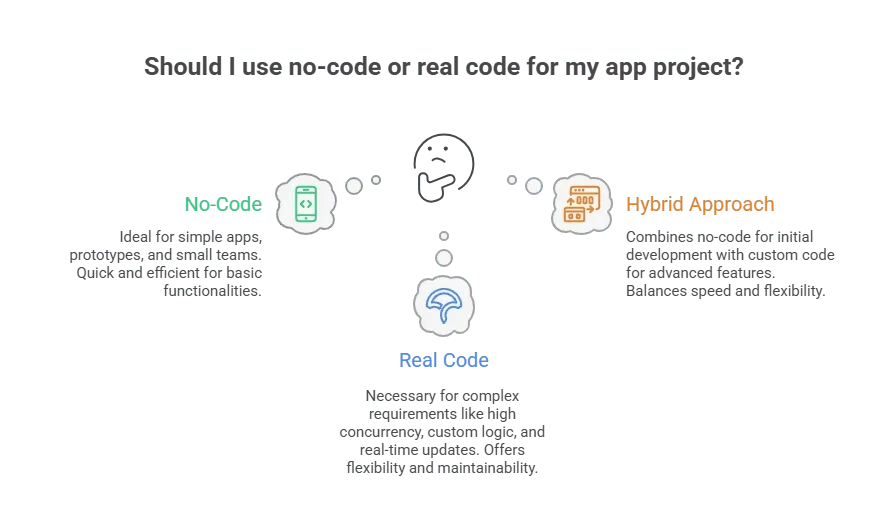
When apps grow to include many users, complex logic, large datasets, or advanced integrations, no-code tools may struggle. Then, switching to real code or a hybrid approach may become necessary.
So no-code tools shine in speed, simplicity, and cost savings. But they may require trade-offs among scalability, flexibility, and long-term maintainability.
When no‑code works and when real code might win
No-code tools excel at building simple mobile apps, internal tools, dashboards, and quick prototypes. They help a small team or solo builder ship an app idea without hiring developers. They handle UI, data, basic logic, and connect to external services.
Why the no‑code AI app builder trend matters
The rise of no‑code AI tools is changing who can build apps and how quickly. More people can now take an app idea and turn it into a fully functional web or mobile app. Costs drop, timelines shrink, and the barrier to entry lowers.
That makes no-code AI app builder tools a practical option for entrepreneurs, startups, small teams, and businesses that need internal tools, especially when speed and simplicity matter more than maximum customization.
Table of contents
- -Why no‑code + AI matters
- -Top No-Code AI App Builders
- -Rocket.new: Quick, Powerful App Launches
- -Bubble
- -Adalo
- -Glide
- -Make (Make.com) + Airtable / Zapier / PostgreSQL
- -Quick comparison: Feature matrix
- -What do many users like, and what do they warn against?
- -When no‑code works and when real code might win
- -Why the no‑code AI app builder trend matters