
Want to turn ideas into a startup without coding skills? Vibe coding lets founders describe products in natural language while AI builds and tests them, accelerating development and boosting productivity.
Curious how to build a startup with Vibe Coding without complex tech hurdles?
You can build, test, and grow a startup by describing what you want in natural language, while AI helps generate code and handle the heavy lifting. This approach is helping non-technical founders launch faster than before.
McKinsey study found that developers can complete tasks up to two times faster using generative AI, with some coding tasks seeing productivity gains of around 35 to 45%.
So yes, the shift is real. And vibe coding is right at the center of it.
What is Vibe Coding?
Let’s keep it simple.
Vibe coding is a way to build software by describing your ideas in plain language, and AI tools generate code for you. Instead of writing every line of code manually, you guide the system like a creative director.
You focus on:
- What do you want to build
- How the user should feel
- What the app should do
The AI handles the code.
This is why vibe coding is gaining traction among non-technical founders. You don’t need deep coding experience. You just need clarity in your ideas.
👉Worth a quick read: What is Vibe Coding: A Simple Guide for Developers
Why Vibe Coding Works for Startups?
Startups move fast. And traditional programming can feel time-consuming.
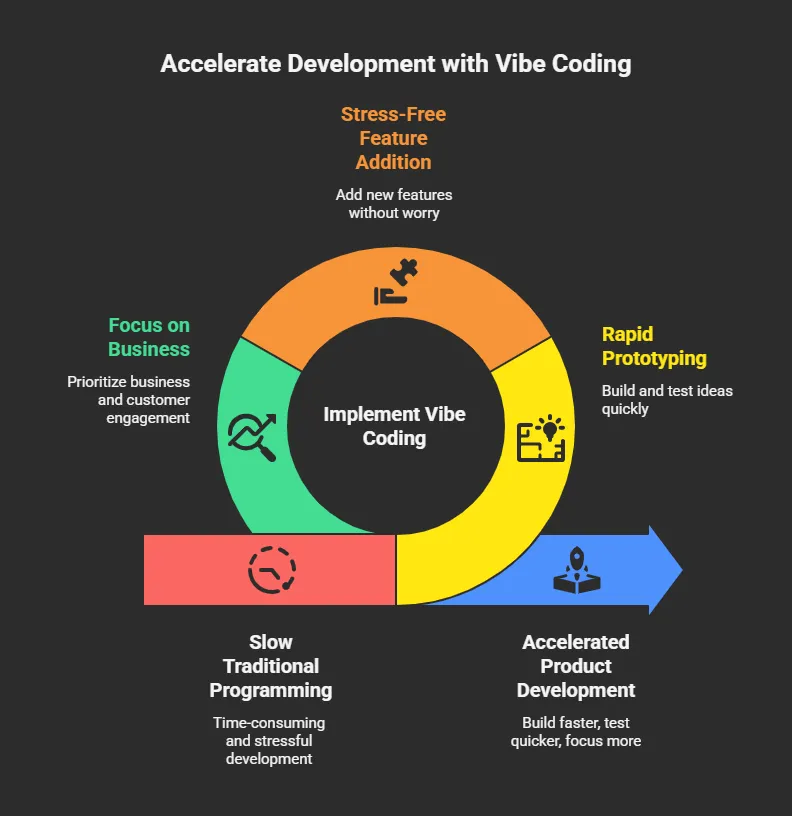
It shifts your role. You’re not just a developer. You become a product thinker. And that changes everything.
The Core Vibe Coding Process
So, how does this actually work in real life? Let’s walk through the vibe coding process in a simple, practical way.
Think of it like a loop where you describe, build, test, and improve. You’re not stuck in technical details. You’re guiding the app like a creator.
1. Describe the Idea
Start with an example prompt:
“Build a simple fitness tracking app with a clean UI and daily progress tracking.”
The AI assistant reads your context and begins generating code.
2. Refine the Output
You check if the code works. If not, you provide feedback.
Example prompt:
“Make the UI more minimal and add a dark mode.”
3. Test and Improve
You test the app. Fix bugs. Add features.
Example prompt:
“Add user login and save progress using Firebase.”
4. Repeat
This loop is your development process. It’s fast, simple, and flexible.
That’s the beauty of vibe coding. You’re not buried in code lines or stuck debugging for hours. You stay focused on your ideas, your user, and your product.
The more you practice this loop, the faster and smoother your startup journey becomes.
Step-by-Step Guide to Building Your Startup
So, how do you actually go from an idea to a working app using Vibe coding?
Let’s break it down into a clear, practical flow.
Step 1: Define Your Project Goals
Before touching any tools, get clear on your project goals.
Ask yourself:
- What problem does this app solve?
- Who is the user?
- What is the desired outcome?
Clarity here makes everything easier later.
Step 2: Choose the Right Vibe Coding Tools
There are many tools available right now. You don’t need all of them.
Here’s a simple breakdown:
| Tool | Use Case | Why It Helps |
|---|---|---|
| Cursor | AI coding editor | Great for writing and refining code |
| Claude Code | AI assistant | Helps generate code from prompts |
| GitHub Copilot | Code suggestions | Speeds up development |
| Firebase Studio | Backend support | Handles database and auth |
These vibe coding tools support your entire stack, from frontend to backend.
Step 3: Start Building with Prompts
This is where the fun begins. You don’t start with code. You start with an idea.
Example prompt:
“Create a landing page for a productivity app with signup and dashboard.”
The AI will generate code. You review the output.
Then refine:
Example prompt:
“Use Tailwind CSS for styling and make it mobile friendly.”
You keep going until the code works the way you want.
Step 4: Add Functionality
Now you move deeper into app development.
Add features step by step.
Example prompt: /q“Add user authentication with email and password.”
Example prompt: “Store user data using Firebase.”
Example prompt: “Add a progress tracking dashboard.”
You’re not stuck in implementation details. You focus on what matters.
Step 5: Test Everything
Testing is key.
Check:
- Does the code work?
- Is the user flow smooth?
- Are there bugs?
Run multiple test cycles. Provide feedback to the AI assistant.
Example prompt:
“Fix login error and improve error messages.”
Step 6: Launch and Improve
Once your app is ready, launch it.
Then:
- Collect user feedback
- Improve features
- Add new features
This loop keeps your startup growing.
That’s it. Simple steps, clear flow, and steady progress. With vibe coding, you’re not overwhelmed by the development process. You’re building, testing, and improving in a way that feels natural. Stay consistent with these steps, and your project will move forward faster than you expect.
Vibe Coding vs Traditional Programming
Let’s compare quickly.
| Aspect | Vibe Coding | Traditional Programming |
|---|---|---|
| Speed | Very fast | Slower |
| Skill needed | Low coding experience | High coding experience |
| Focus | Ideas and functionality | Syntax and structure |
| Process | AI assisted | Manually writing |
You can see the difference. Vibe coding shifts the focus from code to creativity.
Community Insight
Here’s a real perspective from LinkedIn that gives a grounded view of vibe coding:
“I didn’t write a single line of code. I just wrote instructions… by night, I had a clickable app for show.”
This shows how non**-**technical founders are using vibe coding to build fast and test ideas quickly. At the same time, it highlights something important. The real skill is not coding. It’s how well you describe your idea and guide the AI.
Best Practices for Vibe Coding
So, how do you actually get better results with vibe coding? It’s not just about using tools. It’s about how you guide them. Let’s keep this practical and easy to follow.
Be Clear with Prompts
Use simple natural language and be specific about what you want.
-
Bad example:
“Make app better”
-
Good example:
“Add a clean dashboard with user stats and progress charts”
Clear prompts help the AI generate code that’s closer to your desired outcome.
Break Tasks into Small Steps
Don’t try to build everything in one go. That usually leads to messy output.
Instead:
- Build one feature
- Test it
- Move to the next
This keeps your development process clean and manageable.
Understand the Basics
You don’t need deep software development knowledge, but knowing a few basics makes a big difference.
Focus on:
- What is frontend and backend
- How APIs work
- How data is stored
This helps you guide the AI better and understand how your app works.
Use Multiple Tools
Don’t rely on a single platform. Different tools do different tasks better.
Use several tools:
- Cursor for editing and refining code
- Claude code for generating code from prompts
- Firebase Studio for backend and database
This setup gives you more flexibility and better results.
Vibe coding works best when you stay clear, patient, and consistent. Focus on your idea, guide the tools step by step, and keep improving through feedback. Over time, you’ll notice your ability to build, test, and refine getting faster and smoother.
Launch Your Startup Faster with Rocket.new
So, let’s talk about a platform that actually brings everything together in one place.
Rocket.new is designed for modern builders who want to move fast without getting stuck in technical setup. It helps non-technical founders and creators turn ideas into working apps using AI, without needing deep coding experience.
At its core, Rocket.new is not just another tool. It’s a full platform where you can describe your idea in plain language, and it helps generate code, structure your project, and guide your development from start to finish.
Where Rocket.new comes at
Rocket.new connects your idea directly to execution. You don’t need to manually set up your stack or worry about complex setup steps.
You simply describe what you want:
- The app idea
- The features
- The user flow
And the platform helps generate code, organize your project, and move you forward step by step.
It removes the usual friction that slows down early-stage startup building.
More Than Vibe Coding, It’s Vibe Solutioning
Here’s the interesting part.
Rocket.new goes a step further than basic vibe coding. It’s closer to what you can call vibe solutioning.
👉Worth reading at: Understanding What is Vibe Solutioning and its Practical Applications
Instead of just writing prompts and getting pieces of code, you’re getting ready-to-use apps, structured prototypes, and working flows. You describe the outcome, and the platform builds toward that result.
So you’re not just generating code. You’re creating complete solutions that you can test, refine, and even launch.
Top Features
- Prompt to App Creation: Builds apps directly from single prompts
- Figma Import: Converts design files into live, editable layouts
- AI-Powered Backend: Automatically handles logic, data, and workflows
- Custom Domain Support: Publishes projects with a branded domain
- Code Export: Allows developers to extend or customize later
- Live Preview: Shows instant updates while editing
These features make it easier to build, test, and improve your app without getting stuck in setup or configuration.
Use Cases
1. MVP Creation: You can build a working app in record time. This is perfect when you want to test ideas quickly and validate them with real users.
2. Internal Tools: Create tools for your business without hiring a developer. From dashboards to tracking systems, you can build what you need on demand.
3. SaaS Platforms: Launch a full platform with login, dashboards, and analytics. It helps you move from idea to a usable product much faster.
Rocket.new makes vibe coding feel practical and real. You’re not just experimenting with prompts. You’re building actual products that people can use. If your goal is to move fast, test ideas, and grow your startup, this kind of platform gives you a strong head start.
The Future of Startups with Vibe Coding
So, where is this heading? The shift is already happening. Startups are moving toward faster building, less coding, and more focus on users.
What We’ll See More Of
- Build without deep coding experience
- Launch faster
- Focus on users instead of code
What’s Driving This
AI, large language models, and better tools are improving fast, making it easier to generate code and build applications.
Vibe coding is becoming a standard way to build. Founders who adapt will move faster and stay focused on real user value.
Bringing It Together The problem
Building a startup through traditional programming can feel slow and resource-heavy, especially for non-technical founders trying to turn ideas into real products. Vibe coding changes that by letting you describe your idea while AI helps generate code, so you can build, test, and refine your app faster without getting stuck in technical work.
At its core, learning how to build a startup with vibe coding is about shifting your focus from writing code to guiding it. You think about the user, the features, and the business while the tools handle the rest. Stay consistent, keep testing, and improve step by step, and you’ll be able to build something real in less time than you expected.
Table of contents
- -What is Vibe Coding?
- -Why Vibe Coding Works for Startups?
- -The Core Vibe Coding Process
- -1. Describe the Idea
- -2. Refine the Output
- -3. Test and Improve
- -4. Repeat
- -Step-by-Step Guide to Building Your Startup
- -Step 1: Define Your Project Goals
- -Step 2: Choose the Right Vibe Coding Tools
- -Step 3: Start Building with Prompts
- -Step 4: Add Functionality
- -Step 5: Test Everything
- -Step 6: Launch and Improve
- -Vibe Coding vs Traditional Programming
- -Community Insight
- -Best Practices for Vibe Coding
- -Be Clear with Prompts
- -Break Tasks into Small Steps
- -Understand the Basics
- -Use Multiple Tools
- -Launch Your Startup Faster with Rocket.new
- -Where Rocket.new comes at
- -More Than Vibe Coding, It’s Vibe Solutioning
- -Top Features
- -Use Cases
- -The Future of Startups with Vibe Coding
- -What We’ll See More Of
- -What’s Driving This
- -Bringing It Together The problem