

How can operations teams grow faster with AI tools? See the practical steps to build and scale AI apps that reduce repetitive work and support lean teams today.
Can AI really help operations teams scale quickly?
Yes, when the right strategy and tools are used.
About 78% of companies now use AI in at least one business function, underscoring how mainstream this technology has become across operations and everyday workflows.
Today, operations leaders are expected to do more with less. Lean teams need ways to cut repetitive tasks and save time without burning out people.
Modern AI tools make this easier than ever. But not all AI apps for operations teams are built the same. Some will fly, others won’t.
So, let's review the steps to build and scale AI apps that work.
Why Build AI Apps For Operations Teams?
So, what’s at stake here?
Operations teams handle the daily nitty‑gritty of business processes. They juggle schedules, track tasks, manage data entry, and keep everyone coordinated.
In the AI era, expectations have shifted fast. Ops leaders want tools that save time, handle repetitive tasks, and deliver instant answers. That’s where AI apps and AI tools come in.
You can think of AI apps as helpers that run on AI models behind the scenes and make your life easier. Some are simple, such as AI chatbots that provide instant answers.
Others are powerful AI agents that automatically create tasks or analyze data without requiring a human to trigger them each time.
Start With a Clear Problem Statement
Before building anything, ask:
What operations problem needs solving right now?
Do teams waste time in meeting follow-ups?
Are standard operating procedures stuck in shared docs?
Is task management slow or manual?
Define specific pain points. Then match them with AI-powered tools that can help. This prevents spending months building something that people don’t want.
So, start small and focused.
Pick the Right AI Tools For the Job
Not all AI tools are the same.
Some are great at handling natural language. Others are best at analyzing data or automating routine tasks. It’s okay to mix and match.
| Tool Category | What It Does | Example Task |
|---|---|---|
| AI Chatbots | Natural language responses | Answer employee questions |
| AI Agents | Autonomous task handling | Coordinate across channels |
| Project Management Tools w/ AI | Automated workflows | Create tasks from Slack messages |
| AI Executive Assistant Tools | Meeting summarization | Generate meeting summaries |
| No Code AI Platforms | Fast app building | Build custom AI workflows without code |
This mix gives you flexibility.
For example, AI chatbots can help support teams with instant answers to policy questions. Meanwhile, AI agents can monitor specific triggers and respond automatically.
Choosing the right AI tools is like picking the right players for your team.
Design With Ops Teams in Mind
Next, talk to the people who will actually use your AI apps.
Ops leaders often know what they need. They can list tasks that feel repetitive or boring. That’s exactly where modern AI tools shine.
Ask teams about their:
- Routine tasks they dislike
- Biggest time sinks during the week
- Friction points in workflows
This helps you match tools to real needs. Avoid building AI apps that people see as “just tech toys.” Instead, focus on workflow improvements that save real time.
Integrate with Existing Tech Stack
Your team already uses email, messaging apps, and project management systems. The goal is not to replace those. It’s to make them better with AI.
For example:
- Plug AI chat into Slack messages so people get instant answers.
- Connect AI agents to your calendar, so follow-ups get created automatically.
- Sync AI apps with your project management tools so tasks appear in the right place.
Integration matters more than fancy features. If your AI apps don’t integrate smoothly with the existing tech stack, teams will ignore them or work around them.
Build with Scalability in Mind
Ops leaders want tools that grow with the business. A pilot project might work for a small group, but will it work when the whole company uses it?
Here are a few ways to think about scale:
Standard Operating Procedures (SOPs): Turn SOPs into structured prompts that AI tools can reuse. This makes new team onboarding easier and more consistent.
Distributed Teams: If your team is spread across time zones, AI chatbots or AI assistants can give up‑to‑date support around the clock.
Enterprise-grade security: Security matters more as usage grows. Ensure your AI-powered tools support robust audit logs and data controls to protect business data.
Scaling isn’t just about adding more users. It’s about ensuring the tools you build today continue to work smoothly tomorrow without your team losing sleep over it.
Break Down Features in Simple Steps
A big mistake is to build too much at once. Start with the basics, then expand.
Here’s a simple roadmap for the early stages:
1. Instant Answers: Add AI chat to internal tools so people can get information fast.
2. Task Automation: Set up AI tools that automatically create tasks from meeting summaries or Slack messages. This cuts down manual task creation.
3. Meeting Summaries: Use an AI executive assistant to summarize meeting notes. Then automatically create task templates or follow-ups.
4. Distributed Workflow Orchestration: Introduce AI agents that manage complex workflows by triggering steps across tools without manual input.
In every step, ask yourself - "Does this save the team time? Does it reduce repetitive tasks?"
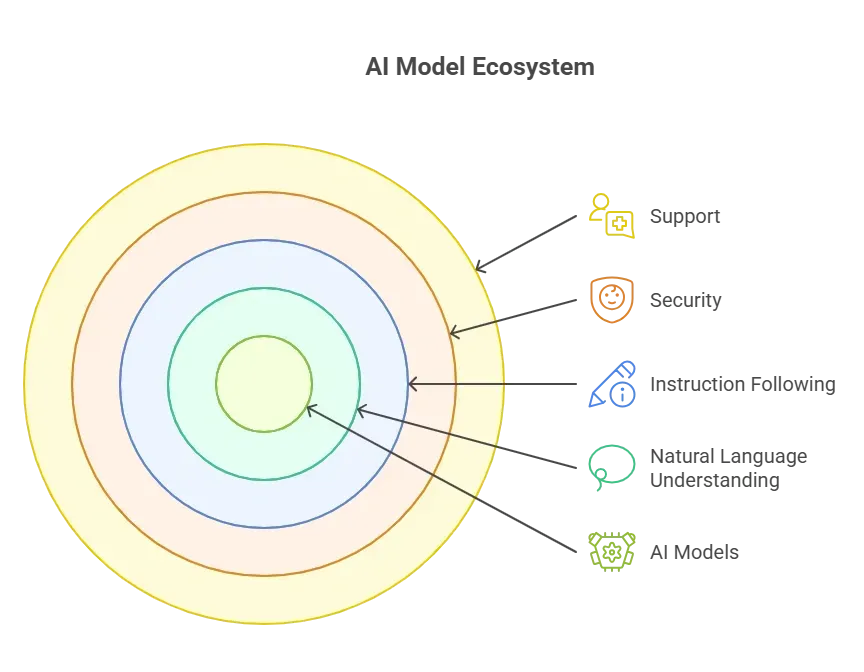
Leverage the Right AI Tools and AI Models
So, what’s behind all these apps?
AI models.
These are the engines that power everything from chat responses to task creation.
Rocket.new: Launching AI Apps at Full Throttle
Rocket.new is built for ops leaders who want speed without the mess. It helps teams build AI-powered apps that actually work inside daily operations, not outside them.
No long setup. No heavy learning curve. Just practical tools that move fast.
With Rocket.new, teams can create AI apps using natural language and no-code workflows. That means fewer blockers and more progress. Ops leaders can design automated workflows, connect internal data, and deploy AI assistants that handle real work.
All without touching complex logic or writing code.
Key Features
- No code builder for AI-powered tools
- Prebuilt AI assistant and AI chat templates
- AI agents that handle follow-ups and task automation
- Support for automated workflows across multiple channels
- Works with existing tech stack and popular project management tools
- Built with enterprise-grade security and audit logs
Rocket.new works well for ops leaders who want control, speed, and clarity. It doesn’t try to be flashy. It just helps teams get real work done faster.
Using AI Agents to Do More
AI agents take action for you. They go beyond simple prompts.
Imagine an agent that:
- Reads incoming requests
- Creates tasks in your project management tools
- Sends reminders to team members
- Summarizes results by the end of the day
That’s more than a chatbot. That’s a coworker you don’t have to pay for lunch.
These agentic AI systems can communicate across multiple channels, including Microsoft Teams, Google Workspace, and project boards.
But start modestly. Get early wins with simple agents that handle small tasks first.
Community Insight
One Reddit thread puts a real spin on how AI is being used right now:
“78 percent of companies say they use AI. But only 15 percent see meaningful business impact. The gap is insane…Only 21 percent of companies redesign workflows after adding AI. The rest just dump AI on top of old processes and hope for magic.”
The takeaway? Simply having AI chat or AI agents doesn’t guarantee results.
Adoption Tips that Help Teams Win
It’s one thing to build AI apps. It’s another to make sure they get used.
Here are some tips:
- Start with a free plan that includes tools to test ideas.
- Keep the learning curve low. Train teams on real tasks.
- Pair AI assistants with internal champions who can show others how they help.
- Review analytics often. If usage is low, figure out why.
- Celebrate small wins. If the team saved hours this week, shout about it.
Adoption isn’t a checkbox. It’s about creating habits. When teams see real-time savings and less repetitive work, AI apps stop being “just tech” and become part of the team.
How AI Apps For Operations Teams Can Scale Fast
Building AI apps that scale for operations teams is like teaching someone to fish and not just handing them food. It takes clear planning, smart choice of AI-powered tools, seamless tech integration, and user‑friendly design.
When everything clicks, operations leaders see real-time savings, fewer repetitive tasks, and faster team coordination. The faster your tools adapt to real needs, the faster your team moves.
At the end of the day, scaling AI apps isn’t about complexity or flashy features. It’s about building tools that fit naturally into workflows, solve real problems, and actually get used. When teams see value, adoption follows, and that’s when operations really start to move fast.
Table of contents
- -Why Build AI Apps For Operations Teams?
- -Start With a Clear Problem Statement
- -Pick the Right AI Tools For the Job
- -Design With Ops Teams in Mind
- -Integrate with Existing Tech Stack
- -Build with Scalability in Mind
- -Break Down Features in Simple Steps
- -Leverage the Right AI Tools and AI Models
- -Rocket.new: Launching AI Apps at Full Throttle
- -Key Features
- -Using AI Agents to Do More
- -Community Insight
- -Adoption Tips that Help Teams Win
- -How AI Apps For Operations Teams Can Scale Fast

