

Looking to create internal tools on your own? Learn how no-code and AI platforms let non-technical users build tools, connect data, and automate workflows with steps and smart platform choices.
How to build internal tools without hiring a developer?
With modern AI and no-code platforms, even non-technical users can create internal tools that handle real workflows, connect smoothly to data sources, and automate daily tasks without writing code. This shift is already happening at scale.
A report by McKinsey highlights that around 65% of application development activity will be done using low-code or no-code tools. That clearly shows internal tools are no longer limited to engineers or large tech teams.
In this blog, you’ll learn how to approach building internal tools step by step, choose the right platforms, and turn simple ideas into working systems without needing a developer.
Why Internal Tools Matter More Than You Think?
Every business operates on systems. Some are visible. Others run quietly in the background. These are your internal tools.
Think about:
-
Inventory trackers
-
Sales dashboards
-
Employee onboarding forms
-
Project tracking boards
Most companies rely on internal software or generic software that doesn’t fully fit their needs. That leads to manual processes, messy data, and wasted time.
So, building internal tools tailored to your workflow makes sense. And now, with low code tools and AI features, you don’t need to rely on writing code or hiring developers.
What are Internal Tools, Really?
Internal tools are custom apps or systems used by teams inside a company. They help manage data, track operations, and improve how a business operates.
Unlike customer-facing mobile apps, internal tools are built for internal use.
That means:
-
Focus on function, not fancy design
-
Direct access to existing data
-
Strong access controls and audit logs
You can build tools for:
-
Managing data from Google Sheets
-
Connecting SQL databases
-
Handling production data
-
Automating workflows
And yes, you can build custom apps using just a few clicks.
The Shift: From Full Code to No Code and Low Code
Earlier, building internal tools required full code knowledge. Developers had to:
-
Design the data model
-
Write custom logic
-
Create the user interface
-
Handle error handling and version control
Now, low-code platforms and no-code tools simplify this.
Here’s a quick comparison:
| Approach | Skills Needed | Speed | Flexibility |
|---|---|---|---|
| Full code | High | Slow | Very high |
| Low code | Medium | Fast | High |
| No code | Low | Very fast | Medium |
With an internal tool builder, you can generate apps using natural language or drag and drop interfaces.
How AI Changes Everything?
AI is not just for chatbots. It helps in building apps faster.
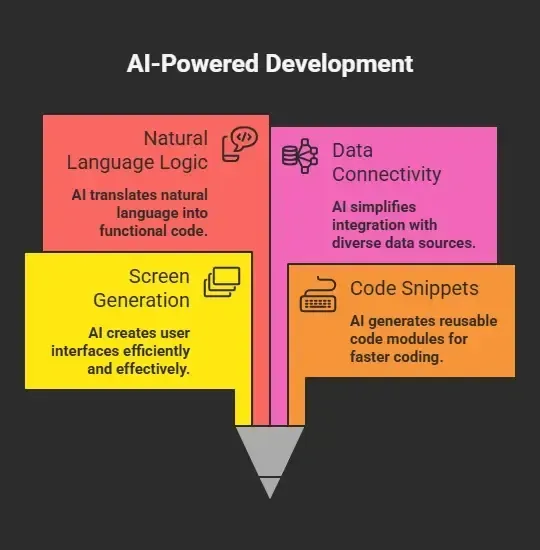 This reduces the need for writing code manually.
So instead of spending weeks building internal tools, you can create production ready internal apps in hours.
Step-by-Step: Building Internal Tools Without a Developer
You don’t need to build everything at once. Start small. Most successful internal tools begin as simple workflows and grow over time.
Focus on solving one clear problem. Trying to build a complex system from day one can slow you down and create confusion.
Step 1: Start With Your Workflow
Ask yourself:
-
What problem are you solving?
-
What data sources are involved?
Maybe you are tracking leads in Google Sheets. Or managing inventory trackers.
Start simple.
Step 2: Choose the Best Internal Tool Builder
Pick a platform that fits your needs.
Some popular options:
-
Microsoft Power Apps
-
Other low-code platforms
Look for:
-
Drag and drop builder
-
Support for SQL databases
-
Strong access controls
-
Audit logs
-
Free plan availability
The best internal tool builder should let you build tools quickly without writing code.
Step 3: Connect Your Data Sources
Your internal tools depend on data.
You can connect:
-
Google Sheets
-
SQL databases
-
data warehouses
-
APIs from existing tools
This creates a seamless data flow. You can also edit data directly from your tool.
Step 4: Build the Interface
Use drag and drop features to create your user interface.
Add:
-
Tables
-
Forms
-
Buttons
Many internal tool builder platforms allow you to generate screens automatically.
Step 5: Add Business Logic
Now comes the smart part.
Use:
-
Automated workflows
-
Custom logic
-
AI-based rules
You can write custom logic using simple prompts. No need for full code.
Step 6: Set Permissions and Security
This is important for internal tools.
Add:
-
Access controls
-
User groups
-
Granular permissions
-
Audit logs
For sensitive data, you may want enterprise-grade security.
Step 7: Deploy and Scale
Most platforms let you deploy with just a few clicks.
You can:
-
Launch unlimited apps
-
Use custom domains
-
Choose self hosted options
Self hosted setups give you complete control over your own infrastructure and own data.
Don’t aim for perfection in your first version. Internal tools are meant to evolve. Build fast, test with your team, and improve as your needs grow.
Microsoft Power Apps: A Popular Choice
Microsoft Power Apps is one of the most widely used platforms for building internal tools, especially for teams that want quick results without writing code.
What it offers:
-
Canvas apps for flexible design
-
Strong connection to multiple data sources
-
Integration with Google Sheets and other systems
Power Apps works well for business users who want to create internal tools with minimal technical effort.
It also supports:
-
Automated workflows
-
Access controls
-
Audit logs
With simple setup and flexible paid plans, power apps is a solid starting point if you want to build and scale internal tools quickly.
Self Hosted vs Cloud: What Should You Choose?
Choosing between self hosted and cloud setups depends on your needs, your data sensitivity, and how your business operates daily. Both options work well for building internal tools, but the right choice comes down to control, speed, and long-term flexibility.
Self Hosted
-
Full control over data
-
Better for sensitive data
-
Helps avoid vendor lock in
-
Works well for data teams
-
Gives you control over your own infrastructure
Cloud
-
Faster setup
-
Easier to manage
-
Good for small teams
-
No need to handle infrastructure
-
Quick scaling with minimal effort
Many internal tool builder platforms now offer both self hosted and cloud options along with enterprise features, so you can start simple and shift as your needs grow.
Common Use Cases for Internal Tools
Internal tools can be used across almost every part of a business. From operations to finance, they help teams stay organized and reduce dependency on scattered systems.
Here are some ideas:
-
Inventory trackers for warehouses
-
HR onboarding tools
-
CRM dashboards
-
Project management tool systems
-
Finance reporting dashboards
These internal tools help reduce manual processes, improve accuracy, and make it easier for teams to manage data in one place.
Start with one use case that solves a real problem in your workflow. Once that works well, you can expand and build more internal tools around it..
Rocket.new: Building Internal Tools at Speed
Rocket.new is more than just an internal tool builder. It’s a vibe solutioning platform where you describe what you need in natural language, and it turns that idea into working internal tools without writing code.
It syncs perfectly with the idea of building internal tools without a developer. You focus on the problem, and the platform handles the structure, logic, and setup behind the scenes.
Rocket.new is built for solutioning and simplicity. It helps you go from idea to working tool in minutes.
Top Features
-
Prompt to App Creation: Builds apps directly from single prompts
-
Figma Import: Converts design files into live, editable layouts
-
Speeds up building with ready-to-use elements
-
Automatically handles logic, data, and workflows
-
Shows instant updates while editing
-
Publishes projects with a branded domain
-
Use / and @ to run actions and quickly scope edits.
-
Allows developers to extend or customize later
Build Internal Tools with Just a Prompt
Instead of going step by step manually, you can simply type what you want.
Example prompt:
“Build an internal tool to track employee tasks, connect it with Google Sheets, add user groups for managers and team members, and include a dashboard to monitor progress.”
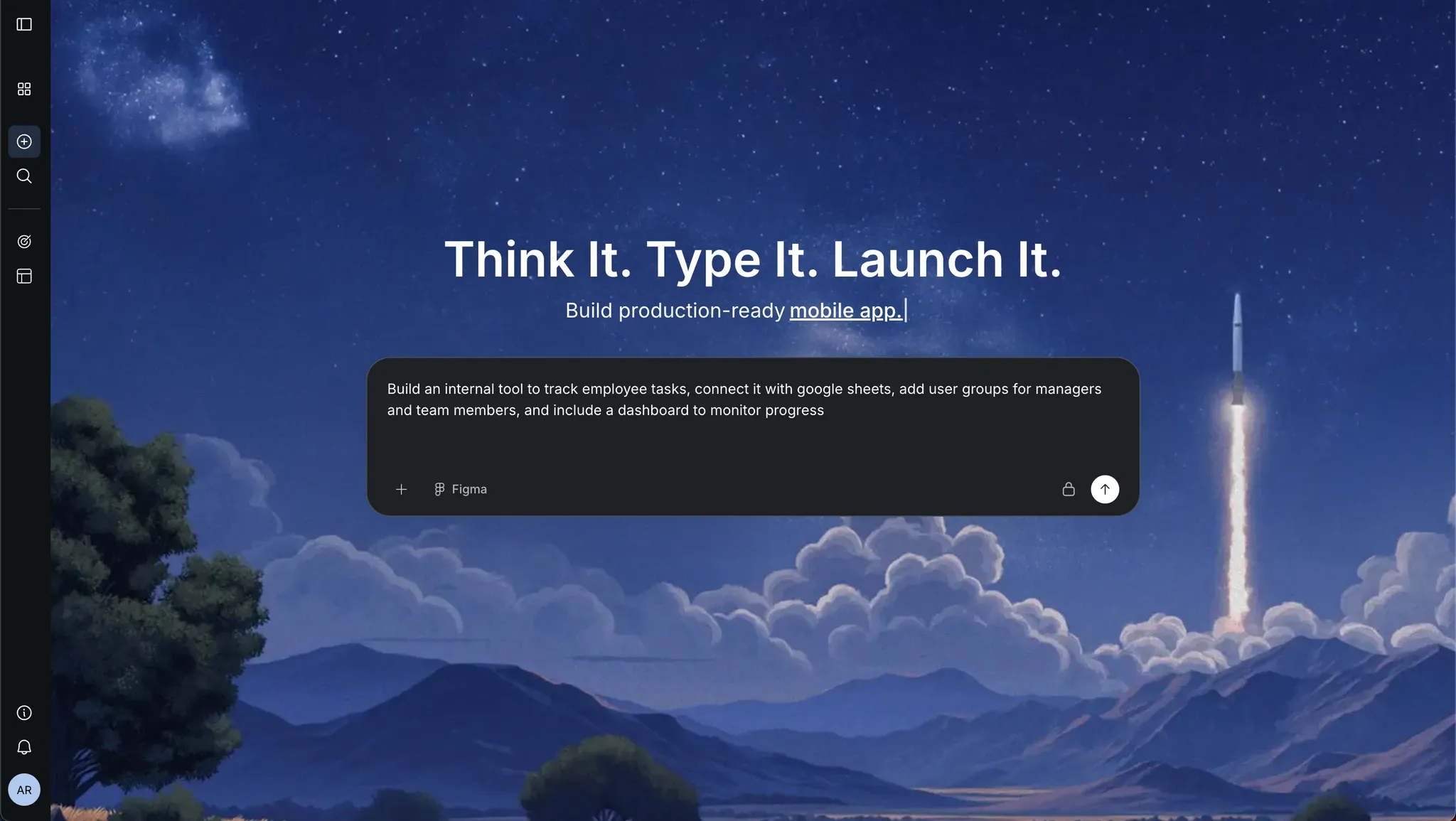 That’s it. The platform will generate screens, connect data sources, and set up workflows for you. You can then tweak the user interface, edit data, and adjust business logic without touching full code.
If you want to move perfectly and skip the complexity, Rocket.new makes building internal tools feel simple and natural, even if you have zero technical background.
Build Smarter, Not Harder
Many businesses still depend on manual processes or generic software that does not quite fit their workflow. This often leads to confusion around data sources, messy business logic, and wasted time. The better approach is to use an internal tool builder with no code or low-code features.
You can connect your data sources, design interfaces with drag and drop, and automate workflows using AI. Self hosted options also give more control over sensitive data and production data.
You do not need developers for every step anymore. With the right setup, business users can build powerful internal tools using natural language and simple interfaces. That is the idea behind how to build internal tools with AI without a developer.
Table of contents
- -Why Internal Tools Matter More Than You Think?
- -What are Internal Tools, Really?
- -The Shift: From Full Code to No Code and Low Code
- -How AI Changes Everything?
- -Step-by-Step: Building Internal Tools Without a Developer
- -Step 1: Start With Your Workflow
- -Step 2: Choose the Best Internal Tool Builder
- -Step 3: Connect Your Data Sources
- -Step 4: Build the Interface
- -Step 5: Add Business Logic
- -Step 6: Set Permissions and Security
- -Step 7: Deploy and Scale
- -Microsoft Power Apps: A Popular Choice
- -Self Hosted vs Cloud: What Should You Choose?
- -Self Hosted
- -Cloud
- -Common Use Cases for Internal Tools
- -Rocket.new: Building Internal Tools at Speed
- -Top Features
- -Build Internal Tools with Just a Prompt
- -Build Smarter, Not Harder


