
Want to create a mobile app using AI today? Learn how simple prompts, visual tools, and automation help transform ideas into functional apps while avoiding common mistakes and confusion easily.
How to build a mobile app with AI?
Well, with the modern tools, you can turn an idea into a working app using simple prompts, visual editors, and smart automation.
In fact, AI adoption in apps is growing fast. AI chatbot apps saw downloads increase by over 112% year-over-year, according to Statista. That means the shift is already here, and it’s easier than it looks.
This blog gives you a clear path to turn your idea into a working app using AI tools. It helps you understand each step, avoid common mistakes, and actually build apps without feeling stuck or confused.
Why AI is Changing How Apps Are Built?
So, what’s actually different now?
In the past, app development was slow and technical. You had to spend hours writing code, setting up backend logic, and testing everything step by step. Now, things have shifted.
Here’s what’s changed:
-
Faster start: An AI app builder can take your idea and start generating a structure instantly. No need to build from scratch.
-
Less dependency on coding: You don’t need deep coding knowledge anymore. Many non developers are now building real apps using simple tools.
-
Simple input with prompts: You just describe what you want using natural language, and the tool handles layouts, backend, and user flows.
-
Built-in smart features: AI powered features like chatbots, recommendations, and smart search are easy to add without extra setup.
-
More control without complexity: You still get control over your app, but without dealing with heavy technical steps.
So, the whole process feels lighter now. You can focus more on your idea and users, instead of getting stuck in code and setup.
So, How Do You Actually Build It?
Alright, now that you know why things are changing, let’s get into the real part. How do you go from an idea to a working app using AI?
Don’t worry, this isn’t complicated. The process is pretty straightforward when you break it down step by step.
Before we jump in, keep these two quick notes in mind:
-
Start simple: Don’t try to build a huge app on day one. Pick a small idea and build from there. It helps you learn faster and avoid confusion.
-
Focus on clarity: The better you describe your app using prompts, the better results you’ll get. Clear input leads to better output.
Step 1: Start With a Clear App Idea
Before touching any tool, you need a solid idea.
Ask yourself:
-
What problem does your app solve?
-
Who are the users?
-
Is it for internal tools or public use?
Keep it simple. A small app idea works better than trying complex projects at the start.
You can create:
-
Productivity apps
-
Fitness tracking apps
-
Content tools
-
Internal automations
The clearer your idea, the better your AI prompts will be later.
Step 2: Choose the Right Tool
Now comes the fun part.
You need an AI app builder that fits your needs. There are many tools available, and each platform has its own capabilities.
Here’s a quick comparison:
| Feature | Basic App Builder | AI App Builder | Best AI App Builder |
|---|---|---|---|
| Coding needed | Medium | Low | Very low |
| Speed | Slow | Fast | Very fast |
| Backend setup | Manual | Semi-automatic | Automatic |
| Built in databases | Limited | Available | Advanced |
| AI powered features | Few | Good | Strong |
| Free plan | Sometimes | Yes | Yes |
A best AI app builder gives you more control, faster setup, and built in databases. Many tools also offer a free plan, so you can test before moving to paid plans or even a premium plan.
Step 3: Describe Your App Using Prompts
This is where AI really shines. Instead of writing code, you describe your app using natural language prompts.
Example:
“Create a fitness tracking mobile app with user login, workout logging, and progress charts.”
The tool starts generating UI, backend, and logic. Good prompts matter. Keep them clear and direct. You can edit and refine as you go.
Use multiple prompts to:
-
Add features
-
Fix layout
-
Improve user flow
-
Connect API services
Some tools even support Claude code style prompting, where you guide the AI step by step.
Step 4: Customize the Design and Features
Once your working app is ready, you’ll want to edit it.
You can:
-
Change layouts
-
Add new features
-
Adjust backend logic
-
Improve UI for mobile and web apps
Most platforms give you drag-and-drop control plus code editing if needed.
You don’t need heavy coding experience, but having some understanding helps you get more control. This is where AI-powered features like chat, voice, or recommendations can be added easily.
Step 5: Set Up Backend and Real Data
Now let’s talk about the backend. A good AI app builder includes built in databases and backend services. This means you don’t have to manually create servers.
You can:
-
Store real data
-
Manage users
-
Handle authentication
-
Connect API keys
Using real data instead of mock data helps you test properly. Also, API integrations allow your AI app to connect with other services like payments, maps, or analytics.
Step 6: Test Your App Properly
Testing is where many people rush. Don’t.
You should test:
-
User login
-
Data storage
-
App speed
-
Mobile responsiveness
-
Android and IOS compatibility
Run multiple test cycles. Fix bugs. Edit flows. Repeat. Most tools allow live preview and testing on devices. This helps you see how your mobile apps perform in real situations.
Step 7: Deploy and Publish
Once everything looks good, it’s time to deploy.
You can publish your app to:
-
Android platforms
-
IOS app store
-
Web apps
Many platforms simplify deployment. One click and your app goes live. Some tools also offer analytics to track users and performance.
Take your time with each step. You don’t need to rush. The goal is to understand the flow, test properly, and improve as you go. Once you get the hang of it, building apps with AI starts to feel natural and way more manageable.
What Builders Are Saying
There’s real discussion around this shift, especially among professionals building apps with AI.
Here’s a LinkedIn insight:
“Rocket.new… allows users to build full, production-ready apps from natural-language prompts, rather than just quick prototypes.” View LinkedIn post
This shows a strong real-world perspective. AI tools like Rocket.new are not just for basic ideas anymore. They are helping people create complete apps with backend, UI, and deployment from simple prompts. At the same time, understanding how things connect still helps when you want more control as your app grows.
Rocket Power: Building Apps with Rocket.new
Rocket.new is not just another tool. It’s a vibe solutioning platform where you describe your idea, and it starts generating real apps instantly. It get under the whole concept of building apps using prompts instead of writing code perfectly.
Whether you're a beginner or someone with coding experience, Rocket.new helps you create, edit, and deploy apps without getting stuck in complex setup. It’s designed for non developers and developers who want to build faster and smarter.
Top Features
-
Prompt to App Creation: Builds apps directly from single prompts
-
Figma Import: Converts design files into live, editable layouts
-
AI-Powered Backend: Automatically handles logic, data, and workflows
-
Command-based actions: Use / and @ to run actions and quickly scope edits
-
Custom Domain Support: Publishes projects with a branded domain
-
Code Export: Allows developers to extend or customize later
-
Reusable Components: Speeds up building with ready-to-use elements
-
Live Preview: Shows instant updates while editing
How Easy It Is to Build an App with Rocket.new
Let’s keep this super simple.
-
Step 1: Describe your idea: Just type what you want to build using clear prompts.
-
Step 2: Let the tool do its thing: The AI starts generating your app with UI, backend, and features.
-
Step 3: Edit and customize: You can edit layouts, add features, and adjust backend logic anytime.
-
Step 4: Test your app: Check how it works with real data and fix anything if needed.
-
Step 5: Deploy your app: Publish your app for Android, iOS, or web in just a few clicks.
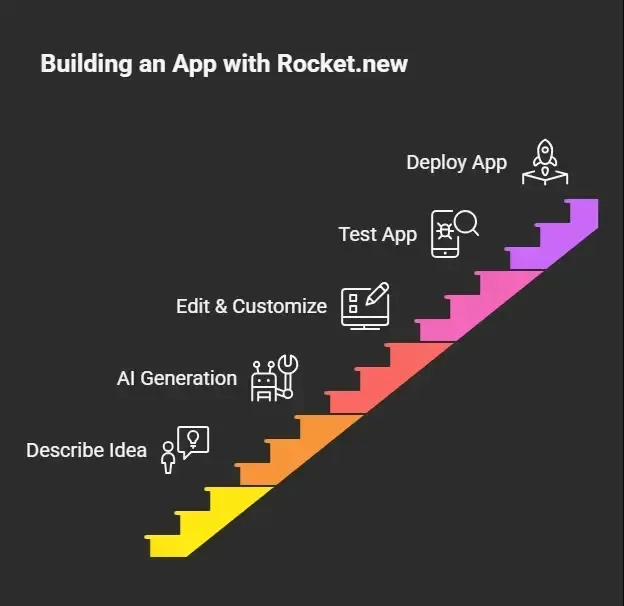 It really feels like giving instructions and watching your app come to life.
Rocket.new has introduced 25,000+ ready to use templates in every category, whether it's a tech, a booking, or a travel, you can get all of them with just one click.
Rocket.new makes the whole process feel simple and practical. You focus on your idea, and the tool handles the heavy work. That’s what makes building apps with AI feel smooth and accessible today..
Native Apps vs Web Apps
Before you move ahead, it helps to understand the difference between these two. This will guide your decisions when building your app with AI.
Let’s keep it simple.
- Native mobile apps
These are built specifically for Android or iOS. They usually offer better performance and deeper access to device features.
- Web apps
These run in browsers but can still feel like apps. They are easier to build and deploy, especially with modern tools.
AI tools now blur the line. You can build mobile apps that feel like native apps while still using web technologies in the background.
You don’t have to stress too much about this choice in the beginning. Many AI tools handle the heavy lifting, so you can focus more on building and testing your app.
Common Mistakes to Avoid
Before you jump in fully, it’s good to know where most people go wrong. Avoiding these early can save you time and effort.
-
Trying complex projects too early
-
Ignoring backend logic
-
Not testing enough
-
Using weak prompts
-
Skipping real data setup
Take it step by step. Fix mistakes as you go, improve your prompts, and keep testing. That’s how you get better and build stronger apps over time.
From Idea to App: Build Faster with AI
Building apps once needed strong coding knowledge, time, and patience. Many people had a great idea but couldn’t turn it into real apps. The process felt slow, technical, and hard to manage without experience.
Now, AI tools change that. An AI app builder helps you create, test, and deploy apps using simple prompts. You can build mobile apps without heavy coding experience and still get a working app with backend and features. Start with a clear idea, choose the right tool, and keep testing. With AI, building apps feels simpler and more practical for everyone.
Table of contents
- -Why AI is Changing How Apps Are Built?
- -So, How Do You Actually Build It?
- -Step 1: Start With a Clear App Idea
- -Step 2: Choose the Right Tool
- -Step 3: Describe Your App Using Prompts
- -Step 4: Customize the Design and Features
- -Step 5: Set Up Backend and Real Data
- -Step 6: Test Your App Properly
- -Step 7: Deploy and Publish
- -What Builders Are Saying
- -Rocket Power: Building Apps with Rocket.new
- -Top Features
- -How Easy It Is to Build an App with Rocket.new
- -Native Apps vs Web Apps
- -Common Mistakes to Avoid
- -From Idea to App: Build Faster with AI