
How can you stay organized while managing multiple AI tools and data? Let's explain AI databases, their benefits, selection tips, and setup strategies for efficient, scalable workflows.
Trying to keep up with AI without losing track of tools and data?
That’s exactly where an AI tools database steps in. It serves as a central hub for organizing AI systems, managing data, and maintaining workflows.
The global AI market is projected to grow from around US$199.47 billion in 2024 to about US$2.17 trillion by 2031, at a ~39.1 % CAGR (2025–2031).
At this pace, the market is expected to reach approximately US$1.68 trillion by 2031, underscoring AI’s rapid adoption across industries worldwide.
Let's break down how AI databases work, what to look for, and how to choose the right setup without overthinking it.
Why are AI databases everywhere?
AI is no longer limited to research teams. It appears across content, analytics, customer support, and internal workflows. As usage grows, organization becomes a real problem.
- AI tools: Used daily for writing, visuals, automation, and analysis across teams.
- Data sprawl: Data lives across apps and dashboards, slowing collaboration.
- Free AI tools: Easy to start with, but hard to track once usage grows.
- AI services: Expanding faster than teams can organize them.
- AI database: Brings tools, models, and data into one controlled system.
An AI database creates a structure that makes AI growth feel scattered.
What makes an AI database different from traditional databases?
Traditional databases were built for storage. AI databases were built for understanding context and meaning. That difference changes how teams work with data.
- Semantic search: Finds results based on intent, not exact words. Lets you type questions naturally and still get relevant results, even if the wording isn’t exact.
- Similarity search: Matches related ideas even when wording changes. Finds items that are conceptually close, so you don’t miss relevant information just because the words differ.
- Vector search: Converts data into vectors for fast matching. Transforms text, images, or other data into numerical forms so the system can quickly find similar items.
- Natural language queries: Let users ask questions in plain language. You can type or speak normally instead of learning complex query syntax.
- Machine learning: Improves results over time using patterns. The system learns from past searches and usage data, delivering smarter results with every query.
This approach explains why AI databases outperform traditional databases in modern workflows.
Core features that matter in an AI tools database
Not every platform handles real work well. The right features decide whether a system feels helpful or frustrating after a week.
- Semantic search: Makes finding relevant data faster and more efficient.
- Vector search: Handles large datasets without slowing down.
- Natural language processing: Understands human-style questions.
- AI models: Power predictions, summaries, and recommendations.
- Data security: Controls access to sensitive data.
- Free plan: Allows testing before commitment.
- Paid plans: Support scaling as usage increases.
- API keys: Allow custom workflows and connections.
- User friendly interface: Helps non technical users stay comfortable.
These core features shape how useful an AI database feels in day-to-day use.
How Free AI Tools Fit Into the Picture?
Free AI tools play a bigger role than many realize.
For teams just starting with AI, these tools provide a low-risk way to experiment and explore new workflows without a financial commitment. Often, free tiers are sufficient for early experiments, helping teams understand what works before moving to paid systems.
Some of the best free AI tools cover writing, image generation, and data analysis, giving teams a wide range of capabilities right from the start. Image generators, for example, allow quick creative work and can be used for content drafts, marketing visuals, or design exploration.
When combined with a strong AI database, free AI tools become even more powerful. An AI database makes it easy to discover, organize, and reuse outputs from these free tools, turning scattered experiments into efficient and meaningful workflows.
AI for data analysis and smarter decisions
This is where AI databases begin to earn real trust. Data analysis becomes faster and easier to understand.
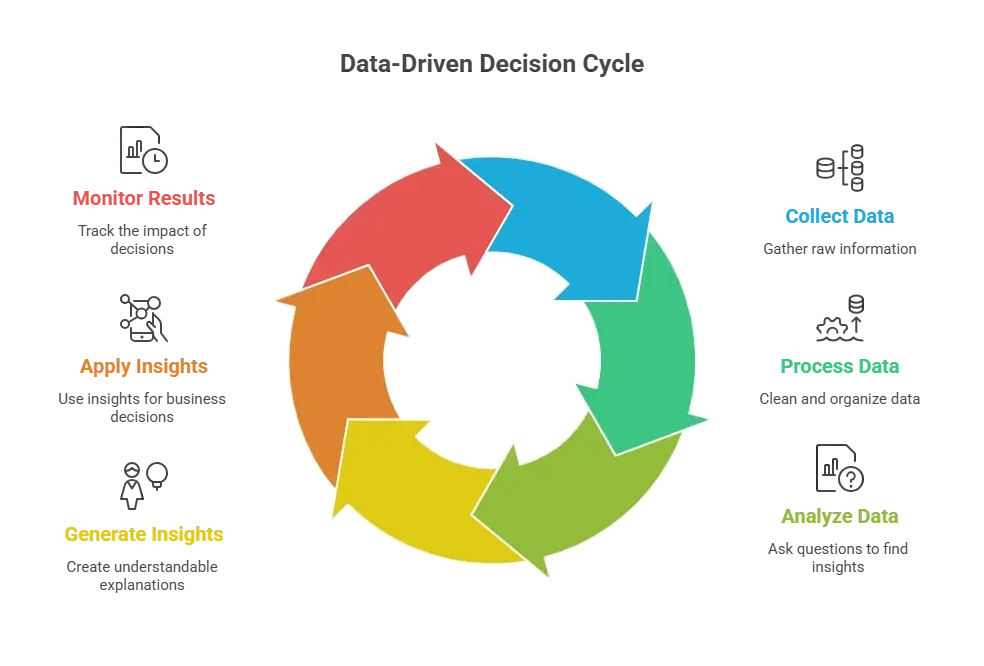
AI-driven data analysis shortens the gap between data and action.
AI use cases powered by modern databases
AI databases do more than just store data; they actually power real workflows. From chatbots to e-commerce, these systems make daily tasks smarter and faster.
| Use case | Role of AI database |
|---|---|
| Data analysis | Fast querying and pattern detection |
| AI chatbot | Uses retrieval augmented generation |
| Image generation | Connects image generators |
| Internal tools | Supports app builder workflows |
| E commerce | Improves search accuracy |
This table shows how AI databases sit behind practical applications, keeping work simple, connected, and efficient.
Community insight
A Reddit post about an AI tool database highlights how much more useful a single, organized reference is than juggling many scattered resources.
“It includes a wide array of tools covering various AI domains like machine learning, natural language processing, computer vision, and more… Both popular and niche tools are listed, making it easy to find exactly what you need.”
Organized, searchable databases help professionals, educators, and teams find the right tools quickly and save time on discovery.
Rocket.new: Building AI-Driven Internal Dashboards
Rocket.new helps turn ideas into working tools quickly, making it a natural fit for AI database–driven workflows.
Rocket.new build apps that combine data, AI logic, and dashboards, all without writing code.
How it works:
- Template library: Browse built-in templates for internal dashboards, web apps, and admin systems.
- One-click start: Preview a template and turn it into a live project instantly.
- AI suggestions: Templates are generated from your prompt, helping you start without a blank page.
- Data & AI integration: Connect AI services and structured data seamlessly for actionable insights.
Rocket.new shows how AI logic, data, and real tools can coexist on a single platform, making it easy for teams to move from ideas to actionable outputs without scattered apps or plugins.
AI agents and daily automation
AI agents bring movement to stored data. They act instead of waiting.
- AI agents: Trigger actions using stored data.
- Multiple tools: Work together in one flow.
- AI writing assistant: Handles drafts and summaries.
- Video generation: Supports content workflows.
- Everyday tasks: Automated quietly in the background.
AI agents turn AI databases into active systems.
Choosing the right AI database
Picking the right AI database is about balance, not hype. The goal is steady use, not complexity.
- Right AI database: Balances simplicity and depth.
- Best AI database: Supports growth without confusion.
- Data security: Keeps access controlled.
- Language models: Improve understanding and responses.
- Paid subscription: Needed once usage scales.
- Steep learning curve: Should be avoided.
The best choice feels calm, not complicated.
The AI tools database wrap-up
AI tools keep multiplying. Data spreads everywhere. Focus slips. The AI tools database brings structure to AI database systems, connects AI tools, and keeps data usable. The main takeaway is simple. Centralized AI data leads to smoother workflows and better decisions.
By keeping all AI tools, models, and data in one place, teams save time, reduce confusion, and make their AI workflows more effective. The key takeaway: organizing AI isn’t just convenient, it directly boosts productivity and impact.
Table of contents
- -Why are AI databases everywhere?
- -What makes an AI database different from traditional databases?
- -Core features that matter in an AI tools database
- -How Free AI Tools Fit Into the Picture?
- -AI for data analysis and smarter decisions
- -AI use cases powered by modern databases
- -Community insight
- -Rocket.new: Building AI-Driven Internal Dashboards
- -AI agents and daily automation
- -Choosing the right AI database
- -The AI tools database wrap-up