
Choosing the right webpage builder depends on your goals, skill level, and budget. This guide compares free vs paid plans, SEO tools, eCommerce features, and AI-first options like Rocket.new to help you pick the platform that fits your business.
Choosing the right webpage builder is one of the most important decisions you make when building your online presence. With hundreds of options ranging from simple drag-and-drop tools to AI-first platforms, the difference between the right and wrong choice can cost you time, money, and customers. This guide breaks down everything you need to know so you can pick a webpage builder that fits your goals, skill level, and budget.
What Is a Website Builder?
A webpage builder is a software tool that lets you create, design, and publish a website without writing code from scratch. Most use drag-and-drop editors, pre-built templates, and visual controls so anyone can build a live, functional site regardless of technical skill.
Modern webpage builders typically handle hosting, SSL security, and software updates automatically. Many include built-in SEO tools, analytics, and eCommerce features so you can run a complete web presence from one platform.
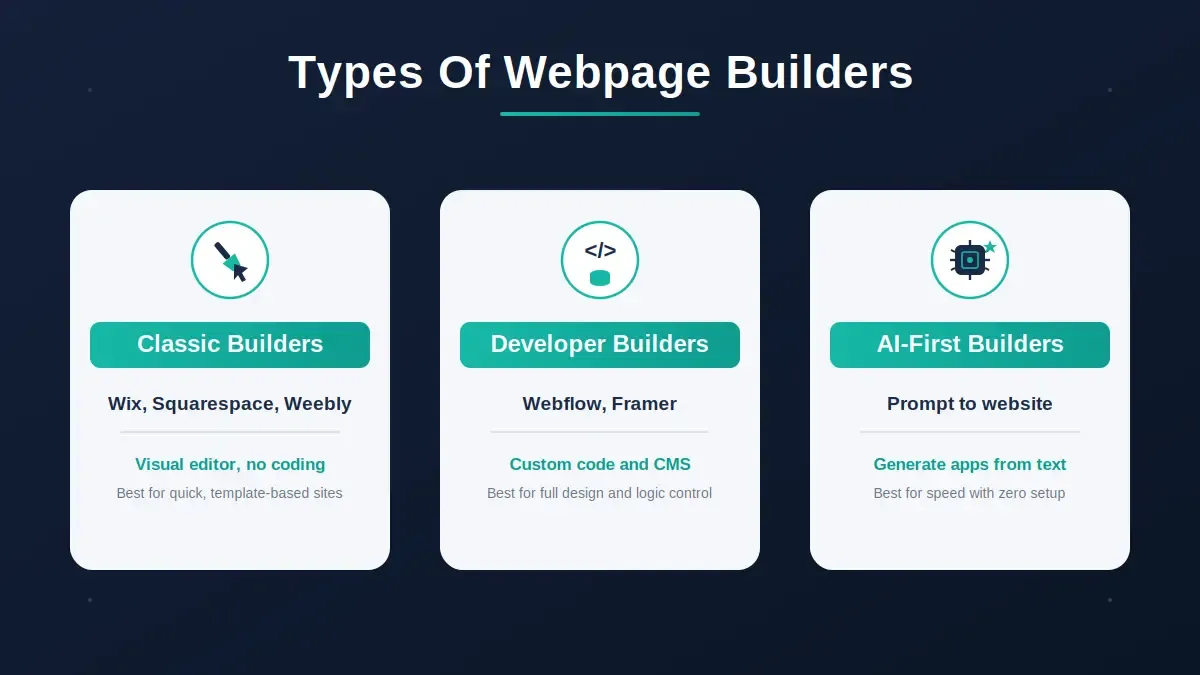
Three main categories of webpage builders available today
Key types:
- Classic drag-and-drop builders (Wix, Squarespace, Weebly): visual editors, template libraries, no coding required
- Developer-oriented builders (Webflow, Framer): visual tools with access to custom code and CMS
- AI-first builders (Rocket.new): generate full web apps and sites from natural language prompts, Figma files, or existing URLs
Know What You Need First
Before picking a website maker, clarify your goals, understand your target audience, and plan relevant content for better search performance. The right webpage builder depends on what you are building, who you are building it for, and how you plan to grow, and defining a clear purpose helps shape the site's design and functionality.
Ask yourself:
- What kind of business is this for? A café needs a menu and a booking link. A SaaS startup needs a conversion-focused landing page with a sign-up flow. A designer needs a portfolio.
- Do I need to sell online? If yes, prioritize eCommerce features: product pages, inventory, payment processing, and order management.
- How content-heavy is the site? Blogs, news sites, and documentation sites need strong CMS tools and SEO-friendly publishing workflows.
- What is my technical comfort level? Honest self-assessment here saves hours of frustration later.
- Will this need to scale? Check performance, CDN coverage, and upgrade paths before committing.
Answering these questions before you compare tools makes the decision significantly easier. It avoids the common mistake of choosing the flashiest option instead of the right one.
Free vs Paid vs Premium Builders
Free plans are useful for testing and low-stakes projects. For any serious business presence, a paid plan is almost always necessary, though a free website builder can still be a practical starting point.
| Type | Cost | Custom Domain | Templates | Best For |
|---|---|---|---|---|
| Free webpage builder | $0 | Usually not | Basic | Testing ideas, temporary sites |
| Paid webpage builder | $10-$40/mo | Yes | Broad library | Small business, portfolios, blogs |
| Pro/Enterprise builder | $50+/mo | Yes | Premium + custom | Complex sites, eCommerce, teams |
| AI-first builder (Rocket.new) | Free tier + credits | Yes | 25,000+ templates + AI generation | Web apps, mobile apps, full-stack sites |
Paid builders usually handle back-end updates and maintenance automatically, while piecing together separate hosting, themes, and tools for a new site can push the total cost higher.
Free plans typically restrict custom domains, remove platform branding, eCommerce features, and storage limits. Some platforms let you create a free website and even build multiple sites at no cost, but you usually need to upgrade to connect a custom domain and unlock advanced features. A built-in subdomain is common on free plans, while a new custom domain name gives a more professional look. A personalized domain typically costs about $10-$20 per year. Rocket.new's free tier lets you create an account in 30 seconds with no credit card required, and you can start building immediately using the AI app builder.
Pick Based on Skill Level
There is a webpage builder for every skill level. The key is matching the tool to how you actually work, not how you wish you worked, so modern tools can help you save time and make it faster than ever to build a website.
Wix and Squarespace are common beginner picks because of their simplicity.
Match your skill level to the right webpage builder type
No coding needed: Drag-and-drop builders let you add sections, images, text, and buttons visually. You move elements around with a few clicks, with no code required, which makes a website creator easier to fit into your day-to-day.
Some technical comfort: Builders like Webflow and Framer let you add custom code, control CSS, and build more complex layouts. Great if you enjoy experimenting or want precise control.
Prefer plain language: Rocket.new lets you describe what you want in plain English and generates a working web app or site, including the backend. By 2026, many platforms use Agentic AI to help plan site structures and suggest design improvements. You can also upload a Figma design and Rocket.new converts it to production-ready React or Flutter code automatically. Learn more about building stunning websites with AI.
Why Website Templates Matter
Website templates are the starting point for your site's visual design. Professionally designed templates give you a strong starting point and make it easier to keep every page on brand from the beginning.
- Quick landing pages: Minimal templates are clean, focused, and easy to adapt.
- Online shops: Look for eCommerce templates with product pages, checkout flows, and cart features already built.
- Portfolios: Templates with strong image layouts and minimal copy work best.
Built-in responsive templates in 2026 are designed for mobile-first viewing and adjust layouts for different devices.
Templates enforce visual consistency and prevent your site from looking cobbled together, but a good website also needs fresh, engaging content, intuitive navigation, and clear calls to action that guide visitors toward the next step, with attractive layouts and buttons and links that are easy to use across devices. Rocket.new ships with over 25,000 templates across categories including SaaS, eCommerce, dashboards, content sites, and internal tools. You can browse the vast template library and remix any template for free without consuming credits. Squarespace is often a strong fit for creatives because its modern designs are especially branding-friendly.
SEO Tools You Cannot Ignore
A well-built site that nobody can find is a wasted investment. Every serious webpage builder now includes built-in SEO tools for search engine optimization, but the quality varies significantly.
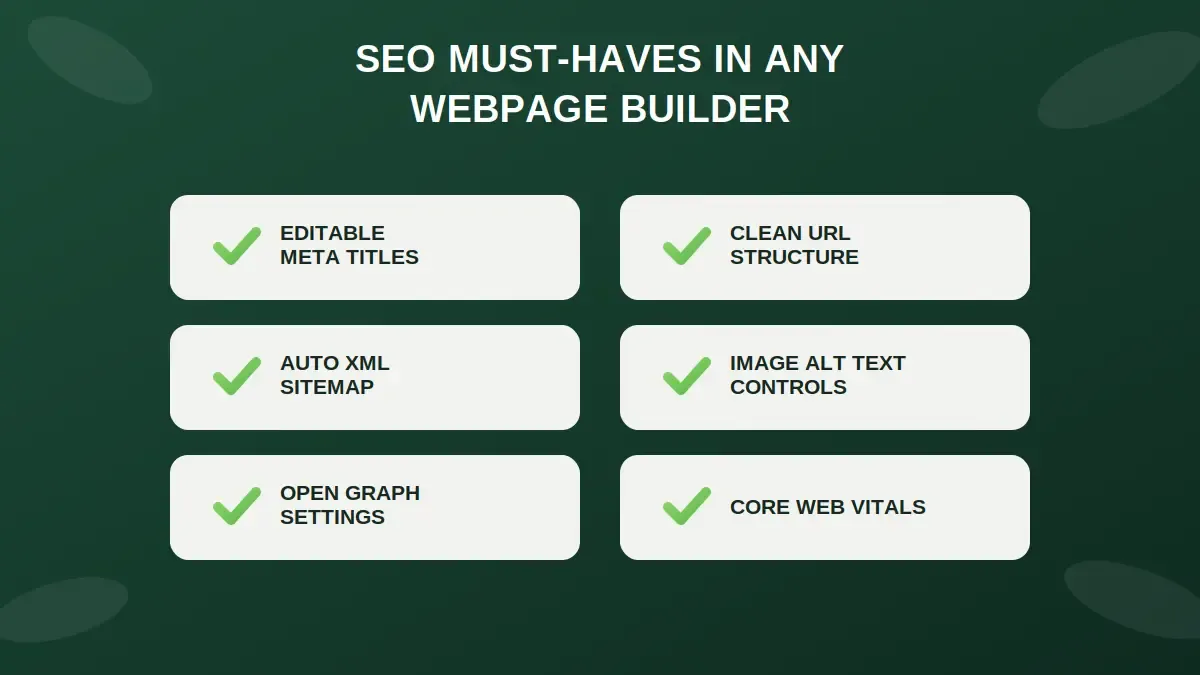
The six SEO features every webpage builder should include by default
What to look for in a webpage builder's SEO toolkit:
- Editable meta titles and descriptions per page
- Clean URL structures (no auto-generated gibberish)
- Automatic XML sitemaps
- Image alt text controls
- Open Graph and social preview settings
- Core Web Vitals optimization (page speed, layout stability)
An seo assistant can surface page-level recommendations and help improve visibility in search engines, which supports stronger organic traffic over time.
Google's page experience guidelines confirm that loading speed, interactivity, and visual stability directly affect rankings. Choose a builder that optimizes these by default, not as an afterthought.
Every site built with Rocket.new ships with SEO-ready metadata structure, WCAG accessibility compliance, GDPR coverage, and performance optimization built in as baseline defaults. Explore how SEO-ready builds work in practice.
eCommerce Features
If selling is part of your business model, your webpage builder needs to handle it properly so you can sell products without workarounds. A basic page builder is not enough for a real online store. Shopify is widely considered the industry standard for online stores because of its sales tools, multi-channel selling, and large app store.
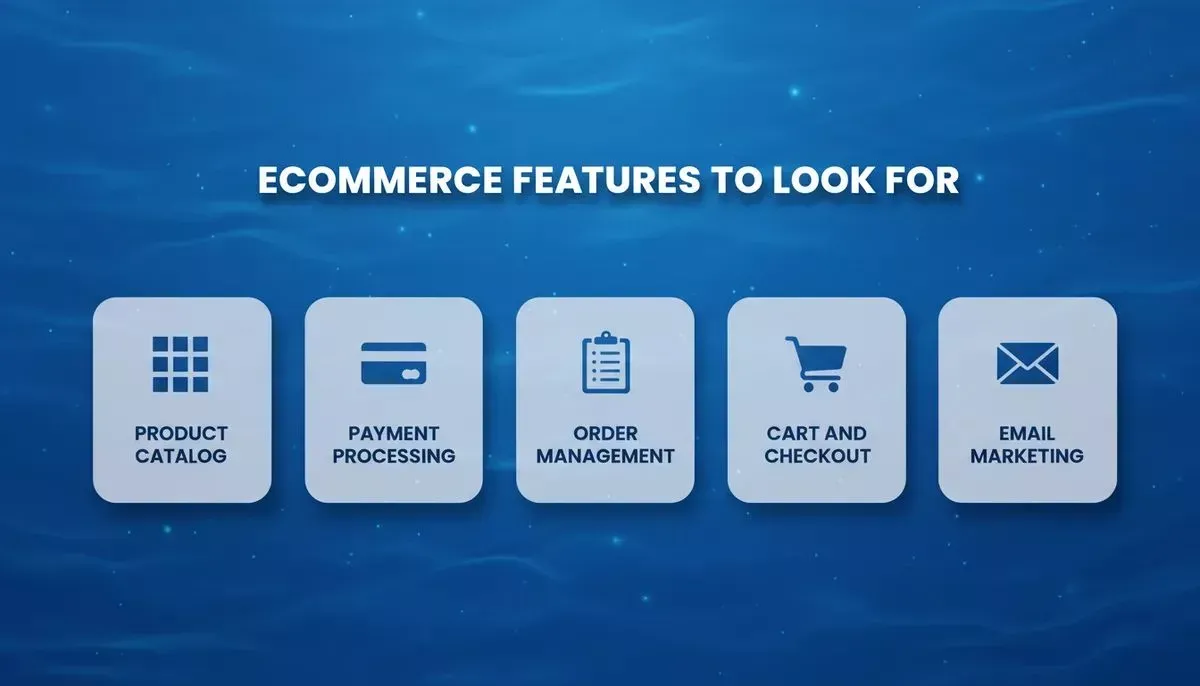
Five core eCommerce capabilities every online store builder must cover
Core eCommerce capabilities to evaluate:
- Product catalog management: upload products, set variants, manage inventory
- Payment processing: Stripe, PayPal, and regional payment methods (Rocket.new supports Stripe and Razorpay natively)
- Order management: track purchases, process refunds, send confirmations
- Cart and checkout flow: mobile-optimized, minimal friction
- Email marketing integration: abandoned cart recovery, order updates, promotions, and support for marketing campaigns
Global eCommerce revenue exceeded $4.1 trillion in 2024 and continues to grow, making an eCommerce-capable webpage builder a business-critical investment. If selling is central to your business, do not settle for a builder that treats eCommerce as an add-on, and check for customer support options like live chat and email assistance.
Rocket.new includes a dedicated online store builder that generates a complete store with product catalog, shopping cart, Stripe checkout, order management, and admin dashboard from a single prompt. After setup, businesses should test, publish, and promote the store to start selling online.
Traditional Builders vs AI-First Builders with AI Tools
Here is how classic webpage builders compare to AI-first platforms across the dimensions that matter most:
Key differences between traditional webpage builders and Rocket.new
| Dimension | Classic Builders | Developer Builders | AI-First (Rocket.new) |
|---|---|---|---|
| Coding required | None | Optional | None or full custom code |
| Output type | Website | Website or web app | Web app, mobile app, website |
| Mobile apps | No | No | Yes, Flutter, iOS and Android |
| Starting point | Template | Template or blank | Prompt, Figma, URL, or template |
| Figma import | No | Partial | Yes, full code generation |
| GitHub sync | No | Limited | Yes, two-way sync |
| Code ownership | No export | Partial | Full source code download |
| Built-in research | No | No | Yes, Solve for market research and PRDs |
| Competitor monitoring | No | No | Yes, Intelligence across 9 signal pillars |
| eCommerce | Add-on | Add-on | Built-in recipe |
| Free tier | Yes | Limited | Yes, no credit card required |
| Custom domain | Paid plans | Paid plans | Yes, paid plans |
WordPress powers over 43% of the web and remains a leading choice for long-term scalability and data ownership.
The key distinction: Classic builders are website tools, often aimed at simpler sites, while more complex websites usually need more flexibility. Rocket.new is a platform where you research what to build, build it, and monitor what happens after, all in one place with shared context that carries forward between tasks. It also includes built in ai tools, while many teams still rely on separate ai tools when managing complex websites.
How Rocket.new Fits In
One Reddit user shared their experience building a site using a no-code AI platform:
"Built my first website in a matter of minutes... hero section with a bold CTA, overview of services, contact form, responsive layout, clean design."
Rocket.new is not a classic webpage builder competing with Wix or Squarespace. It is the Vibe Solutioning platform, the first platform where business research, product building, and competitive monitoring happen in the same place with shared context.
Three pillars:
Solve answers any business question in plain language and returns a structured, evidence-backed report covering market sizing, competitive analysis, pricing strategy, PRD generation, and investment assessment. Output exports as a PDF or presentation deck. See Solve in action.
Build generates production-ready web apps in Next.js, mobile apps in Flutter (iOS and Android, App Store and Google Play ready), high-converting landing pages, multi-page websites, eCommerce stores, internal dashboards, and customer portals. Every build ships with SEO structure, WCAG accessibility, GDPR coverage, and performance optimization by default.
Intelligence monitors competitors continuously across nine signal pillars: website changes, social media, news and press, GTM activity, product and technology updates, hiring signals, business and finance, customer reviews, and community sentiment. It delivers structured Intel cards that interpret what signals mean for your business, not just surface-level alerts. Explore Rocket.new Intelligence.
What this means for webpage builders specifically: If you need a simple brochure site, a classic builder may be faster. If you need a web app, a site backed by real market research, code you can own and export, or a mobile app output alongside your website, Rocket.new is the stronger fit.
Confirmed capabilities from official documentation:
- Create a free account in 30 seconds via Google, SSO, or email with no credit card required
- Figma-to-code conversion generates production-ready React, Next.js, or Flutter code
- Full source code is downloadable and syncs two-way with GitHub on paid plans
- 25,000+ templates available; browsing and remixing are free
- Custom domain with automatic HTTPS; buy a domain inside Rocket.new or connect your own
- 26+ integrations: Stripe, Supabase, Google Analytics, Notion, Linear, Airtable, Mailchimp, and more
eCommerce Revenue: Why the Stakes Are High
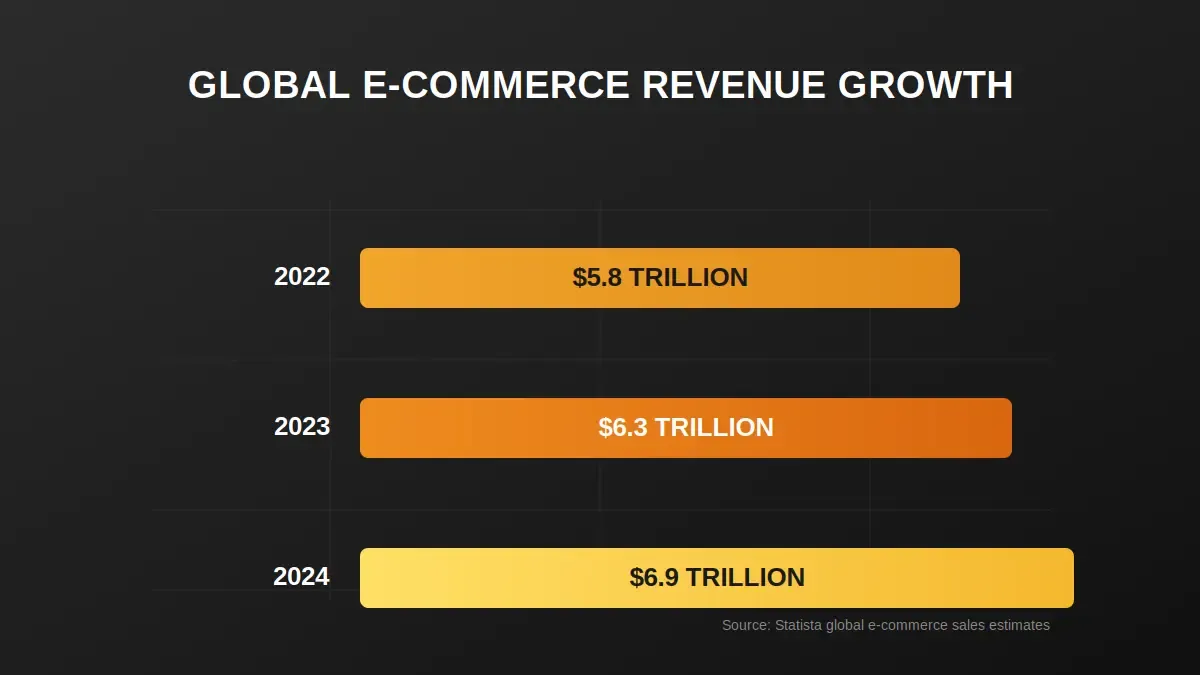
Global eCommerce revenue has grown consistently, crossing $6.9 trillion in 2024
eCommerce is not a niche anymore. With global online retail sales growing year over year, choosing a webpage builder that handles eCommerce properly is a direct business decision. Builders that treat it as an afterthought will cost you revenue.
Pre-Signup Checklist
Before committing to any webpage builder, run through this checklist:
- Can I choose the perfect domain by picking a domain name that reflects my brand and is easy to remember?
- Are there enough templates for my industry and style?
- Does it support the eCommerce features I need?
- Can I connect Google Analytics or a similar analytics tool?
- Does it include built-in marketing tools to help me drive traffic after launch?
- Can I integrate links or embeds from social media platforms?
- Does it generate mobile-responsive output by default?
- Can I export or own my code if I want to migrate later?
- Is there a free tier to test before paying?
- Does the builder optimize for Core Web Vitals and page speed?
Ready to move beyond templates and build something that actually reflects your business? Rocket.new takes you from idea to live web app or website in minutes, with the research, the build, and the competitive intelligence all in one place. Start building for free on Rocket.new, no credit card required.
Table of contents
- -What Is a Website Builder?
- -Know What You Need First
- -Free vs Paid vs Premium Builders
- -Pick Based on Skill Level
- -Why Website Templates Matter
- -SEO Tools You Cannot Ignore
- -eCommerce Features
- -Traditional Builders vs AI-First Builders with AI Tools
- -How Rocket.new Fits In
- -eCommerce Revenue: Why the Stakes Are High
- -Pre-Signup Checklist