Thinking about building a website without coding skills? Use no code tools and web builders to create fast, professional sites, improve customer experience, and manage content easily with simple, guided steps.
How to create a no-code website with zero coding skills?
The good news is you can have your own beautiful website up and running in just a few hours without writing code. Web builders and AI website builder tools have made it easier than ever to launch fast, professional sites for personal projects or small businesses.
According to a recent growth stat, the number of websites worldwide surpassed 1.2 billion in 2025, underscoring just how many people are now building sites without code.
In this blog, you’ll follow clear, practical steps designed to keep things simple and help you gain the confidence to start building without code.
Let’s get started.
What is a No-Code Website Builder?
So, what exactly is a no-code website builder? Simply put, it’s a visual platform that lets you create a website without touching a single line of code.
👉Worth a Quick Read: Best No-Code Website Builder for Fast, Easy Site Creation
Instead of writing complex code, you use intuitive design tools like drag-and-drop editors, pre-made templates, or guided prompts to build your site, style it, and publish it online.
Key Features of No-Code Website Builders:
-
Drag-and-Drop Editors: Move elements around easily without coding.
-
Templates & Site Layouts: Start with a professionally designed layout or a blank canvas.
-
Media Management: Upload images, videos, and other content effortlessly.
-
Built-in SEO Tools: Optimize your pages so your site appears on search engines.
-
Custom Domain Options: Connect your own domain or use a free one to go live professionally.
-
Collaboration Tools: Work with your team or clients directly on the platform.
No code builders are perfect for beginners and small businesses alike. They give you creative freedom while saving time, letting you focus on content and design instead of writing code.
Whether you want a simple portfolio or a full online store, a no-code website builder makes it achievable in just a few hours.
Why People Love No-Code Websites
Well, it’s simple. Building without code brings a bunch of perks:
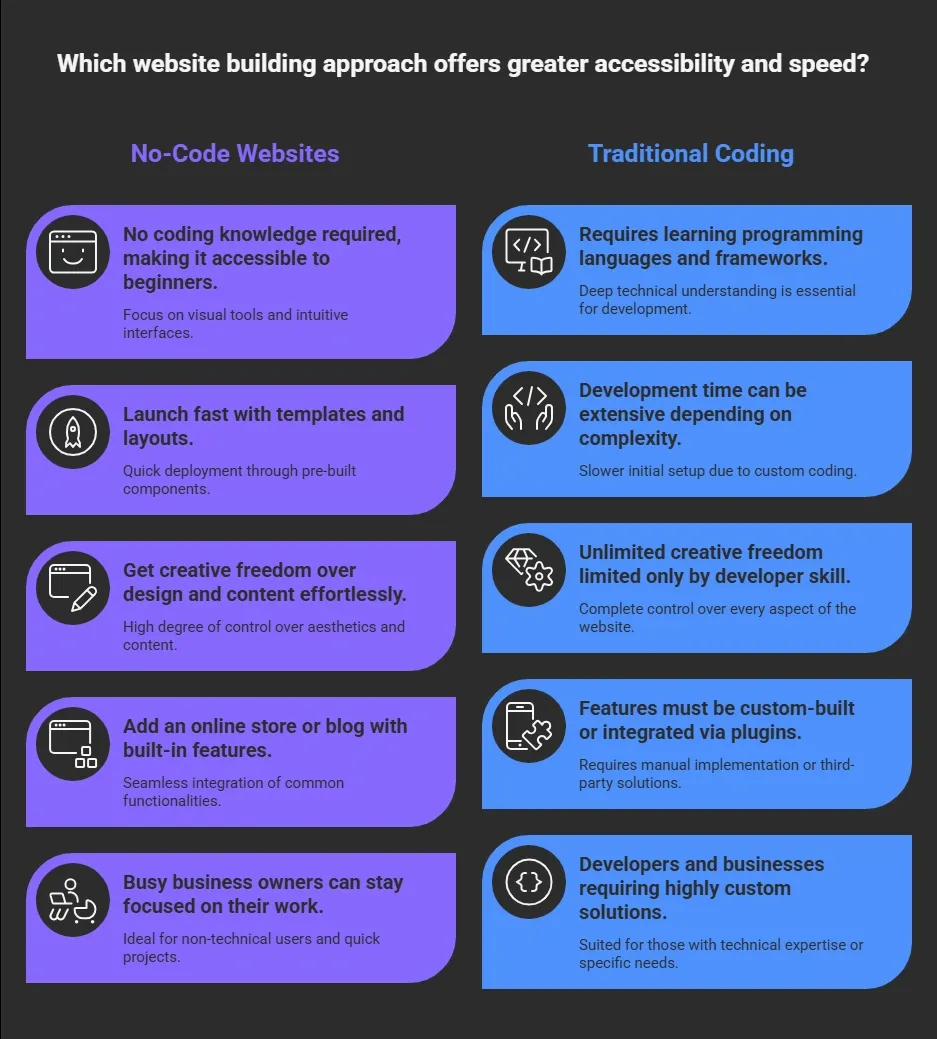
Plus, most no-code builders are easy to use. You get a blank canvas, ready templates, and collaborative editor tools that make shaping your site fun, not frustrating.
Tools You Can Use to Create Your Website
Before you start building, it’s helpful to know the types of tools available. Depending on your needs, whether you want a quick start, full design control, or even an online store, there’s a no-code website builder to match.
Here’s a breakdown of common options and what they’re best for.
| Tool Type | Best For | Notes |
|---|---|---|
| Drag-and-Drop Platforms | Beginners | Visual editor, easy customize |
| AI Website Builder | Quick start | Generates layouts and content based on prompts |
| Template-Based Platforms | Design control | Edit templates to fit your style |
| Builder + Hosting Bundle | All-in-one | Hosting and builder included |
| Custom Code Friendly | Scaling sites | Add custom code if needed |
These tools range from basic drag-edit interfaces to powerful AI builders that generate entire site frameworks from plain text.
Let's see this in action
Alright, now that you know the tools and what a no-code website builder can do, it’s time to get your hands dirty. Don’t worry, it’s not complicated.
We’re going to break it down into simple, actionable steps so you can follow along without feeling lost. Think of this as your roadmap to creating a beautiful website in just a few hours.
What You’ll Learn in These Steps:
-
Picking the right website builder for your project
-
Choosing templates or starting with a blank canvas
-
Adding content, images, and videos effortlessly
-
Setting up SEO, navigation, and basic site settings
-
Previewing, tweaking, and publishing your site
Now, let’s dive into the actual steps.
Step 1: Pick a Website Builder
First, choose your platform. Some popular options include no-code builders that provide templates and intuitive design workflows. Think about what you’re making: simple portfolio? blog? online store? That will guide your pick.
Many users turn to intuitive AI website builder options. These let you speak or type a description and automatically generate layouts, colors, and starter page content without writing code.
Step 2: Choose a Template or Blank Layout
After signing up, most builders ask you to pick a starting point.
You might see:
-
Pre-designed templates
-
Sample site layouts
-
Blank canvas option
If you’re new, a template is super helpful. You get professionally designed pages ready for your own text and images. If you prefer total control, start with a blank canvas and build from scratch.
Step 3: Customize with Intuitive Design Tools
Now the fun starts. Use drag-and-drop design tools to adjust:
-
Page titles
-
Images and videos
-
Text sections
-
Navigation menus
-
Colors and fonts
Play with the site layout until it feels right. Want an online store? Add product pages, images, and prices with just a few clicks.
Remember, this is what makes no code so great: you don’t have to write code to control how your site looks.
Step 4: Add Content and Media
Content is what gives your website personality. Add your own text, photos, videos, and more. Most builders make it easy:
-
Upload images
-
Write page copy
-
Add forms or contact sections
-
Drag new blocks into pages
Be mindful of how your content appears on mobile, too. Good builders show a live preview so you can test what visitors will see.
Step 5: Set Up SEO and Basic Settings
Before you launch your site, take a few moments to handle SEO:
-
Update titles and meta descriptions
-
Connect a custom domain
-
Configure site menus
-
Add a favicon
Good built-in SEO tools will walk you through these steps, ensuring your site performs well in search engines without a complex setup.
Step 6: Preview and Publish
Once your pages are ready, preview on desktop and mobile. After a final check, hit publish. Some builders even let you launch fast on a free domain, or you can connect your own custom domain for a more professional touch.
And that’s it. Your website is live and ready to be seen.
By the end of these steps, you’ll have a site that not only looks professional but also works perfectly across devices. It’s hands-on, easy, and yes, it’s fun.
What Real Builders are Saying?
Real builders often share their honest experiences on professional networks, too. Here’s a recent insight from LinkedIn about Rocket.new and building without code:
“From a single prompt to a full multi‑page responsive website or app in minutes Rocket.new has set a new standard for how modern software gets built. It handles backend, templates, design, and deploy all at once.” Chidanand Tripathi, LinkedIn
This reflects what many creators find exciting: the right platform can take you from idea to a live site fast, making how to create a no code website feel smooth and surprisingly simple..
Rocket.new: A Fresh Approach to AI Website & App Building
If you want a modern spin on building websites without touching code, Rocket.new is one of the most powerful AI website builders available. It’s perfect for beginners, busy business owners, or creators who want to launch fast without getting stuck on technical details.
Rocket.new isn’t just a tool to make sites look good. It also handles backend setup, layouts, and responsive design, meaning you can focus on content and style while the platform takes care of the heavy lifting. Whether it’s a portfolio, marketing site, or a full web app, Rocket.new lets you bring your vision to life in just a few hours.
Top Features
-
Text-to-App Creation: Describe your idea, and Rocket.new builds the pages, layout, and logic automatically.
-
Figma Import: Convert your design files into live, responsive web pages in seconds.
-
Custom Domain Support: Launch your site or app on a professional domain with full branding.
-
Live Preview & Edit: Make changes and see them in real time, so your site looks exactly how you want.
-
Built-in SEO Tools: Optimize page titles, meta descriptions, and other elements to help search engines find your site.
Use Cases
-
Portfolios: Show off your work with interactive pages and media without touching code.
-
Marketing Sites: Launch promotional or project-specific websites quickly for campaigns or events.
-
Dashboards & Admin Panels: Create functional apps for teams or small businesses that need real-time data.
-
Web Apps: Build full applications with user accounts, forms, and workflows without writing code.
Rocket.new makes creating a no-code website easier and more fun than ever.
With AI-driven features and built-in tools, you can turn ideas into live websites and apps in just a few hours, all while staying in control of design and content. It’s like having a developer and designer on your team, but without the stress or cost.
Build Your Dream Website
Most people shy away from building websites because coding feels intimidating. That fear can hold back creative ideas or delay small business goals. But the good news is you don’t need to know code to get online. With modern no-code website builders, intuitive design tools, and ready-to-use templates, creating your own website is easier than ever. You can have a professional site, a blog, or even an online store up and running in just a few hours.
No code platforms give you the freedom to design, add content, and optimize for search engines without any technical stress. Whether you’re a beginner or a busy business owner, these tools help you bring your vision to life, publish fast, and connect with your audience. With a few clicks, your website can go from idea to live, fully functional, and looking great.
Table of contents
- -What is a No-Code Website Builder?
- -Why People Love No-Code Websites
- -Tools You Can Use to Create Your Website
- -Let's see this in action
- -Step 1: Pick a Website Builder
- -Step 2: Choose a Template or Blank Layout
- -Step 3: Customize with Intuitive Design Tools
- -Step 4: Add Content and Media
- -Step 5: Set Up SEO and Basic Settings
- -Step 6: Preview and Publish
- -What Real Builders are Saying?
- -Rocket.new: A Fresh Approach to AI Website & App Building
- -Top Features
- -Use Cases
- -Build Your Dream Website