
Ready to turn a trained AI model into a real app? See how Fal AI hosts models, provides REST API access, while Rocket.new helps build a simple working interface fast.
How to Deploy AI Model with Fal AI and Rocket.new?
You deploy your trained model on a scalable AI infrastructure like Fal AI, expose it via a REST API, and build a working app interface with Rocket.new.
AI adoption keeps growing. According to McKinsey’s 2023 Global AI Survey, 55% of organizations report using AI in at least one business function.
So yes, AI deployment is now part of real business operations, not just tech experiments.
Let’s walk through the full process clear way.
Why Model Deployment Matters More Than You Think?
You can build powerful AI models. You can train multiple ml models. You can run model evaluation, tune hyperparameters, and improve model accuracy.
But if your model never reaches production, it does not help real users.
Model deployment connects machine learning to real-world applications. It turns experiments into usable AI applications. It supports cross-team decision-making, including supply chain managers and product leads.
In the machine learning lifecycle, model training is only one stage. After data preparation and handling missing values in your training data, you move into AI model deployment. That phase decides whether your AI initiatives succeed or stall.
Preparing Your Model for Deployment
Before AI deployment begins, take a step back. Proper preparation ensures your model runs smoothly in production and avoids headaches later. Here’s how to structure it clearly:
Key Steps
1. Clean Data and Evaluation
- Collect and prepare your data carefully.
- Handle missing values properly to maintain data quality.
- Run model evaluation with cross validation during development.
- Track key metrics: accuracy, response time, error rates.
- Monitor input distributions to ensure they match real production scenarios.
- Outcome: A well-tested trained model that performs reliably under production traffic.
2. Version Control and Registry
- Use a model registry to store and manage model versions.
- Track changes and compare results across different versions.
- Enables smooth rollback if a new model underperforms.
- Supports collaboration between data scientists and operations teams.
- Especially helpful for teams using Azure Machine Learning or other cloud providers.
Preparing your model is more than a technical step it’s the foundation for stable AI deployment. Clean data, proper evaluation, and version tracking ensure your trained model moves seamlessly into production, making the entire deployment process predictable and manageable.
The Deployment Process: Step by Step
Deploying an AI model can feel overwhelming, but breaking it into clear steps makes it manageable. Think of it as moving from a stable, trained model to a live system your users can interact with.
Follow these steps to keep things running smoothly and predictably.
Step 1: Package the Model
Your model needs dependencies, runtime configuration, and environment settings. Define model configuration clearly.
Decide if your model will support batch inference or real-time inference. Many AI systems need instant predictions, especially those powering generative AI tools.
Step 2: Select a Deployment Environment
Your deployment environment affects scalability and reliability. Options include cloud service providers, Azure machine, or edge devices for local inference.
Your production environment must handle expected production traffic. Plan for stress testing before launch.
Here is a quick comparison:
| Platform | Best For | Notes |
|---|---|---|
| Fal AI | Generative AI and fast endpoints | API-based model serving |
| Azure Machine Learning | Enterprise ml models | Built-in machine learning operations |
| Edge Devices | Low latency use cases | Works for offline AI systems |
Choosing the right deployment environment makes AI model deployment smoother.
Step 3: Test Thoroughly
Run rigorous testing. Conduct stress testing under load. Route a small percentage of traffic to the new model first.
Check for unintended consequences in automated decision making. Monitor model performance continuously.
Step 4: Monitor and Improve
After release, continuous monitoring begins. Use monitoring tools to track performance monitoring dashboards. Watch key metrics closely.
If performance drops due to shifts in the new data, retrain and redeploy the models.
The deployment process is more than moving a model from local to cloud. It’s about planning, testing, monitoring, and iterating. Follow these steps carefully, and your AI systems will be more reliable, scalable, and ready for real-world users.
Deploying AI Models with Fal AI
Fal AI focuses on deploying generative AI and large language models.
You upload your trained model. Fal AI creates scalable API endpoints. It handles model serving and scaling automatically.
This helps data scientists avoid heavy infrastructure tasks. It also supports both batch inference and real time inference.
Fal AI works well for:
- Custom image generation
- Text generation systems
- Specialized inference endpoints
- Fine-tuned tensorflow models
It simplifies deploying AI models in a cloud-ready production environment.
How to Integrate Fal AI with Rocket.new?
Connecting Fal AI with Rocket.new is easier than it sounds. If your AI model is already deployed on Fal AI, you can plug it directly into your Rocket app using a REST API.
This approach keeps the model-serving layer separate from your app's interface, making the setup clean, scalable, and easy to maintain.
Integration Method: REST API
Fal AI exposes your deployed model through secure API endpoints, and Rocket.new lets you integrate external APIs into your app workflows.
The workflow looks like this:
- Your model runs on Fal AI
- Rocket.new sends requests to the Fal AI endpoint
- Fal AI returns predictions or generated output
- Your app displays the results to real users
This structure ensures smooth communication between your AI backend and the front-end application.
Quick Steps to Connect Fal AI to Rocket.new
1. Get Your Fal AI API Key
- Sign in to fal.ai and generate your API key.
- This key authenticates all requests from your Rocket app.
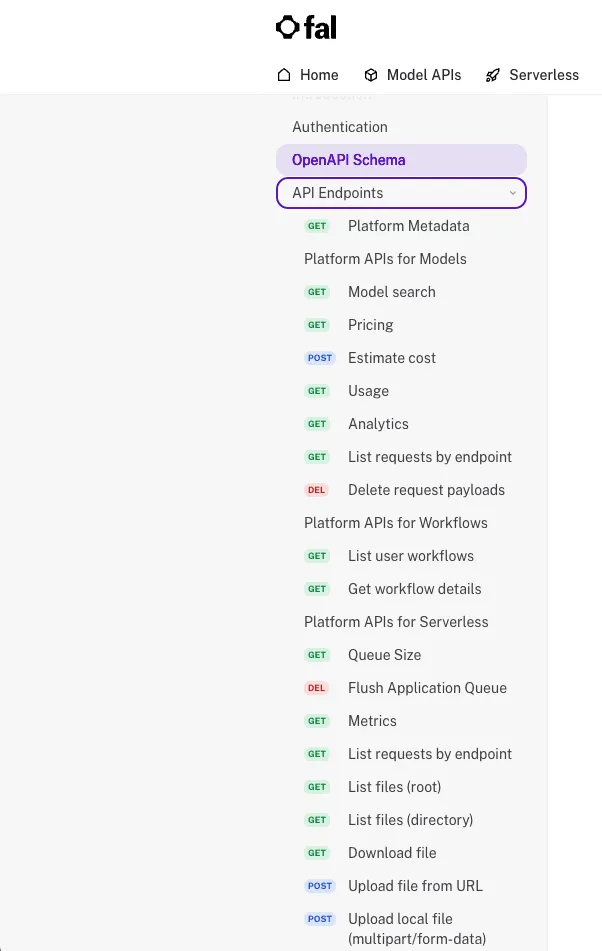
2. Check the API Documentation
- Review the official docs: Fal AI API Docs
- You’ll find endpoint details, request formats, and response structures.
3. Deploy Your Custom Model
- Upload your AI model to Fal AI.
- Configure inference parameters and set up your endpoint.
4. Connect API in Rocket.new
Inside Rocket.new:
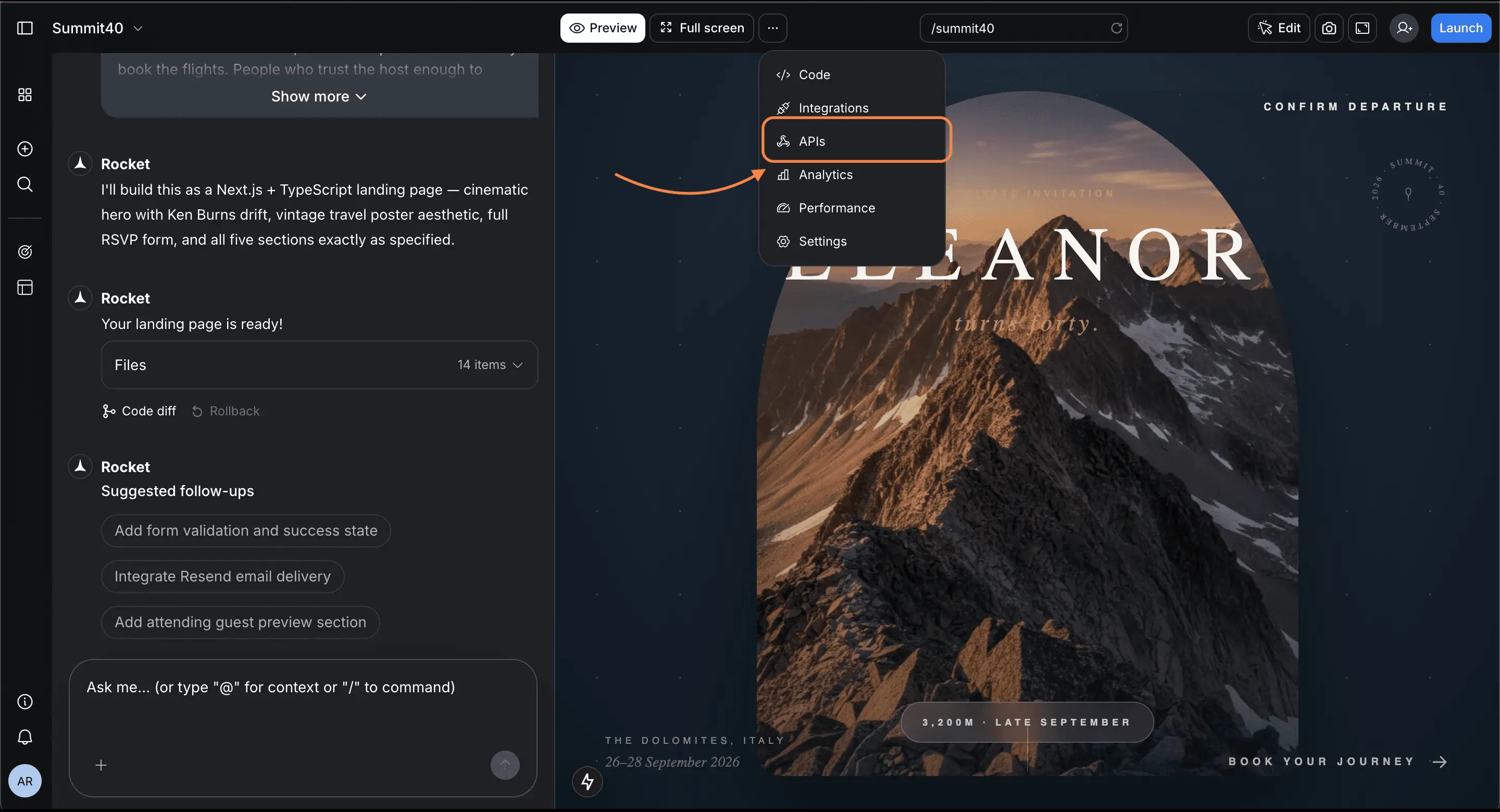
- Add a new API connection
- Paste your Fal AI endpoint URL
- Add headers with your API key
- Map request body fields to user input
Now your Rocket app can trigger your deployed model seamlessly.
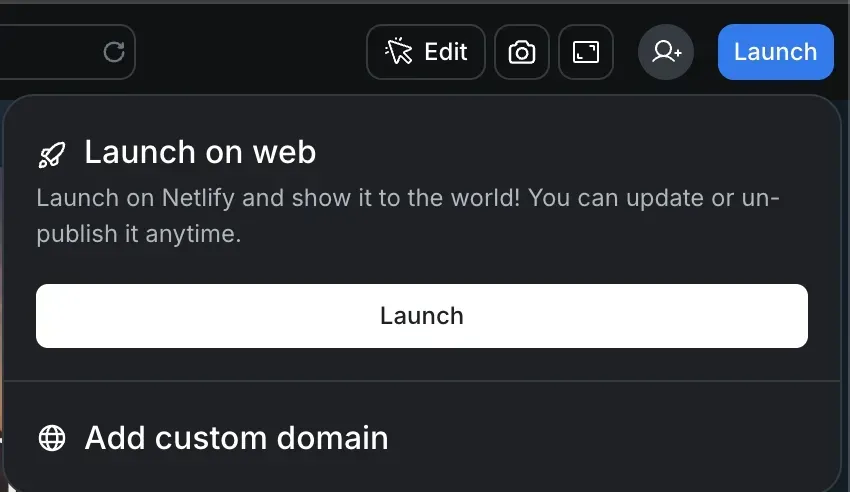
5. Test and Launch
- Send test requests to validate outputs.
- Check that predictions or generated content are accurate.
- Once validated, publish your app.
No heavy backend build is needed. Your AI model is live and accessible to real users.
Integrating Fal AI with Rocket.new lets you quickly turn a deployed AI model into a working application. You separate the concerns of model serving and user interface, reduce complexity, and get a fully functional product without writing extensive backend code..
Community Insight
A common challenge in AI deployment is keeping models stable after training. As Omkumar Solanki points out on LinkedIn:
“Training a model is exciting, but the harder part is everything after: getting the model into production, keeping it stable, knowing when it’s drifting, and making sure it still works when real users and messy data are involved.” LinkedIn
This reflects real experience: many AI projects fail during deployment, not during model development. Proper monitoring and drift detection are key to success.
Best Practices for Stable AI Deployment
Let’s keep this simple and practical.
- Keep a stable production environment
- Track model performance regularly
- Maintain a model registry
- Apply continuous integration when updating a new model
- Watch input distributions carefully
- Collect user feedback from real users
- Use performance monitoring dashboards
These steps support optimal performance. When deploying ML models, treat the deployment environment as carefully as model training.
How to Deploy an AI Model the Right Way
Many teams focus heavily on model development but overlook that AI model deployment determines real success. They train strong machine learning models but struggle to deploy them to production environments. Without proper testing, monitoring, and version control, even the best-trained model can fail to deliver reliable results.
The solution is to use Fal AI for scalable model deployment and connect it with Rocket.new to build complete, user-ready applications. Combine this with rigorous testing, continuous monitoring, and careful version tracking. If you want to understand how to deploy an AI Model properly, focus on the deployment environment, real user feedback, and ongoing performance improvements. Keep it structured, launch carefully, and refine steadily.
Table of contents
- -Why Model Deployment Matters More Than You Think?
- -Preparing Your Model for Deployment
- -Key Steps
- -The Deployment Process: Step by Step
- -Step 1: Package the Model
- -Step 2: Select a Deployment Environment
- -Step 3: Test Thoroughly
- -Step 4: Monitor and Improve
- -Deploying AI Models with Fal AI
- -How to Integrate Fal AI with Rocket.new?
- -Integration Method: REST API
- -Quick Steps to Connect Fal AI to Rocket.new
- -Community Insight
- -Best Practices for Stable AI Deployment
- -How to Deploy an AI Model the Right Way