What makes website visitors stay longer and take action? See how effective website design templates improve navigation, clarity, mobile responsiveness, and engagement while helping businesses create user-friendly, conversion-focused experiences.
Why do some websites grab your attention while others make you leave in seconds?
The secret often lies in effective website design templates.
A carefully designed template guides users smoothly through your site, keeps them engaged, and encourages them to explore more pages. Good templates make navigation easy, content clear, and calls to action obvious.
According to data, 60% of global website traffic comes from mobile devices, underscoring the need for an intuitive, responsive design.
This shows that selecting the right templates isn’t just about aesthetics; it’s about creating a site that visitors enjoy using and want to return to.
Why Website Templates Matter for Engagement?
Website templates are the skeleton of your site. They give structure, consistency, and style. Good templates make navigation smooth, content readable, and calls to action obvious.
In short, they make visitors say, "Hey, I can actually find what I want here."
Some benefits include:
- Faster setup compared to building from scratch
- Professional look without hiring a designer
- Easy customization to match your brand or personality
When visitors find your site easy to navigate and visually appealing, they stick around. Simple as that.
Picking Templates That Click With Users
Not all website templates are created equal. Some are flashy but confusing. Some are clean but boring.
Here’s what to consider:
- Audience Needs: Know who’s visiting your site. Are they looking for a portfolio, business services, or a one-page info hub?
- One-Page or Multi-Page: One-page templates are ideal for portfolios, small businesses, and SaaS products. Multi-page templates are suitable for e-commerce, finance, and retail sites.
- Professional Website Look: Templates should feel polished. A messy site screams amateur hours.
- Mobile Responsiveness: More than half of web traffic comes from phones. Pick templates that scale well.
Remember, the right template isn’t just about looking good, it’s about making your site easy to navigate, enjoyable to explore, and perfectly suited to your audience’s needs.
Top Tips for Designing With Templates
After picking a template, the real fun begins, making it feel like your own site instead of a generic layout. Small tweaks can make a big difference.
- Customize Colors and Fonts: Pick colors that match your brand and personality. Fonts should be readable but stylish.
- Add High-Quality Images: Photos and graphics aren’t just decoration. They guide the eye and make your site feel alive.
- Clear Navigation: Menus should let users easily find services, the portfolio, or contact information.
- Engaging Text: Short paragraphs, catchy headings, and clear calls to action.
A few thoughtful adjustments to colors, images, navigation, and text can turn any template into a site that feels professional, polished, and easy for visitors to explore.
Template Types and Ideal Uses
Different templates serve different purposes. Picking the right type helps your site look professional, stay organized, and keep visitors clicking through.
| Template Type | Best For | Notes |
|---|---|---|
| One Page Templates | Portfolios, small business | Keeps info simple, fast navigation |
| Multi-Page Templates | E-commerce, finance, retail | More room for content, detailed pages |
| Free Website Templates | Startups, testing ideas | Cost-effective, easy to modify |
| Professional Website Templates | Agencies, corporate | Polished look, builds trust |
Choosing the right template type helps match your content and audience needs, making your site more engaging and easier to navigate.
Community Insight
Many designers and developers talk about using templates as part of their workflow. On Reddit, a developer shared this perspective:
“Templates are products sold to designers/users as a starting point or out-of-the-box solution… you customize them to fit your needs. If the final product is clean, responsive, and fits the client’s needs, does it really matter how it was built?”
This shows that the real value often comes from how templates are used, not just where they came from.
Creating Templates That Match Your Brand
A template is more than just a layout, it’s a canvas for your brand and personality. Carefully choosing and customizing it makes your site feel unique and professional.
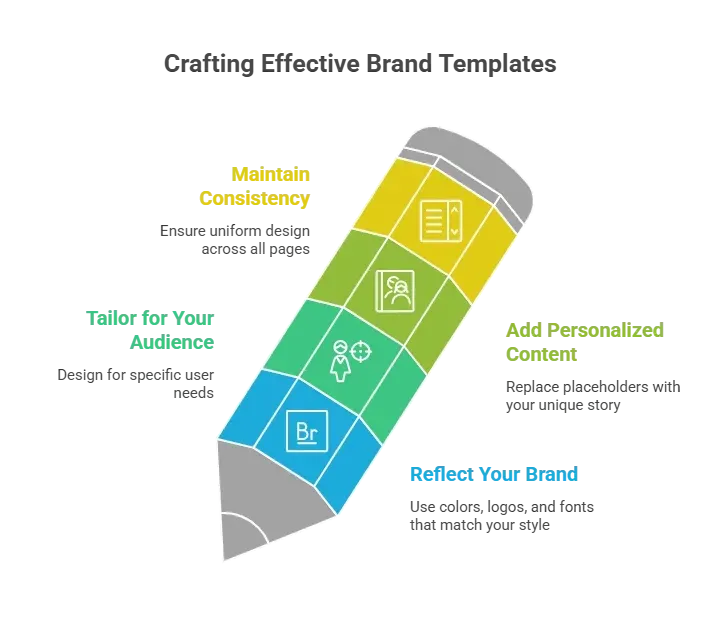
Customizing templates to match your brand helps your site stand out, builds trust with visitors, and creates a cohesive experience that feels intentional rather than generic.
Rocket.new: Templates Made Easy
Rocket.new makes building professional, engaging websites fast and straightforward. It helps users take templates and turn them into sites that look polished, feel unique, and work smoothly for their audience.
Plus, it’s perfect for anyone, whether you’re a beginner testing ideas or a seasoned creator wanting a sleek, ready-to-launch site.
Top Features:
- One Prompt App Generation – Builds full websites or apps from a simple text description.
- Figma Import – Converts design files into responsive live pages instantly.
- Automatic Backend Setup – Creates database and logic without manual coding.
- Custom Domain Support – Publishes projects with your own branded domain.
- Template Library – Offers ready layouts to speed up site creation.
- Third Party Integrations – Connects tools like Stripe, email, and analytics easily.
- Live Preview Editing – Shows real time updates while making changes.
Use Cases:
- Portfolio Sites: Artists and photographers can pick sleek templates, upload images, and launch a fully functional portfolio in no time.
- Business Sites: Small business owners can select professional templates, tailor their services, and start engaging clients instantly.
- SaaS Landing Pages: One-page templates make it easy to present features, testimonials, and calls to action.
Example Template – Form Builder:
The Form Builder template is a modern, calm, and highly intuitive web-based tool. It lets users create Notion-style forms in seconds using a clean block editor, live theming controls, and page-by-page layouts.
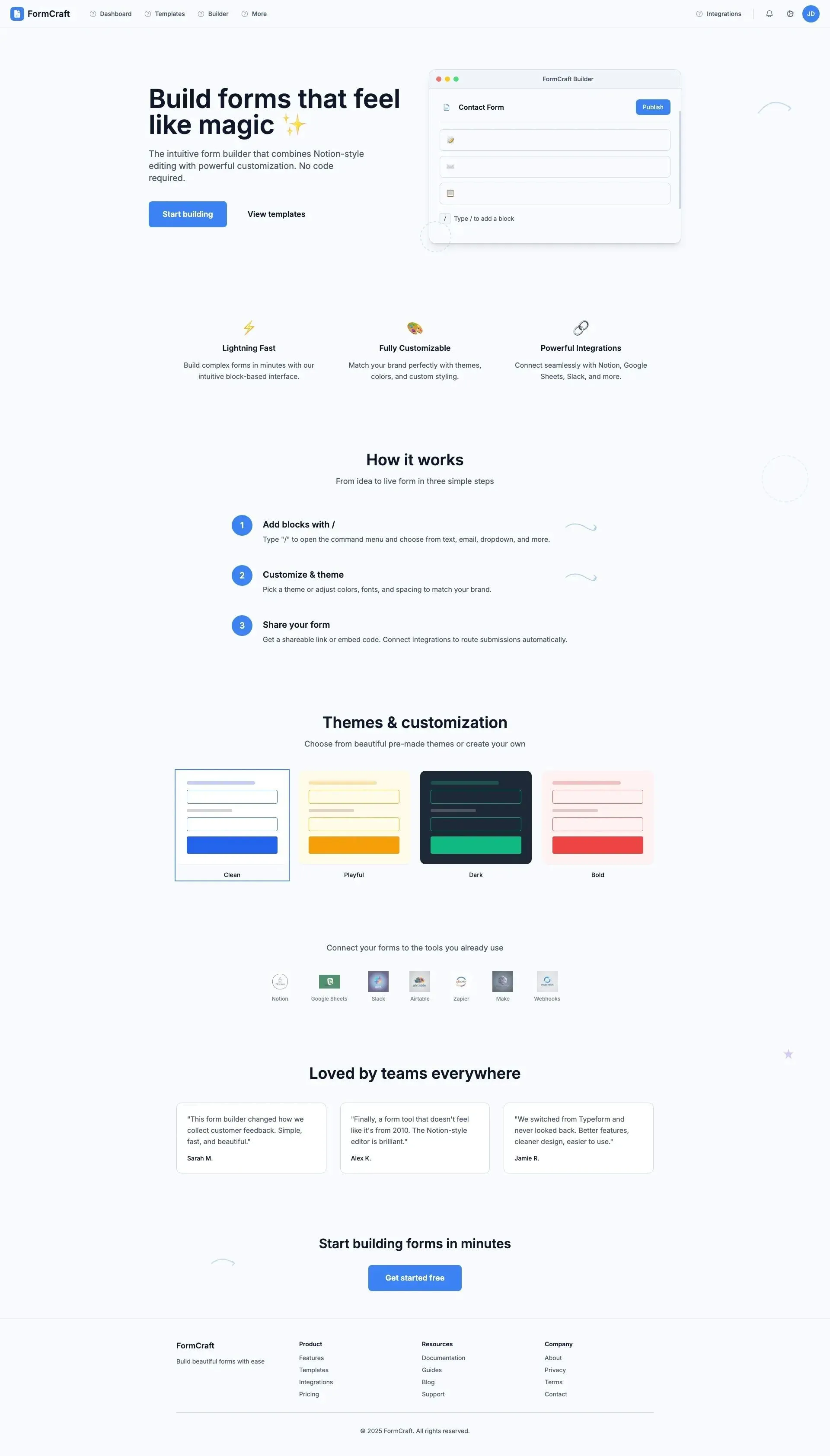
From a blank canvas to a fully branded multi-step form, users can add questions with "/", drag blocks into columns, customize fonts, colors, logos, and covers, preview submissions, and integrate visuals all in a minimalist interface with soft cards, subtle doodles, and reassuring microcopy. This keeps the experience fast, clear, and pleasantly low-friction.
Rocket.new helps users take templates from “good enough” to “best out there” by combining intuitive tools, sleek design options, and flexible customization. Whether it’s a portfolio, business site, or a specialized template like Form Builder, it makes building a professional website simple and satisfying.
👉Build Your Website with Rocket 🚀
Design Principles for Engagement
Good templates don’t just look nice, they guide visitors, keep them interested, and make your site easy to use. Following a few design principles can make a big difference.
- Focus on Readability: Use clear headings, short paragraphs, and bullet points to make content easy to scan.
- Visual Hierarchy: Highlight the most important information first so users know where to look.
- Interactive Elements: Buttons, hover effects, and forms encourage clicks and engagement.
- Performance: Fast-loading templates prevent frustration and reduce bounce rates.
- Consistency: Maintain a uniform style across all pages to give your site a professional look.
Following these principles ensures your templates aren’t just pretty—they actively engage users and keep them exploring your site.
Business Templates: Professional and Practical
Business templates need to clearly showcase your services, contact information, and brand identity. Visitors should immediately understand what your business offers and how to reach you.
One page templates work well for simple business sites, keeping everything on a single scrollable page. Multi-page templates are better for finance, retail, or SaaS projects that require more detailed information.
Adding high-quality images, concise service descriptions, and a clear sign-up or contact section makes the site professional and easy to navigate. These small touches help build trust and keep visitors engaged.
How to Customize Web Design Templates
Even a great template needs a personal touch. Small adjustments can make it feel unique and align perfectly with your brand and content.
- Adjust CSS: Minor tweaks to spacing, fonts, or colors
- Swap Images: Replace stock photos with your own photography
- Modify Text: Make headings and content reflect your voice
- Add Interactive Elements: Forms, buttons, and calls to sign or click
Even a great template needs a personal touch. Small adjustments can make it feel unique and align perfectly with your brand and content.
How Website Design Templates Can Change User Engagement
Many websites fail to hold attention because the design is messy, boring, or confusing. Visitors leave quickly, and engagement tanks.
Using smart website design templates that match your audience and brand fixes that. One-page portfolio templates, professional templates for business, and free templates for testing ideas are all part of the toolkit.
Website design templates are more than a shortcut. They can transform a site into a place users enjoy, interact with, and remember. Picking the right template and customizing it with images, text, and personality can make all the difference.
Table of contents
- -Why Website Templates Matter for Engagement?
- -Picking Templates That Click With Users
- -Top Tips for Designing With Templates
- -Template Types and Ideal Uses
- -Community Insight
- -Creating Templates That Match Your Brand
- -Rocket.new: Templates Made Easy
- -Example Template – Form Builder:
- -Design Principles for Engagement
- -Business Templates: Professional and Practical
- -How to Customize Web Design Templates
- -How Website Design Templates Can Change User Engagement