
What drives success in iOS app building today? Developers focus on streamlined workflows, faster cycles, polished performance, and structured automation to meet user expectations efficiently.
What drives today’s iOS app-building approach toward high-impact results?
A clear signal comes from Apple’s newsroom: the App Store ecosystem facilitated nearly $1.3 trillion in developer billings and sales in 2024. That scale shapes new habits, smarter workflows, and stronger pressure to ship polished iOS applications that perform across iOS devices.
Users expect polished experiences, swift performance, and friction-free updates.
Teams want shorter cycles. That creates tension against older methods that once dominated the iOS development world.
Today, they slow things down. Newer practices shift energy toward clearer structure, more automation, and smoother testing paths.
The Shift From Old Tools to Modern Speed
Older iOS development cycles leaned heavily on manual configuration, repeated provisioning tasks, and slower compilers. They worked but often added drag. Many teams also maintained parallel setups across multiple Mac computers, which made collaboration clunky.
Modern tools change the rhythm.
So teams now:
- Use faster hardware in the macOS line, including Mac mini machines for shared builds.
- Kick off a new project faster through better templates in Xcode.
- Rely on the iOS SDK for more stable components.
- Run earlier tests on the iOS simulator before pushing to a real device.
This helps shift more time toward creativity, app logic, and thoughtful user interaction rather than wrestling with setup issues.
Clean Project Starts With Xcode
A good workflow still begins with a proper setup in Apple’s integrated development environment. Many developers open Xcode and immediately configure their new project structure with clarity in mind. The development environment offers code editor features that speed up navigation and refactoring.
Today’s typical setup includes:
- A Mac computer running the latest version of macOS.
- A downloaded copy of Xcode and all required components.
- An active Apple Developer account tied to an Apple ID.
- A structure for multiple Swift files across modules.
- Baseline testing support using tools built into the integrated development environment IDE.
Teams also closely follow development guidelines and Apple’s Human Interface Guidelines when shaping the app’s user interface. This sets a stronger direction before deeper work begins.
Coding Approaches For Cleaner Flows
Modern iOS development encourages more modular thinking. Smaller pieces. Clearer files. Minimal guessing. Old, sprawling Objective-C codebases once made maintenance messy.
Now, the Swift programming language pushes developers toward neat, predictable patterns.
Some teams still use Objective-C, especially when maintaining existing apps or integrating older components. But Swift remains the quicker path for most builds.
Key habits shaping today’s coding style:
- Breaking features into separate Swift files.
- Using structured patterns for the app controller.
- Keeping logic tidy to avoid memory leaks.
- Writing clear Swift code instead of nesting too many steps in one place.
This isn’t about reinventing the wheel. It’s about writing code that the next developer won’t fear.
Testing That Matches Real Use
Testing changed dramatically.
Developers used to rely too heavily on a single iOS simulator run and call it a day. That often created surprises when the first real device test came around.
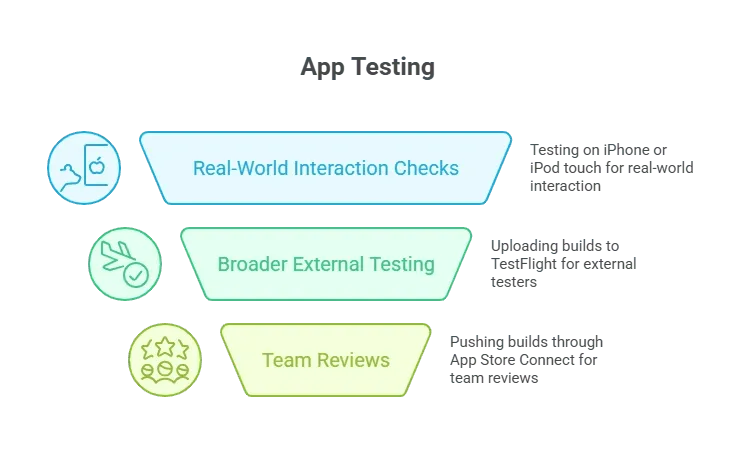 This reduces awkward surprises during the app review process. It also spreads insight across different device sizes, including iOS devices that developers don’t carry in their own pockets.
A Quick Comparison
| Practice Area | Older Method | Modern Method |
|---|---|---|
| Setup | Manual provisioning on each Mac system | Shared signing assets via App Store Connect |
| Coding | Large Objective C files | Smaller Swift files with clear separation |
| Preview | Primary testing on real device | Early checks in iOS simulator + real device mix |
| Sharing builds | Email IPA files | TestFlight app distribution |
| Design | Sparse UI tools | Stronger UI elements, graphical interface previews |
Prep For Launch
Once the real device tests run smoothly, teams package the iOS application in App Store Connect. They attach screenshots, describe features, and check requirements against App Store Review Guidelines. After that, everything heads toward the Apple App Store queue.
Small touches matter here:
- Follow naming patterns that help users interact with the app easily.
- Keep the app’s user interface consistent with expected flows.
- Avoid last-minute code changes that may complicate stability.
This keeps the process calmer as the build moves through the stringent quality review process.
Rocket Mobile — Building Apps Straight From an iPhone
Rocket.new introduces Rocket mobile, a phone-based workflow that lets creators build and shape apps directly on an iPhone. The update swaps the usual desk setup for a pocket-sized workspace, making early app work fast and flexible without waiting to sit down at a Mac.
A few practical perks fit nicely here:
- Build and edit layouts from an iPhone without opening a laptop.
- Bring in Figma design files and turn them into functional screens.
- Generate cross-platform code that can later be exported for full iOS preparation.
- Share prototypes instantly for quick reactions or early testing.
Once the concept feels right, the exported project can move into proper iOS work for the iOS SDK, debugging tools, App Store Connect setup, and real device testing.
Rocket Mobile Use Cases
- Fast MVP sketches while commuting or traveling.
- Quick refinements during feedback sessions.
- Designer-first workflows where Swift isn’t needed yet.
Modern iOS App Building Wrap-Up
Modern practices in iOS app development lean toward cleaner architecture, more robust testing, and smoother early workflows. As tools grow sharper, teams spend less time wrestling with setup and more time creating experiences people enjoy.
Table of contents