
How can teams quickly create clear product roadmaps using AI? This blog explains building a roadmap generator without heavy coding, highlighting benefits, uses, and the growing adoption of AI in planning.
Looking to build a product roadmap generator?
I have some good news: you absolutely can without heavy coding or design stress. In fact, AI tools are transforming how we plan and visualize future work.
Gartner predicts that by 2028, 90% of enterprise software engineers will use AI code assistants, up from less than 14% in early 2024.
A product roadmap generator lets you design a visual representation of project goals, timelines, milestones, and tasks that align with business goals and strategy. It’s a core tool for product managers and teams that work across functions, such as sales, marketing strategy, and dev.
So let’s get started.
Why a Product Roadmap Generator Matters?
Before you start building, it’s worth understanding why a roadmap generator actually matters. You might be thinking, “Why not just use free roadmap templates or a roadmap online tool?” Fair question.
Here’s where a roadmap generator makes a difference:
- Reduces manual effort compared to static roadmap templates
- Adapts quickly to changes in project scope and shifting priorities
- Helps teams working across global teams and different timelines
- Supports visual roadmaps for better clarity and communication
- Lets you use Kanban boards, color coding, and structured layouts
- Converts high level objectives into actionable tasks and clear milestones
- Improves real-time collaboration within the team
- Turns your roadmap into a dynamic tool instead of a static document
A roadmap generator doesn’t just help you plan. It helps your team stay aligned, track progress, and adjust quickly as things change, making your roadmap more useful day-to-day.
Rocket.new: The Saviour
If you’ve ever wished you could build apps without writing endless lines of code, Rocket.new is your shortcut. It turns plain text instructions into a fully functional web app fast, simple, and surprisingly powerful.
Here’s what makes Rocket.new stand out:
- Build from prompts: Describe what you want, and Rocket.new automatically generates backend logic, database setup, UI design, and deployment.
- Integrations ready: Works with OpenAI, Stripe, Supabase, and more, letting you add AI features, analytics, authentication, and scalable infrastructure.
- Clean code export: You can access the code behind your app and extend it as needed.
- Dynamic tools creation: Perfect for creating forms, charts, dashboards, and AI assistants.
- Data visualization & planning: Generate visual roadmaps, timelines, and project planning tools without extra software.
With Rocket.new, building a product roadmap generator is not only possible, but it’s also quick and adaptable. You get a tool that’s ready for teams, stakeholders, and real-time collaboration, all from a few lines of text.
What You’ll Build
Before diving into building your roadmap generator, it helps to know what the finished tool can actually do. Think of this as your blueprint for what your AI-powered app will deliver.
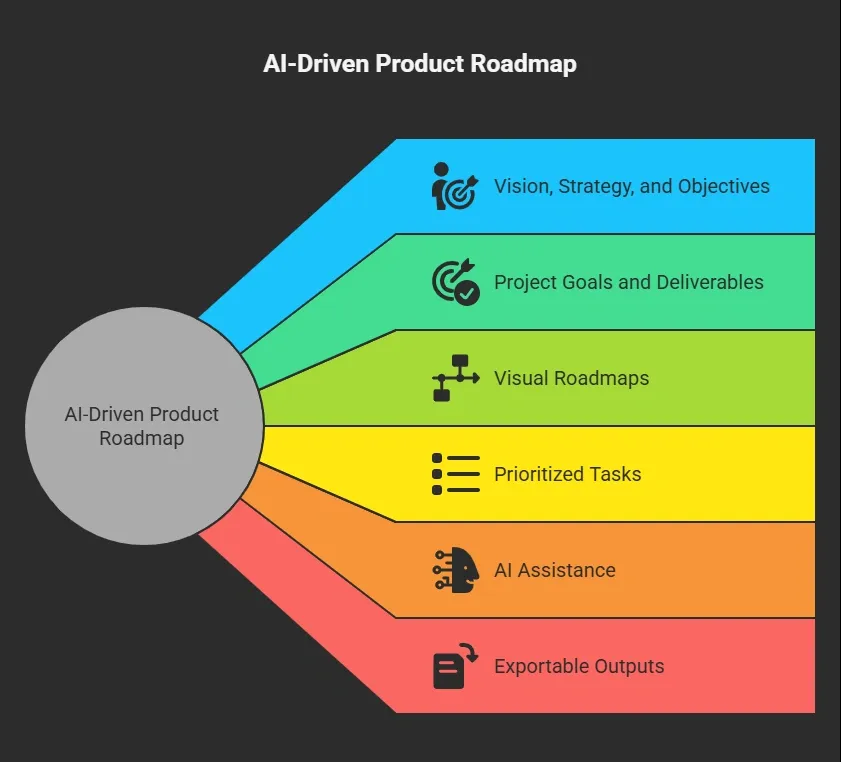
These features give your team a clear, interactive way to plan, track, and communicate project progress. With Rocket.new, all of this comes together in a tool that’s as flexible as your workflow.
Build Your Product Roadmap Generator
Now that you know what your roadmap generator will include, let’s get into the actual process.
You don’t need to code or design everything from scratch. Rocket.new handles most of the heavy lifting. Your job is to guide it with the right inputs and ideas.
Ready? Let’s start building your roadmap generator step by step.
Step 1: Understand Your Scope
Start by defining your project scope.
Ask these questions:
- What is the primary purpose of the generator?
- Who will use it: product managers, teams, or stakeholders?
- What business strategy or goals should it support?
Clarifying the scope helps Rocket.new generate an app that fits your needs rather than a generic structure.
Step 2: Define Your Requirements
List the key features your generator needs.
For example:
- A form to add roadmap items
- An editable timeline with color coding
- A section for business goals and expected outcomes
- Filters for priorities, deliverables, and milestones
- Real-time updates and collaboration
Next, write these into a prompt like this:
"Build a product roadmap app that includes a timeline, color-coded goals, editable tasks, milestones, and charts. Allow users to track progress, sort by priority, and export charts."
Rocket.new will use that to create the basic app structure.
Step 3: Prompt Rocket.new
Head into Rocket.new and start a new project. In simple language, type your vision. You don’t need to break it down into code or jargon. Just clear plain instructions.
Rocket will generate:
- UI screens and workflow
- Forms and data fields
- Backend database and logic
- Charts and tables for visualization
You can refine iterations with follow-up prompts to add filters, AI-assisted suggestions, or export options.
Step 4: Customize the Interface
Your visual workspace is where your team will interact with the product roadmap. Add elements like:
| Component | Purpose |
|---|---|
| Timeline Chart | Shows dates and deliverables |
| Priority Filter | Lets team sort tasks |
| Milestone Tracker | Highlights key progress |
| AI Assistant | Helps with suggestions |
Customize colors and layout to match your project or branding. Rocket makes this part easy.
Step 5: Add AI Features
Rocket.new integrates with OpenAI and other AI models. With this integration, you can add smart features like:
- An AI assistant to rewrite roadmap descriptions
- AI suggestions for priorities based on goals
- Summarization of progress or backlog items
Just tell Rocket what you want the AI to do, and it will generate the code.
Step 6: Test and Iterate
After your basic generator is live:
- Invite your team to test it
- Gather feedback on usability and clarity
- Adjust workflows and features
- Add support for multiple user roles if needed
Iterating early helps you refine the tool without high costs.
👉Build Your Product Roadmap with Rocket 🚀
Community Insight
Here’s a real insight shared by professionals on LinkedIn about AI-driven product building:
“AI made code fast. Product teams didn’t keep up… Product, not engineering, is the new bottleneck.”
This hits directly on your topic. Tools like Rocket.new can help you build faster, generate apps, and quickly create roadmaps. But the real challenge now is deciding what to build, setting priorities, and keeping stakeholders aligned.
What About Templates and Customization?
Starting from scratch can slow things down, especially when you already have a clear plan in mind. Templates help you skip the setup and move straight into building your roadmap.
Here’s how templates and customization help you:
- Use ready-made templates to quickly create your roadmap structure
- Pick from different roadmap templates and dashboard layouts
- Save time by avoiding manual setup from the beginning
- Add or edit fields based on your project needs
- Customize timelines, tasks, and milestones easily
- Adjust data visualization to match your workflow
- Shape each template to fit your specific use case
Templates give you a fast starting point, but the real power comes from customizing them. With a few changes, you can turn a simple layout into a roadmap tool that works perfectly for your team and project.
Build, Align, and Track
Teams often struggle to create a roadmap that’s clear, visual, and easy to update. While templates and roadmap online tools help, they still need manual edits, miss custom workflows, and don’t keep up with shifting priorities. This makes it harder for teams and stakeholders to stay aligned and track progress smoothly.
With Rocket.new, you can build a product roadmap generator that turns simple text into a live, interactive tool your team can use right away. It handles databases, UI, backend logic, and deployment with minimal effort, so you can focus on planning and strategy. The main takeaway is simple: you don’t need to code to create a powerful roadmap maker that keeps everyone on the same page.
Table of contents
- -Why a Product Roadmap Generator Matters?
- -Rocket.new: The Saviour
- -What You’ll Build
- -Build Your Product Roadmap Generator
- -Step 1: Understand Your Scope
- -Step 2: Define Your Requirements
- -Step 3: Prompt Rocket.new
- -Step 4: Customize the Interface
- -Step 5: Add AI Features
- -Step 6: Test and Iterate
- -Community Insight
- -What About Templates and Customization?
- -Build, Align, and Track