
Rocket.new transforms user questions into structured outputs using AI-driven parsing and logic. It streamlines workflows, improves data accuracy, and enables efficient automation for developers, analysts, and businesses handling complex inputs.
Why can a simple question turn into a full strategy presentation?
Modern AI systems can take a plain language prompt and convert it into structured insights, organized pages, and presentation-ready output within minutes. Instead of starting from scratch, teams can now move directly from idea to execution.
This shift is changing how people handle research, build an app, and shape early-stage concepts. It removes a lot of manual effort and speeds up decision-making.
According to PWc, AI could contribute up to $15.7 trillion to the global economy by 2030 through increased productivity and consumer demand.
So, let’s talk about how this actually works in real life. This blog will help you understand how a simple prompt can turn into a structured, presentation-ready strategy using modern tools.
What is Rocket.new and Why It Matters?
Rocket is a platform that helps you build an app from plain language. You don’t need to write a lot of code from scratch. You describe what you want, and the system handles the structure, backend, and frontend pieces.
It’s not just another tool. It’s one platform where your ideas turn into something real.
You can:
-
Build an application
-
Create pages and screens
-
Connect backend logic
-
Run deployment
-
Share your work
All in one place.
That matters because most teams waste time jumping between tools. One for design, one for code, one for research, one for testing. Here, everything stays close and connected.
What is Solve and How It Fits In?
Now let’s zoom into the main topic.
Solve on rocket.new is the part that turns your plain question into structured output. You type a prompt like:
“Build an app idea for fitness tracking with social sharing.”
Then the system starts working.
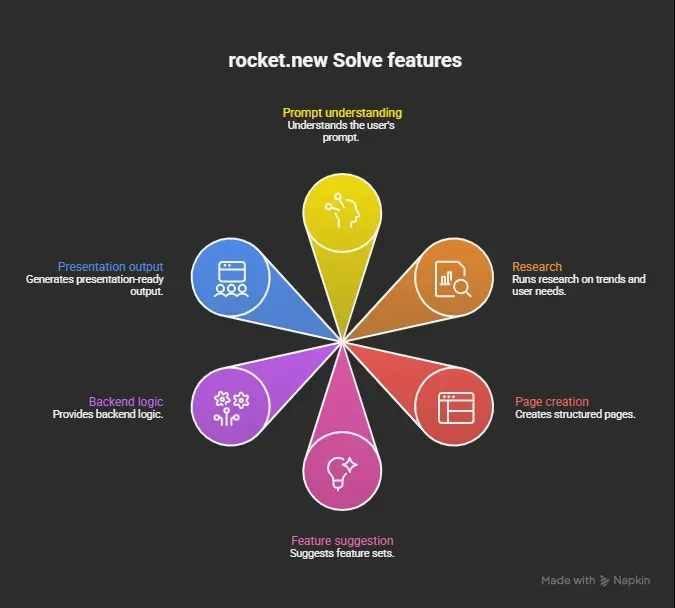 It feels like chatting, but the results look like a full project draft.
How It Works: Step by Step
So, how does this actually move from question to output?
Let’s break it down in a way that feels real and easy to follow. Think of this as the journey from a simple idea to something you can actually show, share, and even present.
1. You Start with a Prompt
You describe your idea in plain language. No need for technical terms. Just explain what you want.
Example:
“Create a music app with sharing features and user profiles.”
That’s it. Simple.
2. AI Understands the Intent
The system reads your prompt and tries to understand:
-
What kind of app you want
-
Who the users are
-
What functionality is needed
This step uses AI tools to process language and structure it.
3. Research Happens in the Background
Next, it runs research.
This includes:
-
Market trends
-
Similar apps
-
User expectations
This research helps shape better ideas and avoid random guesses.
4. Structure Gets Built
Then, it starts to build:
-
Pages
-
Screens
-
Feature suggestions
-
Backend flow
This is where rapid prototyping begins. You start seeing something real instead of just ideas.
5. Code and Logic Are Generated
The system creates code for:
-
Frontend
-
Backend
-
APIs
You don’t need to write everything yourself. You can still edit and improve the code if you want.
6. Output Becomes Presentation-Ready
Finally, you get:
-
Structured pages
-
A dashboard view
-
Export options like pdf
-
Sharing link
You can literally present it to a team or client.
From a single prompt to a complete output, this flow shows how fast ideas can turn into something useful. Once you understand this process, you can start using it better, refine your prompts, and get stronger results every time.
A Quick Table to Make It Clear
Sometimes, seeing everything in one place just makes it easier to understand. Here’s a simple breakdown of how each step flows into the next and what you actually get at every stage.
| Step | What Happens | Result |
|---|---|---|
| Prompt | You describe idea | Clear direction |
| AI Understanding | Intent analysis | Structured plan |
| Research | Market and user study | Better ideas |
| Build | Pages and screens created | Rapid prototyping |
| Code | Backend and frontend ready | Fully functional draft |
| Output | Export and sharing | Presentation-ready |
This table shows how smoothly the process moves from a basic idea to a ready-to-share result. Each step builds on the previous one, so nothing feels random.
Once you get used to this flow, it becomes much easier to plan, build, and present your ideas with confidence.
Why This Feels Different from Regular App Building?
Let’s be honest, traditional app building can feel slow and repetitive. You often spend a lot of time just getting the basics right before you even see something usable.
You:
-
Write code
-
Test
-
Fix bugs
-
Repeat
And this cycle can go on for months before you have something ready to show. Now, compare that with a faster approach.
Here, rapid prototyping changes the pace completely. Instead of waiting weeks, you can move much quicker and actually see progress early on.
You can:
-
Build a draft in minutes
-
Test ideas quickly
-
Share results fast
It feels more flexible and less frustrating. You get to focus on your ideas instead of getting stuck in long development loops. That’s exactly why many users enjoy this experience and keep coming back to it.
Key Features That Stand Out
Let’s slow it down and look at the features that actually make a difference in daily use. These are not just nice add-ons. They directly affect how fast you can build, test, and share your work.
1. Plain Language Input
You don’t need complex syntax or technical terms. Just describe your idea the way you normally would.
You can type something like: “Create a music app with sharing and user profiles.”
That’s enough to get started. The system understands your prompt and turns it into something structured. This makes it easier for beginners and saves time for experienced users.
2. Full Stack Output
You don’t just get a rough idea. You get a complete starting point.
This includes:
-
Frontend for user interaction
-
Backend for logic and data handling
-
APIs to connect different parts
This means you’re starting with something close to fully functional, not just a concept.
3. Built-in Research Layer
Before building anything, the system runs research in the background.
It looks at:
-
Market trends
-
Similar apps
-
User behaviour
This helps shape better ideas and avoids random decisions. You’re not just building fast, you’re building with some direction.
4. Dashboard and View Control
Everything stays organized in one place.
You can view:
-
Pages
-
Data
-
Overall structure
The dashboard gives you a clear view of your project. You can click through screens, understand how things connect, and make changes easily.
5. Export and Sharing Options
Once your work is ready, sharing is simple.
You can:
-
Export your project as a pdf
-
Share a link with others
-
Post updates for feedback
This makes collaboration smooth. You can show your work to a team or client without extra steps.
6. Tokens and Usage System
The platform runs on a token system.
-
Basic features are free
-
Advanced tasks use more tokens
This helps manage usage while still letting you test ideas without spending too much at the start.
These features work together to make the whole process feel simple and fast. Once you start using them, you’ll notice how quickly you can move from an idea to something real, test it, and share it without getting stuck.
From Simple Question to Strategy Output
Let’s bring it back to the main idea and connect everything clearly.
You start with a plain question. No complex setup, no long planning phase. Just a simple prompt describing what you want.
Then the process flows step by step:
-
AI understands your intent
-
Research shapes your idea with real insights
-
Pages and screens get built
-
Code is generated for frontend and backend
-
Output becomes presentation-ready
What started as a small idea quickly turns into something structured and usable. You’re not just thinking anymore, you’re actually building and seeing results.
So yes, a simple prompt can turn into something you can present, share, and work on further. That’s exactly what makes this approach stand out.
Real Use Case Example
Let’s understand this with a simple, real-life scenario so you can see how everything comes together, you want to build a fitness app we're assuming that.
You type: “Create a social fitness app for beginners.”
That’s your starting point. No long planning, no complex setup.
You get:
-
User profiles
-
Activity tracking feature
-
Sharing feed
-
Dashboard
-
Backend logic
Everything is structured in a way that makes sense right away.
Then, you can:
-
Click to view screens
-
Edit code
-
Connect APIs
-
Run deployment
You’re not stuck at the idea stage anymore. You can actually see and interact with what you’re building.
Within minutes, you have a working concept in front of you. From here, you can continue refining it, test different ideas, and shape it into something even better.
Turning Ideas into Actionable Strategy
Teams often struggle to turn ideas into structured plans. They spend months on research, writing code, and trying to connect frontend, backend, and overall app flow. This slows down progress and makes it harder to test ideas early.
A simple prompt can now help build a structured application with clear pages, research-backed direction, and ready-to-share output. It saves time, reduces manual effort, and helps users move faster. You can test ideas, share results, and improve your work step by step. Still, human judgment matters. The platform supports your thinking, but you decide what works best in the end.
Table of contents
- -What is Rocket.new and Why It Matters?
- -What is Solve and How It Fits In?
- -How It Works: Step by Step
- -1\. You Start with a Prompt
- -2\. AI Understands the Intent
- -3\. Research Happens in the Background
- -4\. Structure Gets Built
- -5\. Code and Logic Are Generated
- -6\. Output Becomes Presentation-Ready
- -A Quick Table to Make It Clear
- -Why This Feels Different from Regular App Building?
- -Key Features That Stand Out
- -1\. Plain Language Input
- -2\. Full Stack Output
- -3\. Built-in Research Layer
- -4\. Dashboard and View Control
- -5\. Export and Sharing Options
- -6\. Tokens and Usage System
- -From Simple Question to Strategy Output
- -Real Use Case Example
- -Turning Ideas into Actionable Strategy