
Supabase MCP lets AI assistants in editors like Cursor and VS Code query data, inspect schemas, and manage tables in a Supabase project through permission-controlled tool calls, without exposing credentials. It sits between your LLM and database layer, keeping humans in control.
Supabase MCP is a server implementation of the Model Context Protocol that lets AI assistants in editors like Cursor, Claude Desktop, or VS Code query data, inspect schemas, and manage tables in a Supabase project through structured, permission-controlled tool calls, without ever touching credentials directly. Teams using it report fewer integration headaches, tighter security boundaries, and faster development cycles.
What Is Supabase MCP?
Supabase MCP is a server that exposes your Supabase project as a set of structured, permission-controlled tools that AI assistants can call from inside your editor. It is built around the Model Context Protocol (MCP), a standard that defines how AI tools communicate with external systems. MCP enables an AI assistant to understand which tools are available and what actions it can perform.
The Supabase MCP server provides tools for a Supabase project. These tools let an AI assistant query data, inspect a database schema, manage tables, and work with edge functions. The AI never directly touches credentials. Instead, it asks permission through structured tool calls.
Understanding AI in backend development helps put Supabase MCP in context: it is one of the most practical ways AI has entered the database layer without creating new security risks.
How Does the Supabase MCP Server Work?
The MCP server operates as a controlled gateway between your AI editor and your Supabase project. It listens for requests from an MCP client, validates permissions, and only executes approved actions within the connected project's scope.
Here is what happens behind the scenes:
- The MCP client sends a request: An AI tool or editor requests an action, such as querying data, checking the database schema, or fetching configuration details.
- The MCP server validates permissions: It checks developer permissions, project scope, and access limits before allowing anything to run.
- Tool calls are executed against the Supabase project: Approved requests are converted into structured tool calls that run only within the connected Supabase project and respect row-level security.
- Results are returned securely: The output is sent back in a controlled format without exposing credentials or granting unrestricted access.
This setup is critical when handling sensitive data. The MCP server never blindly runs commands. Everything stays scoped and reviewed.
The flow below shows how a request moves from your editor to your database:
Request flow: AI client sends a tool call, the MCP server validates permissions, approved calls reach the Supabase project (DB and edge functions), and denied calls are blocked before execution.
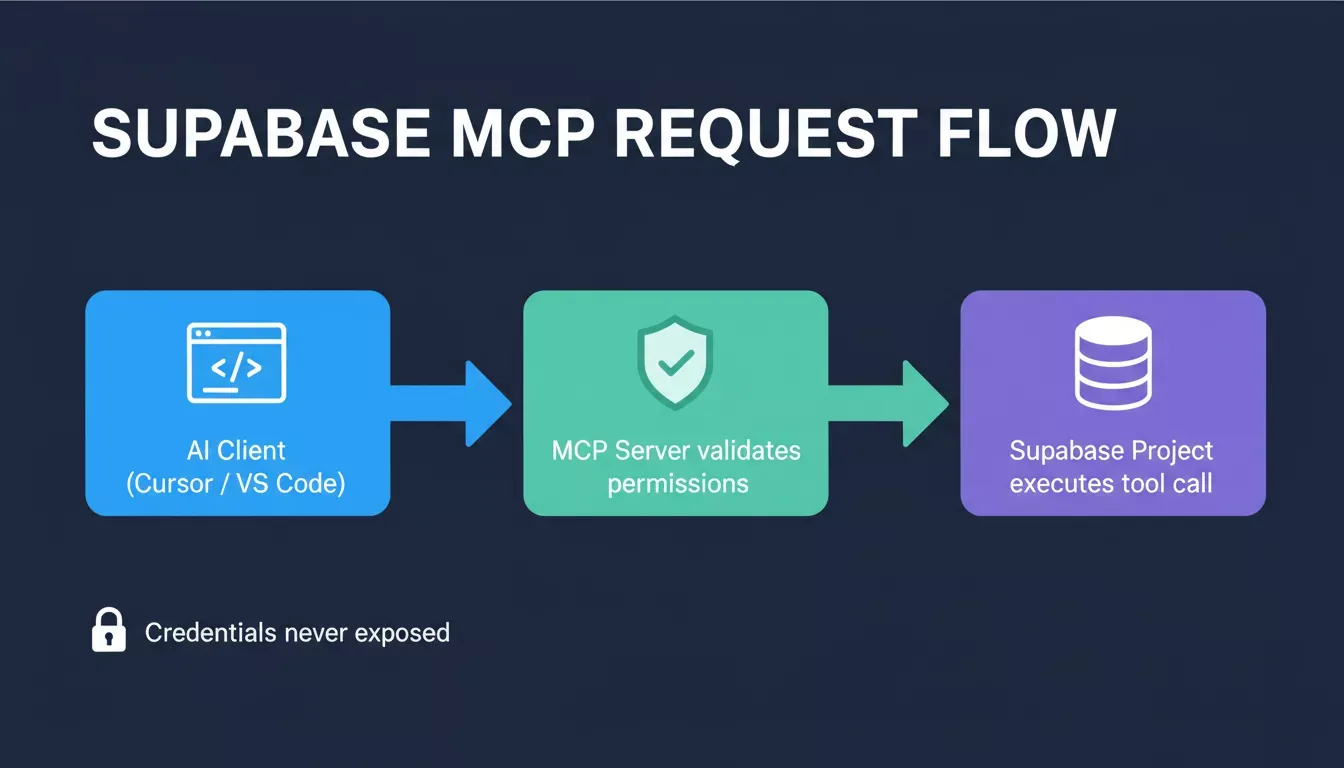
How a request travels from your AI editor through the MCP server to your Supabase project.
Which MCP Clients Support Supabase MCP?
The most common MCP clients are Cursor, Claude Desktop, and VS Code extensions. Most MCP clients live inside developer tools, running directly where developers already write code.
- Run inside familiar tools: MCP clients work directly where developers already write code, so there is no need to switch dashboards or contexts.
- Support manual approval: Before any action runs, developers review and approve each tool call, especially useful when executing SQL queries or applying schema changes.
- Keep humans in control: The AI suggests actions based on context, but the final decision always remains with the developer.
How Does Supabase MCP Fit into Modern AI Workflows?
Supabase MCP sits between large language models and the database layer, giving AI structured and controlled access to the backend without requiring developers to write glue code.
According to Index.dev's 2025 developer productivity report, developers using AI tools report 30-60% gains in productivity for routine coding and testing tasks. As AI becomes part of everyday workflows, tools like Supabase MCP address one missing piece: providing AI with structured, controlled access to the backend.
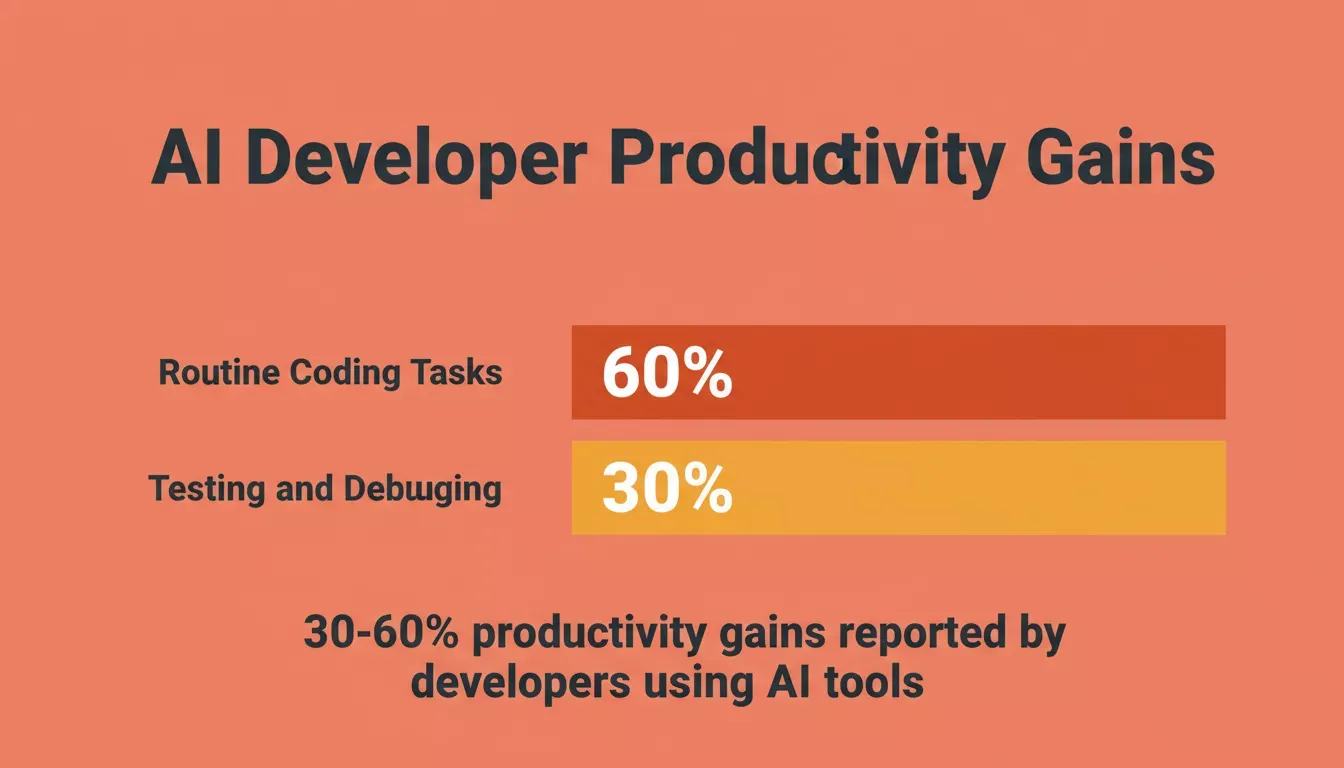
Developers using AI tools report 30-60% productivity gains on routine coding and testing tasks (Index.dev, 2025).
How Do You Set Up Supabase MCP?
Setup starts in your Supabase account. Enable MCP access in the Supabase dashboard, then connect an MCP client to your project.
The official Supabase MCP documentation walks through each configuration step in detail.
Recommended setup steps:
- Use a development project first: Start in a safe environment to avoid affecting production data.
- Connect an MCP client: Link your AI assistant or editor to interact with the Supabase project.
- Enable project-scoped mode: Limit MCP access to the project's resources only.
- Start in read-only mode: Test queries and tool calls without risking accidental changes.
Many teams run MCP while running Supabase locally. This makes it easier to design and test applications without touching real data. If you want to skip manual schema setup entirely, you can generate a database schema with AI before connecting MCP.
What Can Supabase MCP Tools Actually Do?
The table below summarizes the main MCP tools, their functions, the components they use, and typical use cases.
| Task Group | What It Does | MCP Component | Typical Use Case |
|---|---|---|---|
| SQL Operations | Executes SQL queries and returns results | MCP server | Querying data |
| Schema Tools | Applies schema changes | MCP client | Development branch |
| Edge Functions | Manages edge functions | MCP server | Backend logic |
| Config Access | Fetches config values | MCP client | Environment setup |
This table highlights the key MCP tools and their typical use cases, helping developers quickly see which actions MCP can perform safely without exposing sensitive data.
What Security Risks Should You Know About?
The primary attack vector for Supabase MCP is prompt injection: hidden instructions inside user content that trigger untrusted commands. This is the risk most unique to AI-driven tools and the one most teams underestimate.
Another issue is exposing sensitive data. Some projects store sensitive data in plain text. If MCP has write access or elevated access, mistakes happen fast.
Ways to mitigate security risks:
- Use read-only PostgreSQL user roles
- Limit write access
- Disable specific tools when not needed
- Avoid exposing real data
- Use obfuscated data or non-production data
LLMs carry inherent risks. MCP does not eliminate them entirely, but when used correctly, it significantly reduces the risk of security issues. For a broader look at protecting your stack, the web application security checklist covers the full surface area beyond MCP alone.
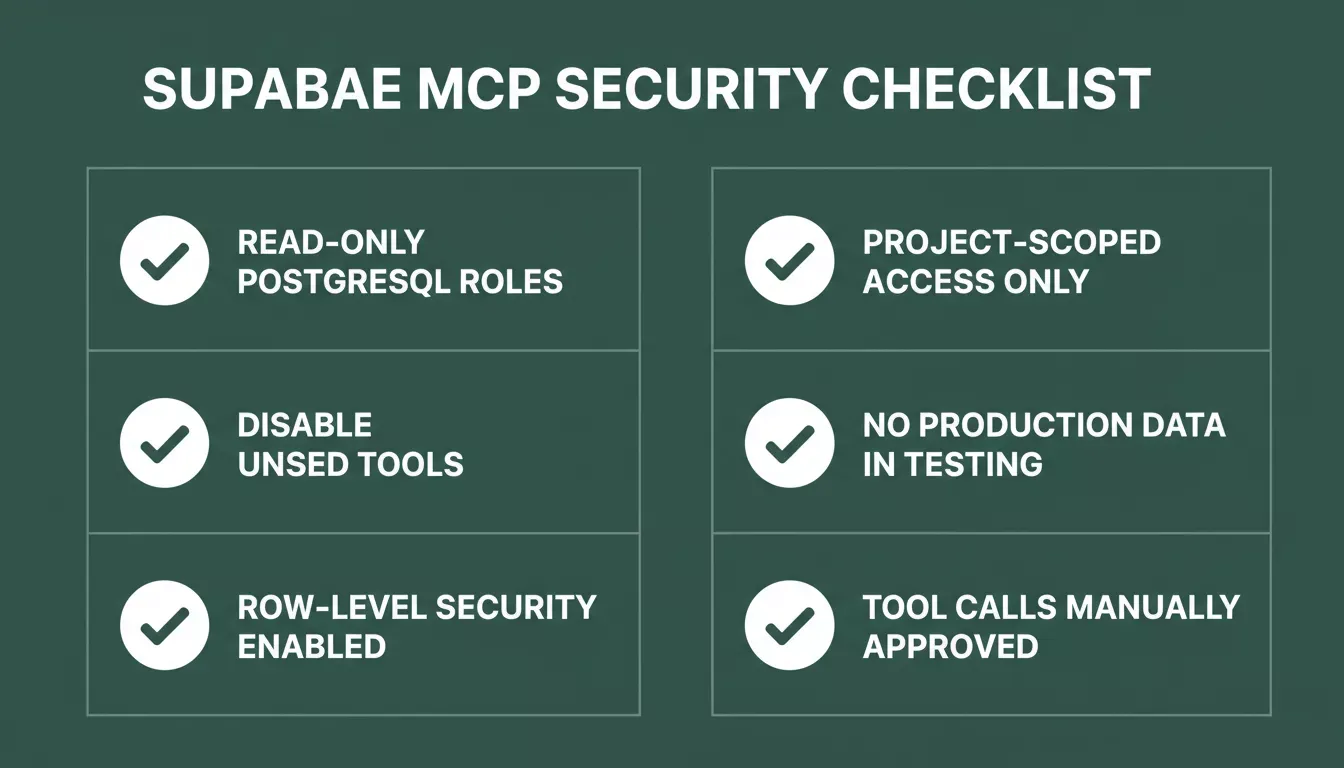
Five security practices every team should apply before using Supabase MCP in any environment.
Best Practices and Common Pitfalls
Following a few consistent habits keeps MCP setups secure and predictable.
Best Practices
- Keep MCP on a development branch
- Limit developer permissions
- Review tool calls carefully
- Avoid exposing sensitive tables
- Disable specific tools when testing new flows
Common Pitfalls
Teams often skip project scoping. Without proper scoping, MCP may access the project's resources beyond its intended scope.
Another mistake is skipping row-level security. RLS should still apply, and MCP respects row-level security rules, so use them. Some teams also forget about environment variable hygiene: hardcoding secrets during MCP testing is still risky.
Using MCP directly on production during early testing is asking for trouble. Teams serious about building secure AI platforms treat MCP as a development-environment tool first and graduate it to production only after thorough testing.
How Do Support Teams Use Supabase MCP?
Supabase MCP is not only for developers. When a customer submits a support ticket, a support agent can use an AI assistant connected through MCP to review logs, tables, and context.
Support tickets involving data issues often need quick access to context. MCP helps without exposing sensitive data. Some companies even connect MCP to a support ticketing system, where the support person reviews results, manually accepts actions, and responds faster.
What Developers Are Saying
A developer on the MCP subreddit described the experience after testing MCP with Supabase as being able to inspect schemas and query data without touching the dashboard, like having a backend teammate always available.
Supabase MCP vs. Rocket's Supabase Connector
These are two different mechanisms. The table below clarifies when to use each.
| Supabase MCP | Rocket's Supabase Connector | |
|---|---|---|
| What it is | An open protocol server that you configure in your editor | A first-party OAuth integration built into Rocket |
| Connection method | Manual MCP server setup in Cursor, VS Code, or Claude Desktop | OAuth flow with no API keys and no server to configure |
| Scope | Per-project, developer-configured | Workspace-level, available across all Rocket tasks |
| Who sets it up | The developer manually | Anyone: connect from Settings, the Connectors tab, or chat |
| What it scaffolds | Controlled tool calls to an existing Supabase project | Full backend: Postgres DB, auth, file storage, and edge functions generated from a prompt |
| Best for | Teams using AI editors (Cursor, VS Code) who want structured DB access during development | Teams building apps on Rocket who want a complete Supabase backend without manual setup |
Bottom line: Supabase MCP is a development-time protocol for AI editors. Rocket's Supabase connector is a no-code, OAuth-based integration that scaffolds your entire backend from a single prompt inside Rocket.