
Generate apps from prompts by describing your idea in plain language. Rocket.new turns that text into production-ready Next.js or Flutter apps, with built-in research, backend scaffolding, and competitor tracking in one platform.
Generate apps from prompts by describing your idea in plain language. AI models interpret the text, scaffold database schemas, configure backend logic, and produce interface components in minutes. Rocket combines research, building, and competitor intelligence in one platform, making it the fastest path from idea to deployed app.
Key Takeaways
- Prompt-to-app generation converts natural language into production-ready Next.js web apps or Flutter mobile apps automatically.
- The best platforms handle the full stack: frontend, backend, auth, and deployment from a single prompt.
- Rocket's three pillars, Solve (market research), Build (AI app generation), and Intelligence (competitor monitoring), work together so you can validate before you build.
- Figma designs import directly into Rocket and convert to production-ready React, Next.js, or Flutter code for both web and mobile.
- Start free with no credit card required; the Pro plan starts at $25/month with unlimited team members.
What Is Prompt-to-App Generation?
Prompt-to-app generation is the practice of describing a software product in plain language and letting an AI system produce the working code, database schema, navigation logic, and UI components automatically. The builder writes intent; the platform writes structure.
This works because modern AI models can parse conversational descriptions, extract architectural requirements, and map them to production-grade frameworks. On Rocket, that means Next.js for new web apps and Flutter for iOS and Android. Figma-to-code conversion also supports React output for teams importing existing designs.
What makes this different from earlier low-code tools is the absence of a fixed template. You describe what the app should do, and the platform decides the structure: a scheduling app, a SaaS dashboard, a Flutter mobile app for habit tracking; each starts from a prompt, not a drag-and-drop canvas.
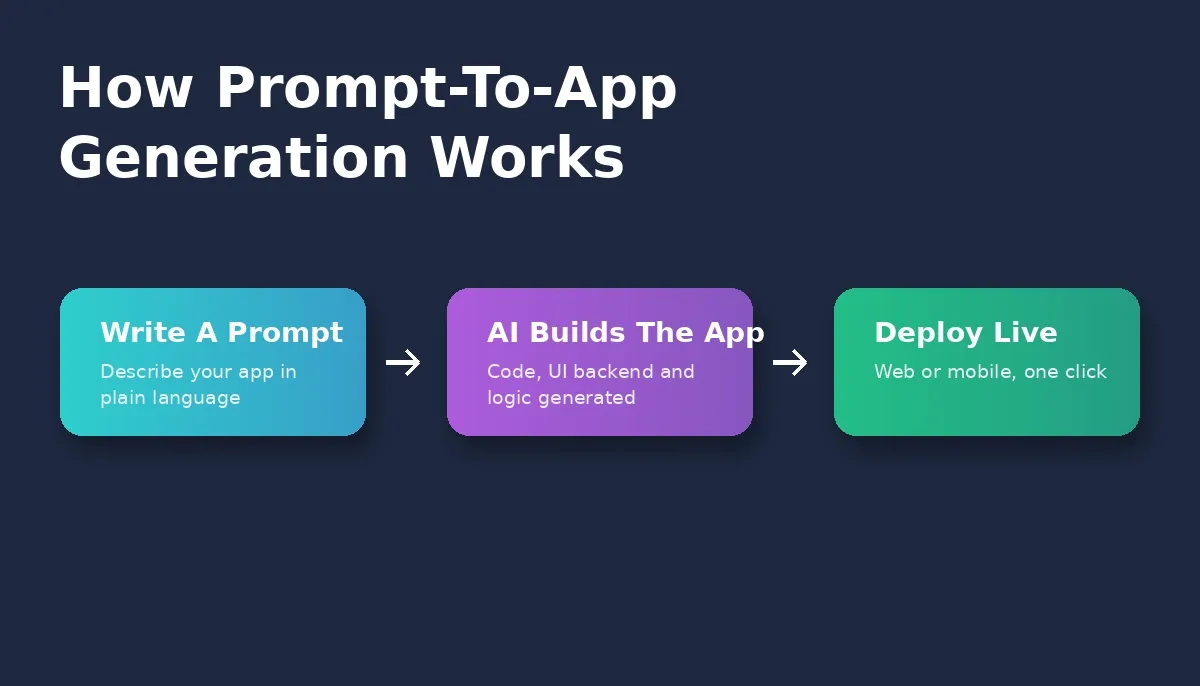
From plain-language prompt to deployed app: the three-step process that replaces weeks of setup.
Why Prompt-Based App Creation Feels Natural
Describing an idea in plain words is faster than drafting technical specs. When builders can state interface behavior, user flows, and backend requirements conversationally, the friction of starting drops sharply.
The back-and-forth matters too. Rocket scores every prompt for clarity before starting work. If the score meets the threshold, the build starts immediately. If it falls below, Prompt intelligence asks a short set of targeted questions, platform, key screens, must-have features, then starts once it has enough to proceed.
This pace supports people juggling multiple app ideas at once, and it gives developers a way to skip redundant setup steps entirely. Instead of stitching files together, they request features, attach additional prompts, and work on deeper code details only when needed.
How AI Models Turn Words Into Structure
AI models analyze a prompt, extract meaning, and turn it into database schemas, backend logic, interface components, and project files. A short request produces a quick prototype; a detailed one produces a deeper workflow.
Because Rocket's editor is visual, builders can rearrange components, adjust a page, or edit screens after the first generation. The workflow bridges no-code app builders and traditional development, giving beginners a working starting point and dev teams production-ready code they can extend.
One concrete example: a prompt like "Create a SaaS app with subscription billing, user accounts, and a dashboard" produces a Next.js app with Supabase authentication, a Postgres database with row-level security, and Stripe checkout, all wired together. For teams who want to go further, the full-stack AI builder guide covers advanced patterns in depth.
The AI-Productivity Debate: What the Research Actually Shows
The evidence on AI-assisted development is real but contested, and it is worth representing honestly.
A GitHub study on AI coding tools found that developers using AI assistance completed a specific HTTP-server task up to 55% faster. A 2025 randomized controlled trial by METR found that experienced open-source developers were, on average, 19% slower when using AI tools, despite predicting they would be faster. The researchers attributed the gap to time spent managing AI errors and context.
Both findings are real. AI tools accelerate certain tasks (boilerplate, scaffolding, repetitive code) while adding friction in others (debugging AI-generated errors, maintaining context across long sessions). Prompt-to-app platforms like Rocket are designed to reduce the second category, the Advisor Agent handles error loops and architectural decisions automatically.
The JetBrains Developer Ecosystem Survey shows AI code generation has become one of the fastest-adopted developer tools in recent years. The adoption curve is clear; the productivity question depends heavily on the task and the tool.
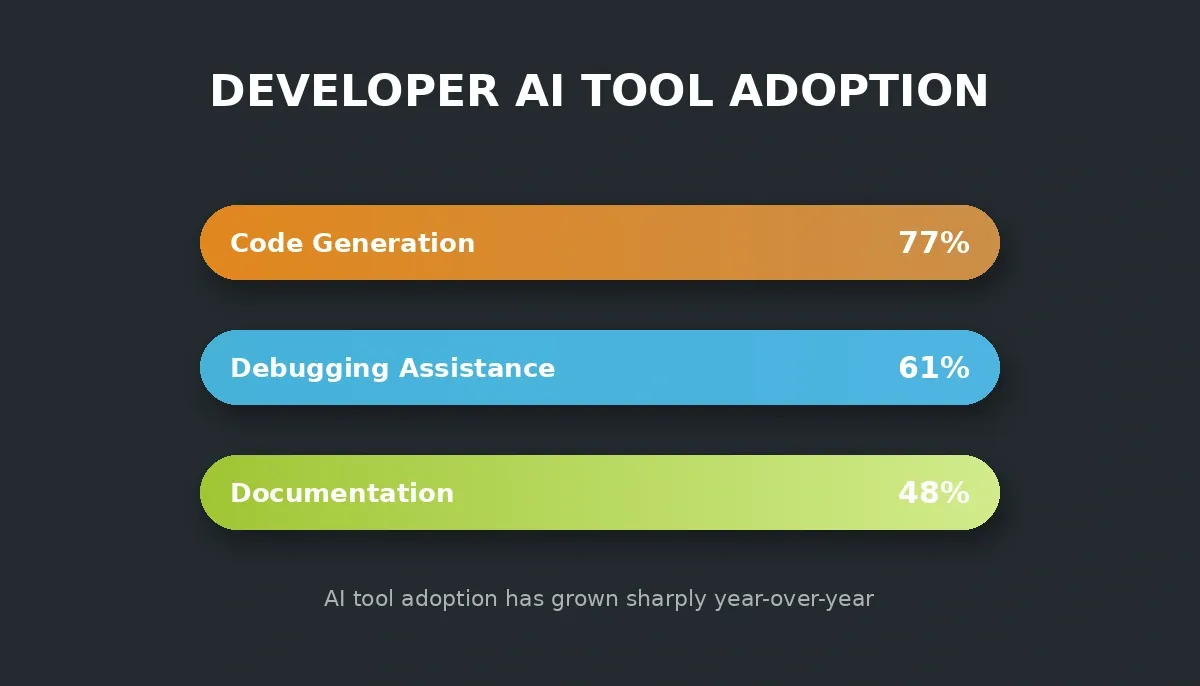
Developer adoption of AI tools has grown sharply year-over-year across code generation, debugging, and documentation.
Comparing Prompt-Based Builders
Choosing a platform matters. The table below reflects Rocket's documented capabilities as of August 2026. Competitor columns reflect publicly available information at time of writing; verify current state before making a purchasing decision, as these products change frequently.
| Feature | Rocket | Bubble | Lovable | Replit |
|---|---|---|---|---|
| Web output | Next.js (React via Figma) | Proprietary runtime | React | Any language |
| Mobile output | Flutter (iOS + Android) | No native support | No native support | Manual process |
| App Store deployment | iOS + Android via Flutter | No native support | No native support | Manual process |
| Figma import | React, Next.js, or Flutter | Not supported | Not supported | Not supported |
| Competitive intelligence | Built-in via Intelligence | Not available | Not available | Not available |
| Market research | Built-in via Solve | Not available | Not available | Not available |
| Full code export | Yes, with GitHub sync | Not available | Yes | Yes |
| Free tier | 20 credits, no credit card | Free plan available | Free plan available | Free plan available |
| Starting paid plan | $25/month | $29/month | $25/month | $25/month |
Rocket data sourced from docs.rocket.new. Competitor data from public pricing pages; last checked August 2026.
For a detailed side-by-side, see the Rocket vs Lovable comparison and the Rocket vs Bubble comparison.
Rocket.new is the only prompt-based builder with native Flutter output, Figma-to-code for all three frameworks, and built-in market research.
What You Can Build With Rocket
Rocket handles production-grade projects across web, mobile, and e-commerce from the same prompt-based interface. The range is wider than most teams expect on first use.
Web Apps and SaaS Products
Next.js apps with Supabase backends, Stripe billing, user authentication, and role-based access. A SaaS product with subscription tiers, team workspaces, and an admin dashboard can be generated from a single detailed prompt and then iterated through chat.
Mobile Apps for iOS and Android
Flutter apps that submit directly to the Apple App Store and Google Play. Figma designs convert to Flutter screens with matching layouts, spacing, and components. As of September 2025, Rocket's generation time for a first mobile build dropped to approximately three minutes.
Internal Tools and Dashboards
Admin panels, data tables, CRM dashboards, and CRUD workflows connected to Supabase or Airtable. These are among the fastest builds. See how teams approach this in the internal tools guide.
E-commerce and Landing Pages
Online stores with product catalogs, checkout flows, and payment integrations. Multi-page websites with SEO metadata, sitemaps, and social previews built in. You can also explore ready-made templates to start faster without consuming build credits.
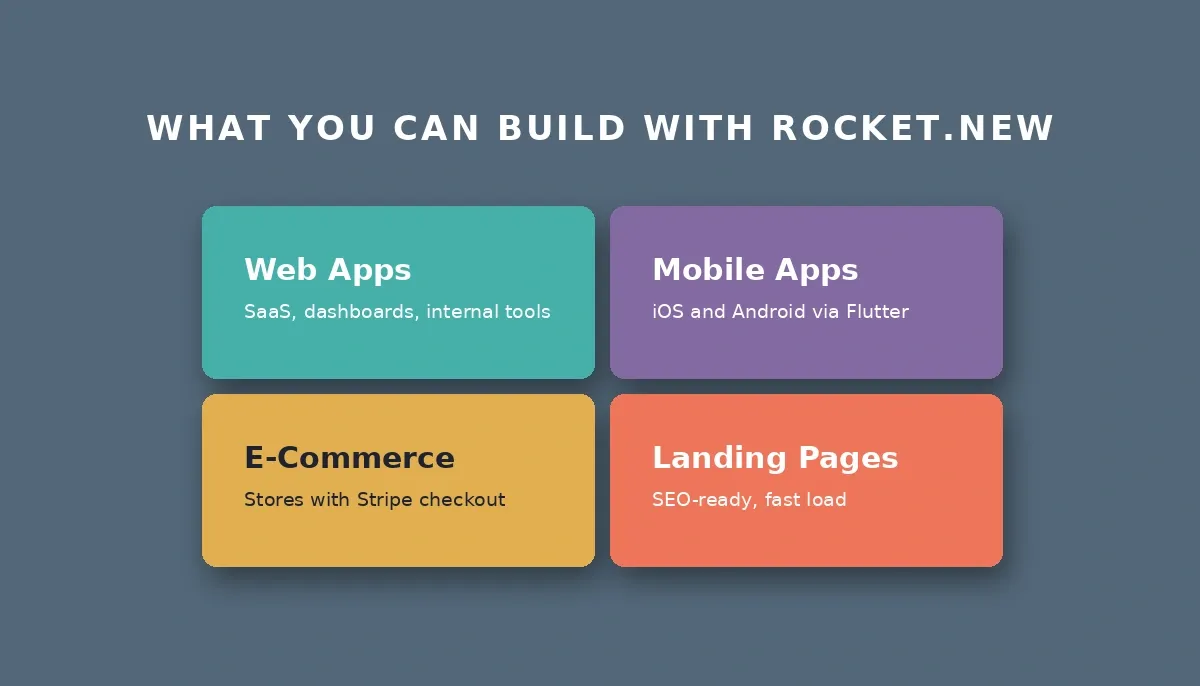
Four production-ready build categories from a single prompt-based workflow.
How a Prompt Turns Into a Working App
When someone writes the first prompt, Rocket scores it for clarity. If the prompt is specific enough, platform, key screens, and must-have features, the build starts immediately. If not, Prompt intelligence asks the minimum questions needed to proceed confidently.
The platform then creates pages, screen layouts, backend connections, and logic paths. For mobile apps, the layout automatically adapts to phone screens and targets iOS and Android via Flutter. Builders add extra features through follow-up prompts; a simple first prompt sets the structure, while follow-up requests adjust integrations, reorder sections, or expand backend logic.
Rocket's build flow: prompt scoring gates every build so vague inputs get clarified before generation starts.
Prompt Styles That Produce Clear Results
The difference between a prompt that starts immediately and one that triggers clarifying questions is specificity. Rocket's prompt intelligence covers the elements that matter most: platform, who it is for, key screens, must-have features, and constraints.
Prompts That Start Without Questions
- "Create a Next.js web app for small business owners managing appointments. Key screens: homepage, booking flow, confirmation page, and booking history. Use Stripe for payments and Resend for email confirmation."
- "Build a Flutter mobile app for iOS and Android for habit tracking. Clean screens, dark mode only. Store progress in Supabase."
- "Create a SaaS product with subscription billing, user accounts, and a dashboard. Stripe for payments, Supabase for auth and database."
Prompts That Trigger Clarifying Questions
- "Create a scheduling app." (Platform? Who is it for? What features?)
- "Build a mobile app." (iOS, Android, or both? What does it do?)
- "Make an internal tool." (For what workflow? What data does it connect to?)
The fix is not a longer prompt, it is a more specific one. Adding platform, audience, and two or three key screens is usually enough. For a deeper guide on writing effective prompts, see prompt engineering best practices.
Specificity is the single biggest factor in whether a build starts immediately or asks clarifying questions.
Why Teams Say This Style Changes Daily Work
Prompt-driven building shifts how every role on a team operates. Designers adjust screens right away. Developers skip repeated setup steps. Product teams request new features in plain language rather than technical specs.
The workflow reduces repeated tasks. After describing the idea, teams adjust a line of code here, generate new logic there, and build faster without losing structure. For teams already using vibe coding approaches, the vibe coding workflow guide covers how to integrate prompt-based building into existing development cycles.
One trade-off worth naming: prompt-to-app generation works best for greenfield builds and feature additions. Migrating a large existing codebase into Rocket is a different workflow, the From GitHub path supports iterating on existing Next.js TypeScript repositories, but it is not a one-click migration for any stack.
Real-Life Uses Across Teams
Internal Tools and Admin Dashboards
These are the fastest builds. A prompt describing a data table with CRUD operations, role-based access, and a Supabase backend typically produces a working first draft without clarifying questions. Teams use these for order management, content moderation queues, and support ticket dashboards.
Early Prototypes and MVPs
Founders use Rocket to validate ideas before hiring engineers. A working Next.js app with auth, a database, and a payment flow can be live in a day. The rapid prototyping guide covers the full workflow from idea to shipped MVP.
Mobile Apps for iOS and Android
Flutter apps for habit tracking, booking, and e-commerce. The Figma-to-Flutter path is particularly useful for design teams that already have screens. Teams building mobile-first products can also explore the mobile app builder guide for a step-by-step walkthrough.
SaaS Products With Auth and Billing
Multi-tenant SaaS apps with Supabase for auth and database, Stripe for subscriptions, and Resend for transactional email. Rocket scaffolds the complete backend, Postgres database, user authentication, file storage, and edge functions, from a single prompt.
Workflow From Prompt to Deploy
- Write a prompt that describes the app, its platform, its key screens, and the expected behavior.
- Rocket scores the prompt for clarity. If it is vague, Prompt Intelligence asks targeted questions before starting.
- Generate the first draft with AI (Next.js for web, Flutter for mobile).
- Edit screens through the visual editor, click any element to update text, spacing, or styling without writing code.
- Connect APIs, set up the backend via Supabase (Postgres database, auth, file storage, and edge functions), and attach a custom domain.
- Deploy with one click and submit to the App Store or Google Play if building for mobile.
This rhythm lets teams produce results early and improve through steady iteration. For a step-by-step walkthrough of the full build process, see the rapid prototyping guide.
Rocket: The Complete Vibe Solutioning Platform
Rocket is the vibe solutioning platform built around three pillars that take a project from idea to market. Most prompt-based builders stop at code generation. Rocket goes further by combining strategic research, AI app building, and competitive intelligence in a single product.
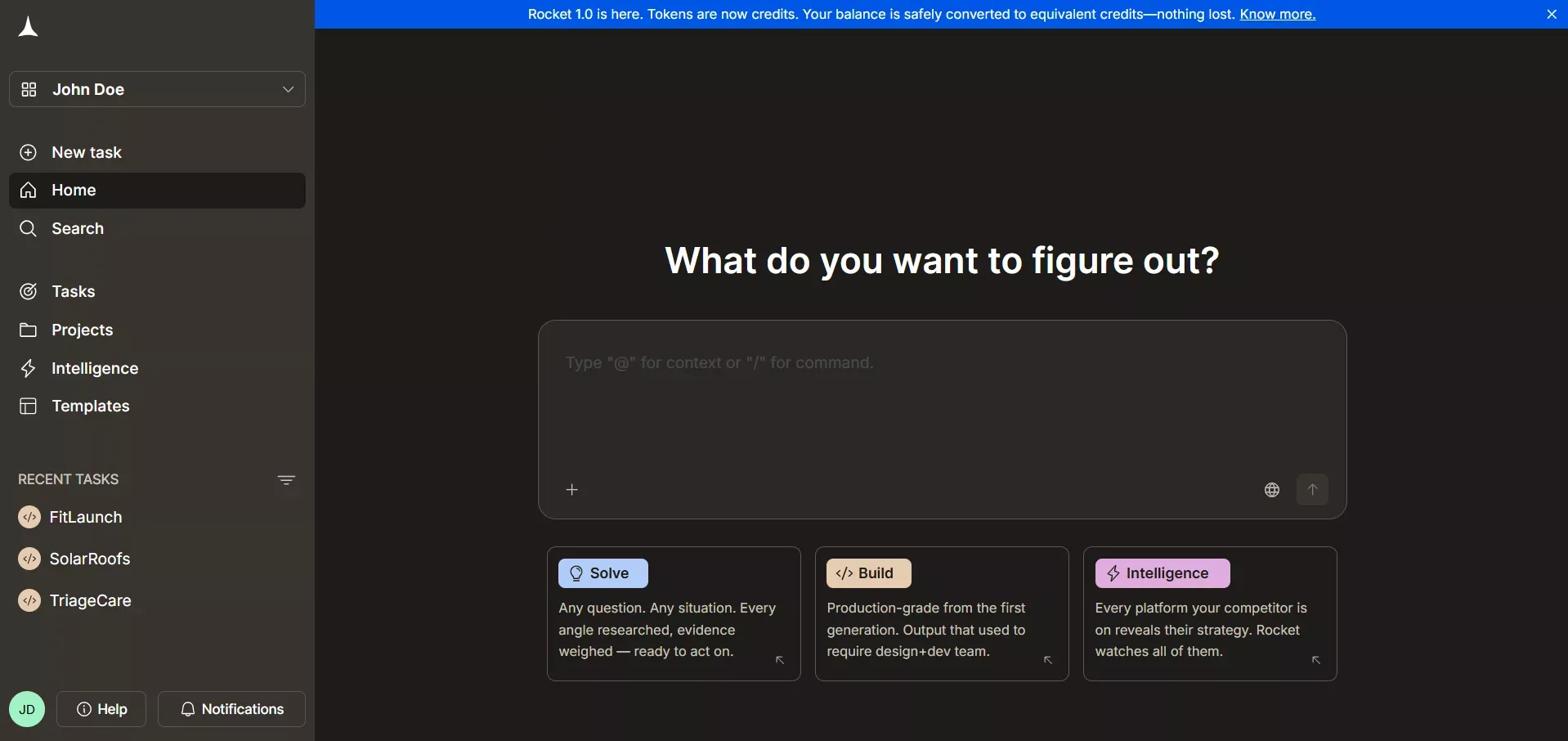
Rocket.new Platform with Solve, Build and Intelligence
Solve Pillar: Research Before You Build
Solve is Rocket's research engine. Before writing a single prompt, teams use Solve to validate ideas, size markets, run competitive teardowns, and answer complex business questions. Type a question in plain language and get back a structured, evidence-backed report built from live data.
Free and Pro plans include Light Solve for fast, conversational research. The Rocket and Booster plans auto-route queries to Light Solve or Full Solve depending on complexity. Full Solve produces consultant-grade reports with detailed analysis and recommendations. Explore Solve on Rocket to see how it works.
Build Pillar: Generate Apps From Prompts
Build is where prompt-to-app generation happens. Describe your idea, and Rocket automatically produces the frontend, backend, and integrations. The framework is assigned automatically: Next.js for new web apps, Flutter for iOS and Android mobile apps. Figma-to-code conversion also supports React output.
| Feature | What It Does |
|---|---|
| Prompt-driven full-stack creation | Builds UI, logic, and navigation from plain English |
| Figma-to-code conversion | Converts Figma designs to React, Next.js, or Flutter code |
| Backend and authentication | Scaffolds Supabase Postgres database, auth, file storage, and edge functions |
| 26+ connectors | Stripe, HubSpot, OpenAI, Twilio, Airtable, and more |
| Cross-platform deployment | One-click web publish or App Store / Google Play submit |
| GitHub sync | Two-way sync for Next.js TypeScript projects |
| Visual Edit | Click any element to edit without writing code |
| Advisor Agent | Built-in architect that resolves error loops and makes architectural decisions automatically |
Intelligence Pillar: Monitor Competitors Continuously
Intelligence is Rocket's continuous monitoring layer. It watches companies you care about across nine signal pillars: Website, Social Media, News and Media, GTM, Product and Technology, People and Hiring, Business and Finance, Reviews and Community, and Traffic.
Unlike a news aggregator or alert tool, Intelligence interprets signals in context. When a competitor goes quiet on hiring while accelerating product releases, Intelligence surfaces that pattern as a strategic signal, not just a data point. Visit the Intelligence product page to set up your first watchlist.
Rocket Pricing
Rocket runs on a credit-based system. One credit balance covers Solve, Build, and Intelligence. No credit card required to start.
| Plan | Price | Credits Per Month | Includes |
|---|---|---|---|
| Free | $0 | 20 (one-time) | Build + Light Solve |
| Pro | $25/month | 100 | Build + Light Solve |
| Rocket | $50/month | 250 | Build + Full Solve (auto-routed) + Competitive Intelligence |
| Booster | $250/month | 1,500 | Build + Full Solve (auto-routed) + Competitive Intelligence |
All paid plans include unlimited team members. Annual billing saves 20%. The Rocket and Booster plans auto-route Solve queries to Light Solve or Full Solve depending on complexity. See the full pricing breakdown for details.
Ship Your App Faster to the Market with Rocket
Ready to generate apps from prompts and ship faster?
Rocket.new gives you the full stack: research with Solve, AI-powered building with Build, and competitor monitoring with Intelligence. Start for free with no credit card required. Build your first app on Rocket today.
Table of contents
- -Key Takeaways
- -What Is Prompt-to-App Generation?
- -Why Prompt-Based App Creation Feels Natural
- -How AI Models Turn Words Into Structure
- -The AI-Productivity Debate: What the Research Actually Shows
- -Comparing Prompt-Based Builders
- -What You Can Build With Rocket
- -Web Apps and SaaS Products
- -Mobile Apps for iOS and Android
- -Internal Tools and Dashboards
- -E-commerce and Landing Pages
- -How a Prompt Turns Into a Working App
- -Prompt Styles That Produce Clear Results
- -Prompts That Start Without Questions
- -Prompts That Trigger Clarifying Questions
- -Why Teams Say This Style Changes Daily Work
- -Real-Life Uses Across Teams
- -Internal Tools and Admin Dashboards
- -Early Prototypes and MVPs
- -Mobile Apps for iOS and Android
- -SaaS Products With Auth and Billing
- -Workflow From Prompt to Deploy
- -Rocket: The Complete Vibe Solutioning Platform
- -Solve Pillar: Research Before You Build
- -Build Pillar: Generate Apps From Prompts
- -Intelligence Pillar: Monitor Competitors Continuously
- -Rocket Pricing
- -Ship Your App Faster to the Market with Rocket