
How do apps talk behind the scenes? See API endpoints as URL-based endpoints where servers receive and return data, simplifying massive API usage into a clear, approachable concept.
What exactly is an API endpoint?
An API endpoint is a specific digital location where an API server waits to handle API requests. It’s like a stop on the internet where you ask for or send data, and it replies. You hit that spot using a URL and exchange info smoothly.
API use is massive. According to recent data, APIs now account for over 57% of global Internet traffic, underscoring how much apps and services rely on them to communicate and share data.
So let’s break this down and make API endpoints feel less like a weird tech spellbook.
API Endpoints in Real Life
Let’s make this simple.
APIs don’t have to sound scary. Imagine ordering food from your favorite restaurant. This analogy will make API endpoints super relatable.
Think about ordering food:
- You send a message to the restaurant (that’s the API request).
- You tell them what you want (in the request body or query parameters).
- The kitchen prepares it.
- You get your food.
In the digital world:
- Your API client (your app or website) requests information from the API server (the kitchen).
- The server replies over an endpoint URL with exactly the info you asked for.
API endpoints are the precise addresses where that exchange happens.
So next time you open an app and see data pop up instantly, remember it’s not magic. It’s your API client talking to the right API endpoint and getting the response it needs. That’s the heartbeat of modern apps in action.
What is an API Endpoint?
Before diving deeper, it helps to picture an API endpoint as a specific address on the internet where data stops to exchange information.
Let’s answer the main question clearly: what is an API endpoint?
How API Endpoints Work?
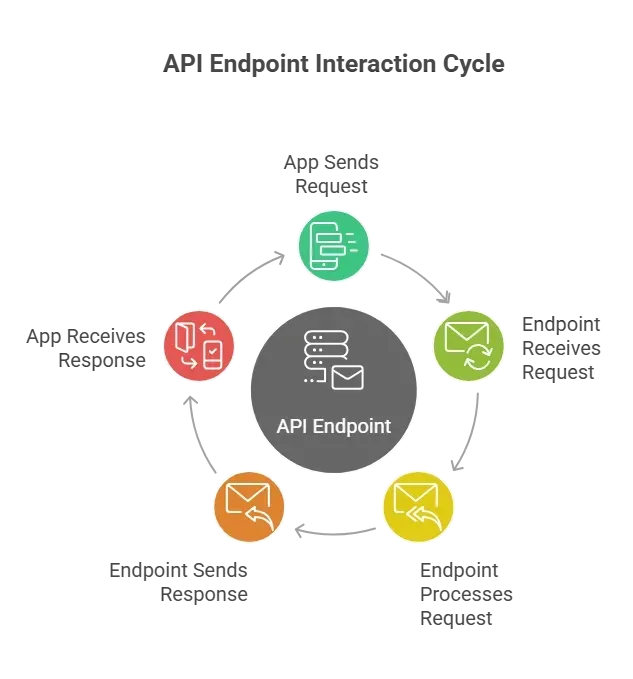
Now that we know what an API endpoint is, it’s time to see one in action. Think of it like a little conversation between your app and a server; each step matters.
Here’s how API endpoints work in practice:
- The API client forms a request.
- The client picks the endpoint URL it wants.
- The request includes details in the query parameters or request body.
- The API server authenticates using mechanisms such as API keys.
- The server does some work.
- The server returns data or an error with a status code such as 200 (OK) or 404 (Not Found).
These are the basics of data transfer between apps, no humans typing on screens needed.
Think of it like sending a letter: you write it carefully, drop it in the mailbox (endpoint), the post office checks who you are, delivers it, and you get a reply. That’s the handshake that makes digital apps talk seamlessly.
Why Endpoint Structure Matters?
The endpoint structure is more than a URL string. It tells developers what to expect. A good structure helps API users understand what data they’ll receive or send. For example:
1GET https://myapp.com/api/users/123?details=full
2Here:
- GET is one of the HTTP methods that tell the server to retrieve data.
- /api/users/123 is the core endpoint for fetching data for user 123.
- Query string ?details=full is a query parameter.
Each piece clues the server in on exactly what the API client wants.
API Server and HTTP Methods
APIs don’t just sit there. They speak HTTP, just like web pages. These are the most common HTTP methods you’ll use with API endpoints:
| HTTP Method | What It Does |
|---|---|
| GET | Ask for data |
| POST | Send new data |
| PUT | Update existing data |
| DELETE | Remove data |
Each method signals different work. A POST request often has a request body with your info inside. A GET request usually doesn’t. The API server decides what to do based on this.
Multiple Endpoints and REST APIs
Once you get a handle on a single API endpoint, the next step is understanding that most APIs aren’t just one-stop shops. They have multiple endpoints, each handling a specific task.
Most APIs have multiple endpoints. A single API might have one endpoint for logging in, another for fetching posts, and a third for saving comments. Combined, they give the API client a full toolbox.
With REST APIs, these endpoints follow simple, predictable patterns. Each endpoint generally maps to one specific resource: users, posts, messages, etc. This makes it easy for developers to know where to go for each piece of data.
So, when you’re navigating an API, think of it like a small city. Each endpoint is a different building with a clear purpose. Knowing the layout keeps you from wandering around lost and makes building apps a lot less stressful.
API Keys and Security
Most real‑world APIs don’t let anyone just hit an endpoint. You usually need an API key or token. Think of it like a password that lets your app talk to the server.
An API key:
- Lets the server know who you are.
- Helps limit abuse and stop malicious code or data.
- Protects sensitive data from random callers.
Some servers protect their endpoints with transport layer security too a fancy way of saying everything is encrypted.
What API Documentation Tells You?
Before diving into testing or using endpoints, it helps to have a map, and that’s exactly what API documentation provides. Great documentation is like a recipe book for endpoints.
It tells you:
- The endpoint URL
- The HTTP methods to use
- What query parameters are allowed
- What a request body should look like
- What responses you’ll get back
Good docs make it clear what the API server expects and what the API client will get. They save frustration and stop you from guessing what an endpoint does.
A Community Take
Here’s something I spotted on LinkedIn:
“An API endpoint is a defined URL or path where an API accepts a request from the client, such as a web app, mobile app, automation script, or AI agent, and sends back a response. It serves as the official communication point between the frontend and backend.”
Testing API Endpoints
Once you define an endpoint, you’ll want to test it. You can do testing API endpoints with simple tools like Postman or curl. These tools let you send fake API requests to see what responses they return.
Testing lets you check:
- If the status code is right
- If input validation catches bad data
- If the endpoint returns the requested data
- If error messages make sense
It’s like asking loudly, “Hey server, do you work?” and listening for a respectful reply.
Testing API endpoints isn’t just about catching mistakes; it helps ensure your app communicates with the server smoothly and that your users never get stuck waiting for data that never arrives. Think of it as a quick rehearsal before the big performance.
Organizing Endpoints for the Future
As your app grows, API endpoints can multiply quickly. Without a plan, things get messy, and no one wants that. Organizing endpoints thoughtfully keeps everything manageable and predictable.
If you work with many API endpoints, it helps to:
- Organize endpoints logically (by feature or resource)
- Plan API versioning so old users don’t break when APIs change
- Think about backward compatibility
- Monitor how endpoints are used with the monitoring API endpoints tools
A smart organization keeps API users happy and developers sane.
Treat your endpoints like a well-stocked toolbox, label everything, keep it tidy, and update with care. That way, you won’t be hunting for the right endpoint in the middle of a deadline panic.
How Rocket.new Powers APIs?
Rocket.new is a vibe solutioning platform that helps build apps without writing code. It actually generates backend infrastructure, such as API endpoints, for you while building your full app.
That means you tell Rocket.new what your app should do, and it gives you the endpoint URLs, backend logic, database integration, and everything you’d need to handle API calls from your app.
Top features:
- Plain Language to Whole App: Describe your app in natural language, and Rocket.new builds the frontend, backend, infrastructure, and all API endpoints automatically.
- Automatic Backend & Auth Setup: Database schemas, authentication, and security are configured with no effort.
- Figma‑to‑App Design Support: Convert Figma files directly into fully responsive UI with real code.
- Cross‑Platform Build: Create apps that work on web and mobile right out of the box.
- Prebuilt Templates: Leverage ready‑made UI templates to drastically reduce development time and token use.
- Third‑Party Integrations: Connect with tools like Stripe, Supabase, and more for payments, storage, authentication, and data.
Rocket.new doesn’t just spit out code; it gives you a launchable app complete with backend logic, API endpoints, data handling, and integration points so you can iterate fast, wire data quickly, and skip months of boilerplate engineering.
API Endpoints: How Apps Talk to Each Other
Here’s a simple takeaway. An API endpoint is a specific web address where an API client sends a request, and the API server responds with data or actions. When you know how to read an endpoint URL and pair it with the right HTTP methods, you can make apps talk to each other like old friends. APIs are everywhere, and API endpoints are the handshake they use.
Even if you’re not a developer, understanding API endpoints gives you insight into how apps, websites, and services interact behind the scenes. It’s the invisible wiring that keeps our digital world running smoothl,y from checking the weather to posting on social media.
Table of contents
- -API Endpoints in Real Life
- -What is an API Endpoint?
- -How API Endpoints Work?
- -Why Endpoint Structure Matters?
- -API Server and HTTP Methods
- -Multiple Endpoints and REST APIs
- -API Keys and Security
- -What API Documentation Tells You?
- -A Community Take
- -Testing API Endpoints
- -Organizing Endpoints for the Future
- -How Rocket.new Powers APIs?
- -API Endpoints: How Apps Talk to Each Other