Creative Industry Professional Portfolio & Gig Management Website Template
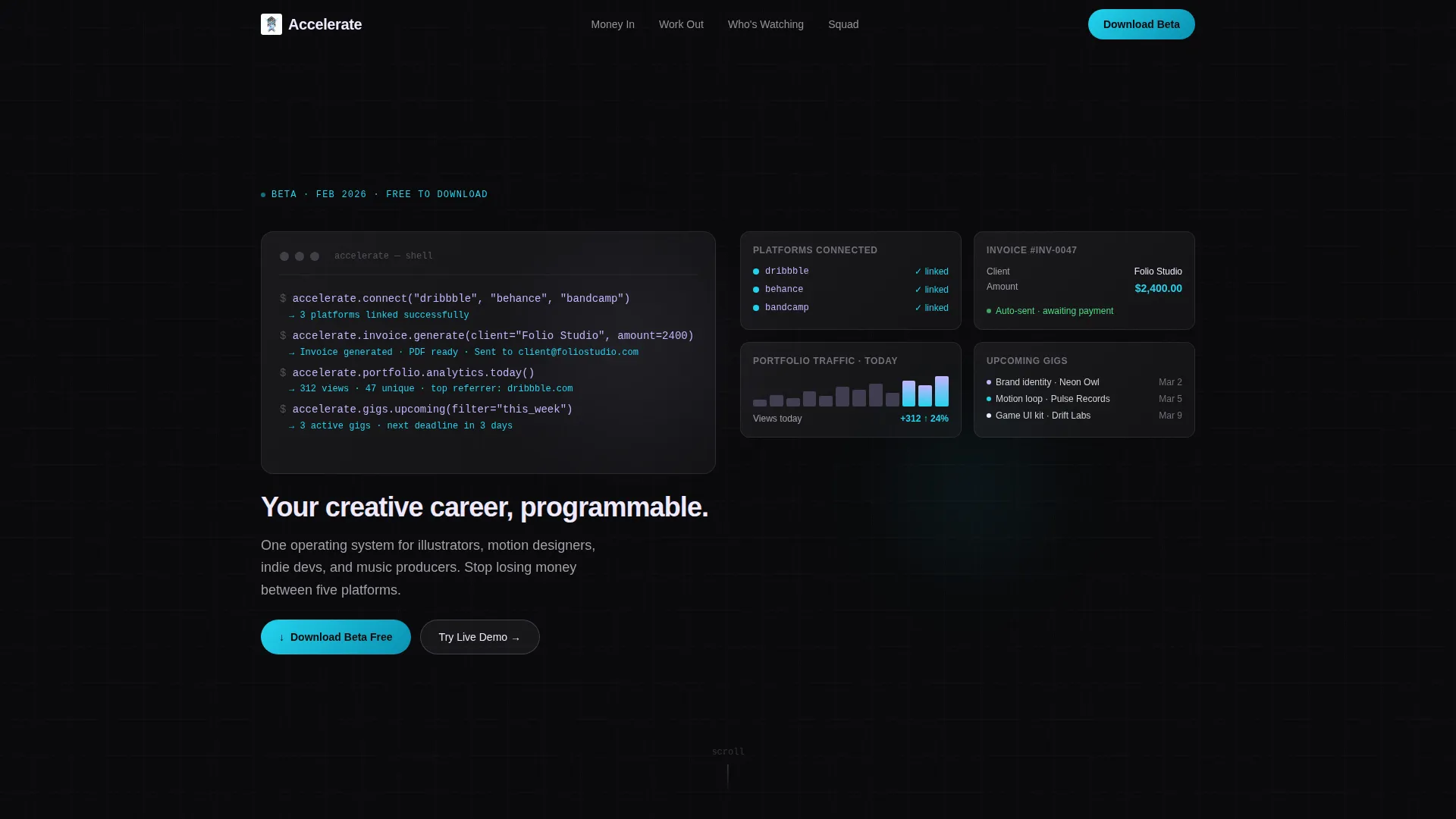
Accelerate is a hub-and-spoke landing page template built for creative industry professionals who need one place to manage gigs, invoices, portfolio traffic, and collaboration requests. With a Dashboard Pro theme, an AI Iridescent color system, and an animated terminal-style header, it presents a polished app-download funnel that turns scattered freelance chaos into a clean, programmable workflow.
by Rocket studio
Quick summary
Accelerate is a single-page, anchor-nav landing page template designed for a creative industry accelerator app. It guides visitors through an animated problem-to-solution story, shows a live-data dashboard simulation, and drives them toward a free beta download. The template combines a terminal-style header, spoke-based navigation, and an iridescent dark-mode palette.
Who this template is for
This template is built for founders and teams launching a creative productivity app aimed at independent creative professionals. It speaks directly to the people those apps serve and helps you earn the download before you ask for it.
- Freelance illustrators, motion designers, indie game developers, and music producers juggling multiple platforms at once
- Studio founders who have recently moved beyond a solo setup and need to organize their bench talent fast
- Creative directors at boutique agencies who need a clear pitch to attract their target user on day one
What problem this template solves
Emerging creatives lose time and money because their tools do not talk to each other. Invoices live in one app, portfolio analytics in another, and collaboration requests pile up in email threads. This template frames that exact pain clearly, then dissolves it section by section into a working solution.
- Scattered invoices and unpaid gigs with no single view of money coming in
- Portfolio traffic that is invisible because analytics are spread across unconnected platforms
- Collaboration requests managed over email with no structured tracking system
What you get with this template
You get a fully structured, hub-and-spoke landing page built around four audience pain points, each mapped to a dedicated spoke section. The design is ready to customize with your brand colors, copy, and real dashboard screenshots or assets.
- An animated terminal-style header block with a live widget reveal sequence on the right side
- A fixed left-side anchor navigation labeled in freelancer-friendly language: Money In, Work Out, Who's Watching, and Squad
- A sticky bottom call-to-action bar with platform toggle icons for macOS, iOS, and Windows, plus a secondary in-browser demo path
Feature list
This section outlines the core built-in components and interaction patterns included in the Accelerate template.
Animated Terminal Header Block
The header opens with a monospaced code snippet that animates line by line. Each command is human-readable, such as connecting platforms, generating an invoice, or pulling today's portfolio analytics. As each line runs, a corresponding dashboard widget snaps into place on the right side of the screen. The headline types itself in after the sequence finishes.
Hub and Spoke Anchor Navigation
A fixed left-side navigation panel links to each spoke section of the page. Labels use plain freelancer language rather than generic product terms. Visitors can jump directly to the pain point most relevant to them without scrolling through unrelated content first.
Problem-to-Solution Visual Arc
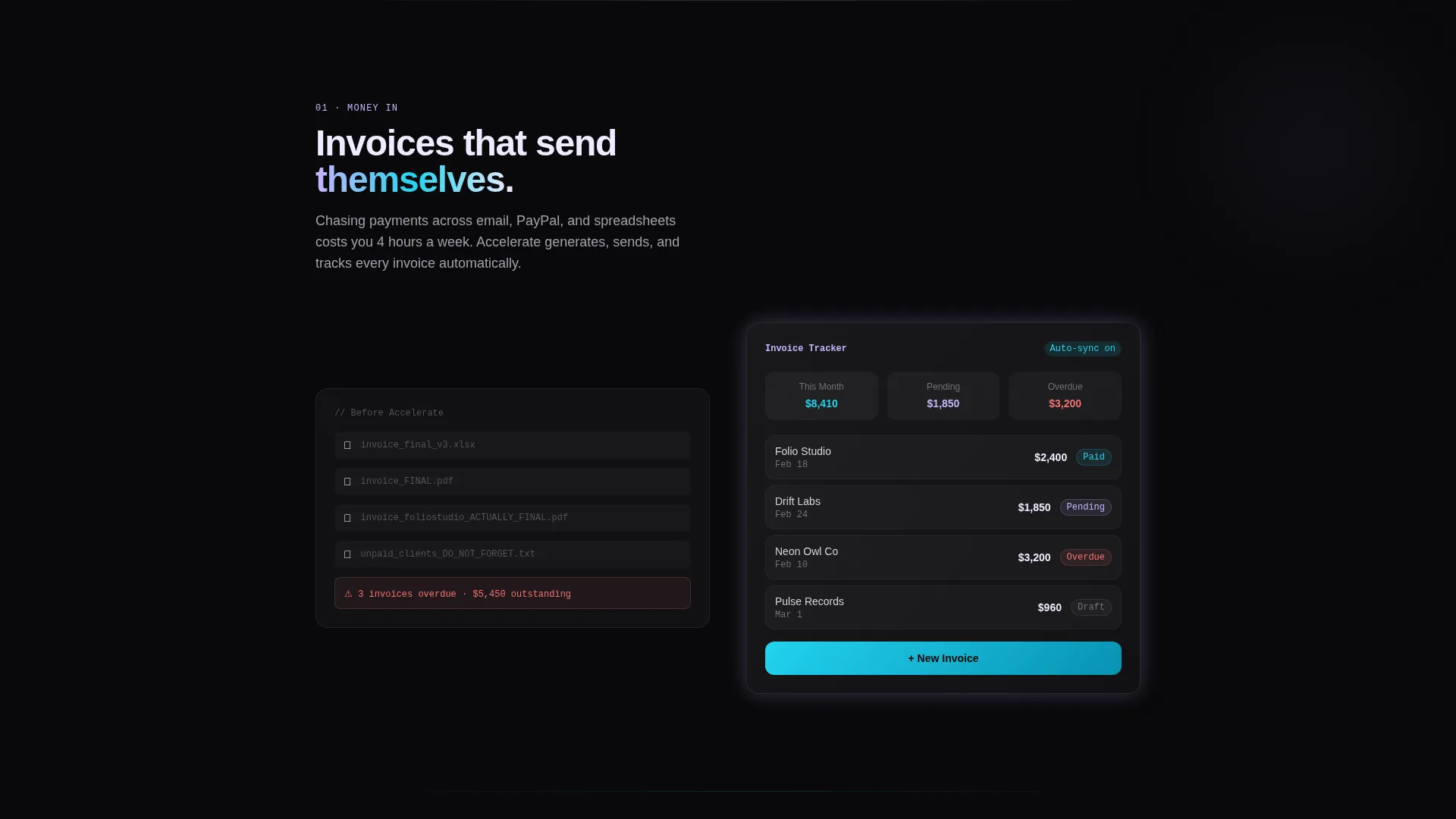
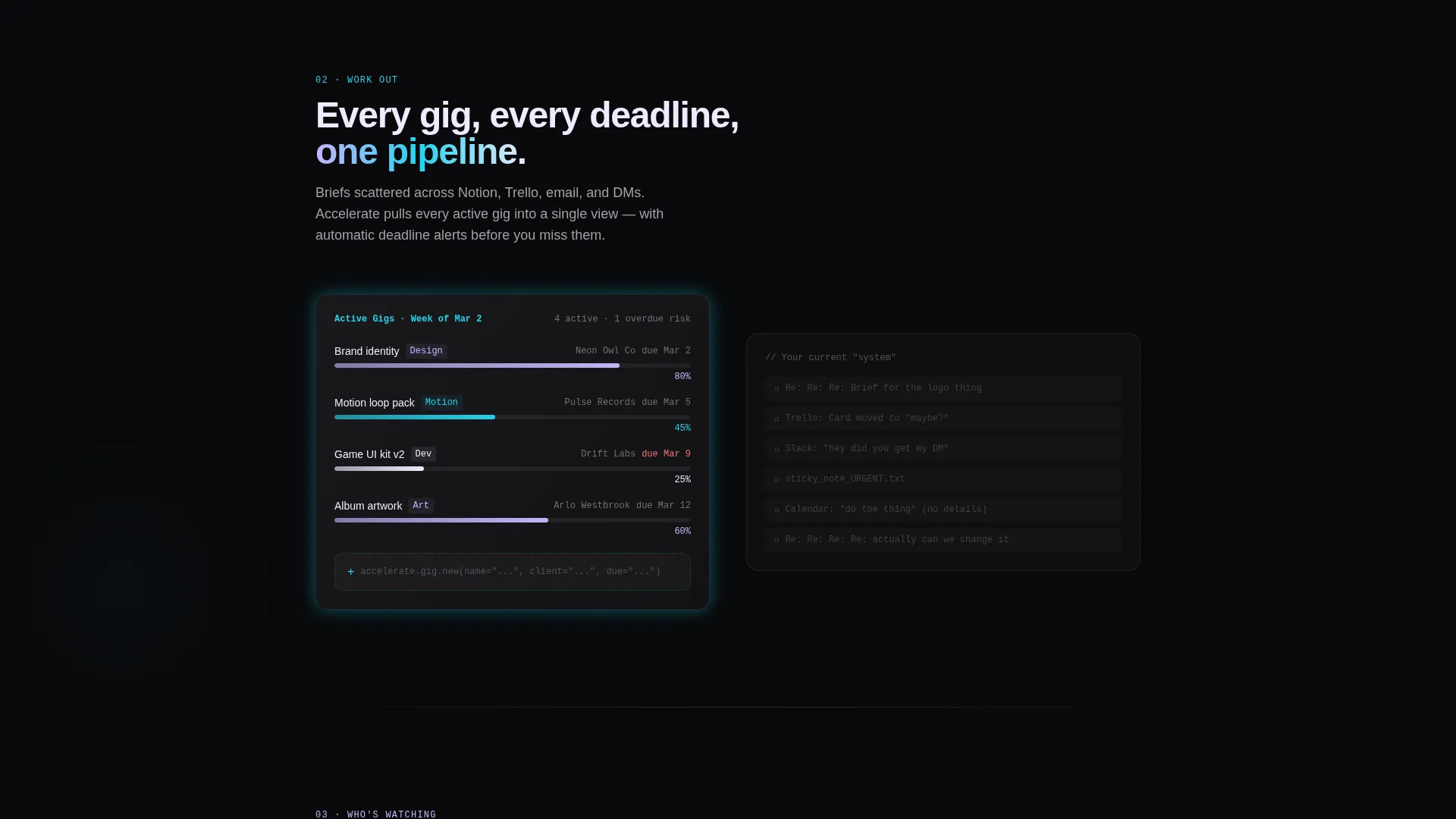
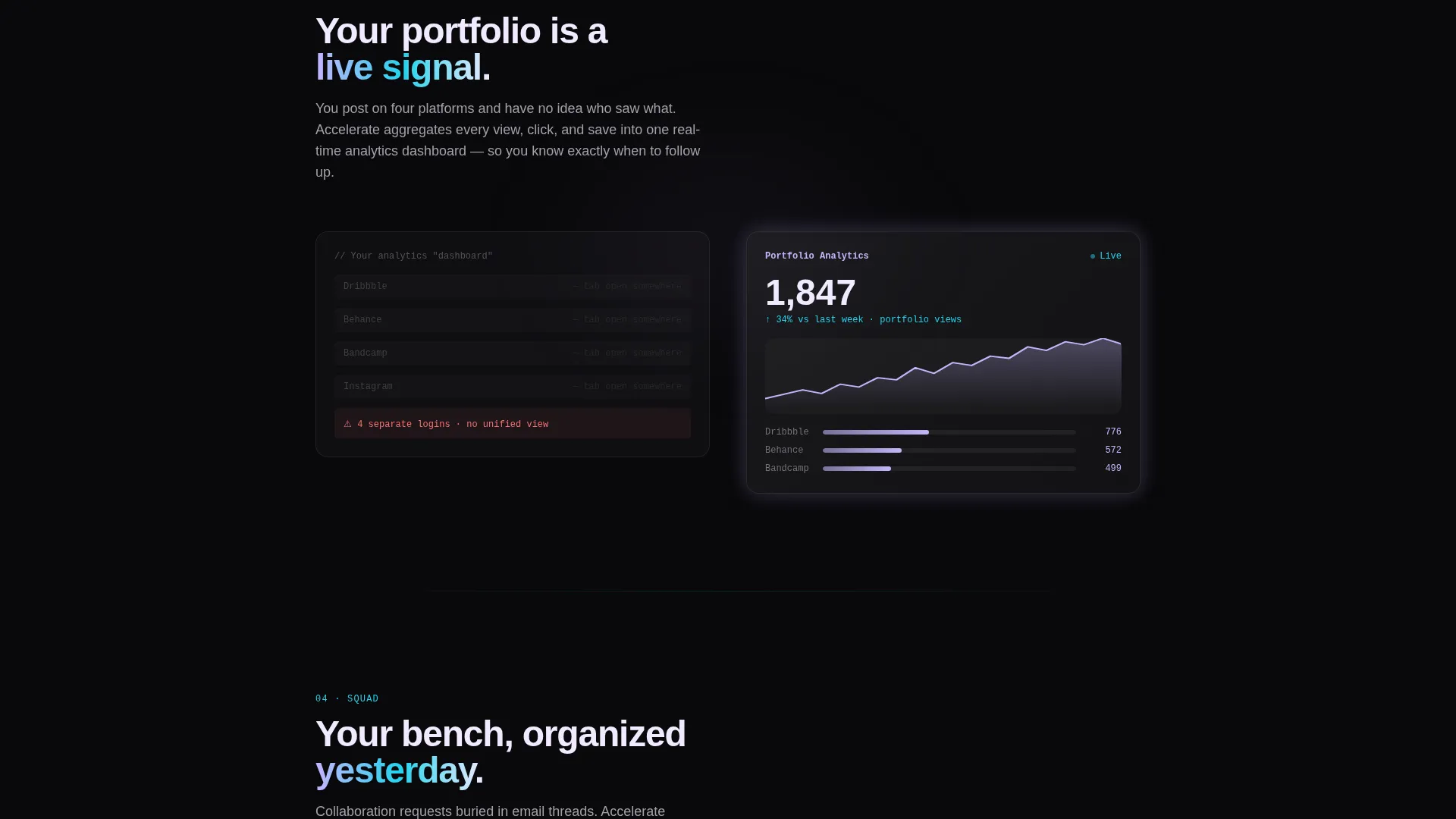
Each spoke section opens with a grayscale mock interface representing a specific pain point. As the visitor scrolls, that panel dissolves into a full-color, iridescent dashboard module showing the solution. The iridescent accents intensify progressively as the visitor moves deeper into the page.
Live Dashboard Replay Simulation
Near the end of the scroll journey, the template renders a fictional creative's full work week as an animated dashboard replay. Gigs appear, invoices auto-send, and portfolio view counts climb in real time, giving visitors a concrete feel for the product before any commitment.
Sticky App Download Bar
A persistent bottom bar appears after the visitor passes the first spoke section. It carries the primary call-to-action "Download the Beta Free" alongside platform toggle icons for macOS, iOS, and Windows. The bar stays visible without interrupting the reading flow.
Interactive Demo Sandbox Path
A secondary call-to-action labeled "Try the Live Demo" opens an in-browser sandbox dashboard. Visitors can drag widgets and explore the interface without signing up or downloading anything. This path removes commitment friction at the exact moment hesitation is most likely.
Page sections overview
| Section | Purpose |
|---|---|
| Terminal Code Header | Animate platform commands and snap widgets into place to open with energy |
| Anchor Nav Bar | Let visitors jump to their most relevant pain spoke immediately |
| Problem Spoke: Money In | Visualize scattered invoices as a grayscale pain state |
| Solution Spoke: Money In | Dissolve pain into a full-color invoice dashboard module |
| Problem Spoke: Work Out | Show disorganized gig tracking as a broken workflow |
| Solution Spoke: Work Out | Replace it with a structured, color-active gig management view |
| Problem Spoke: Who's Watching | Display invisible portfolio analytics as a blind spot |
| Solution Spoke: Who's Watching | Reveal a live traffic graph that surfaces audience data clearly |
| Problem Spoke: Squad | Frame collaboration chaos over scattered email threads |
| Solution Spoke: Squad | Replace it with a real-time collaboration request dashboard |
| Dashboard Replay Section | Play a fictional creative's full week as an animated data replay |
| Sticky Download Bar | Keep the primary app download call-to-action visible at all times |
| Live Demo Path | Offer an in-browser sandbox as a no-signup secondary conversion path |
Design & branding system
The template follows a Dashboard Pro theme using an AI Iridescent color system. The palette is built around four values that together feel like light refracting through a prism on a matte-black surface. Every color has a specific role and does not drift from it.
- Void black (#09090B) dominates all backgrounds, giving the interface a clinical, focused feel
- Holographic lilac (#C4B5FD) marks active navigation states and progress indicators, while soft iridescent pearl (#F0EAFF) lifts card surfaces and data containers off the dark background
- Electric cyan (#22D3EE) fires on hover states, notification indicators, and primary action buttons to create clear, lively interaction signals
Mobile & speed optimization
The template is designed with a scroll-driven, single-column flow that naturally adapts to smaller screens. The anchor navigation and sticky bottom bar are both built to remain functional and unobtrusive on mobile viewports.
- The hub-and-spoke structure keeps each section self-contained, so content loads and reads cleanly on any screen width
- Sticky user interface elements, including the bottom download bar and left anchor nav, are positioned to avoid overlap with mobile operating system interface controls
- The animated header and dashboard replay sequences are scoped to deliver their visual impact without relying on heavy external dependencies
How this template helps you convert
Accelerate earns the conversion before it asks for one. The entire scroll journey is structured as a trust-building sequence, so by the time the sticky download bar appears, the visitor has already seen their problem solved.
- The animated terminal header creates immediate recognition: visitors see their own workflows described in plain, readable commands before any marketing language appears.
- The progressive problem-to-solution arc builds confidence spoke by spoke. Each grayscale pain panel dissolving into a colorful, working module makes the product's value feel concrete rather than claimed.
- The in-browser demo sandbox removes the final barrier. Visitors can drag widgets and experience the product directly, making the download decision feel like a natural next step rather than a leap of faith.
Other information about this template
Accelerate sits in the Startup and Launch category under the Accelerator and Incubator subcategory, with a specific focus on the creative industry accelerator niche. It is one of the more interaction-rich templates in this category, combining multiple animated sequences with a genuine dual-path conversion model.
- The template style is Hub and Spoke with anchor navigation, making it well suited to audiences who arrive with a specific pain point already in mind
- The primary conversion direction is app download, supported by platform toggle icons for macOS, iOS, and Windows
- The secondary conversion path is a live in-browser demo that requires no signup, reducing friction for visitors who are not ready to commit to a download
- The intersection match score for this template's category, subcategory, and niche alignment is 13, indicating a tightly focused use case
Theme
Dashboard Pro
Creative direction
Problem→Solution Arc
Color system
AI Iridescent
Style
Hub & Spoke (Anchor Nav)
Direction
App Download
Page Sections
Animated Terminal Code Header
Hub and Spoke Anchor Navigation
Problem-to-solution Visual Arc
Animated Dashboard Replay
Sticky App Download Bar
In-browser Demo Sandbox Path
Related questions
Who is this template designed for?
Can I customize the colors, copy, and terminal commands?
Does the in-browser demo sandbox come fully connected out of the box?
Is this template a good fit for a pre-launch product?
What conversion paths are built into this template?



