Yoga Studio Booking Confirmation Website Template
The Asana Dynamic Yogastudio landing page is a post-signup confirmation screen built around a dashboard and data grid layout. It greets new members with a code-snippet header, renders their practice details as structured data, and uses spec-sheet cards to display class types, instructor profiles, and a personal practice forecast, all designed to drive app downloads and deepen commitment from the first scroll.
by Rocket studio
Quick summary
This is a single-page post-signup confirmation screen for a yoga studio. It uses a dashboard and data grid layout to turn a standard thank-you page into a living metrics display. New members see their registration rendered as a styled code block, then scroll through class spec cards, instructor capability matrices, and a personal 90-day practice forecast before reaching a clear app download call to action.
Who this template is for
This template is built for yoga studio owners and operators who attract a tech-savvy or data-curious membership base. It works especially well when the studio's audience includes professionals who respond to clean visuals, numeric feedback, and purposeful design rather than stock photography and generic welcome copy.
- Studio owners targeting developers, healthcare professionals, or young adults recommended to movement by a therapist
- Designers and no-code builders who need a complete, styled post-signup confirmation screen ready to customize
- Marketing teams who want to turn a thank-you page into an active app download funnel
What problem this template solves
Most post-signup confirmation screens waste their moment. They say "thank you" and disappear. This template solves that by treating the confirmation page as the first real touchpoint of the member's practice journey, not the last step of sign-up.
- New members arrive with energy and intent, but generic thank-you pages fail to channel that momentum
- Studios miss the opportunity to earn an app download or calendar commitment right at sign-up
- The gap between registration and a member's first class is where drop-off begins, and this template fills that gap with useful, engaging content
What you get with this template
You get a fully structured, design-ready single-page layout built around a Data Command visual theme. Every section is purpose-built to move a new member from confirmation to commitment.
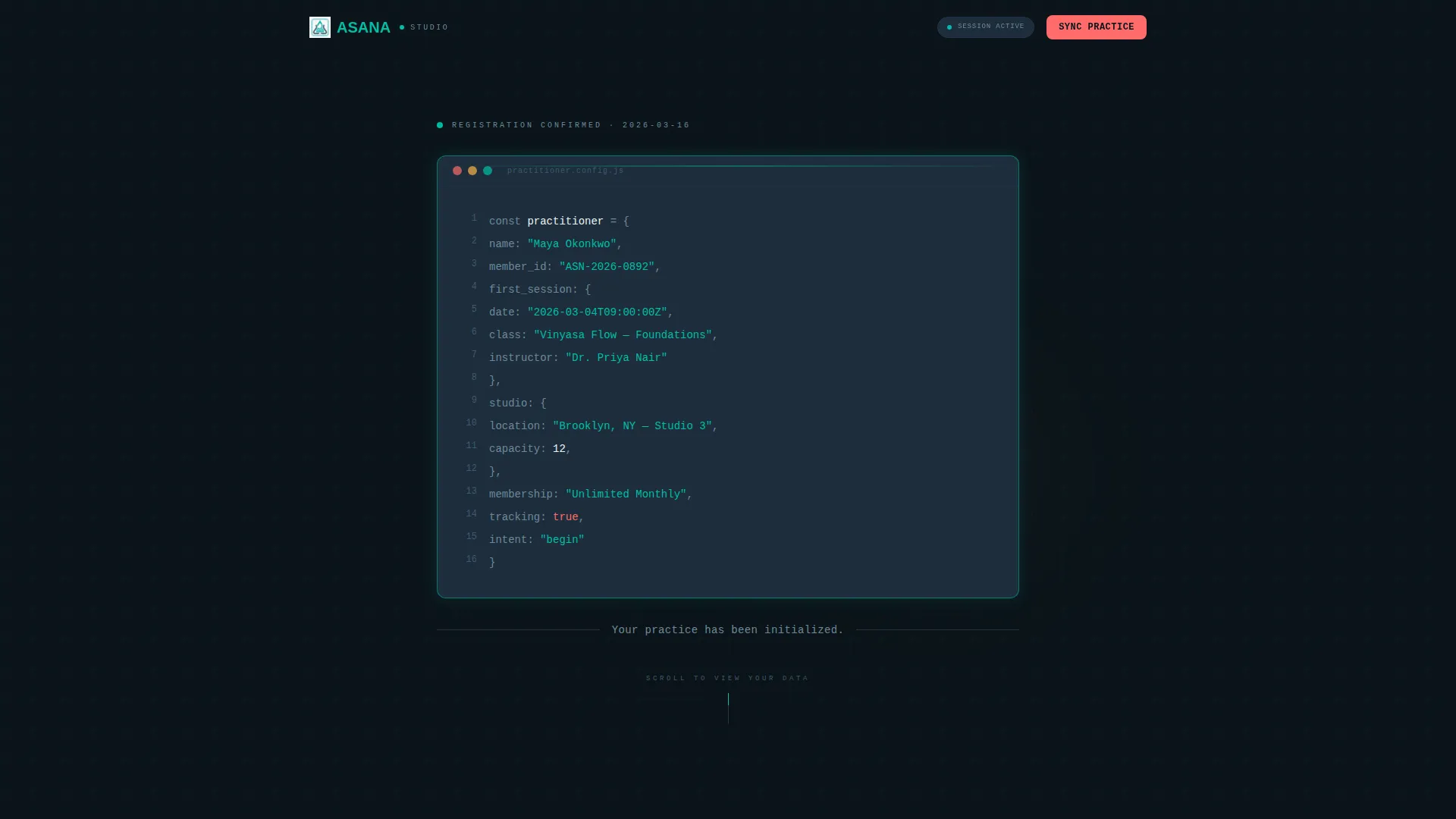
- A styled code-snippet header that confirms registration details as a structured data object
- A spec-sheet data grid with class type tiles, instructor profile matrices, and a 90-day practice forecast card
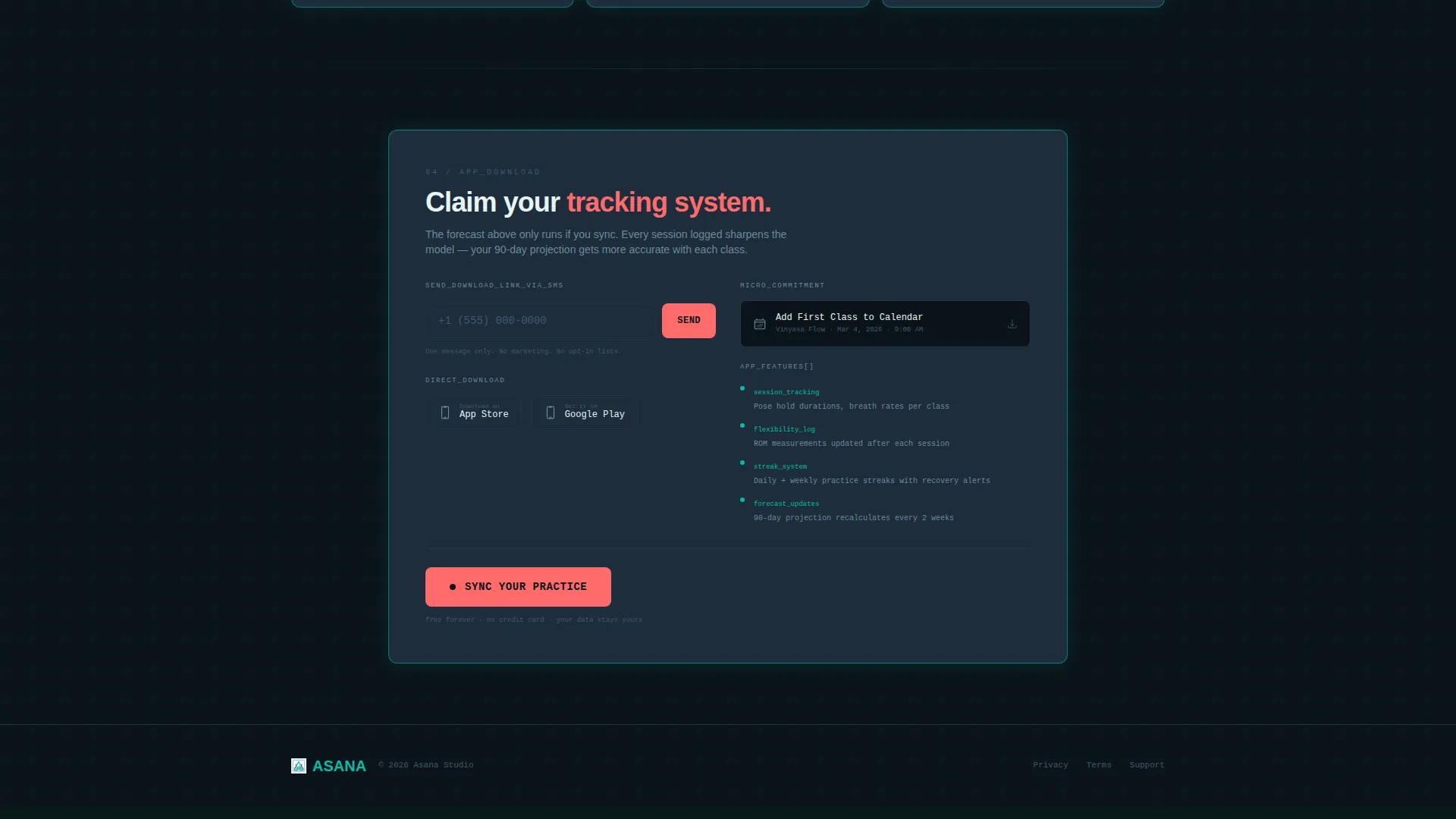
- A coral-colored app download call to action with SMS link delivery, App Store and Google Play badges, and a secondary calendar download option
Feature list
This template ships with six distinct design and content components, each grounded in the source brief.
Code Snippet Registration Header
The header displays the member's confirmation details inside a styled code block. Fields include practitioner.name, first_session.date, studio.location, and intent: "begin". Syntax highlighting uses teal for string values, coral for booleans, and slate for brackets. A single plain-text line beneath reads: "Your practice has been initialized."
Class Type Spec Tiles
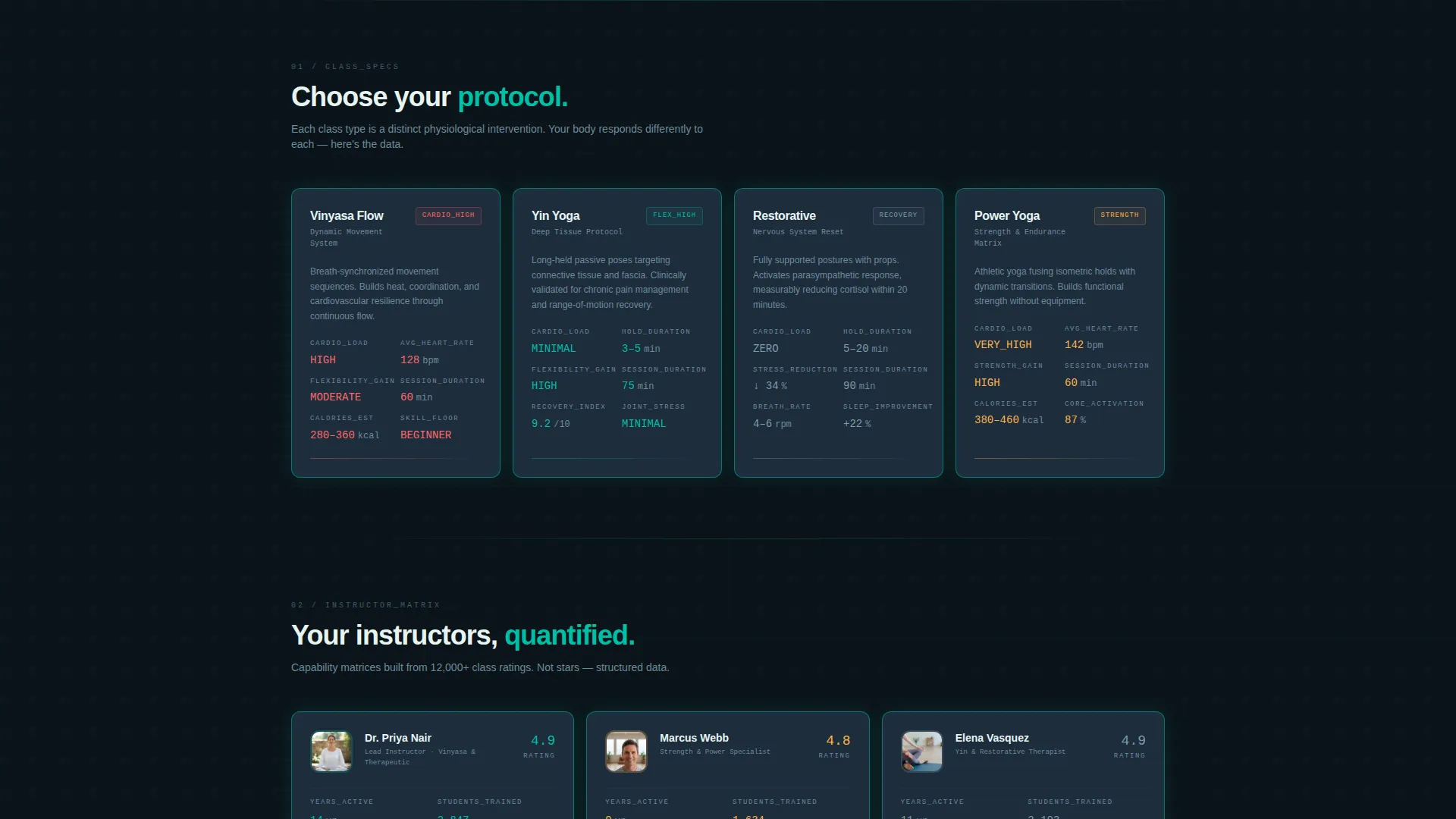
The first row of the data grid presents class types as specification cards. Each tile displays the class name alongside structured metrics: cardio load level, flexibility gain rating, average heart rate, and hold duration where applicable. Vinyasa and Yin are included as built-in examples.
Instructor Capability Matrices
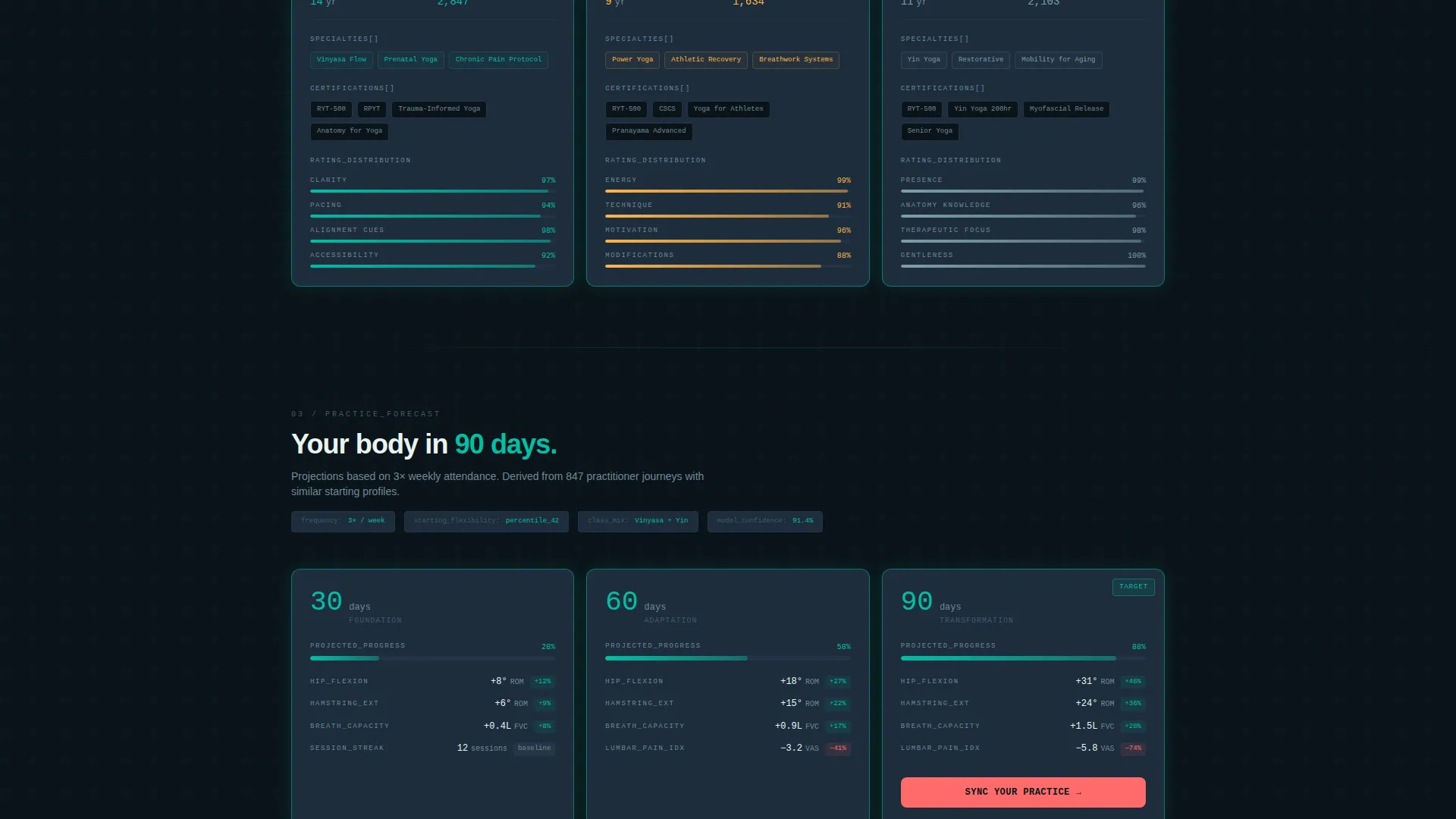
The second data grid row renders instructor profiles as structured capability cards. Each card lists certifications, specialties, years active, and a student rating distribution shown as micro bar charts. This format gives new members immediate, trust-building context before their first session.
90-Day Practice Forecast Card
The third grid row shows a personal Practice Forecast projecting flexibility benchmarks at 30, 60, and 90 days based on selected class frequency. This card is where the primary app download call to action is embedded, placing it at the highest-intent moment in the scroll journey.
Scroll-Triggered Card Animations
Each data card animates into view with a soft teal border-glow effect as the user scrolls down the page. The animation is designed to feel like instruments powering on one by one across a cockpit dashboard, reinforcing the Data Command theme visually and experientially.
Persistent App Download Call to Action
The primary call to action, "Sync Your Practice," appears in coral against terminal black. It lives inside the Practice Forecast card and as a persistent bottom bar on mobile. Tapping it reveals a phone number input for an SMS download link, plus direct App Store and Google Play badge links. A secondary option offers an Add First Class to Calendar download as a micro-commitment path.
Page sections overview
| Section | Purpose |
|---|---|
| Code Snippet Header | Confirms registration as styled structured data |
| Confirmation Subline | Sets tone with "Your practice has been initialized." |
| Class Type Tiles | Displays class specs as scannable metric cards |
| Instructor Profile Matrices | Builds trust through capability and rating data |
| Practice Forecast Grid | Projects 90-day benchmarks to motivate the download |
| App Download Call to Action | Drives SMS link, store badges, and calendar add |
| Persistent Mobile Bar | Keeps the download prompt visible on scroll |
Design & branding system
The template uses a Teal Catalyst color system built on four precise values that together create a clinical yet energetic visual identity. The palette is designed to feel like a heart-rate monitor in a dark room: exact, purposeful, and alive.
- Deep terminal black (#0B1419) as the base background, cool slate (#1E2D3D) for card surfaces, and primary teal (#00BFA6) for data highlights and border-glow animations
- Warm pulse coral (#FF6B6B) reserved exclusively for the call to action and alert states, creating a clear visual hierarchy between information and action
- Syntax highlighting within the code-snippet header uses teal for strings, coral for booleans, and slate for bracket characters, extending the color system into interactive content
Mobile & speed optimization
The template is structured with mobile behavior built into the layout from the start. The persistent bottom bar is a mobile-specific component that keeps the app download call to action visible throughout the entire scroll experience without interrupting the data grid content above.
- The "Sync Your Practice" bar pins to the bottom of the screen on mobile, ensuring the primary conversion path is always one tap away
- The SMS link input field and store badge layout are designed to work within a phone-width viewport without horizontal overflow
- Card grid rows reflow naturally for narrower screens, keeping the spec tile and instructor matrix content readable at mobile scale
How this template helps you convert
This template converts because it earns the action before it asks for it. By the time a new member reaches the app download prompt, they have already seen their own name in a data object, read their projected flexibility gains, and understood exactly what their first class will feel like.
- The code-snippet header creates immediate personal relevance by rendering the member's own registration details, turning a generic confirmation into a moment of recognition that keeps them reading
- The Practice Forecast card delivers the clearest conversion trigger: a personalized 90-day projection that makes downloading the app feel like claiming something already theirs, not installing software
Other information about this template
This template sits at the intersection of yoga studio experience and technology-forward design, making it a strong fit for studios that position themselves as modern, data-informed, and practitioner-focused. It is built as a single-page layout and does not require a multi-page site structure to function.
- The template style is Dashboard and Data Grid, categorized under Technology with a Yoga Studio Thank You Page niche focus
- The Data Command theme and Teal Catalyst color system are self-contained within the template and do not depend on external design libraries
- The calendar download path, offered as a secondary call to action, creates a low-friction micro-commitment that complements the primary app download flow
Theme
Data Command
Creative direction
Spec Sheet
Color system
Teal Catalyst
Style
Dashboard/Data Grid
Direction
App Download
Page Sections
Code Snippet Registration Header
Class Type Specification Tiles
Instructor Capability Matrices
Day Practice Forecast Card
Scroll-triggered Card Animations
Persistent App Download Bar
Related questions
Who is the intended audience for this thank-you page template?
Does this template include the app download functionality itself?
Can I customize the class types and instructor profiles in the data grid?
What makes the Practice Forecast card effective for driving app downloads?
Is this a single-page template or does it require a full website build?