RegTech Startup Reviews & Social Proof Website Template
Comply is a RegTech API documentation landing page template built for developer-facing compliance products. It uses a structured comparison-table layout, a monochrome steel visual system, and a live-styled code demo to show fintech engineers exactly what they get. The template is designed to convert technical decision-makers through evidence, not persuasion copy.
by Rocket studio
Quick summary
Comply is a single-page comparison landing page template for RegTech API products. It combines a data-dense Industry Report creative direction with a Dashboard Pro visual theme to present compliance API capabilities with precision. Two structured comparison tables, a live curl demo, and a sticky call-to-action bar give fintech engineers everything they need to evaluate and act.
Who this template is for
This template is built for technical founders, developer-relations teams, and product marketers who need to explain a complex compliance API to an equally technical audience. It skips the generic software-as-a-service pitch and speaks directly in the language of integration engineers and risk leads.
- Fintech CTOs wiring compliance checks directly into transaction flows
- Integration engineers at neobanks managing regulatory update risk
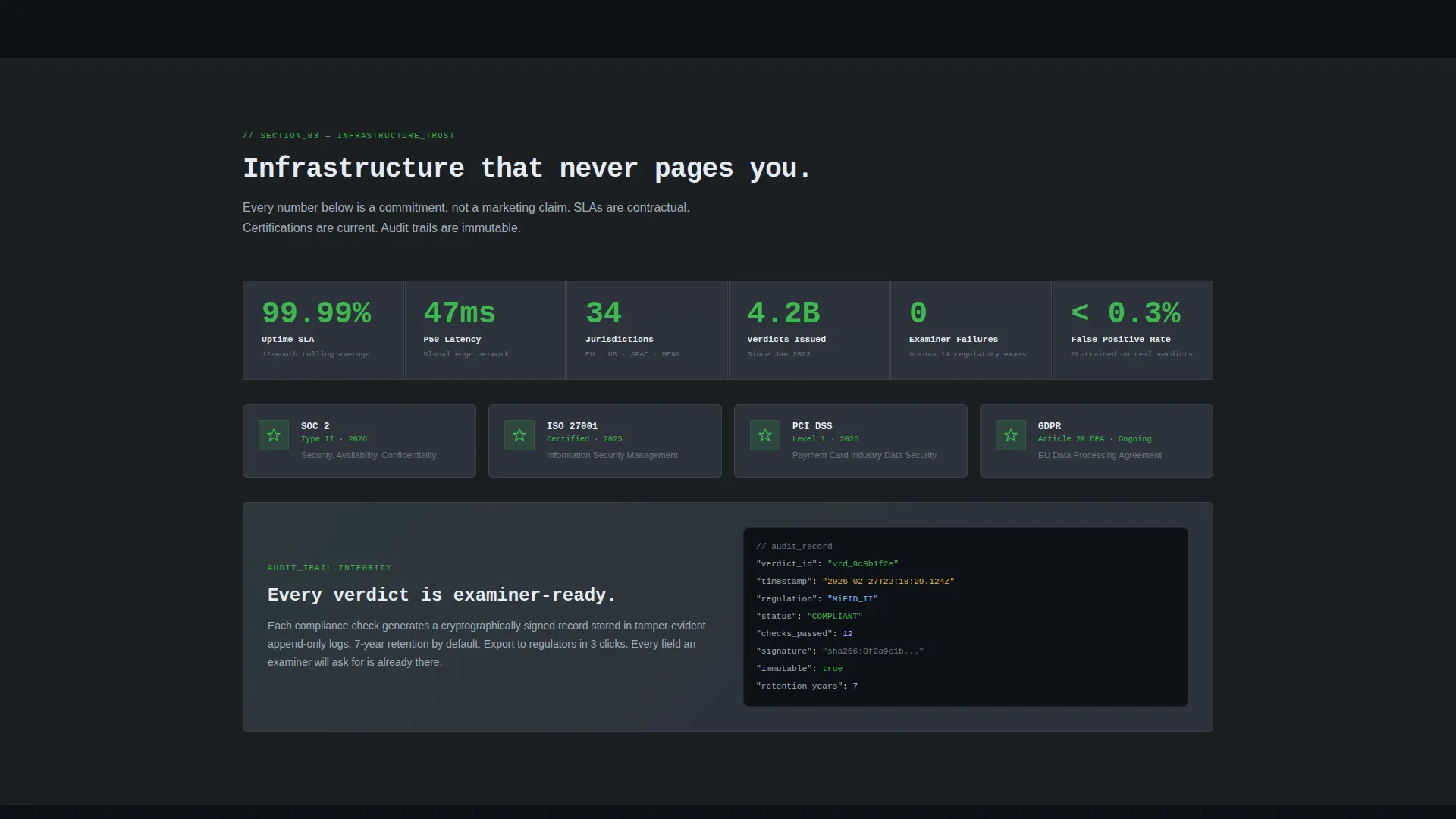
- Heads of risk at trading firms who need auditable, examiner-ready records
What problem this template solves
Compliance API products are difficult to market because the buyers are engineers who distrust superlatives and only trust evidence. A generic landing page with bullet points and testimonials fails this audience. They need to see the data, the response times, and the direct comparison before they consider a next step.
- Visitors leave when they cannot immediately benchmark the product against alternatives
- Complex regulatory scope across frameworks like MiFID II, SOX, and Anti-Money Laundering directives is hard to communicate without a structured format
- Low-friction conversion paths are rare in a category where buyers expect demos and drawn-out sales cycles
What you get with this template
The template delivers a complete, ready-to-customize single-page layout optimized for technical evaluation. Every section is pre-structured to carry real data, so you fill in your own metrics rather than inventing a narrative.
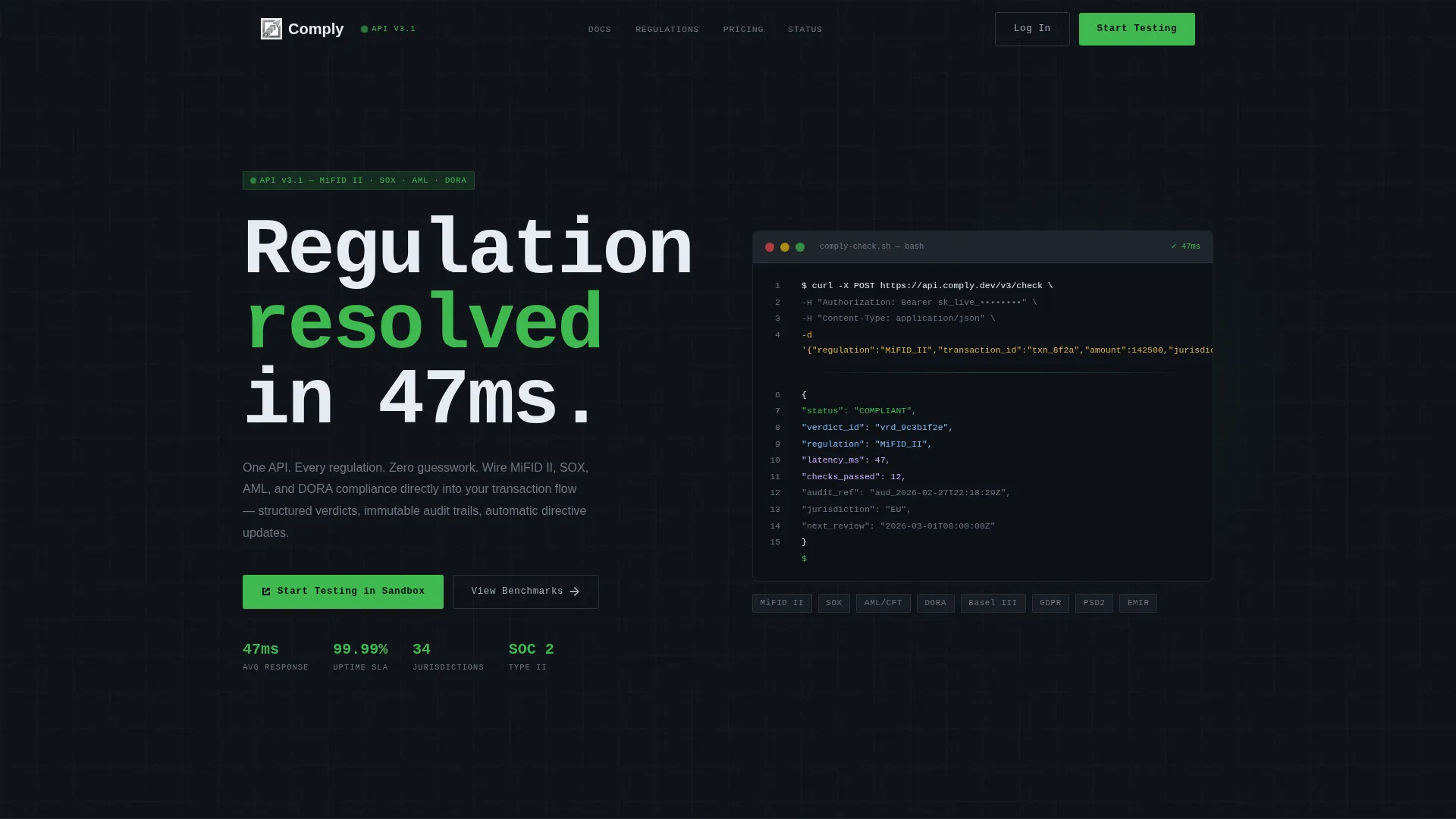
- A logo bar header with a monospaced headline and an animated curl request and JSON response demo
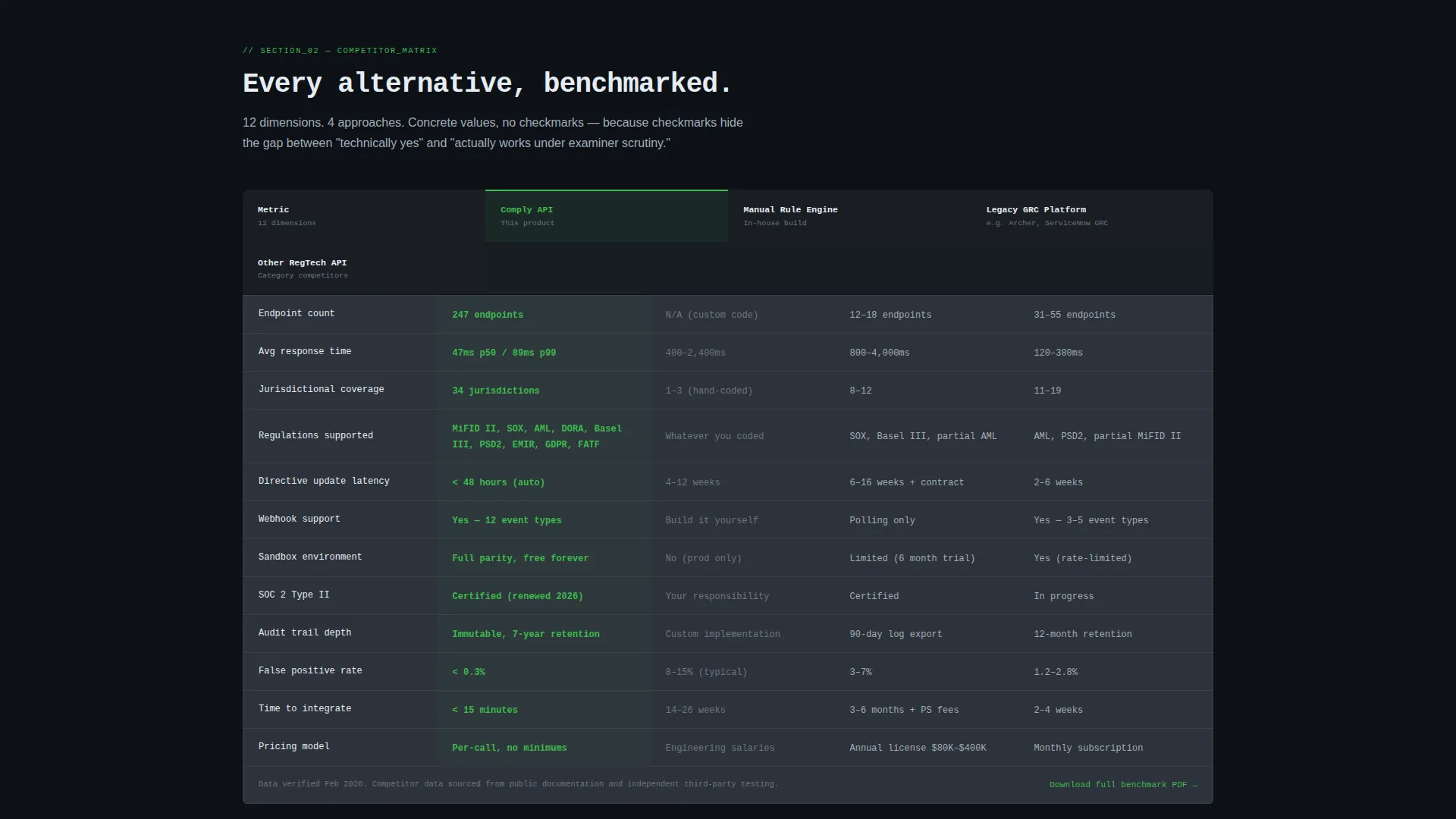
- Two data-dense comparison tables covering in-house build versus API and three named competitor approaches across twelve evaluation rows
- A sticky sandbox call-to-action bar, a gated benchmark PDF download form, and a minimal two-field lead capture form
Feature list
The Comply template ships with a focused set of layout components, each chosen to serve the technical buyer's evaluation process.
Animated API Demo Block
The header section includes a live-styled curl request and its JSON response, animating to show a compliance check resolving in 47 milliseconds. This gives engineers an immediate, credible signal of what working with the API actually feels like, before they read a single line of marketing copy.
Build-versus-Buy Comparison Table
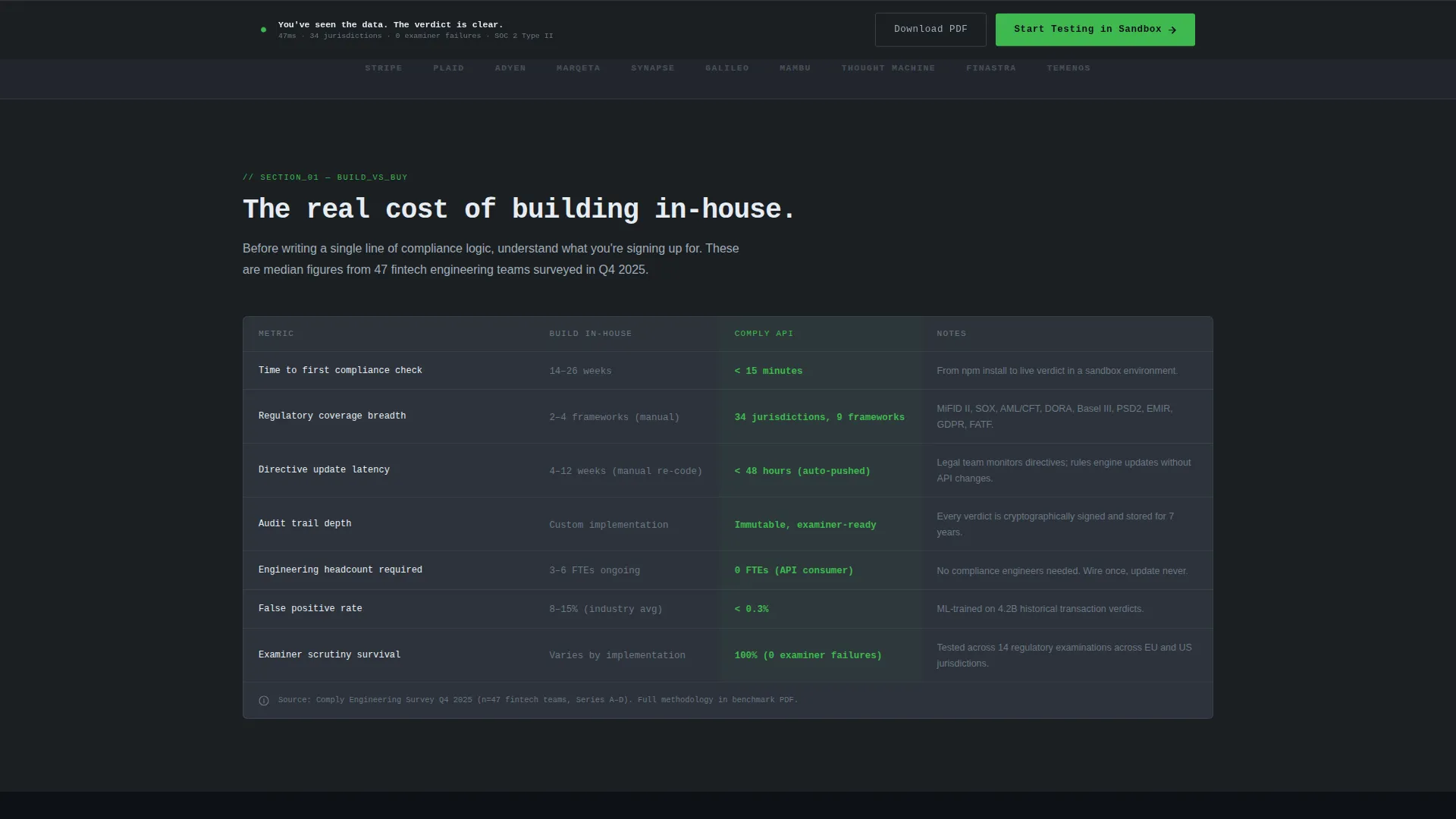
Section one benchmarks the API against building compliance logic in-house. Columns cover time-to-implement, regulatory coverage breadth, update latency when directives change, and audit-trail depth. Every cell holds a concrete value, not a checkmark, so the comparison earns credibility through specificity.
Multi-Competitor Evaluation Table
Section two extends the comparison to three named competitor approaches: manual rule engines, legacy governance, risk, and compliance platforms, and other RegTech APIs. Twelve evaluation rows include endpoint count, response time, jurisdictional coverage, webhook support, sandbox availability, and SOC 2 status.
Sticky Sandbox Call-to-Action Bar
A persistent call-to-action bar activates after the visitor scrolls past the first comparison table. The primary action is "Start Testing in Sandbox," keeping the conversion path visible throughout the rest of the page without interrupting the reading flow.
Gated Benchmark PDF Download
A secondary conversion path offers a downloadable full benchmark report, gated behind a single work-email field. This gives visitors who are not yet ready to test in the sandbox a low-commitment next step that still captures a qualified lead.
Minimal Lead Capture Form
The bottom form asks only for email address and estimated monthly API call volume. This two-field structure reduces friction for engineers who make decisions based on data and prefer not to navigate a full enterprise sales process.
Page sections overview
| Section | Purpose |
|---|---|
| Logo Bar Header | Establishes ecosystem familiarity with recognizable fintech logos and a monospaced brand headline |
| Animated API Demo | Shows a live curl request and JSON response resolving a compliance check in 47ms |
| Build versus. Buy Table | Benchmarks the API against in-house compliance logic across four concrete dimensions |
| Competitor Comparison Table | Evaluates three competitor approaches across twelve structured rows with concrete cell values |
| Sticky call to action Bar | Keeps the sandbox call-to-action visible after the first table is scrolled past |
| PDF Download Gate | Offers a gated benchmark report behind a single work-email field for secondary conversion |
| Lead Capture Form | Collects email and monthly API call volume with minimal friction |
Design & branding system
The visual identity follows a Monochrome Steel color system that feels like infrastructure rather than marketing. The palette uses no warm tones and no decorative elements, signaling reliability and technical depth at every scroll point.
- Core colors: deep gunmetal (#1B1F23) for backgrounds, brushed chromium (#A0ADB8) for secondary text, panel-edge charcoal (#2D333B) for table rows and panel borders
- Signal-green accent (#3FB950) is reserved strictly for status indicators, active states, and primary call-to-action elements
- Typography uses monospaced type for the header line and code demo blocks, reinforcing the terminal-window aesthetic throughout
Mobile & speed optimization
The layout is structured to remain fully readable and scannable across screen sizes. Data-dense comparison tables are the core content, so the template is organized to keep those elements legible on smaller viewports without sacrificing detail.
- Table layouts are designed to scroll horizontally on narrow screens, preserving column integrity without truncating values
- The sticky call-to-action bar is sized and positioned to remain usable on mobile without covering critical content
- Section spacing and font sizing follow the Dashboard Pro theme's responsive guidelines to keep reading flow intact
How this template helps you convert
The Comply template converts by replacing persuasion with evidence. Every layout decision is made to move a technical visitor from skepticism to a clear next action, using the data in the tables rather than copywriting alone.
- The animated API demo in the header creates immediate technical credibility, establishing a concrete performance signal before the visitor scrolls to any comparison content.
- The two comparison tables accumulate evidence with each scroll, making the alternative approaches look increasingly costly or limited by the time the visitor reaches the bottom of the page.
- The dual conversion paths, sandbox access and a gated benchmark report, give both ready-to-act engineers and still-evaluating visitors a friction-appropriate next step.
Other information about this template
The Comply template is categorized under Startup and Launch, with a specific focus on the RegTech startup subcategory and the RegTech API documentation niche. It is built for teams that are launching or repositioning a developer-facing compliance product and need a page that can hold up under scrutiny from a technical audience.
- The template style is Comparison Table, making it well-suited for any API product that benefits from structured side-by-side evaluation
- The Industry Report creative direction means the page reads like a technical analyst's brief rather than a sales document, which builds trust with engineering and risk audiences
- The Dashboard Pro theme and Monochrome Steel color system are consistent with the visual language of financial infrastructure tools, making the product feel native to the environments compliance engineers already work in
- The intersection match score of 13 reflects a strong alignment between the template's design direction, its conversion goal, and the specific needs of the RegTech API documentation niche
Theme
Dashboard Pro
Creative direction
Industry Report
Color system
Monochrome Steel
Style
Comparison Table
Direction
Comparison/Versus
Page Sections
Animated API Demo Block
Build-versus-buy Comparison Table
Multi-competitor Evaluation Table
Sticky Sandbox Call to Action Bar
Gated Benchmark PDF Download
Minimal Two-field Lead Form
Related questions
Who is the primary audience for this template?
Can I customize the comparison table values with my own data?
What are the two conversion paths included in this template?
Is this template suitable for a product still in early development?
What visual style does this template use?



