Dispatch - Frontend Newsletter Landing Page Template
Broadsheet Dispatch is a horizontal scroll landing page template built for frontend development newsletter creators. It uses a Heritage editorial aesthetic, a chapter-by-chapter day-in-the-life scroll narrative, and a built-in reader personality quiz to drive email sign-ups. The design blends aged parchment tones with letterpress typography for a distinctive, editorial feel.
by Rocket studio
Quick summary
Broadsheet Dispatch is a single-page horizontal scroll template for launching a frontend development newsletter. It walks visitors through a developer's morning in editorial chapter spreads, then funnels them into a five-question reader quiz before asking for their email. The result is a sign-up experience that feels genuinely considered, not generic.
Who this template is for
This template is built for newsletter creators and developers who want their sign-up page to reflect the same editorial care they put into the content itself. It suits creators who already have a voice and need a launch page that earns trust quickly.
- Frontend engineers launching a daily digest or developer newsletter
- Tech writers and indie developers building an audience from scratch
- Self-taught developers who want to present their content with a professional, editorial identity
What problem this template solves
Most newsletter landing pages look the same: a headline, a subheadline, and an email input. They give visitors no reason to believe the content is worth their inbox. Dispatch fixes that by showing, not just telling.
- Visitors scroll through actual newsletter moments before they ever see a sign-up prompt
- The personality quiz replaces a generic pitch with a personalised first-edition promise
- The chapter-driven layout creates a distinct brand memory that generic templates cannot match
What you get with this template
You get a fully structured horizontal scroll landing page with five distinct chapter panels, a reader assessment quiz, and a Heritage editorial visual identity ready to customise. Every section is purpose-built for a developer newsletter audience.
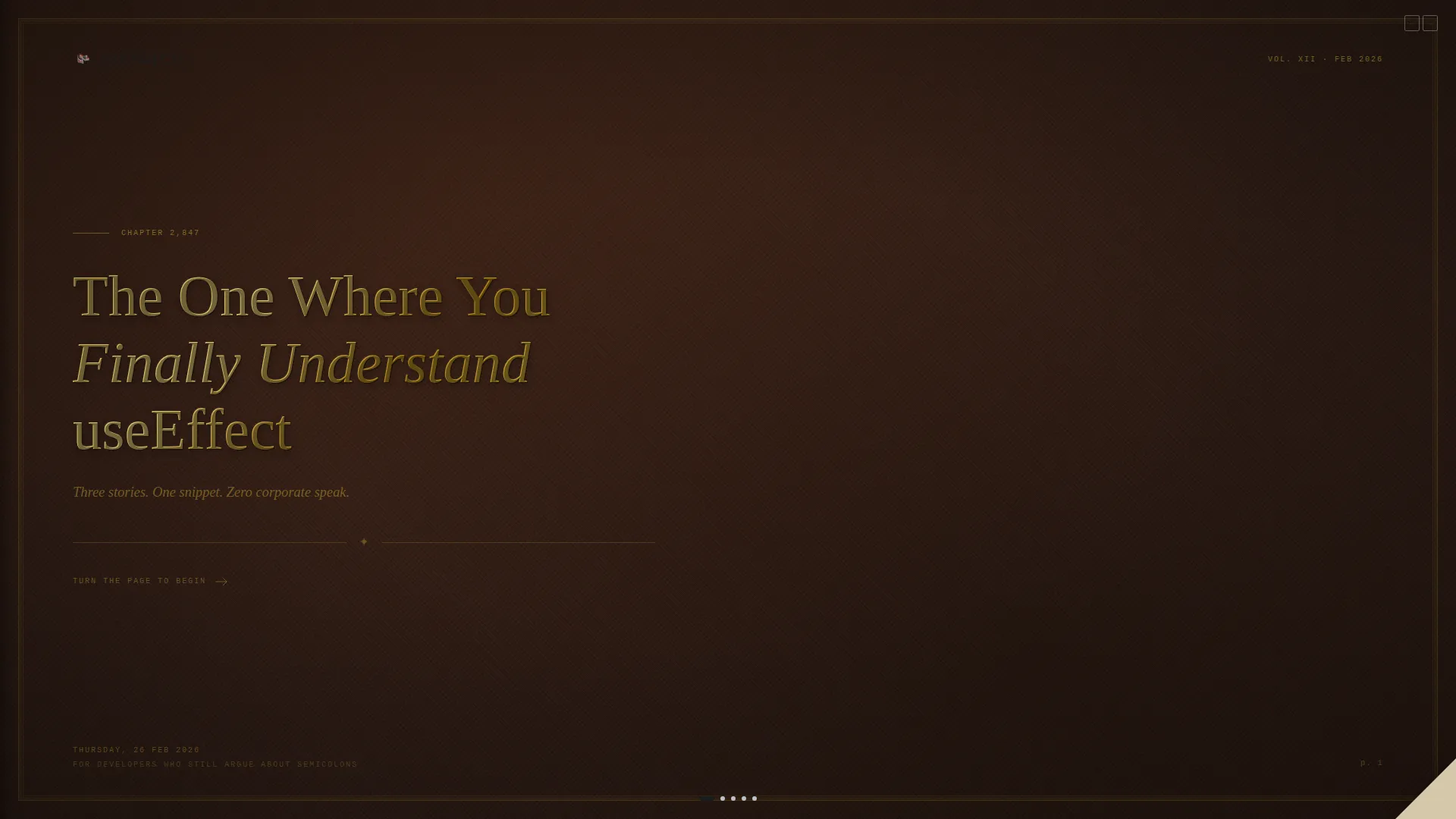
- A leather-textured book-cover hero with debossed typographic headline and page-curl animation
- Three time-stamped editorial spread panels showing newsletter moments at 6:47 AM, 7:02 AM, and 7:15 AM
- A five-question reader personality quiz with styled marginalia answers and a personalised call to action
Feature list
This template ships with a focused set of interactive and editorial features drawn directly from the design brief. Each one serves the core goal: move a sceptical developer from curiosity to subscription.
Horizontal Scroll Chapter Navigation
The page moves horizontally through chapter panels using native CSS scroll-snap. Each panel is a full-viewport spread. No heavy scroll libraries are needed. The experience mimics turning pages in a physical book.
Book Cover Hero with Page-Curl Animation
The opening viewport renders as a leather-textured book cover. A CSS page-curl animation at the right edge signals the first scroll interaction. The debossed headline sets editorial tone before any newsletter content appears.
Day-in-the-Life Editorial Spreads
Three time-stamped panels walk through a developer's morning. Each spread pairs an editorial illustration on the left page with real newsletter content on the right. Timestamps act as chapter numbers to reinforce the book metaphor.
Syntax-Highlighted Code Snippet Panel
The 7:02 AM spread features a code snippet panel with syntax highlighting. It demonstrates the daily code snippet value proposition directly inside the page layout, letting the content speak before the ask.
Reader Personality Quiz
A five-question assessment appears before the email call to action. Questions are styled as handwritten marginalia with toggle answers circled in red ink. Results assign a reader type and personalise the first-edition promise shown in the call to action.
Minimal Email Call to Action
The quiz result feeds directly into a single email-field call to action labelled "Get Your First Edition." A secondary path reading "Browse the Archives" gives sceptical visitors an alternative route. The flow reduces friction at the moment of highest intent.
Page sections overview
| Section | Purpose |
|---|---|
| Book Cover Hero | Sets editorial tone and triggers first horizontal scroll |
| 6:47 AM Spread | Shows the newsletter inbox moment with editorial illustration |
| 7:02 AM Spread | Displays the daily code snippet in a syntax-highlighted panel |
| 7:15 AM Spread | Presents the hot-take opinion column and implied reader reactions |
| Reader Quiz Spread | Captures reader type before presenting the email call to action |
| Minimal Footer | Closes the page with a clean, low-distraction pattern |
Design & branding system
The visual identity follows a Heritage and Story theme. Every colour choice and type decision references the physical feel of a galley proof pulled from a letterpress. The result is a design system that feels earned, not assembled from a component library.
- Aged parchment (#F4ECD8) backgrounds, fresh typeset black (#1A1A1A) headlines, red editor markup (#C0392B) for links and interactive cues, and faded graphite (#7F8C8D) for secondary text and dividers
- Fraunces serif for editorial headlines, JetBrains Mono for code and timestamps, and DM Sans for body reading comfort
- Noise overlay, fade-in-up animations, and hover micro-interactions reinforce the tactile, print-era aesthetic throughout
Mobile & speed optimization
This template is designed desktop-first to support the horizontal scroll chapter experience. A vertical fallback layout is included for smaller screens so the content remains fully readable on mobile.
- Horizontal scroll panels reflow to vertical stacking on mobile viewports
- Native CSS scroll-snap is used throughout, avoiding dependency on heavy external libraries
- Animations include CSS page curl, marquee, and fade-in-up effects built without performance-heavy frameworks
How this template helps you convert
The conversion flow in this template is deliberate. Every panel earns a little more trust before the email field appears, so the ask feels natural rather than abrupt.
- The chapter scroll shows real newsletter moments first, proving value before any sign-up prompt is visible
- The personality quiz replaces a cold pitch with a personalised result, giving visitors a reason to share their email that goes beyond obligation
- The dual call-to-action path lets confident visitors subscribe immediately while offering sceptics an archive browse route, capturing both intent types
Other information about this template
This template sits inside the Blog and Editorial category and is matched specifically to the Frontend Development Newsletter subcategory. It is a strong fit for the Frontend Development Daily Digest niche.
- Template style: Horizontal Scroll with scroll-snap panel navigation
- Theme: Heritage and Story with an Ink and Paper colour system
- Creative direction: Day-in-the-Life chapter narrative across five horizontal panels
- Header concept: Chapter and Book with a leather-texture viewport and debossed gold-foil type
- Landing page direction: Quiz and Assessment flow leading to a personalised email call to action
- The template is built to serve a developer-global English-language audience with no currency or locale restrictions assumed



Theme
Heritage & Story
Creative direction
Day-in-the-Life
Color system
Ink & Paper
Style
Horizontal Scroll
Direction
Quiz/Assessment
Page Sections
Horizontal Scroll Chapter Navigation
Book Cover Hero with Page-curl Animation
Day-in-the-life Editorial Spreads
Syntax-highlighted Code Snippet Panel
Reader Personality Quiz
Dual-path Email Call to Action
Related questions
Can I customise the quiz questions and reader result categories?
Does this template require a separate quiz or form tool?
What happens on mobile since horizontal scroll is a desktop pattern?
How do I connect the email field to my newsletter platform?
Is this template only suitable for developer-focused newsletters?



