Edtech Investor Relations Landing Page Template
Catalyst is a comparison table landing page built for edtech investor relations teams. It pairs a three-tab hero dashboard with a detailed feature matrix, case study cards, and a dual-path lead capture form. The result is a single, confident page that walks founders, CFOs, and investor relations managers through exactly why their current workflow is costing them time.
by Rocket studio
Quick summary
Catalyst is a desktop-first landing page template designed for edtech investor relations platforms. It opens with an interactive tab switcher showing live-rendered dashboards, moves through a structured comparison matrix, and closes with two lead generation conversion paths. Every section is built to give data-driven investors and founders a clear reason to book a walkthrough.
Who this template is for
This template is built for edtech companies that need to communicate investor readiness with precision. It suits teams preparing for Series A fundraising rounds or managing ongoing reporting obligations at scale.
- Series A founders and CFOs preparing board decks and fielding due diligence requests
- Investor relations managers at publicly traded edtech companies who need one living page covering every investor question
- Edtech startup teams replacing manual cap table updates and static PDF exports with a structured, live investor workflow
What problem this template solves
Managing investor communications manually is slow and error-prone. Founders spend hours reformatting cap tables, chasing document versions, and answering the same due diligence questions repeatedly. This template gives them a structured, persuasive page that handles those conversations before they start.
- Replaces four-hour manual cap table update cycles with a live-synced, permissioned, audit-trailed presentation layer
- Removes the credibility gap that comes from sending static PDF exports to sophisticated institutional investors
- Gives earlier-stage visitors a secondary conversion path so no potential lead leaves the page empty-handed
What you get with this template
You get a fully structured single-page layout with high interactivity, a clear visual hierarchy, and two distinct conversion funnels built in. Every section is purpose-built for the investor relations use case.
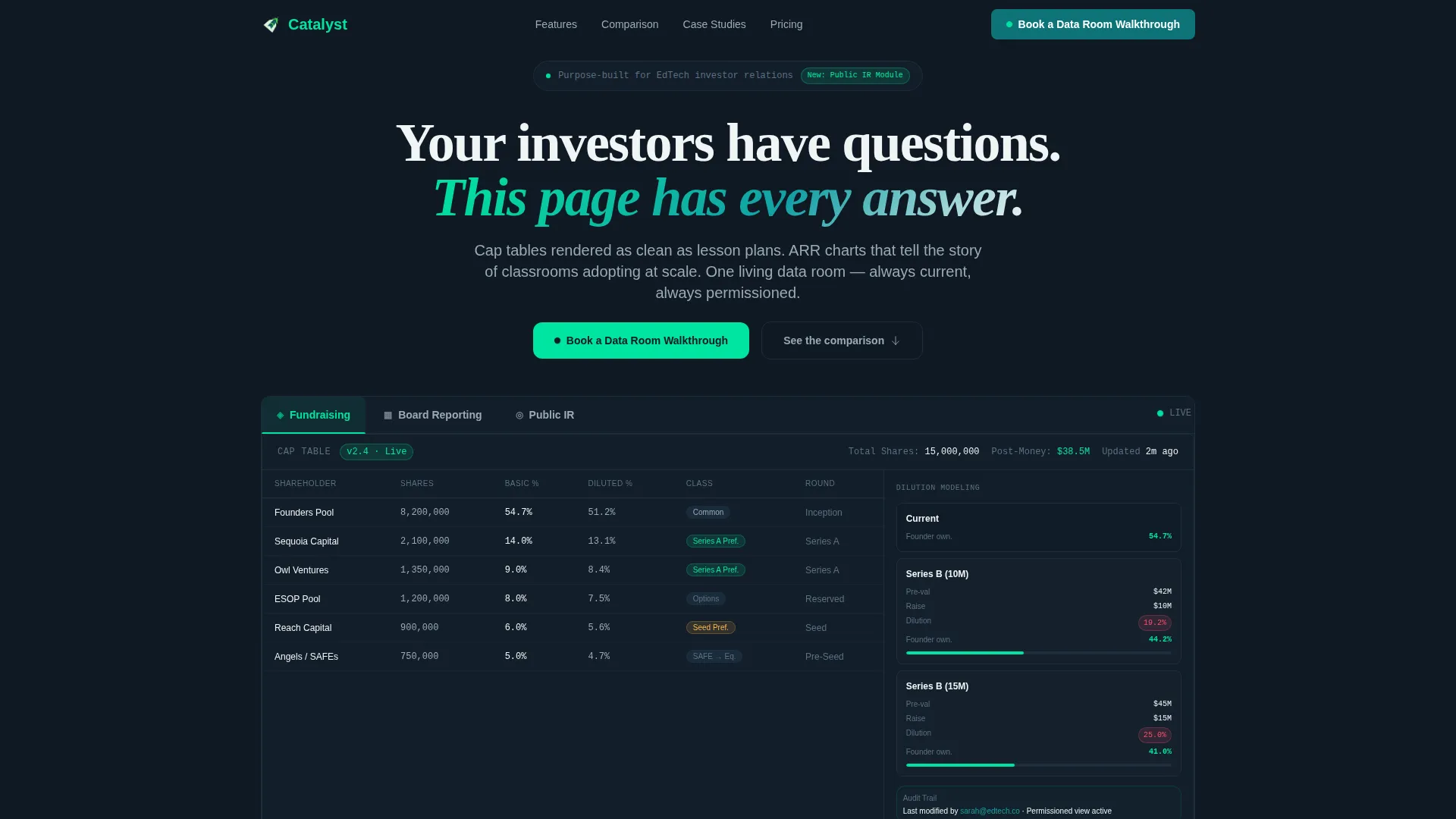
- A three-tab hero section with viewport-swapping dashboard previews covering Fundraising, Board Reporting, and Public IR
- A five-row feature comparison matrix contrasting Manual workflows, generic tools, and Catalyst side by side
- A dual-path lead generation section with a detailed intake form and a gated benchmark report download
Feature list
This template ships with six core components, each designed to move a skeptical CFO or founder from recognition to action.
Three-Tab Feature Switcher
The hero opens with three clickable tabs labeled Fundraising, Board Reporting, and Public IR. Each tab swaps the entire viewport to show a distinct live-rendered dashboard. Fundraising reveals a cap table with dilution modeling, Board Reporting shows a monthly key performance indicator grid with red-amber-green status indicators, and Public IR displays an earnings calendar beside a shareholder composition chart.
Five-Row Comparison Matrix
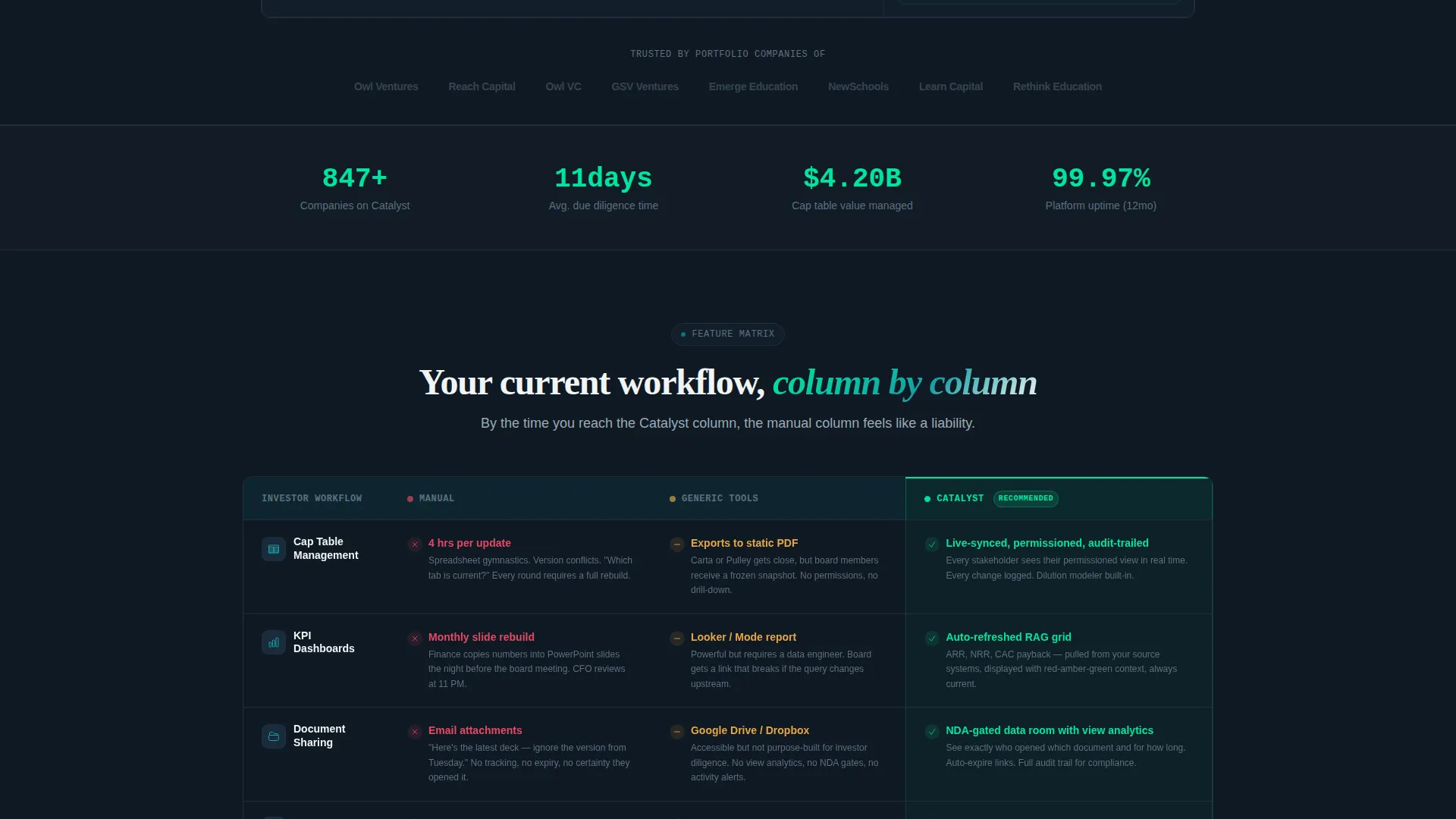
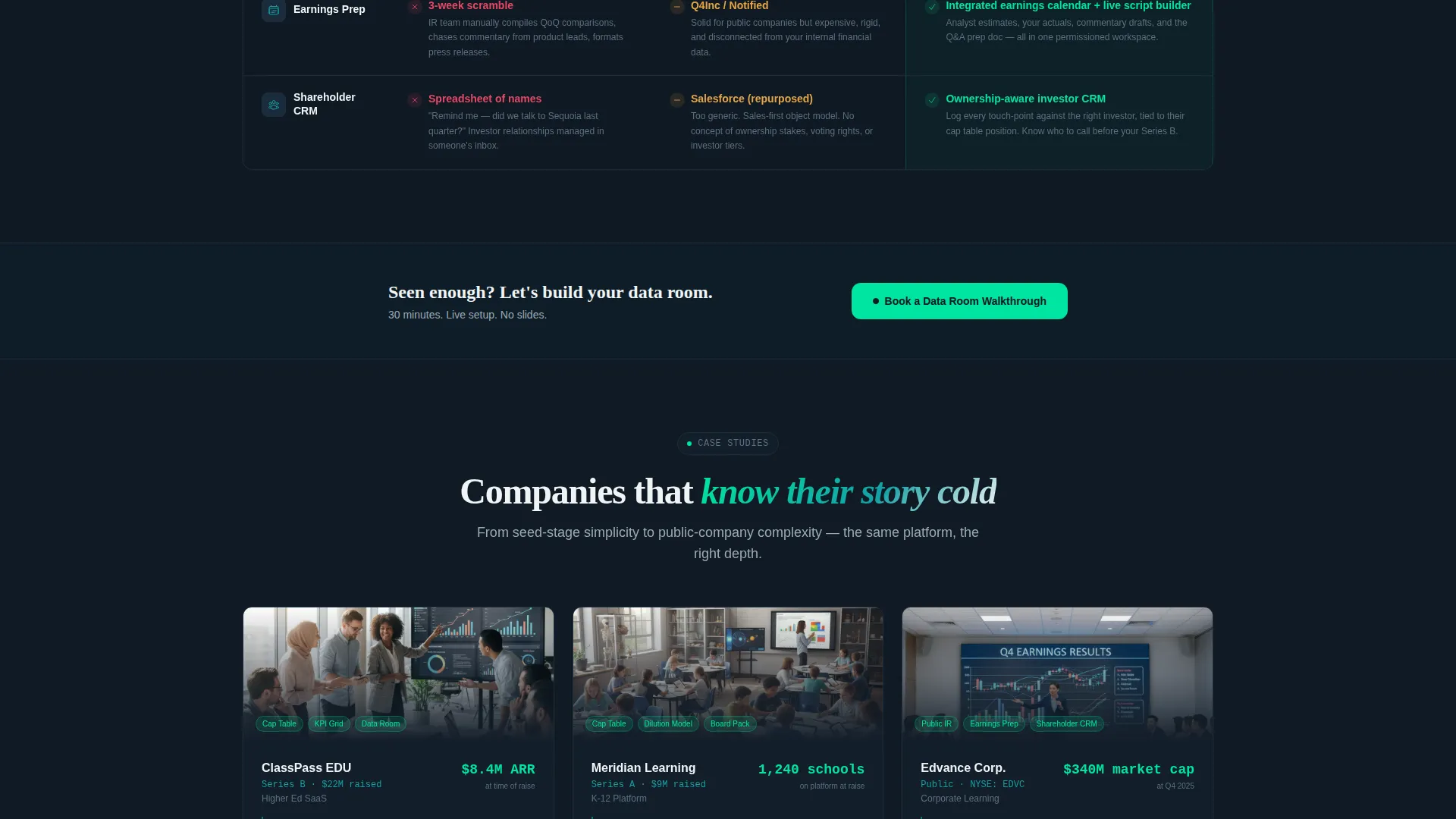
The comparison table is the page's central selling tool. Rows cover five investor workflows: cap table management, key performance indicator dashboards, document sharing, earnings preparation, and shareholder relationship management. Each cell contains a specific, believable detail that makes the manual column feel immediately painful and the Catalyst column feel like relief.
Case Study Card Section
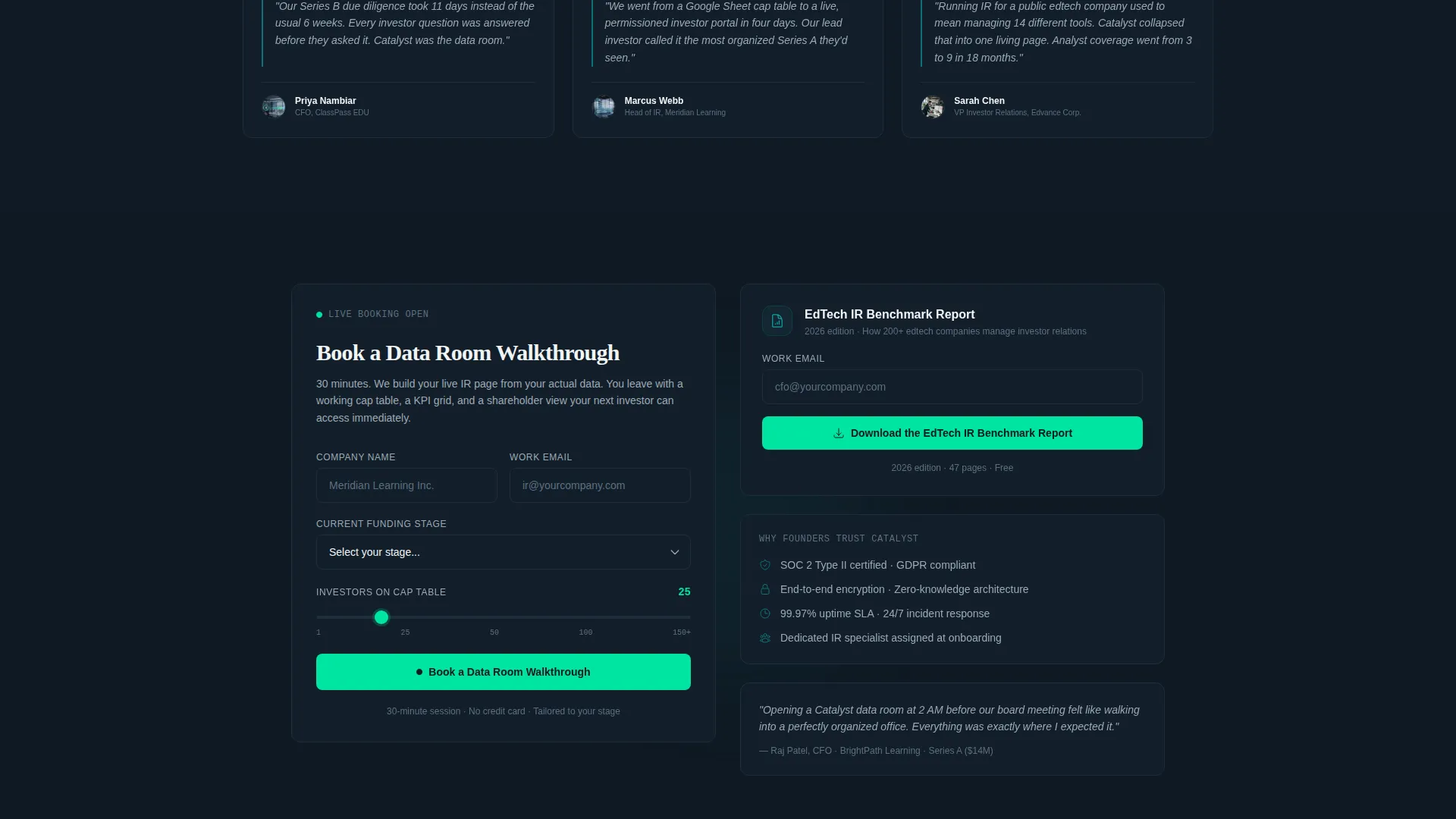
After the matrix, three or more edtech company cards appear with logos, round sizes, and a direct quote from each company's investor relations lead. The section escalates in complexity from seed-stage simplicity to public-company scale, building trust progressively as the visitor scrolls.
Dual-Path Lead Capture
The primary call to action is "Book a Data Room Walkthrough," supported by a form capturing company name, current funding stage via dropdown, number of investors via range slider, and work email. A secondary path offers a gated edtech investor relations benchmark report, giving earlier-stage visitors a lower-commitment way to convert.
Sticky Navigation Call to Action
The "Book a Data Room Walkthrough" button appears both inside the sticky navigation bar and after the comparison matrix. This dual placement ensures the conversion path stays visible regardless of where the visitor is on the page.
Social Proof Metrics Strip
A dedicated metrics bar sits between the case study cards and the lead generation section. It anchors credibility with stats-level confidence, reinforcing the case made by the comparison matrix and the case study quotes above it.
Page sections overview
| Section | Purpose |
|---|---|
| Tab Switcher Hero | Showcase three investor dashboard previews with headline fade-in |
| Comparison Feature Matrix | Contrast manual, generic, and Catalyst workflows row by row |
| Case Study Cards | Build trust with real edtech company quotes and round sizes |
| Social Proof Strip | Reinforce credibility with a metrics bar between cards and form |
| Lead Generation Form | Capture qualified leads via walkthrough booking and report download |
| Linear Single-Row Footer | Close the page with a minimal, uncluttered single-row footer |
Design & branding system
The visual identity follows a Startup Velocity theme. The palette evokes a Bloomberg terminal rebuilt by a design-forward founder: dense with information but never visually noisy.
- Deep command teal (#0D7377) anchors primary actions and section headings; midnight dataroom (#0F1923) covers all backgrounds; bright catalyst green (#00E5A0) fires on hover states and live metric pulses; chalk white (#F0F4F5) fills body text and table cells
- DM Sans handles all user interface labels, data fields, and table copy; Fraunces sets editorial headlines with contrast and authority
- Animations run high throughout: tab switcher viewport swaps, scroll-reveal matrix rows, a green pulse heartbeat on live metric indicators, and staggered card reveals as the visitor moves down the page
Mobile & speed optimization
This template is built desktop-first, reflecting the reality that CFOs and investor relations managers typically review data-heavy pages on large screens. The layout prioritizes density and clarity at widescreen breakpoints.
- Server Components handle static sections such as the comparison matrix and case study cards, keeping initial load lean
- Client Components are reserved for the tab switcher and lead capture form, limiting interactive overhead to where it is actually needed
- The tab switcher and range slider are optimized for pointer-based interaction, consistent with the desktop-priority brief
How this template helps you convert
Every section of this page moves the visitor one step closer to submitting a form. The comparison matrix does the heaviest persuasion work, and the dual-path call to action catches visitors at different stages of readiness.
- The tab switcher creates immediate recognition by showing dashboard states that feel more polished than what most edtech teams currently have, making the product's value tangible within seconds of arrival.
- The comparison matrix names the visitor's exact pain point in the Manual column, then resolves it in the Catalyst column, so the call to action that follows reads as a logical next step rather than a sales push.
- The secondary benchmark report download gives earlier-stage founders a reason to convert before they are ready for a full walkthrough, growing the lead pool without diluting the primary conversion goal.
Other information about this template
Catalyst is categorized under Startup and Launch with a specific focus on the edtech startup subcategory and the edtech investor relations niche. It is localized for the United States market with USD formatting and MM/DD/YYYY date conventions throughout.
- The template uses the Teal Catalyst color system with the Startup Velocity theme, making it distinct from generic SaaS landing page templates in the same category
- Interactivity is rated high across the template: the tab switcher, range slider, dropdown funding stage selector, and sticky navigation call to action all require active user engagement
- The page is designed around the Feature Matrix creative direction, meaning the comparison table is the structural and persuasive core of the layout, not a secondary element
Theme
Startup Velocity
Creative direction
Feature Matrix
Color system
Teal Catalyst
Style
Comparison Table
Direction
Lead Generation
Page Sections
Three-tab Viewport-swapping Hero
Five-row Feature Comparison Matrix
Edtech Case Study Cards
Dual-path Lead Generation Form
Sticky Navigation with Persistent Call to Action
Social Proof Metrics Strip
Related questions
Who is this landing page template built for?
What sections are included in this template?
Does this template include two separate lead generation paths?
Can I customize the comparison table rows and column content?
What design style does this template follow?



