LegalTech Startup Professional Website Template
Docket is a split-screen landing page template built for legaltech growth-stage startups. It pairs a live risk-dashboard screenshot with oversized stat callouts, a before/after metric panel, KPI-led case studies, and a gated ROI report download. The Data Command visual identity uses terminal black, charged indigo, and cyan accents to position your platform as the authoritative tool for legal teams managing contract and litigation risk.
by Rocket studio
Quick summary
Docket is a high-impact, single-page template designed for legaltech platforms that help legal teams spot risk before it becomes litigation. It leads with hard numbers, escalates through case study proof, and closes with a friction-tested lead capture form. The layout is desktop-first, stats-driven, and built to convert general counsel and legal-ops directors into demo bookings.
Who this template is for
Legal-ops directors, general counsel, and firm ops leads need a landing page that earns trust in seconds. This template is built specifically for that audience and for the founders pitching to them.
- General counsel at mid-market companies managing high contract volume
- Legal-ops directors building a first real tech stack with limited budget
- Ops leads at law firms hunting for margin in document review workflows
What problem this template solves
Manual contract review is time consuming. Tracking court filings across multiple courts is error-prone. Legal departments face growing demand for faster risk assessment with no additional headcount. A generic landing page cannot carry the weight of that argument. This template is designed to do exactly that.
- Legal teams waste valuable time on repetitive review tasks that slow down litigation strategy
- Founders struggle to communicate complex AI capabilities to risk-averse legal professionals
- Standard templates fail to establish the authority and precision that attorneys expect
What you get with this template
You get a fully structured, single-page layout that guides website visitors from first impression to booked demo without unnecessary friction. Every section is purposeful. Every element has a job.
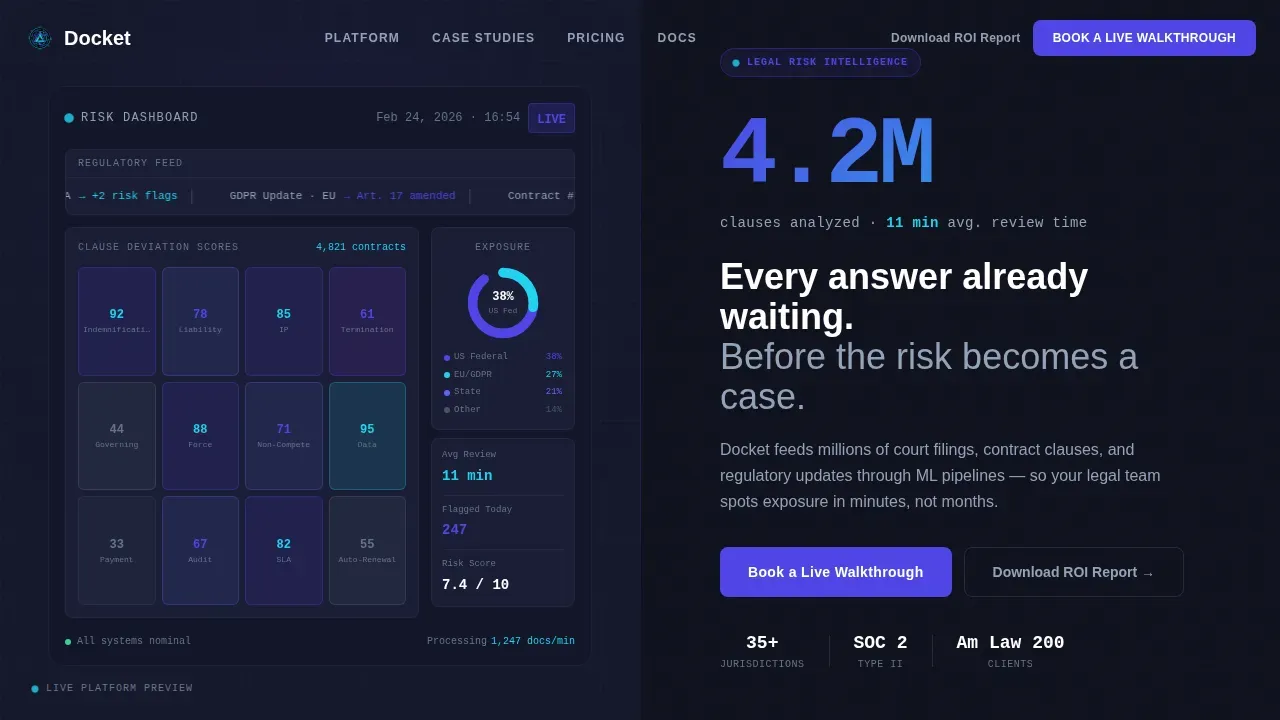
- A split 50/50 hero with a product dashboard screenshot on the left and a bold stat callout on the right
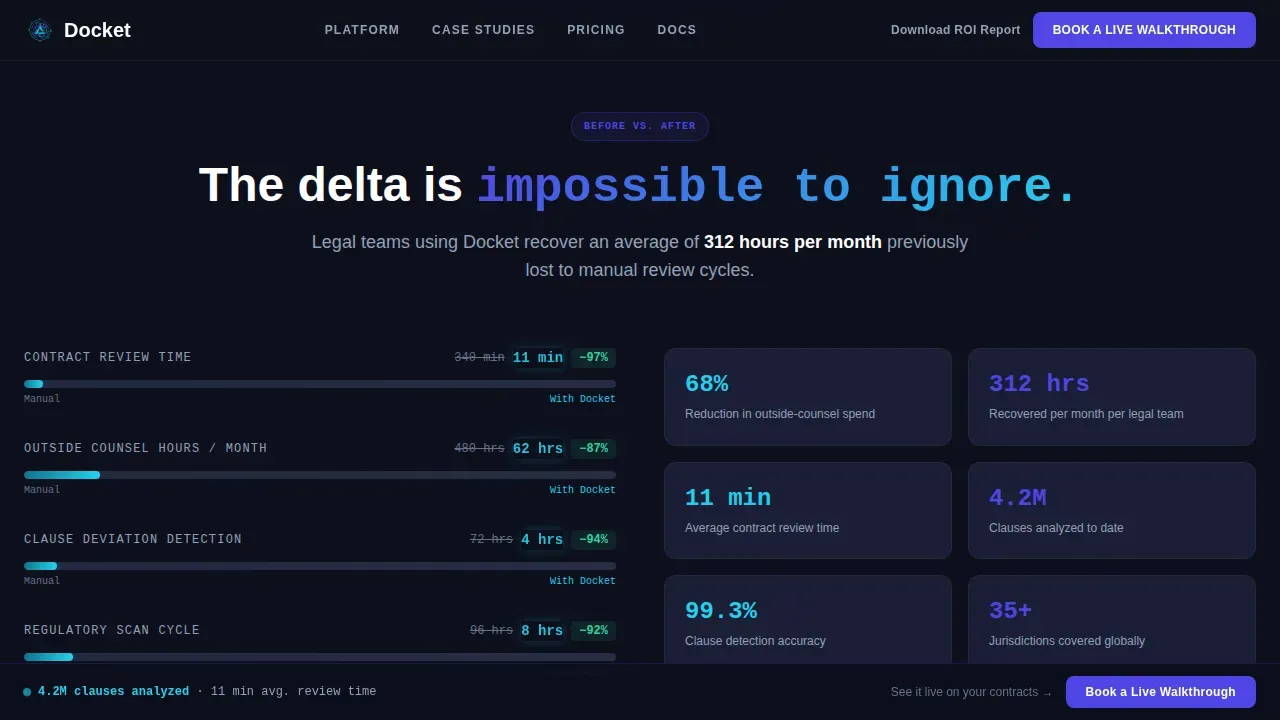
- A before/after metric panel comparing manual review hours versus platform-assisted hours, with a pulsing cyan delta
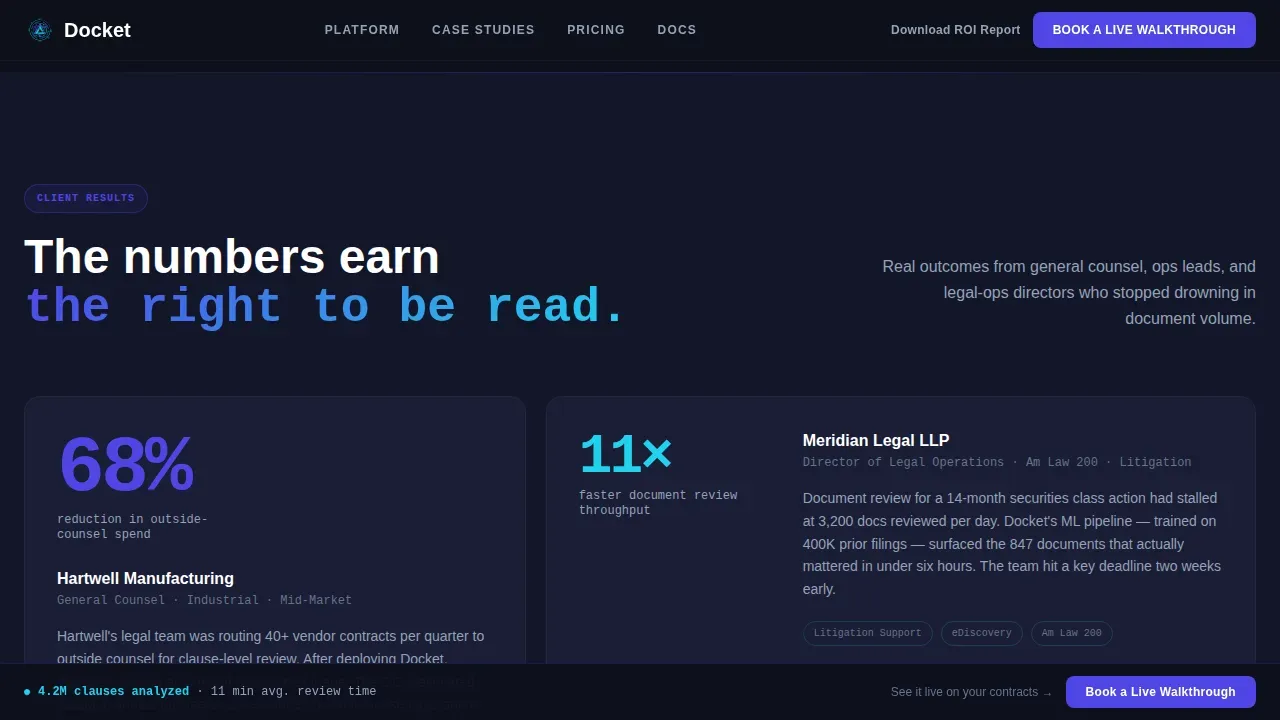
- Three KPI-led case study blocks, each anchored by a headline metric such as a 68% reduction in outside-counsel spend
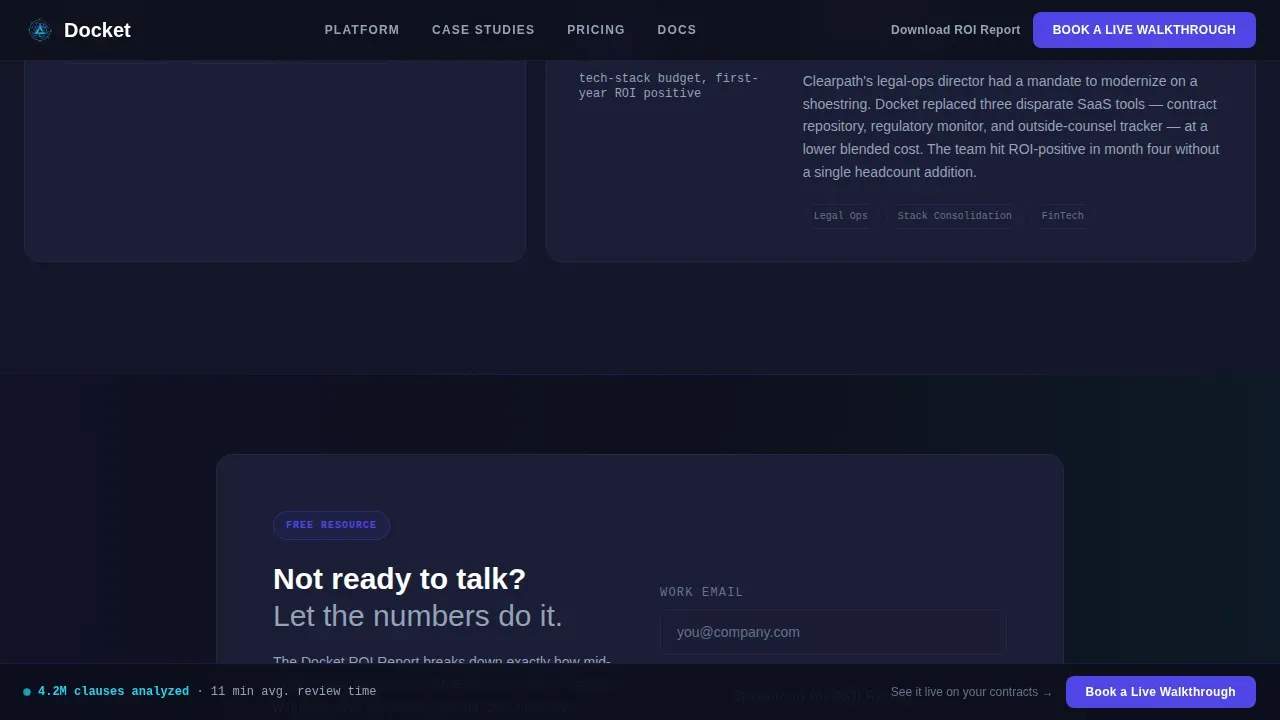
- A gated ROI report download requiring only a work email, for visitors not yet ready to book a demo
- A lead capture form asking for work email, company name, team size, and one optional bottleneck field
- A sticky call-to-action bar that persists on scroll, keeping the primary action always reachable
Feature list
This template is built from six intentional design and layout decisions, each grounded in what legal buyers need to see before they commit.
Stats-First Hero Layout
The hero splits the screen 50/50. The left side holds a crisp product screenshot showing a contract heatmap, a compliance ticker, and a donut chart breaking exposure by jurisdiction. The right side displays "4.2M clauses analyzed. 11 min avg. review time." in oversized indigo type, followed by a one-line subhead and the primary call to action. Numbers are legible, not decorative. The product is the proof.
Before/After Metric Panel
Section two shows the delta that matters. Manual review hours sit on the left in muted slate. Platform-assisted hours pulse on the right in cyan. The gap between the two is impossible to ignore. This panel lets legal professionals evaluate the efficiency gain without reading a word of marketing copy.
KPI-Led Case Study Blocks
Three client case studies each lead with a single hard number. The narrative earns its place only after the metric lands. This structure mirrors how attorneys and legal departments actually assess risk: data first, context second. Each block helps potential clients see themselves in the result and examine the outcome with confidence.
Dual-Path Lead Capture
The primary call to action, "Book a Live Walkthrough," appears in the hero, after the case studies, and in the sticky bar. The secondary path offers "Download the ROI Report" gated behind email-only capture. This dual structure routes the right person into the right funnel without forcing a commitment too early.
Friction-Tested Intake Forms
The walkthrough form collects work email first, then company name, a team size dropdown, and one optional field for the visitor's biggest bottleneck. Keeping forms short reduces drop-off. The optional field surfaces key information that helps the sales team route the inquiry to the right person on day one.
GSAP Scroll Animation System
Staggered number reveals fire on each scroll tick. The before/after panel animates on entry. The sticky call-to-action bar fades in after the hero exits the viewport. Every interaction rewards the click with a cyan pulse, making the experience feel like a live platform rather than a static page.
Page sections overview
| Section | Purpose |
|---|---|
| Split-screen hero | Anchor with product screenshot and oversized stat callout |
| Before/after panel | Show manual versus platform-assisted review hour delta |
| Case study blocks | Deliver KPI-led social proof from real client outcomes |
| ROI report gate | Capture nurture-path emails with a low-friction download offer |
| Walkthrough form | Convert ready buyers into booked demo appointments |
| Sticky call to action bar | Keep the primary action visible on every scroll position |
| Single-row footer | Close with brand anchoring and essential navigation links |
Design & branding system
The visual identity follows a Data Command theme. The palette is inspired by the glow of a financial data terminal: authoritative, addictive, and impossible to look away from. Typography uses DM Sans for headings and JetBrains Mono for all data and number displays.
- Terminal black (#0D0F1C) and charcoal backgrounds keep the focus on data
- Charged indigo (#4F46E5) owns every button, link, and progress bar across the page
- Cool slate (#94A3B8) handles secondary text and chart gridlines without competing for attention
- Cyan (#22D3EE) fires only on interaction and live-data accents, rewarding the click
Mobile & speed optimization
The template is desktop-first by design, reflecting how general counsel and legal operations teams work. Attorneys on workstations need the full dashboard screenshot and metric panel to read clearly at a glance.
- The layout is fully responsive, so the page remains functional and readable on smaller screens
- Server Components handle all static sections for fast initial load; Client Components power the GSAP animations
- Sticky bar and forms adapt cleanly to mobile viewport without losing their conversion function
How this template helps you convert
Leveraging AI as a core message requires a page that earns trust fast. This template escalates confidence with every scroll, moving from product proof to data proof to social proof.
- The hero leads with real platform output and a concrete stat, so legal professionals see the tool's value before reading a single claim
- The before/after panel and case studies build the empirical case, giving attorneys the data-driven context they need to justify a demo request internally
- The dual call-to-action structure captures both ready buyers and earlier-stage researchers, so no qualified lead leaves without a next step
Other information about this template
This template is designed to support legaltech platforms where litigation intelligence, court docket search, and generative AI are core offerings. It bridges the gap between advanced technology and legal practitioners' need for accuracy, security, and efficiency.
- Platforms using document AI and natural language search can use the hero screenshot slot to showcase those interfaces directly
- The case study section supports claims around real time insights drawn from federal and state dockets and state dockets across jurisdictions
- Legal departments and in house legal teams that need to evaluate AI deployment options will find the before/after panel especially persuasive
- The ROI report gate works well for strategic intelligence and litigation intelligence positioning, where buyers need more context before committing
- The template supports messaging around data privacy standards, including language on SOC 2 Type II certification, AES-256 encryption, and the principle that customer data is never used to train public models
- It is well suited for platforms offering real-time citations, so attorneys can verify every AI output against statutes and case law
- The intake forms and dual call-to-action paths reflect best practices for legaltech lead generation: minimal fields, clear routing, and no training required to use the page out of the box
- Teams exploring tools such as CourtLink for court docket search or Westlaw Precision for jurisdiction-specific search results will recognize the template's data-command aesthetic as a natural fit
- The sticky bar and gated download make the template suitable for both direct-response campaigns and content-led nurture sequences targeting opposing counsel and legal departments simultaneously
Theme
Data Command
Creative direction
Stats-First Impact
Color system
Electric Indigo
Style
Split Screen (50/50)
Direction
Lead Generation
Page Sections
Stats-first Split-screen Hero
Before/after Metric Panel
Kpi-led Case Study Blocks
Dual-path Lead Capture System
Persistent Sticky Call to Action Bar
GSAP Scroll Animation System
Related questions
Can I use this template without animation experience?
Does the template support multiple call-to-action paths?
Can I replace the dashboard screenshot with my own product image?
Is this template suited for smaller legal teams or only large law firms?
How does the gated ROI report section work?