Unified D2C API Documentation Landing Page Template
Endpoint is a split-screen landing page template built for direct-to-consumer API platforms. It presents live performance metrics alongside a syntax-highlighted JSON terminal, then walks visitors through interactive endpoint examples before routing them to a sandbox. The template communicates speed, schema clarity, and developer trust without requiring a sign-up first.
by Rocket studio
Quick summary
Endpoint is a single-page, split-screen (50/50) landing page template designed for developer-focused direct-to-consumer (DTC) API platforms. It opens with real performance data on the left and a live JSON response on the right, then scrolls through an interactive endpoint explorer before delivering a full-width call-to-action. The template earns conversions by letting visitors use the API before they sign up.
Who this template is for
This template is built for teams that need to communicate technical value quickly and credibly. It is ideal for developers and product leads who are tired of docs that explain rather than demonstrate.
- Growth engineers at DTC startups who are connecting multiple commerce services and need a single callable surface to replace fragmented point integrations
- Ecommerce chief technology officers evaluating a composable stack and deciding whether to build or buy a unified API layer
- Freelance developers shipping headless storefronts on tight deadlines who need clear api documentation and working request examples from the first page load
What problem this template solves
Most API documentation landing pages either look like a marketing site with no code or a raw reference dump with no narrative. Neither converts the right audience. DTC growth engineers do not need a pitch deck. They need to see the schema, fire a request, and trust the server response before they invest time in a deeper evaluation.
- The template removes the gap between discovery and proof by showing real api endpoints, syntax-highlighted responses, and live latency numbers in the hero itself
- It replaces vague feature claims with interactive code examples that let api consumers test actual calls against mock DTC data before they ever sign in
- It gives ecommerce teams a consistent structure for presenting authentication information, rate limits, parameters, and error handling without burying those details in a separate docs folder
What you get with this template
You get a fully structured, dark-theme landing page that doubles as an interactive api documentation showcase. Every section is built to generate confidence through demonstration rather than description. The template is ready to customize for any rest api or unified DTC platform.
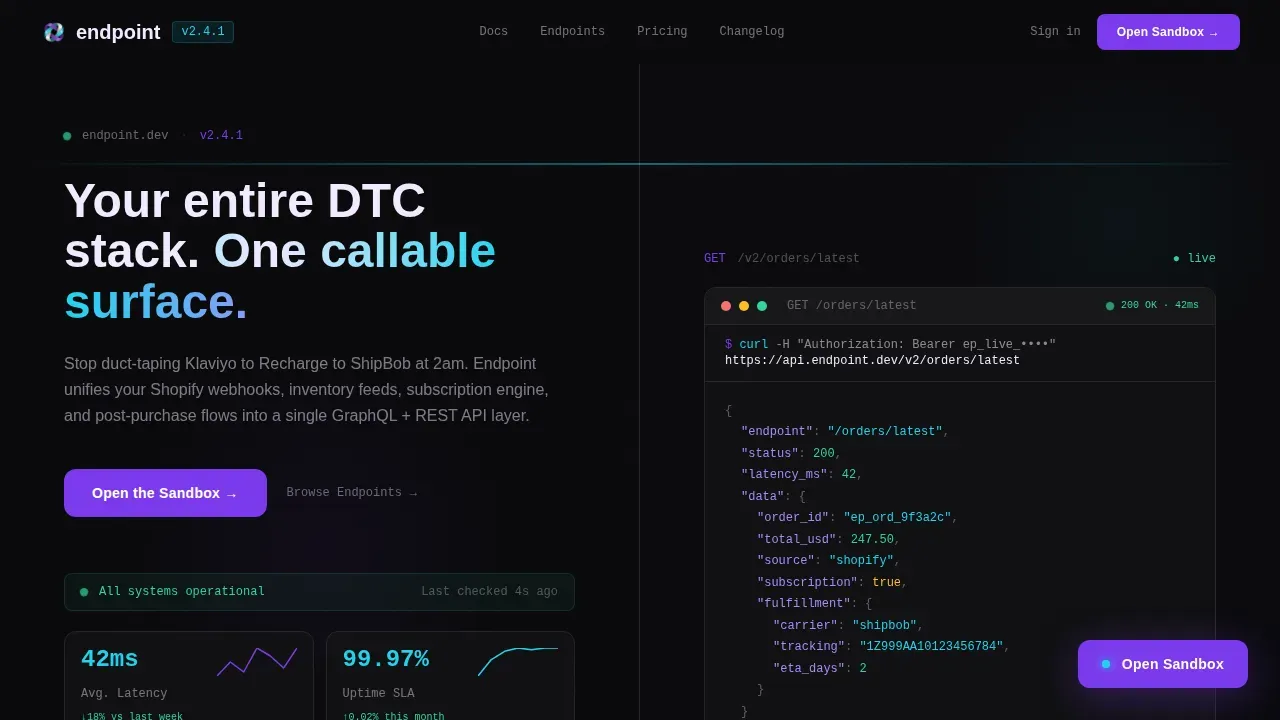
- A split-screen hero with an animated stats dashboard (left panel) and a formatted JSON response body for a live endpoint call (right panel), complete with a blinking cursor and syntax highlights
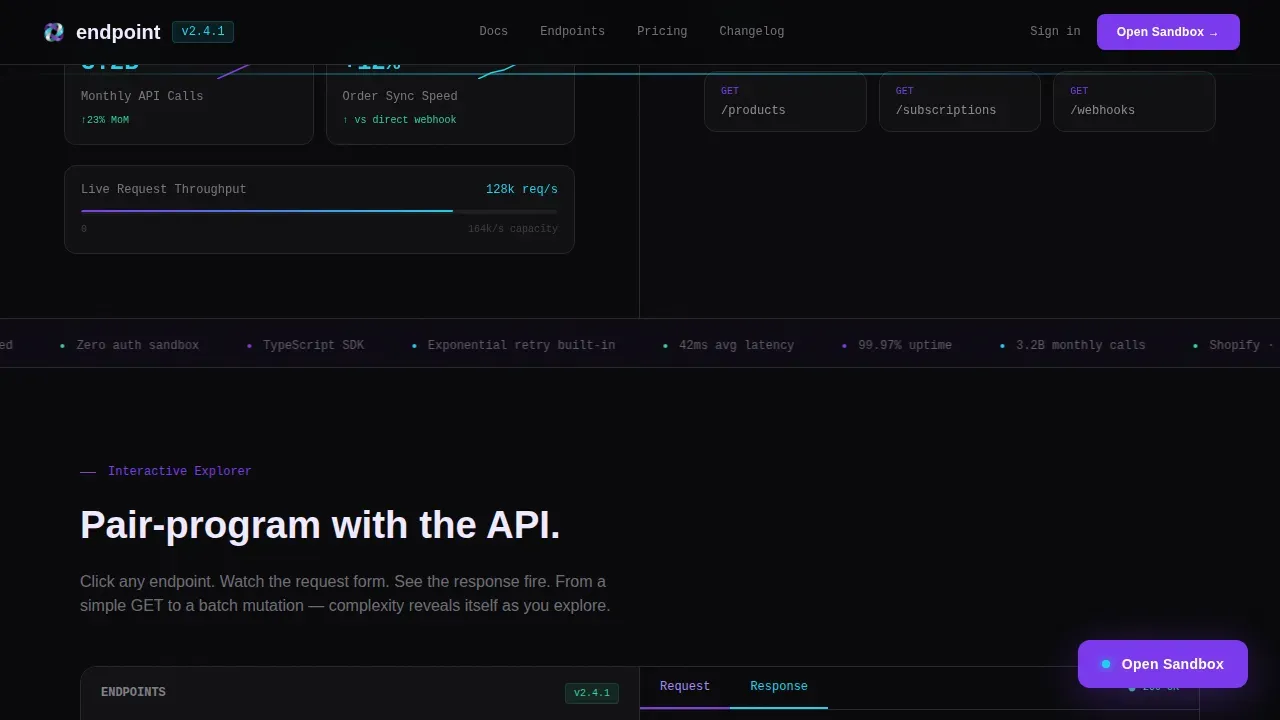
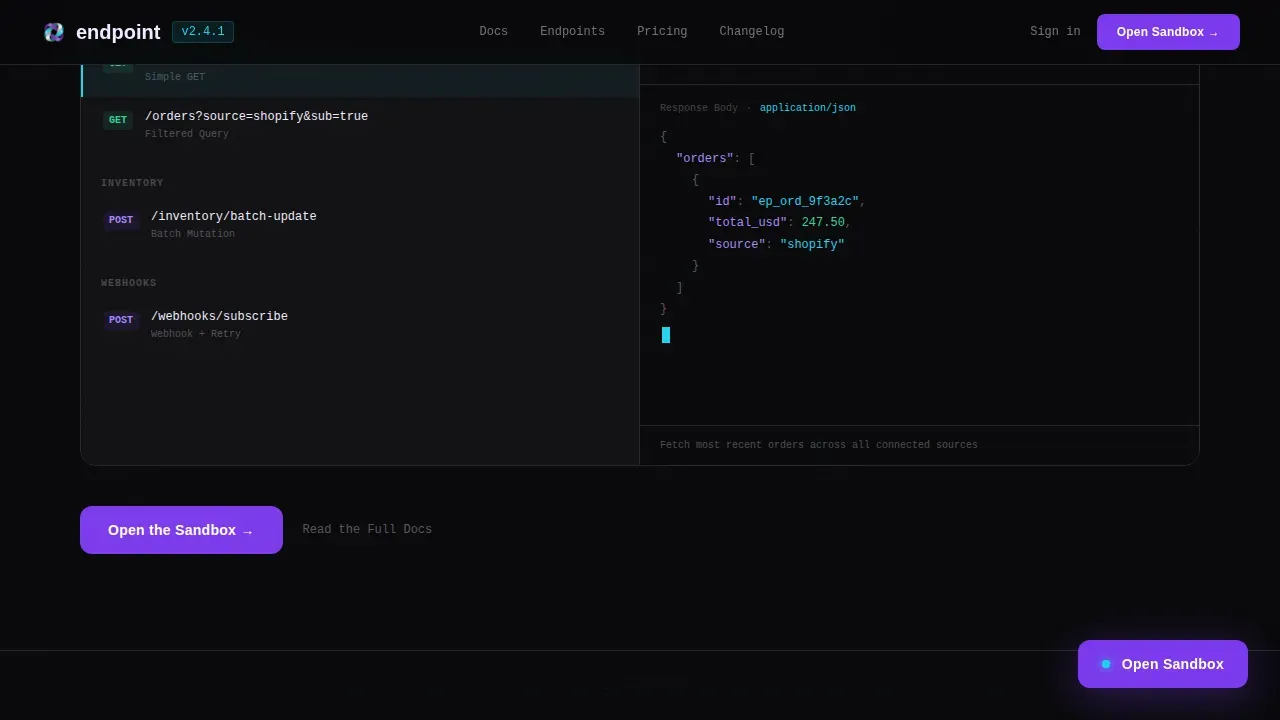
- A scrollable endpoint explorer section where visitors click through api endpoints covering Products, Orders, Subscriptions, and Webhooks, with the right panel rendering live request and response pairs in real time
- A full-width call-to-action bar at the page base that reiterates the sandbox offer, paired with a secondary text link for engineers who want to read the full docs first
Feature list
This template includes purpose-built components that reflect how developers actually evaluate an API platform. Each feature is designed to communicate technical credibility through interaction, not through copy alone.
Split-Screen Stats Hero
The hero divides the viewport into two equal panels. The left panel displays four animated performance metrics rendered in shimmer cyan on a void black background. Numbers tick upward like a stock counter on page load. The right panel shows a formatted JSON response body for a /orders/latest endpoint call, with syntax highlighting and a blinking cursor that makes visitors feel they just executed the request themselves.
Interactive Endpoint Explorer
As the visitor scrolls, the left panel transforms into a navigable endpoint tree organized by resource type: Products, Orders, Subscriptions, and Webhooks. Clicking any item in the tree swaps the right panel to show the corresponding api request and response pair. The complexity increases with each section, moving from a simple GET through filtered queries with a query string parameter, then a webhook subscription with retry logic, then a batch mutation.
Syntax-Highlighted Code Panels
Every code panel in the template renders example requests and responses with full syntax highlighting. The color system distinguishes http methods, url paths, required parameters, status code values, and response payload data. Each code snippet is legible at a glance, so developers can assess schema quality without needing to sign in or access separate docs.
Zero-Auth Sandbox Call-to-Action
The primary call-to-action, labeled "Open the Sandbox," appears twice: first as a floating button after the second endpoint demo and again as a full-width bar at the page base. The final call-to-action reiterates the main offer. Clicking routes visitors to a zero-authentication playground where they can fire test calls against mock DTC data. No form fields appear on this page before the click.
Performance Proof Bento
A dedicated section presents latency benchmarks, uptime figures, and call volume data in a bento-style layout. These real numbers serve as social proof and communicate server reliability without requiring a case study. The layout supports analytics context for ecommerce teams assessing platform health before committing to an integration.
Developer-Minimal Footer
The footer follows a GitHub-style developer-minimal pattern. It keeps the page focused and avoids adding visual noise after the final call-to-action. Links to reference docs and support resources are available without cluttering the conversion flow.
Page sections overview
| Section | Purpose |
|---|---|
| Split-Screen Hero | Animate live stats left, render JSON response right |
| Endpoint Explorer | Let visitors click api endpoints and see live responses |
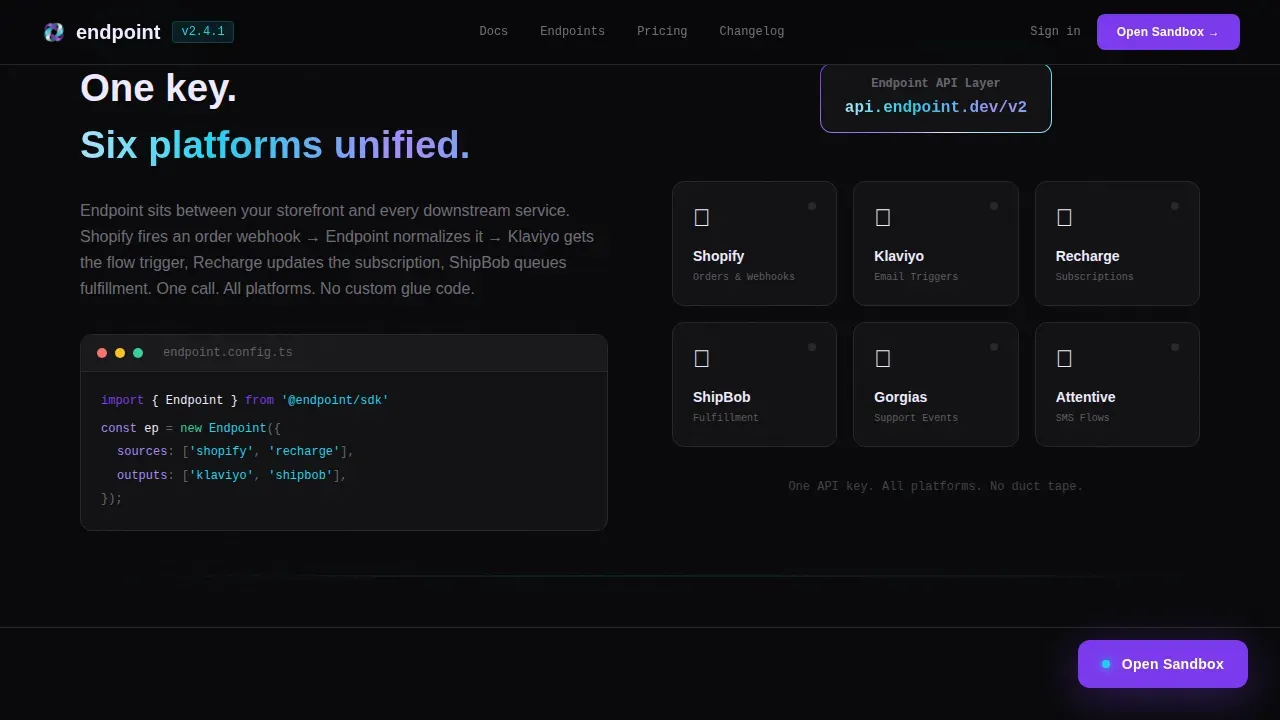
| Integration Showcase | Visualize unified commerce service connections |
| Performance Proof Bento | Display latency, uptime, and call volume data |
| Call-to-Action Bar | Deliver full-width sandbox prompt and docs link |
| Developer-Minimal Footer | Close page with reference links and support access |
Design & branding system
The template uses a Data Command visual identity built on an AI Iridescent color system. The palette feels like light refracting through a prism on a matte black surface. Colors appear only when data moves, as if the user interface itself is bioluminescent and the api calls are what make it glow.
- Void black (#09090B) anchors all backgrounds; holographic violet (#7C3AED) appears on active states, syntax highlights, and the primary call-to-action button; shimmer cyan (#22D3EE) renders response payloads and success indicators; shifting pearl white (#F0EAFF) is used for text and panel surfaces
- JetBrains Mono is the typeface for all code, code snippet blocks, and terminal-style panels; DM Sans handles all user interface labels, navigation, and body copy outside code contexts
- Sparkline charts beneath each metric use holographic violet to reinforce the data-in-motion aesthetic, and staggered JSON line reveals add motion to the response panel without relying on video
Mobile & speed optimization
The template is designed desktop-first to match the primary audience of engineers working on laptops, while remaining responsive for mobile access. All animations use GPU-accelerated transforms only, and layout adjustments are handled through CSS custom properties, keeping the experience smooth across screen sizes.
- The split-screen layout collapses gracefully on smaller screens, stacking the stats panel above the JSON response panel so code examples remain readable without horizontal scrolling
- Ticker counter animations, blinking cursor effects, and syntax highlight reveals are all implemented with performance-conscious techniques to avoid layout shifts during page load
- Code snippet blocks and html content panels are formatted to reflow correctly on mobile, so developers reviewing the page on a phone can still read request and response structures clearly
How this template helps you convert
Good api documentation helps onboard external users and helps internal teams work efficiently across services. This template applies that principle to the landing page itself, treating every scroll interaction as a proof point rather than a promise.
- The hero delivers immediate social proof through real performance numbers and a live JSON response, so visitors form a positive first impression before reading a single line of marketing copy. Keeping api documentation current is crucial, and showing it in motion builds instant trust.
- The endpoint explorer deepens engagement by letting api consumers interact with the api documentation directly on the page. Each click through the endpoint tree demonstrates schema clarity, correct http methods, and clean responses. Visitors who interact convert at higher rates than visitors who only read.
- The final call-to-action reiterates the sandbox offer at the exact moment visitor confidence peaks, routing them to a zero-auth playground where they can generate real api requests and validate the platform for themselves before they sign up.
Other information about this template
This template is classified under the Startup and Launch category with a D2C Brand Startup subcategory, targeting the D2C Brand API Documentation niche. It is the endpoint unified d2c api documentation landing page template in this collection, and it is well-suited for teams building or marketing developer-facing platforms.
- The template supports customization for other types of rest api platforms beyond DTC commerce, including public apis for inventory, fulfillment, and subscription services
- Developers can edit the endpoint tree folder structure to reflect their own api endpoints, define custom url paths, and update parameters, authentication information, and status code descriptions to match their actual api reference
- The html content and html structure of each panel are built to be edited without restructuring the layout; teams can search and replace placeholder data, update the json response bodies, add xml format examples alongside json, or swap in php and javascript code examples as needed
- Authentication flows shown in the explorer are built to communicate centralized authentication concepts, including api keys and token-based access, reflecting best practices for unified DTC apis where centralized authentication handles OAuth flows and credential management for all connected platforms
- The template version delivered here is English-language, USD-formatted, and uses US date formats by default; metadata and description fields can be updated to support other locales
- Rate limits, error messages, and http status codes are presented inline within the endpoint explorer panels, so api consumers understand error handling and rate limit behavior before they sign in
- The template supports tutorials and reference documentation links through the footer and the secondary "Read the Full Docs" text link, giving developers a clear path to deeper api documentation without cluttering the main conversion flow
- Using an api documentation template like this one can save time and ensure consistency across documentation efforts; it serves as a single source of truth for all people working with the api, from growth engineers to ecommerce platform evaluators
Theme
Data Command
Creative direction
Interactive Explorer
Color system
AI Iridescent
Style
Split Screen (50/50)
Direction
Click-Through
Page Sections
Split-screen Animated Stats Hero
Interactive Endpoint Explorer
Syntax-highlighted Code Panels
Zero-auth Sandbox Call-to-action
Performance Proof Bento Section
Developer-minimal Footer with Docs Link
Related questions
Can I customize the endpoint tree to match my own API structure?
Does this template include actual API functionality or live server connections?
What authentication details does the template cover in the explorer?
Is this template suitable for documenting public APIs or only private DTC platforms?
Where does the 'Open the Sandbox' button route visitors?