Immersive Music Production Podcast Landing Page Template
Fader is an editorial landing page template built for music production and mixing podcasts. It combines a full-bleed analog console hero, a Day-in-the-Life scroll structure, and a five-question "Find Your Mix Style" quiz that matches listeners to a production archetype and serves a personalized episode playlist before asking for a single email.
by Rocket studio
Quick summary
Fader is a Heritage-editorial landing page template designed for music production and mixing podcasts. It opens with a grain-heavy console photograph, moves through four intimate content sections named after studio workflow stages, and closes each visit with an interactive archetype quiz that earns the subscriber opt-in by delivering real value first.
Who this template is for
This template is built for podcast creators operating at the intersection of craft and community. It suits hosts who want their page to feel as considered as the episodes inside it.
- Home-studio producers looking to grow a loyal listener base around real signal-chain conversation
- Session musicians and working engineers who want a platform that reflects professional credibility
- Independent podcast hosts in the music production and mixing niche who need editorial depth without a custom build
What problem this template solves
Generic podcast landing pages treat every visitor the same. They list episodes, drop a subscribe button, and hope for the best. That approach loses the listener who needs a reason to trust the show before committing.
- Visitors arrive without context and leave before hearing a single episode
- A flat episode list cannot communicate the depth or the voice of a craft-focused show
- There is no moment that proves the podcast understands how the visitor actually works
What you get with this template
You get a complete single-page editorial layout structured around one episode's journey from first coffee to final bounce. Every section builds intimacy intentionally, moving the visitor from curious observer to committed subscriber.
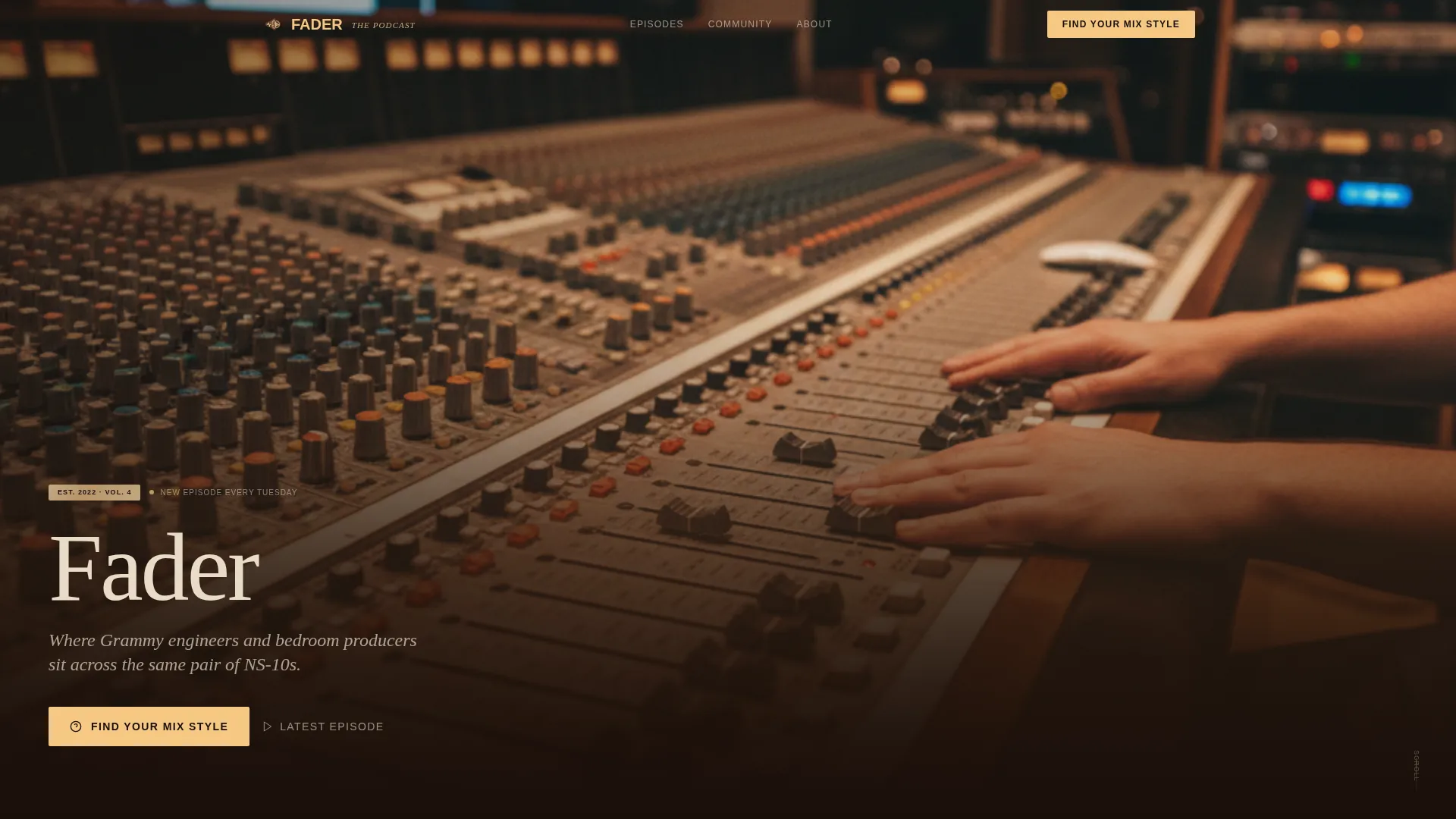
- A full-bleed header with a film-title-card fade-in animation and an immediate quiz call to action
- Four editorially named content sections: Load-In, Tracking, Rough Mix, and Playback
- A five-question interactive quiz that identifies the visitor's production archetype and serves a personalized episode playlist
Feature list
This template packages several distinct interactive and editorial components into one cohesive layout.
Film-Title-Card Hero Animation
The header opens on a grain-heavy, warm-toned console photograph. The podcast name and tagline fade up over the dark lower third using CSS keyframe animation, styled like a film title card appearing over the engineer's shoulder.
Five-Question Archetype Quiz
The "Find Your Mix Style" quiz asks five workflow-specific questions referencing real gear choices, such as compressor preferences on vocals. It identifies one of five production archetypes: Analog Purist, Hybrid Engineer, In-the-Box Producer, Sound Designer, or Beat Architect.
Personalized Episode Playlist Result
On quiz completion, the result page serves a starter playlist of episodes matched to the visitor's archetype. A secondary call to action, "Get Your Playlist and Subscribe," requires only an email address and preferred podcast platform.
Waveform Scrubber Episode Player
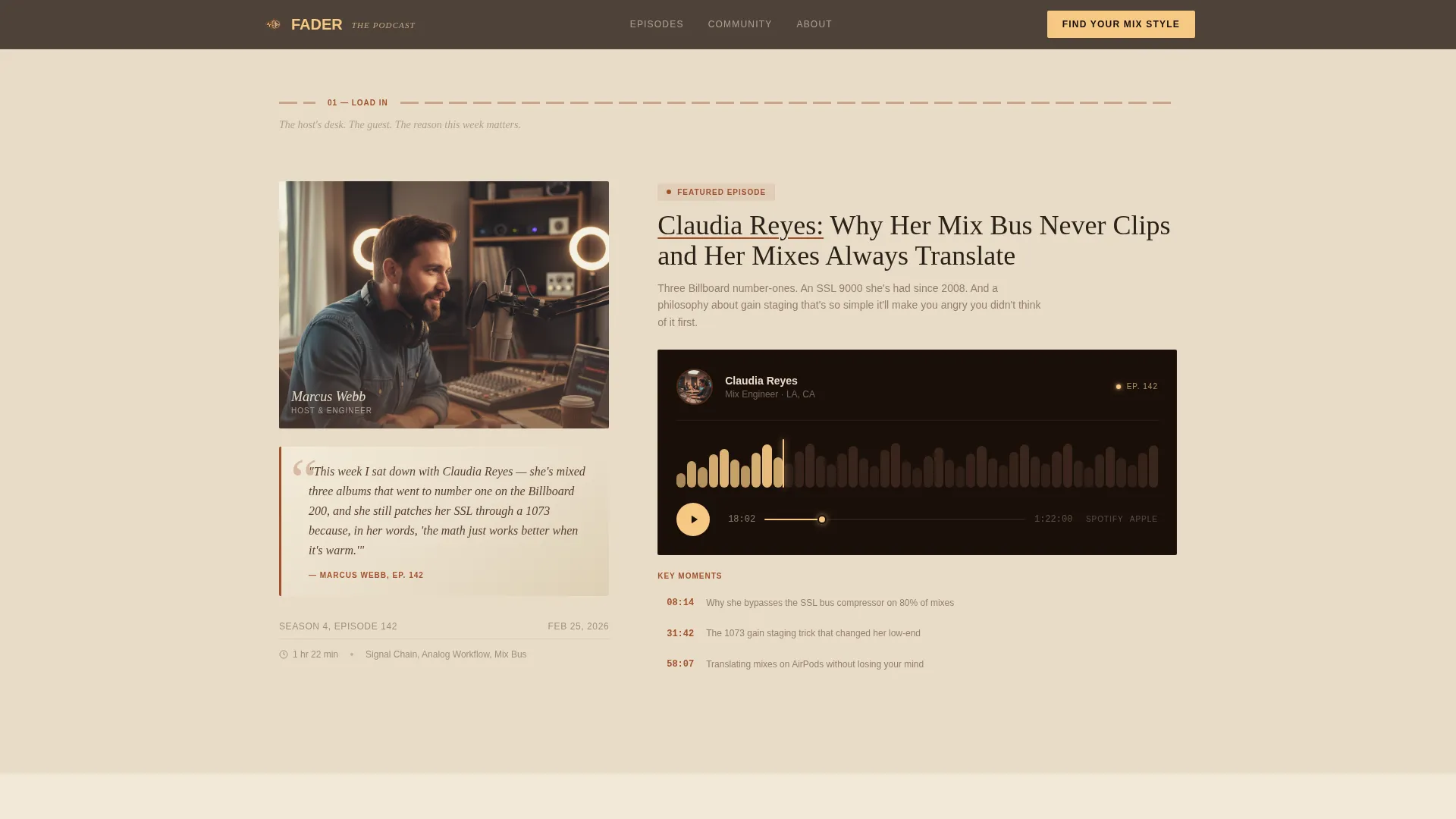
The Load-In section features a featured episode player with a waveform scrubber simulation. It places the audio experience directly in the editorial flow rather than redirecting visitors to an external platform page.
Magazine-Style Episode Cards
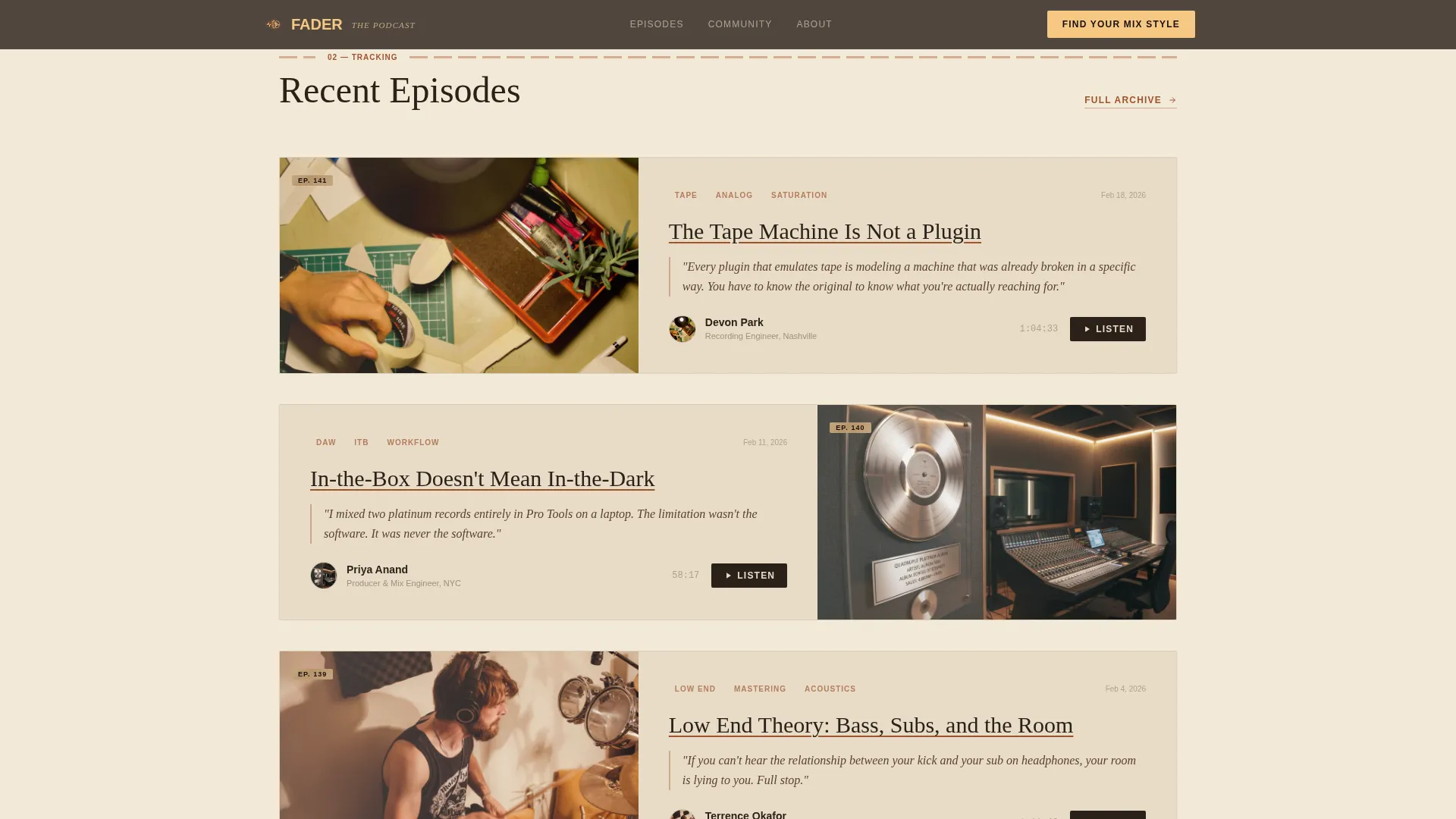
The Tracking section presents three recent episodes as editorial feature cards. Each card includes a pull-quote, key-moment timestamps, and a guest photo shot in their own studio, giving the section the weight of a printed music magazine spread.
Liner-Note Testimonials Layout
The Playback section formats guest testimonials and listener reviews as album liner notes. The treatment turns social proof into an art object that fits the Heritage editorial tone rather than feeling like a reviews widget.
Page sections overview
| Section | Purpose |
|---|---|
| Hero Console Header | Opens with full-bleed photo and film-title fade-in animation with quiz call to action |
| Load-In Episode Player | Features the host desk quote and waveform scrubber episode player |
| Tracking Episode Cards | Presents three recent episodes as magazine feature cards with pull-quotes and timestamps |
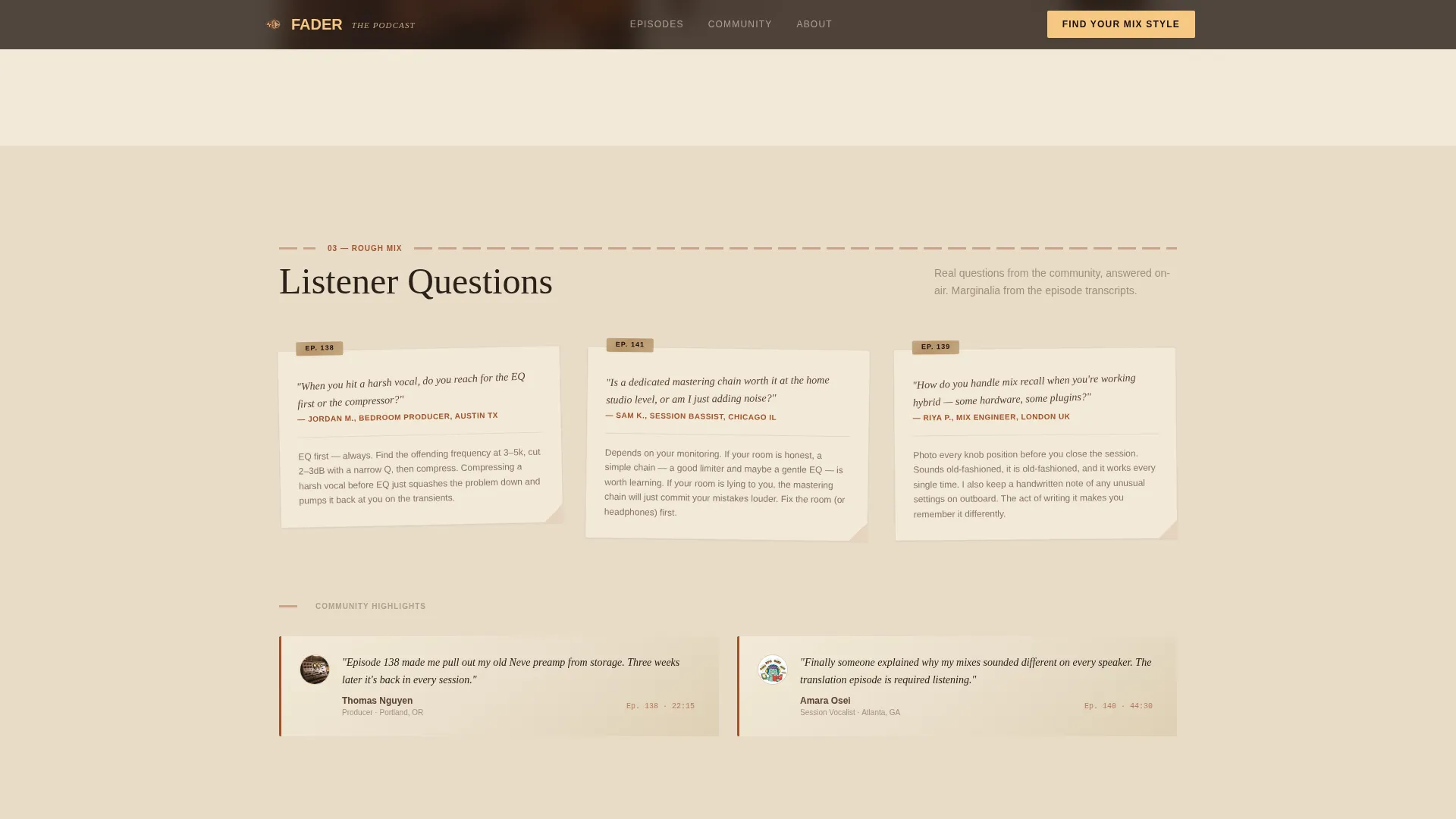
| Rough Mix Community | Displays listener questions and highlights as handwritten-style marginalia beside episode clips |
| Playback Testimonials | Formats past guest and listener testimonials as album liner notes with quiz conversion |
| Footer Horizontal Flow | Closes the page with a horizontal flow footer pattern |
Design & branding system
The visual identity follows a Heritage and Story theme anchored in a Warm Stone color system. Every color choice references the physical world of a seventies-era control room, from oak console trim to faded masking-tape track labels.
- Aged parchment (#E8DCC8) backgrounds and studio walnut (#5C4033) primary tones keep the editorial atmosphere warm and tactile throughout the scroll
- Oxide reel-tape brown (#A0522D) underlines episode titles like pencil marks in a dog-eared production manual, while soft tungsten glow (#F5C882) activates on hover states and pull-quote highlights
- Typography pairs Fraunces, an editorial serif, with DM Sans for body copy, supporting effortless long-form reading in near-black (#2B2118)
Mobile & speed optimization
The template is designed desktop-first to honor the long-form editorial reading experience the layout demands. A mobile-responsive fallback ensures the content remains readable and functional on smaller screens.
- Scroll-linked reveals use the Intersection Observer API so section content appears as the visitor reads down the page
- Native CSS scroll handles all transition behavior without external scroll libraries, keeping the dependency footprint low
- Waveform SVG animation and quiz state machine are built in vanilla CSS and JavaScript, avoiding heavy framework overhead
How this template helps you convert
The conversion architecture earns the opt-in rather than demanding it. Each stage of the page builds enough trust that the final ask feels natural.
- The quiz opens the conversation with a genuine workflow question, demonstrating that the podcast understands how the visitor actually produces music before they have listened to a single episode.
- The personalized archetype result and matched episode playlist give the visitor something concrete to take away, making the "Get Your Playlist and Subscribe" call to action feel like a continuation of value rather than a cold email capture.
Other information about this template
This template is part of the Blog and Editorial category with a subcategory focus on Music Production and Mixing Content. It is positioned specifically for the Music Production and Mixing Podcast niche.
- The Day-in-the-Life creative direction ties every section to a studio workflow metaphor, Load-In through Playback, giving the page a narrative arc that keeps visitors reading
- The Quiz and Assessment landing-page direction is central to the template's conversion model, not an add-on widget
- The template is localized for English-language audiences using United States date formats and USD where pricing context applies
- High animation fidelity is built in through CSS keyframes and Intersection Observer reveals, with no dependency on third-party scroll libraries such as Lenis
Theme
Heritage & Story
Creative direction
Day-in-the-Life
Color system
Warm Stone
Style
Editorial/Magazine
Direction
Quiz/Assessment
Page Sections
Film-title-card Hero Animation
Five-question Archetype Quiz
Personalized Episode Playlist Result
Waveform Scrubber Episode Player
Magazine-style Episode Cards
Liner-note Testimonials Layout
Related questions
Who is this template designed for?
What does the Find Your Mix Style quiz actually do?
Does the template include a working audio player?
Can I use this template for a podcast outside the music production niche?
What typography does this template use?



