CleanTech Startup Specialist Reviews Website Template
Flux is a scroll-reveal landing page template built for cleantech seed-stage startups. It opens with a live energy waste calculator, then unfolds a series of glassmorphic spec panels covering data integrations, anomaly detection, benchmark comparisons, and a reporting dashboard preview. The design converts visitors by showing them their own waste number before asking for anything in return.
by Rocket studio
Quick summary
Flux is a single-page, scroll-reveal landing page template for a cleantech seed-stage platform. It leads with an interactive energy waste calculator, then progressively reveals data-rich spec panels as the visitor scrolls. The visual system uses deep void black, frosted glass cards, and electric teal data accents to create a control-room atmosphere that feels urgent and credible.
Who this template is for
This template is built for founders and growth teams launching a cleantech energy intelligence platform at the seed stage. It speaks directly to the buyers that matter most at that stage.
- Facilities managers overseeing mid-rise office portfolios who need to justify operational changes with hard numbers
- Sustainability officers chasing Scope 2 emissions targets ahead of board reporting season
- Property developers who need documented energy models to qualify for green bond financing
What problem this template solves
Commercial building owners rarely know exactly how much energy is wasting right now, in dollars, per hour. Generic landing pages cannot show that number. Flux solves the credibility gap at the top of the funnel.
- Visitors arrive skeptical and leave without converting because the value is abstract
- A static hero image cannot demonstrate a live data platform the way an interactive calculator can
- Cleantech buyers need to see evidence first and a sign-up form second
What you get with this template
You get a complete, production-ready landing page layout designed around a progressive scroll reveal structure. Every section is a discrete glassmorphic panel that materializes as the visitor scrolls deeper.
- An interactive calculator header that ingests three visitor inputs and outputs estimated annual energy waste, equivalent carbon dioxide tonnage, and a recoverable savings figure
- A spec-sheet scroll sequence covering data integrations, anomaly detection, benchmark comparisons, and a reporting dashboard preview
- A freemium conversion flow with a primary free-trial call to action and a secondary portfolio demo path surfaced at the right moment
Feature list
This section details the core functional and visual capabilities built into the Flux template.
Live Energy Waste Calculator Header
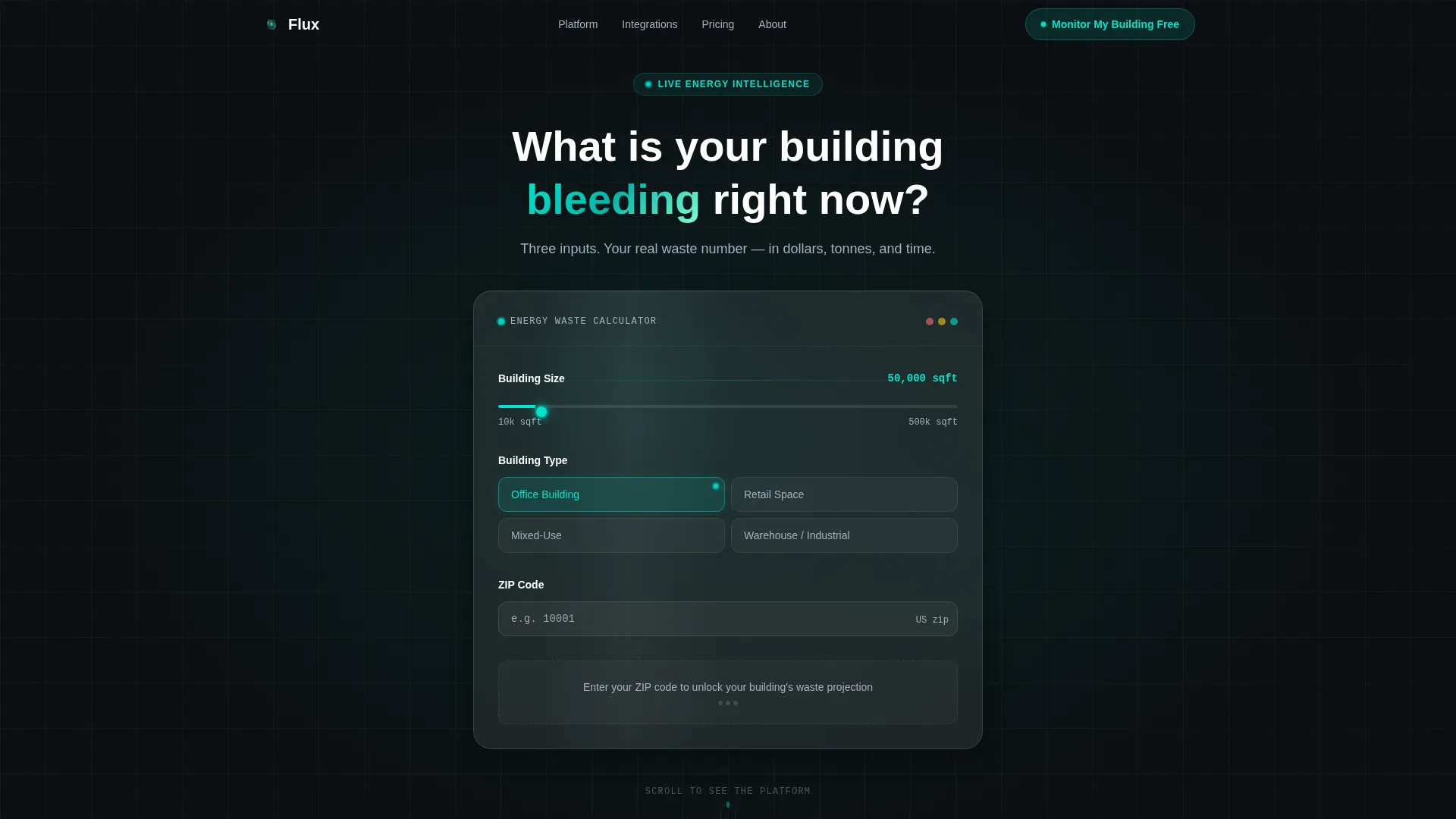
The page opens with a single frosted-glass card asking for building square footage, building type, and zip code. As each field is filled, the card expands in real time, rendering estimated annual energy waste in dollars, equivalent carbon dioxide tonnage, and a ticking recoverable savings figure. The visitor's own data becomes the hero of the page.
Scroll Reveal Spec Panel Sequence
After the calculator delivers its output, each scroll step surfaces one frosted panel at a time. Every panel functions as a discrete spec module, rising with a soft parallax blur-to-sharp transition that makes the scroll feel like walking deeper into a command center.
Anomaly Detection Module
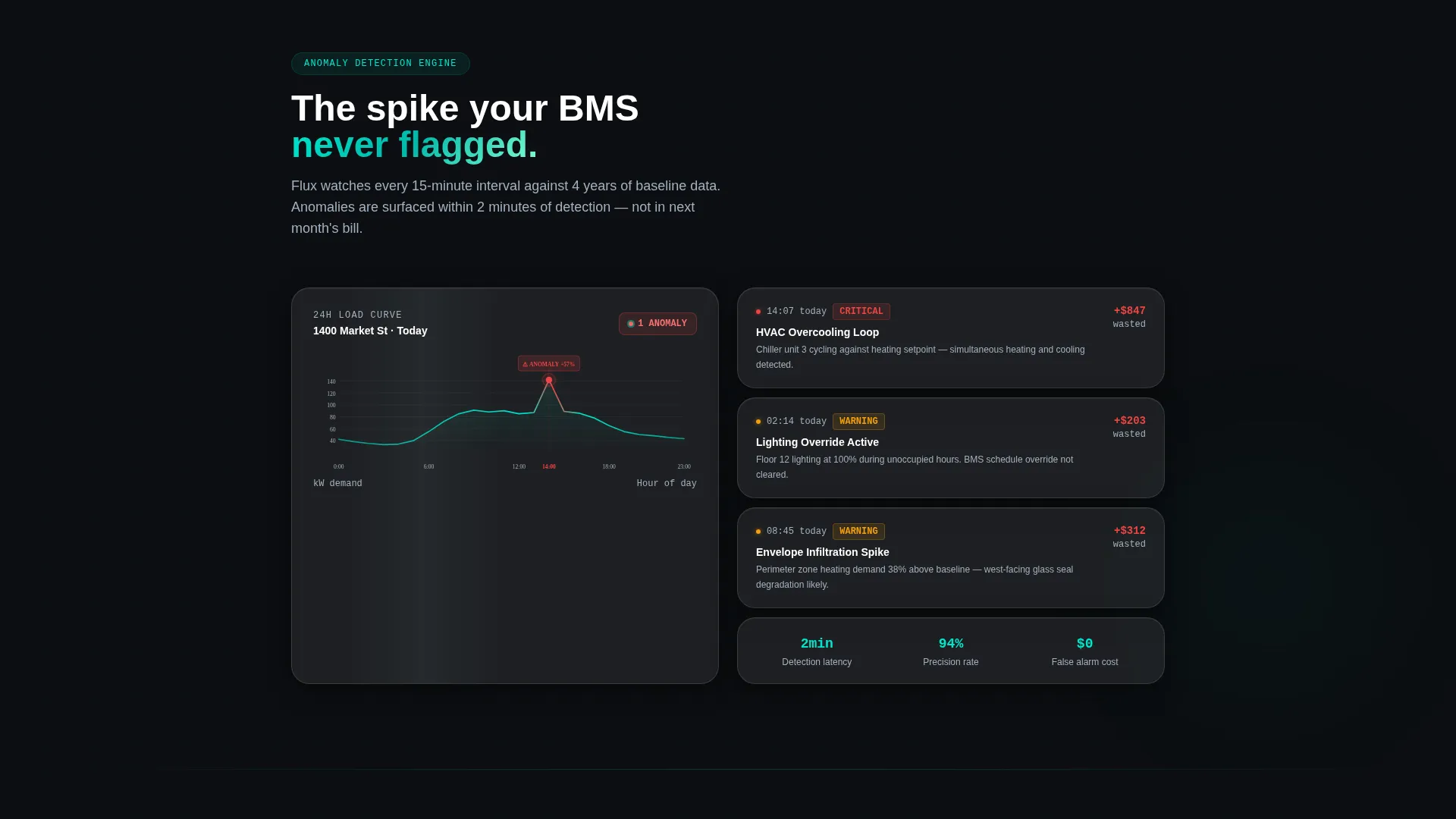
One dedicated panel showcases the anomaly detection engine with a micro-animation that flags a spike in a 24-hour load curve. This gives technical buyers a visual proof point without requiring a live demo call.
Benchmark Comparison Panel
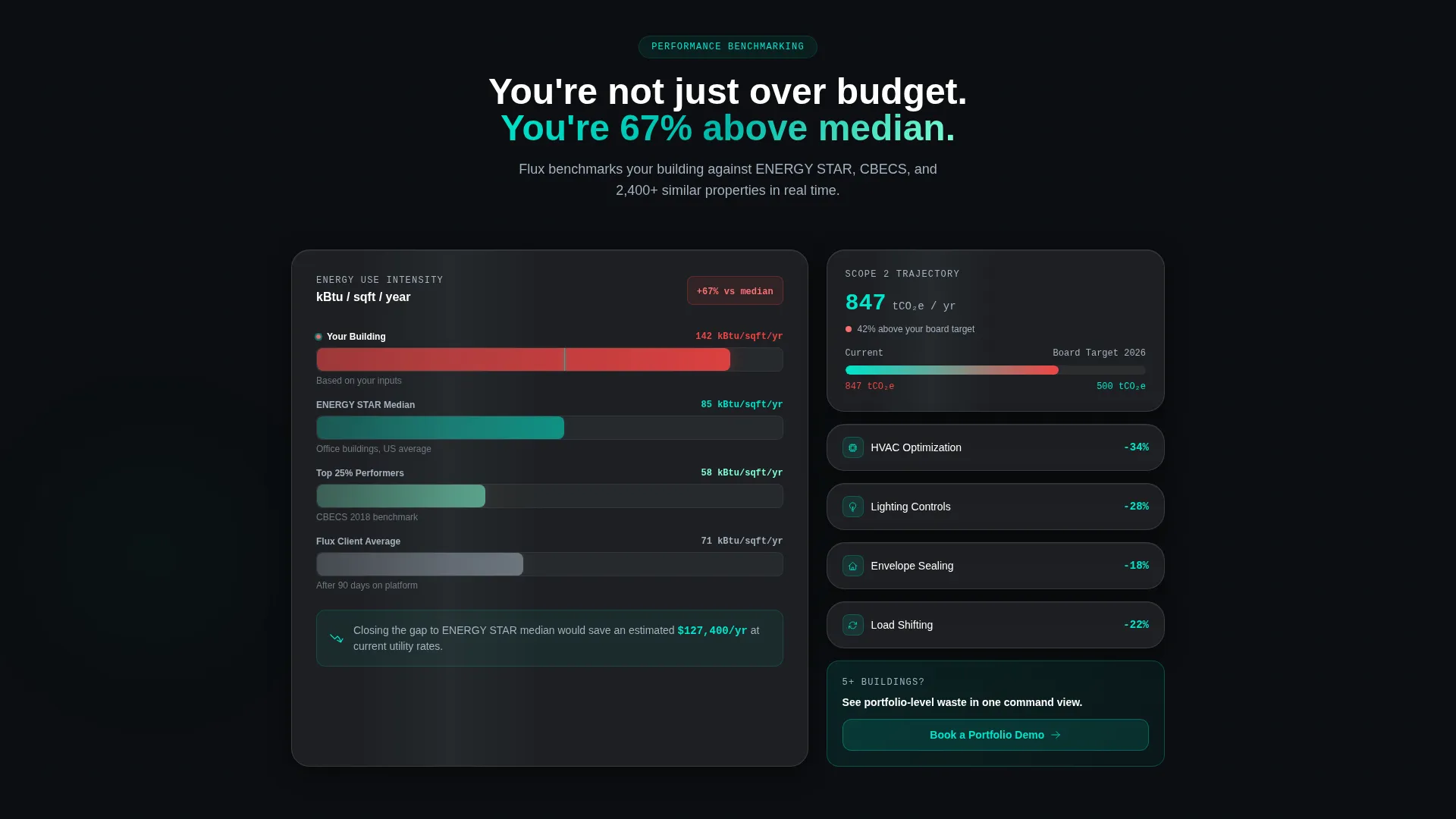
A layered bar chart panel renders the visitor's estimated building performance against an industry median. The chart emerges from nothing as the panel enters the viewport, making the performance gap immediately visible and emotionally resonant.
Freemium Two-Step Signup Flow
The primary call to action, "Monitor My Building Free," appears first inside the calculator results card and again as a persistent frosted pill in the bottom navigation bar. Clicking opens a two-step flow: step one captures work email and building name, step two asks for a utility bill upload or a manual monthly spend entry.
Secondary Portfolio Demo Path
A "Book a Portfolio Demo" conversion path is surfaced specifically after the benchmarking section, targeting facilities managers with five or more buildings. The placement is intentional: it appears only after the multi-site cost pain has been made visible.
Page sections overview
| Section | Purpose |
|---|---|
| Calculator Header Card | Captures three visitor inputs and outputs a personalized energy waste estimate in real time |
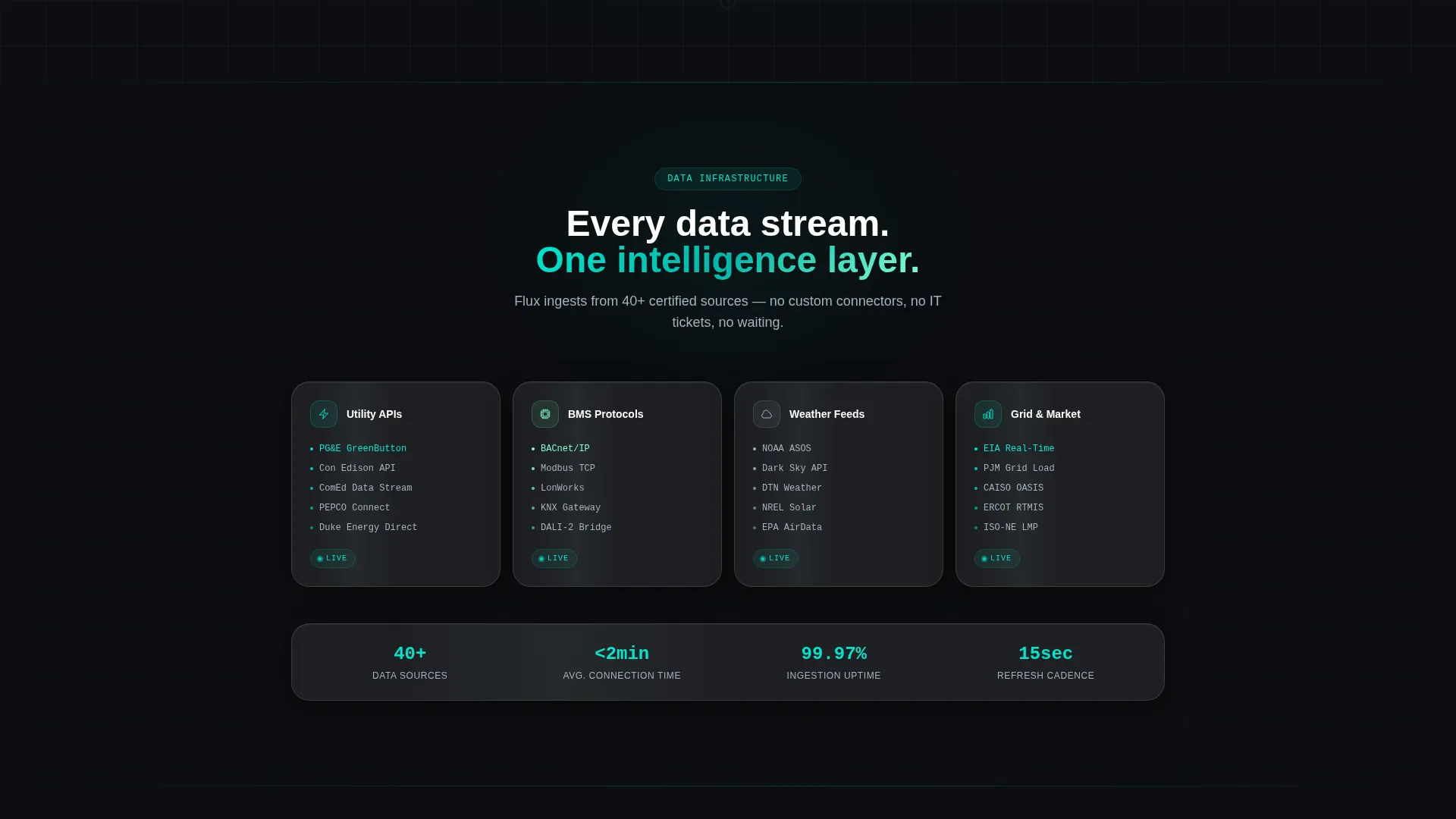
| Data Integrations Panel | Highlights utility application programming interface connections, building management system protocols, and weather feed sources |
| Anomaly Detection Panel | Demonstrates the spike-flagging engine with an animated 24-hour load curve |
| Benchmark Comparison Panel | Compares visitor building performance against an industry median using emerging bar charts |
| Reporting Dashboard Preview | Shows a glassmorphic card with an auto-generated board-ready report and Scope 2 breakdowns |
| Bottom Nav Persistent call to action | Keeps the free-trial pill visible as a frosted floating element throughout the scroll |
Design & branding system
The Flux template uses a Data Command visual theme built on a glassmorphic color system. The palette reads like a rain-streaked control room at night: everything glows softly against structural darkness.
- Deep void black (#0B0E11) forms the base layer, electric teal (#00E5CC) drives live data accents and interactive states, frosted translucent panels at roughly 8% white opacity float above the dark field, and cool signal gray (#A3B1BF) handles secondary text and axis labels
- Glassmorphic cards use backdrop blur and subtle border luminance so each section feels like a separate instrument panel materializing as you approach it
- The scroll reveal cadence follows a Spec Sheet creative direction: each panel rises with a parallax blur-to-sharp transition, so the visual rhythm reinforces the intelligence of the underlying platform
Mobile & speed optimization
The template is designed so the scroll reveal experience translates cleanly across screen sizes. The progressive panel structure naturally supports narrower viewports without sacrificing the data-heavy layout.
- Each glassmorphic card stacks vertically on smaller screens, keeping the calculator and spec panels readable on mobile devices
- The persistent frosted pill call to action in the bottom navigation bar remains accessible throughout the scroll on all screen sizes
- Micro-animations such as the load curve spike flag and the benchmark bar chart emergence are scoped to individual panels, so they trigger correctly regardless of scroll speed or device type
How this template helps you convert
Flux is built around a single conversion insight: buyers trust evidence more than promises. The entire page is structured to deliver evidence before asking for a commitment.
- The calculator header converts passive curiosity into personal stakes. The visitor sees their own projected waste number in glowing teal before the page has asked for anything, making the free trial feel like the obvious next step rather than a leap of faith.
- The scroll sequence builds technical credibility spec by spec. By the time the visitor reaches the freemium call to action again at the bottom navigation bar, they have seen data integrations, anomaly detection, benchmarking, and a reporting dashboard, making the platform feel real and already working.
- The secondary "Book a Portfolio Demo" path is placed immediately after the benchmark panel, targeting the exact moment when a multi-building facilities manager feels the gap between their current performance and what the platform could surface.
Other information about this template
Flux is categorized under the Startup and Launch category with a CleanTech Startup subcategory, reflecting its fit for early-stage energy intelligence ventures. A few additional details are worth noting.
- The template is built for a single-page, section-led landing page flow, not a multi-page website structure
- The freemium model is baked into the layout logic: the 30-day free anomaly alert offer for one building, with no credit card required, is surfaced inside the calculator results card where the visitor's motivation is highest
- The creative direction follows a Spec Sheet cadence, meaning each scroll panel is treated as a product specification module rather than a marketing section, which aligns with the technically literate buyer personas this template targets
- The page does not use stock photography or a traditional hero image; the visitor's three-input data output is the visual centerpiece of the above-the-fold experience
Theme
Data Command
Creative direction
Spec Sheet
Color system
Glassmorphic
Style
Scroll Reveal (Progressive)
Direction
Freemium/Trial
Page Sections
Live Energy Waste Calculator
Scroll Reveal Spec Panel Layout
Anomaly Detection Micro-animation
Benchmark Comparison Chart Panel
Freemium Two-step Signup Flow
Secondary Portfolio Demo Conversion Path
Related questions
What kind of startup is this template designed for?
Can I edit the calculator inputs and output labels to match my platform?
Does the template include the two-step signup flow layout?
Who are the secondary buyer personas this page speaks to?
Is the persistent bottom navigation call to action included?