Manufacturing Community Forum Landing Page Template
Forge is a hub-and-spoke landing page template built for manufacturing community forums. It uses an editorial magazine aesthetic, chapter-by-chapter scroll narrative, and a persistent anchor-nav chapter index to guide plant managers, engineers, and operations leaders toward two conversion goals: joining the community and subscribing to a weekly briefing.
by Rocket studio
Quick summary
Forge is a single-page, hub-and-spoke landing page template designed for a manufacturing professionals community forum. It pairs editorial broadsheet typography with a cinematic factory floor visual system. Five scrollable chapters take visitors from origin story through social proof to a gated sign-up form, all connected by a persistent left-rail chapter-index navigation.
Who this template is for
This template is built for teams launching or growing a B2B community platform in the manufacturing industry. It speaks directly to the operators, engineers, and leaders who make production decisions every day.
- Community founders and operators in the manufacturing sector looking to drive qualified sign-ups
- Content and marketing teams who need a credible, editorial-quality lead generation landing page
- Operations-focused organizations targeting plant managers, process engineers, quality directors, and operations leaders as their core audience
What problem this template solves
Manufacturing professionals are time-poor and skeptical of generic industry content. A landing page that looks like a polished marketing brochure often loses their trust immediately. Forge solves that mismatch by presenting the community as a peer-to-peer knowledge source, not a product pitch.
- Operators and engineers distrust slick marketing copy but respond to specific, experience-grounded proof
- Community platforms often fail to demonstrate knowledge depth before asking visitors to sign up
- A generic page design fails to communicate the niche credibility that manufacturing professionals expect
What you get with this template
You get a complete five-chapter landing page structure with every section pre-built and ready to customize. The layout balances long-form editorial storytelling with data-dense sidebar modules, mimicking the pacing of a trade journal feature article.
- Five distinct chapter sections: hero, origin story, community depth, locked thread preview, and a final call-to-action form
- Two conversion paths: a primary "Join the Floor" two-field sign-up form and an inline "Get the Weekly Briefing" email capture card
- A persistent left-rail anchor navigation styled as a chapter index, plus a floating stats strip, rotating pull-quote callouts, and a locked-thread preview module
Feature list
This template is built around specific structural and visual components drawn directly from the design brief.
Chapter-Index Anchor Navigation
A persistent left-rail navigation lists each chapter as a numbered index entry. Visitors can jump to any section instantly. The active chapter highlights in annotation amber, reinforcing the editorial chapter metaphor throughout the scroll.
Origin Story Chapter Structure
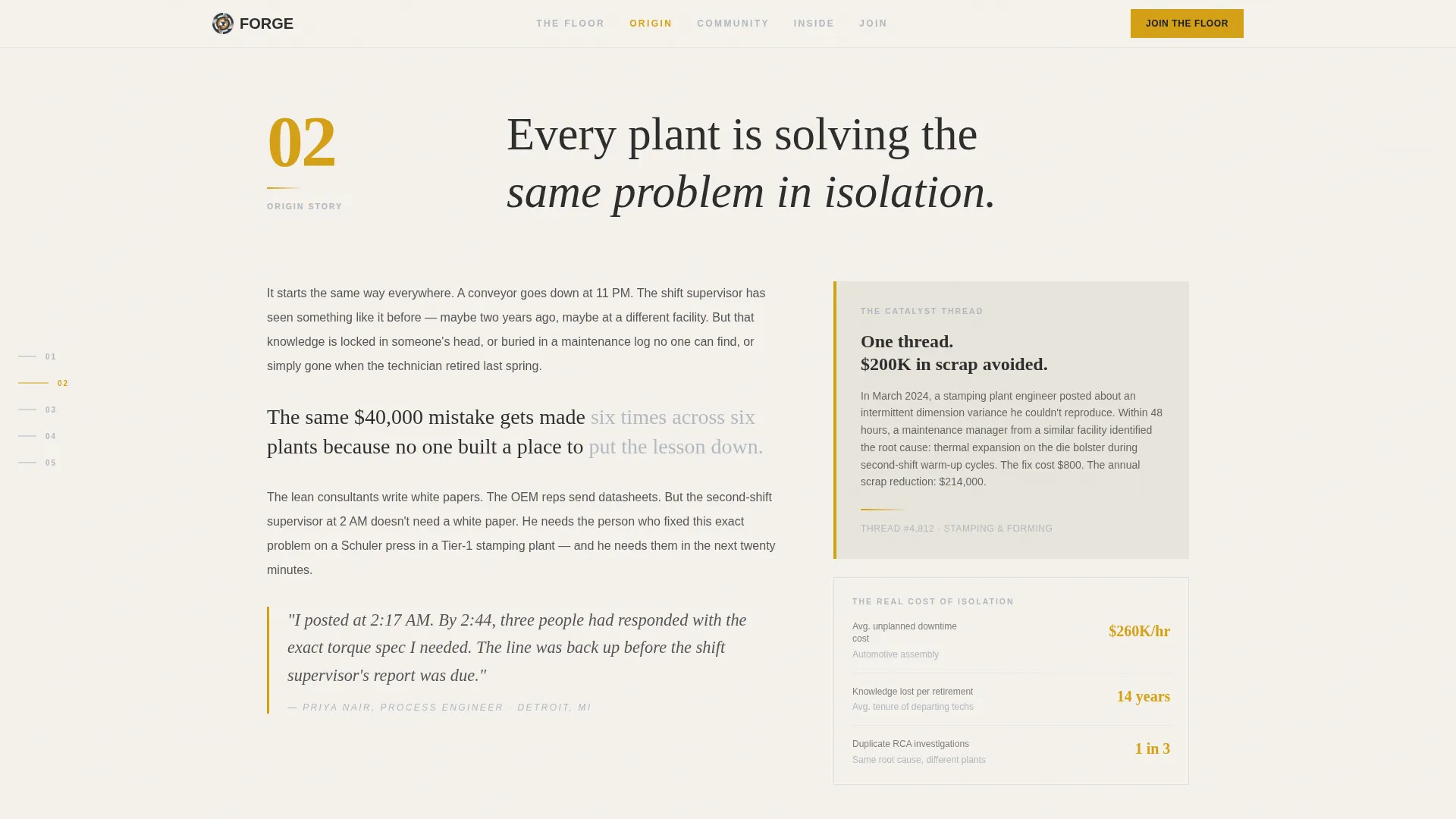
The scroll narrative is divided into five chapters. Chapters One and Two use long-form editorial paragraphs paired with sidebar data modules. This alternating rhythm of storytelling and data mirrors a trade journal feature article, building trust before asking for a conversion.
Locked Thread Preview Module
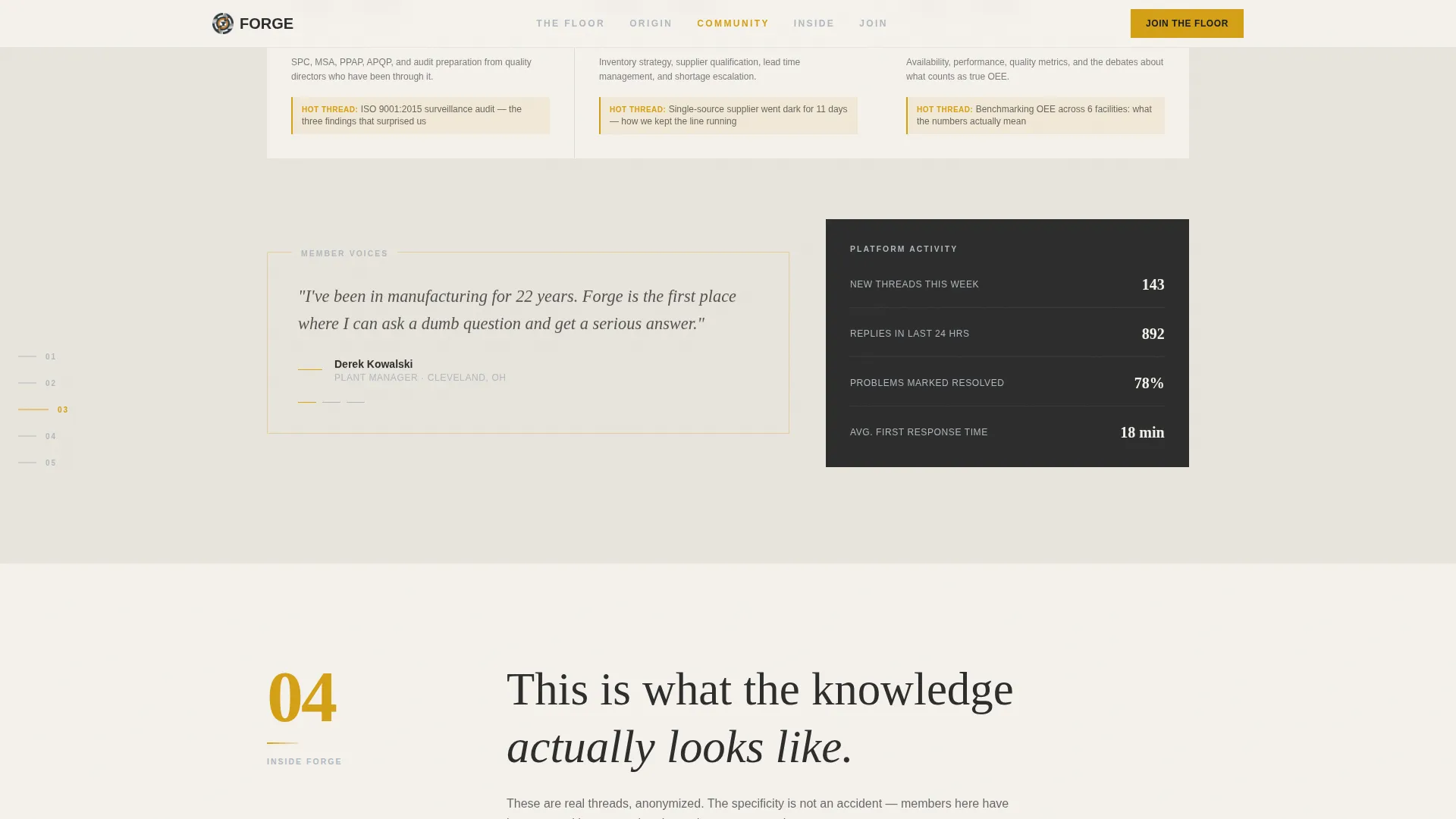
Chapter Four includes a locked-thread preview that surfaces anonymized discussion excerpts. Visitors can read enough to recognize the specificity and operational depth of the conversations inside, without gaining full access until they sign up.
Dual Conversion Path Design
The template includes two distinct conversion moments. The primary "Join the Floor" form at Chapter Five collects work email and job title. A mid-scroll inline card styled as a magazine subscription prompt captures email for the weekly briefing separately.
Editorial Pull-Quote Callouts
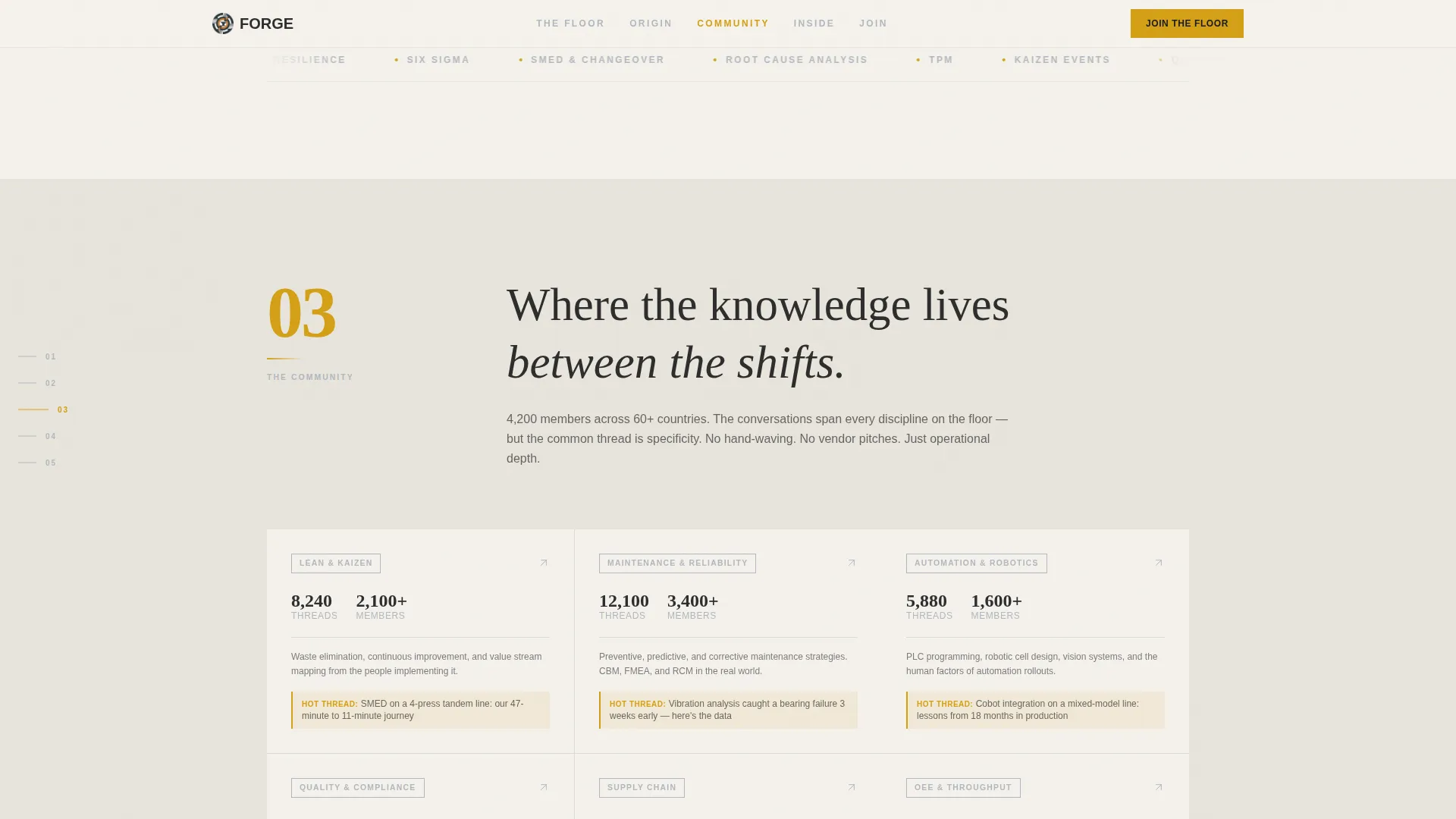
Rotating pull-quote modules styled with annotation amber borders appear throughout Chapter Three. They surface real anonymized member contributions, acting as social proof formatted to match the broadsheet visual identity.
Floating Stats Strip
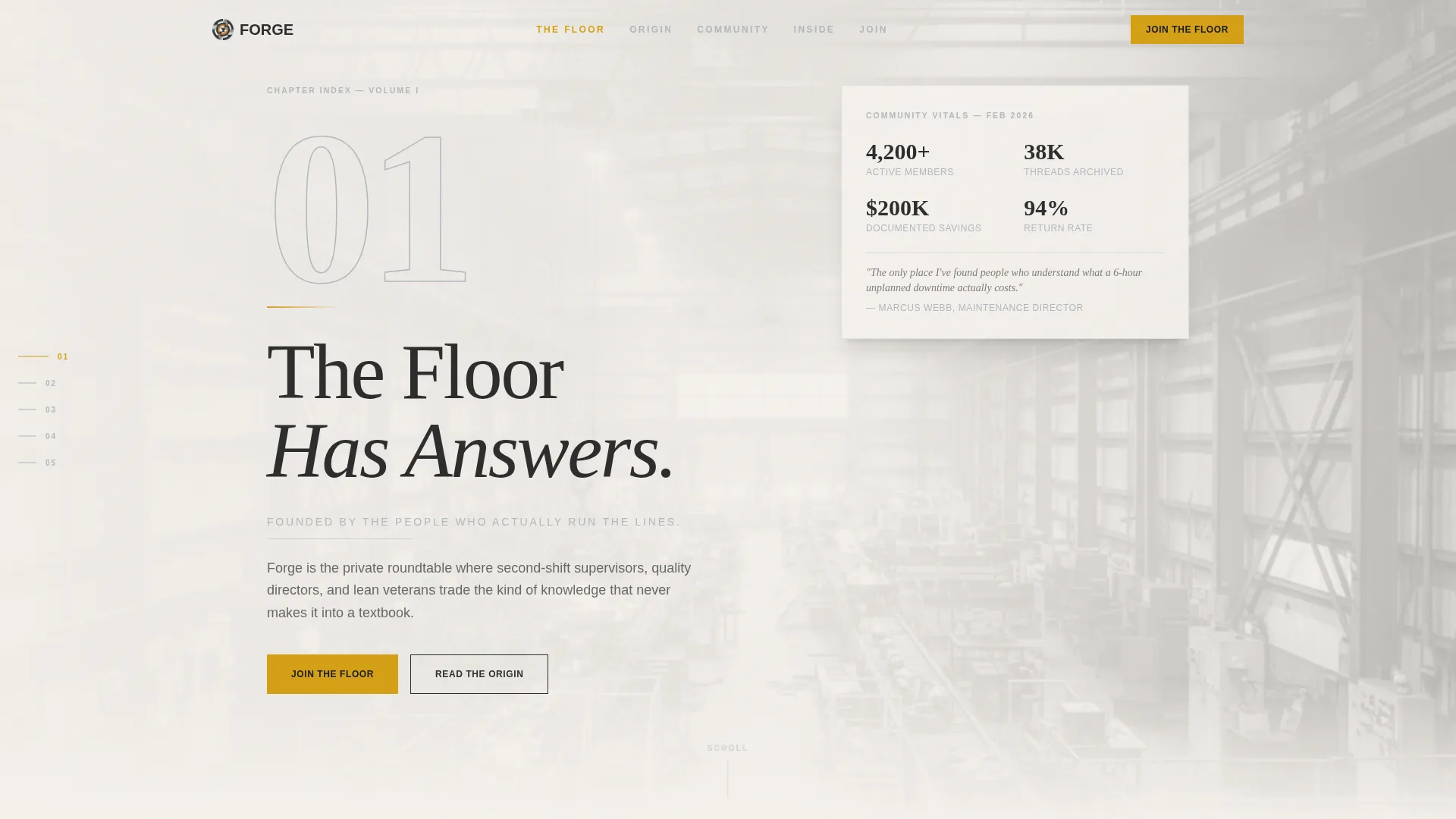
The hero section includes a floating stats strip that sits beneath the headline spread. It surfaces community metrics such as member counts and active discussion categories, giving first-time visitors an immediate signal of community scale.
Page sections overview
| Section | Purpose |
|---|---|
| Chapter 01 Hero | Opens with typographic spread, factory floor photo, and floating stats strip |
| Chapter 02 Origin | Tells the founding story through editorial paragraphs and sidebar data |
| Chapter 03 Community | Showcases member counts, discussion categories, and pull-quote callouts |
| Chapter 04 Locked Preview | Demonstrates knowledge depth and hosts the inline Weekly Briefing capture |
| Chapter 05 Join call to action | Presents the two-field "Join the Floor" sign-up form |
| Footer | Single-row linear footer with essential links |
Design & branding system
The visual identity follows an editorial magazine theme built on the Cloud Canvas color system. Every design decision reinforces the feeling of a well-read trade journal laid across a brushed-steel workbench.
- Color palette: newsprint white (#F4F1EC) for backgrounds, pressroom charcoal (#2D2D2D) for body text, machined aluminum (#B0B8BF) for secondary elements, and annotation amber (#D4A017) reserved for anchor nav highlights, pull-quote borders, and call-to-action states
- Typography: Fraunces serif for display headings and chapter numbers, DM Sans for body copy and interface elements
- Texture and photography: a desaturated, grain-textured factory floor photograph shot from the mezzanine provides the hero backdrop; grain overlay and ink-stained broadsheet styling run throughout
Mobile & speed optimization
The template is designed desktop-first, reflecting the reading habits of plant managers and operations leaders during shift transitions. Full mobile support is included so the experience holds up across devices.
- Desktop-first layout prioritizes the left-rail chapter index and wide editorial column widths, with responsive breakpoints for tablet and mobile views
- Animations include scroll reveals, text scrubbing, spotlight effects, and parallax grain, implemented with minimal JavaScript using Server Components for static content sections
How this template helps you convert
The conversion architecture is layered intentionally. Visitors earn the right to be asked before a form ever appears.
- The locked-thread preview module lets visitors read specific, operational discussion excerpts before signing up, building genuine trust rather than relying on marketing claims alone
- The inline "Get the Weekly Briefing" card appears mid-scroll as a lower-commitment conversion step, giving visitors an easy entry point before reaching the primary sign-up form
- The "Join the Floor" form at Chapter Five collects only two fields, work email and job title, keeping the sign-up friction low for time-poor manufacturing professionals
Other information about this template
Forge is built for teams who need a credible editorial presence in a highly specialized industry niche. A few additional details are worth knowing before you customize and deploy it.
- The template style is hub and spoke with anchor navigation, making it straightforward to expand or reorder chapters as your community content grows
- The creative direction is Origin Story, so the copy framework is structured to move from problem recognition through community proof to a clear call to action
- The header concept follows a Chapter/Book metaphor: a large serif "01" anchors the left margin beside the headline "The Floor Has Answers," with a dateline subhead reading "Founded by the people who actually run the lines"
- The $200K scrap-savings callout referenced in Chapter Two is a social proof anchor, and the template includes a sidebar data module designed to hold this kind of specific, verifiable outcome
- The template falls under the Blog and Editorial category with a manufacturing community forum niche, and it is purpose-built for B2B lead generation in industrial and manufacturing sectors
Theme
Editorial Magazine
Creative direction
Origin Story
Color system
Cloud Canvas
Style
Hub & Spoke (Anchor Nav)
Direction
Lead Generation
Page Sections
Chapter-index Anchor Navigation
Origin Story Chapter Structure
Locked Thread Preview Module
Dual Conversion Path Design
Editorial Pull-quote Callouts
Floating Stats Strip
Related questions
Who is this landing page template designed for?
What conversion actions does this template support?
Can I customize the chapter content and community statistics?
What is the locked-thread preview and how does it work?
Does this template work on mobile devices?



